




Home
»Blog Insights
»What Is BrightSign Digital Signage Device and Why Is It A Preferred Choice For Content Display?
What Is BrightSign Digital Signage Device and Why Is It A Preferred Choice For Content Display?
Keyur Patel
September 12, 2025
6 min
Last Modified:
June 3, 2026
One of the latest products generating significant attention in the digital signage industry is BrightSign. Known for its reliability, performance, and media playback capabilities, BrightSign has become a popular choice for businesses looking to manage professional digital signage experiences across retail stores, corporate environments, restaurants, healthcare facilities, and public spaces.
As interest in the platform continues to grow, many users are searching for answers to questions like what is BrightSign, how it works, and why it has become such a widely adopted solution in the digital signage ecosystem. While there is plenty of information highlighting the benefits of the device, several important aspects still need clarification, which is exactly what we will explore in this blog.
In this blog, we will discuss what is BrightSign, why organizations use BrightSign devices, and the various real-world use cases where BrightSign helps businesses deliver scalable and engaging digital signage solutions. So, let’s take a closer look and understand the platform in greater detail.
What is BrightSign?
Let us start this introduction by giving you an example. Have you ever encountered a live display showing live stock market data and financial news in a bank? We are sure you would have! Did you think about how the live-streaming is controlled?
This is where digital signage solutions come into the picture.
BrightSign is a digital signage device connected to the internet and screens to present personalized content. The content is controlled through a Content Management System and can be personalized in real-time based on the target audience. The seamless integration of CMS into the device ensures minimum risk of hardware failure.
BrightSign offers various business solutions such as Bright Sign Series 5 devices, Series 4 devices, BSN.cloud, and BrightAuthor: connected. Each one comes with a different set of features suitable for various industries.
Once the digital signage device is connected, you can manage your content remotely from anywhere. BrightSign extends its support to different verticals of the industry, including,
- Retail;
- Enterprise;
- Healthcare;
- Public Spaces;
- Finance;
- Education;
- Hospitality;
- Restaurants;
- Entertainment venues;
- Museums;
You can read more about the service in each industry on their official page.
Why is BrightSign used?
The best thing about BrightSign’s digital signage device is the ability to play full HD images and videos at 60 frames per second. The smooth transition between images catches the eyes of the viewers.
The device’s HTML5 capabilities allow you to embed content directly from your website and display it on the screen.
Various other features such as streaming over multiple screens, screen size adjustments, video wall adaptability, etc, are the features to look forward to.
Some may argue why a BrightSign device is preferred over a traditional website. Let’s find out the key reasons behind the shift.
Offline Functionality
Websites can function only with an internet connection. However, BrightSign devices store the content locally, ensuring uninterrupted display even when the internet connection is lost.
Security and Stability
BrightSign devices are more secure and less vulnerable to cyber attacks. The same is not the case with websites, making them a less preferred option for displaying content in public or semi-public spaces.
Interactivity and Engagement
BrightSign devices create interactive experiences, such as touchscreen content displays and sensors, at locations like museums, retail stores, and engagement stations. However, websites can not facilitate such interactive displays.
User-Friendly Content Management
BrightSign digital signage device’s easy integration with CMS allows you to update, maintain, monitor, and troubleshoot content queries swiftly. You do not have to delve into the maintenance work, just like you would have to do with websites.
Rich Media Support and Performance
BrightSign devices effortlessly handle various ranges of media formats having up to 4K resolution. The digital signage display is also capable of managing the smooth display of complex graphic displays with ease. The same can be challenging with traditional website presentations.
Seamless Integration and Scalability
BrightSign device’s swift integration into a larger network of displays facilitates centralized control and management of the content. This means that if your business needs consistent message display across various displays, you can have it using BrightSign. It is very difficult to achieve this using websites.
Advanced Scheduling and Playback Control
BrightSign device allows you to schedule content display or plan content playback down to the minute.
To conclude, BrightSign is a dedicated device used for digital signage in various industrial verticals. The specialized hardware wins over traditional websites in multiple ways, making it the preferred choice for centralized content management.
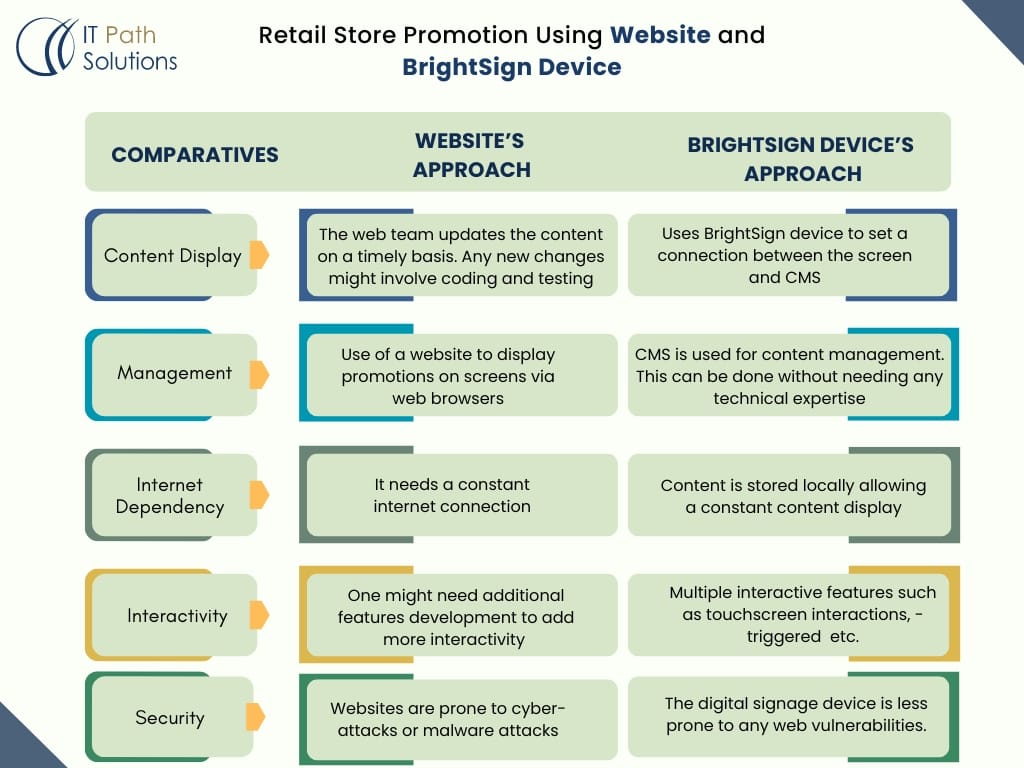
Let us understand the difference between BrightSign Digital Signage solutions and website functioning through an example.
Retail Store Promotion Comparison using Website and BrightSign Device:
FAQs
1. What are BrightSign devices?
BrightSign devices are digital signage media players that provide powerful and reliable solutions for various digital signage applications. They support a wide range of media formats and are known for their stability and performance.
2. Why integrate a CMS with BrightSign devices?
Integrating a CMS with BrightSign devices allows you to centrally manage and control content across multiple devices, streamline content updates, and automate scheduling and deployment processes.
3. What are the prerequisites for integrating a CMS with BrightSign devices?
– Ensure you have the necessary BrightSign hardware.
– Optional, but useful for initial content setup.
– Devices should be networked for remote management.
– Access to BrightSign’s Control Cloud or Local Web Server API.
4. What are the key features to implement in the CMS for BrightSign control?
– Ability to upload media files to the CMS and distribute them to BrightSign devices.
– Tools to schedule when and where content should be displayed.
– Monitor device status, reboot devices, and update firmware.
– Create and manage playlists to control the sequence of content.
5. How do I upload and manage content on BrightSign devices through my CMS?
– Use BrightSign API endpoints for uploading media and updating content.
– Implement a file management system in your CMS to handle media files.
– Create routines to push content to BrightSign devices based on schedules.
6. What are the security considerations when integrating CMS with BrightSign devices?
– Ensure secure API authentication (e.g., OAuth).
– Use HTTPS to encrypt data transmitted between the CMS and devices.
– Implement role-based access control to restrict who can manage devices and content.
Parting Thoughts!
BrightSign Signage device is leading the way when it comes to Digital Signage Solutions. You can use the solutions in different settings, like public spaces, museums, sporting arenas, churches, academic buildings, retail stores, corporate spaces, restaurants, and more. An effective content display can influence customers’ decision-making & ensure a seamless customer experience.
Using Digital Signage display via BrightSign can enhance customer service, and boost promotion and brand recognition. If you need any help to know more about the BrightSign digital signage device integration with your CMS, feel free to reach us.

Keyur Patel
Co-Founder
Keyur Patel is the director at IT Path Solutions, where he helps businesses develop scalable applications. With his extensive experience and visionary approach, he leads the team to create futuristic solutions. Keyur Patel has exceptional leadership skills and technical expertise in Node.js, .Net, React.js, AI/ML, and PHP frameworks. His dedication to driving digital transformation makes him an invaluable asset to the company.
Related Blog Posts
What is SaaS? The Complete Guide to AI-Powered Software as a Service (2026)
Custom Software vs Off-the-Shelf Solutions: Which Is Right for Your Business?