What is SaaS? The Complete Guide to AI-Powered Software as a Service (2026)
Keyur Patel
April 25, 2026
16 min
Last Modified:
April 28, 2026
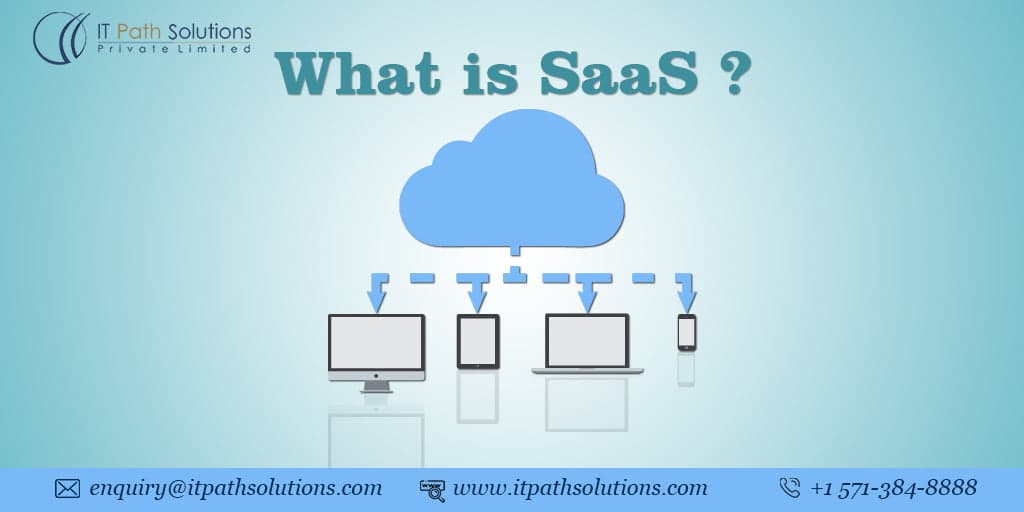
SaaS, or Software as a Service, is a cloud-hosted software delivery model where applications run on a provider’s infrastructure and users access them via a web browser on a subscription basis. No installation, no hardware, no manual updates. It is used by businesses of every size, from solo founders to Fortune 500 enterprises, to run CRM, HR, finance, communication, and virtually every other business function.
SaaS is no longer a trend or an emerging option. In 2026, it is the default. According to Statista, the global Software as a Service (SaaS) market is projected to exceed $370 billion by 2030, reflecting how deeply SaaS has become embedded in modern business operations. Every tool your team uses daily like Slack, Notion, Salesforce, HubSpot, Stripe, runs on the SaaS model. The question for most businesses has shifted from “should we use SaaS?” to “how do we build better SaaS, faster?”
This guide answers both. If you are new to the concept, the first half gives you a solid foundation. If you are a founder, product manager, or CTO thinking about building your own SaaS product, the second half covers how modern teams build, ship, and scale SaaS using AI development workflows in 2026.
What Does SaaS Mean?
SaaS, or Software as a Service, is a software delivery model where a provider hosts an application in the cloud and customers access it over the internet, typically via a browser, for a recurring subscription fee.
The defining characteristics that separate SaaS from traditional software are: the software lives on the vendor’s servers (not yours), updates happen automatically, and you pay monthly or annually rather than buying a licence upfront.
If you have ever logged into Gmail, Zoom, or Shopify, you have used a SaaS product. You did not install anything. You did not manage a server. You opened a browser, signed in, and the software was there.
SaaS meaning in practice: you rent access to software that someone else builds, hosts, and maintains, and you get all the benefits of enterprise-grade infrastructure without the overhead.
How Does SaaS Work?
The technical foundation of SaaS is multi-tenancy. A single instance of the software serves multiple customers simultaneously, with each customer’s data kept logically separate and secure. This is what makes SaaS economics work, the provider builds and maintains one platform and serves thousands of customers from it.
Here is how the delivery chain works:
- Cloud infrastructure — the application runs on cloud servers (typically AWS, Google Cloud, or Azure). The provider manages uptime, security patching, and scaling.
- Subscription access — you pay monthly or annually. Pricing tiers usually correspond to features, users, or usage volume.
- Browser or API access — you and your team log in from any device, anywhere. Mobile apps, desktop clients, and API integrations all connect to the same backend.
- Continuous updates — the provider ships improvements, fixes, and new features on a rolling basis. You always run the latest version with no action required on your end.
- API integrations — modern SaaS products connect to each other through REST APIs, webhooks, and open protocols like OAuth and JSON. Your CRM talks to your billing tool, which talks to your analytics platform — all without manual data entry.
This model eliminates the IT overhead of traditional on-premise software: no local servers, no version management, no licence renewal complexity.
Key Characteristics of a SaaS Platform
What separates a true SaaS platform from generic cloud software? These are the defining characteristics:
- Centralised cloud hosting. All data and application logic live in the cloud. Users access everything from a browser or authenticated API — no local installation required.
- Multi-tenant architecture. One codebase serves all customers. Resources are shared efficiently, which keeps costs low and enables the provider to iterate fast.
- Subscription pricing. Pay monthly or annually. Scale up or down based on usage. No capital expenditure, no long-term licence locks.
- Automatic updates. The provider ships improvements continuously. You never manage a software version upgrade.
- Open integration protocols. Modern SaaS is built to connect. REST APIs, webhooks, and OAuth allow your stack to work as a unified system rather than isolated tools.
- Role-based access and permissions. Enterprise SaaS products support SSO (single sign-on), user roles, and audit logs, essential for team-level and compliance use cases.
- AI-native capabilities. In 2026, competitive SaaS products are built with AI embedded from the start — not bolted on. Intelligent automation, predictive features, and natural language interfaces are now expected, not optional.
SaaS vs Traditional Software — Why It Wins Every Time
The comparison still matters because many businesses are still mid-migration from legacy systems. Here is the honest breakdown:
| Factor | Traditional Software | SaaS |
|---|---|---|
| Setup | Install on local hardware; IT team required | Browser login; ready in minutes |
| Cost model | Large upfront licence fee | Monthly/annual subscription |
| Updates | Manual, often delayed, sometimes paid upgrades | Automatic, continuous, included |
| Scalability | Requires new hardware or licences | Add users or features via settings |
| Accessibility | Tied to installed devices | Any device, anywhere |
| Maintenance | Your IT team’s responsibility | Provider’s responsibility |
| AI capabilities | Rare, bolt-on | Built-in and expanding continuously |
| Time to value | Weeks to months | Hours to days |
The shift from traditional software to SaaS is not just a deployment choice — it changes how quickly you can adapt. When a SaaS provider ships a new AI feature, every customer gets it at the same time. Legacy software users wait for the next release cycle.
Benefits of SaaS for Businesses
- Predictable, controllable costs. You know exactly what you pay each month. No surprise hardware failures, no upgrade fees. Small businesses get access to enterprise-grade software at a price point that was impossible ten years ago.
- Instant scalability. Adding five new team members to your project management SaaS takes thirty seconds. Adding fifty requires no infrastructure planning. SaaS scales with your business, not against it.
- Work from anywhere, on anything. Your team in Mumbai, London, and Toronto all access the same platform, the same data, in real time. SaaS made distributed teams viable long before remote work became the default.
- Always current. Every user runs the same version. Your team never falls behind on security patches or misses a productivity feature because they delayed an upgrade.
- Reduced IT burden. The provider handles infrastructure, uptime, backups, and security. Your team focuses on using the software, not managing it.
- Built-in disaster recovery. Leading SaaS platforms run on redundant global infrastructure. Your data is backed up continuously across multiple data centres. A local hardware failure does not put you out of operation.
- Faster onboarding and adoption. Cloud-based SaaS products are designed for self-service onboarding. New team members are productive in hours, not days.
How SaaS Is Built in 2026 — AI, Vibe Coding & Agentic Development
This is where SaaS development looks entirely different from even three years ago. AI has not just improved the development process, it has restructured it.
1. For Non-Technical Founders: Rapid SaaS Prototyping
Platforms like Lovable, Bolt, Replit, and Base44 have made it possible for founders without a development background to build a working SaaS MVP in days. You describe what you want, the AI generates a functional application, and you iterate from there. You can build and ship a SaaS MVP significantly faster than traditional development allows, but getting to a production-ready, scalable product still requires experienced engineering to handle architecture, security, and edge cases.
These tools handle the visible layer well. Where they hand off to expert developers is in multi-tenancy logic, subscription billing, permissions architecture, and production deployment pipelines.
2. For Technical Teams: AI-Assisted Development with Cursor and Claude Code
Technical teams are accelerating SaaS development with AI coding tools like Cursor, Claude Code, and GitHub Copilot. These tools go well beyond autocomplete, they understand codebase context, generate entire modules, write and run tests, and handle refactoring tasks that previously took hours.
The result is a meaningful compression of development cycles. Features that took two-week sprints now ship in days. Our vibe coding support service is built specifically for SaaS teams running these workflows, whether you are resolving blockers mid-build or need a senior engineer to take an AI-generated codebase to production standard.
3. For Scaling Teams: Agentic AI Development
The frontier of SaaS development in 2026 is agentic AI development, workflows where AI agents plan tasks, write code, run tests, open pull requests, and iterate based on feedback with human oversight at key decision points. Platforms like Antigravity and Emergent are early examples of this model in practice.
Leading SaaS teams now use agentic AI development workflows to manage complex, parallel workstreams that would otherwise require large engineering teams. An agent handles the scaffolding; your senior engineers focus on architecture decisions and product direction.
The 2026 SaaS Tech Stack
For context, here is the stack most modern SaaS products are built on:
- Frontend: React / Next.js (fast, SEO-friendly, component-driven)
- Backend: Node.js or Python (scalable, well-supported, rich AI library ecosystem)
- Database: PostgreSQL for relational data, Redis for caching, vector databases for AI features
- Auth: Auth0, Clerk, or Supabase Auth (role-based, SSO-ready)
- Billing: Stripe (subscriptions, usage-based pricing, metered billing)
- Infrastructure: AWS, GCP, or Vercel (scalable, managed, global CDN)
- AI layer: OpenAI API, Anthropic API, or fine-tuned open-source models embedded at the feature level
AI Features Every SaaS Product Needs in 2026
AI is no longer a differentiator, it is a baseline expectation. Here is what your SaaS product needs to remain competitive:
- Intelligent workflow automation. Smart triggers, auto-categorisation, and conditional logic that eliminate manual repetitive work from your users’ daily routines. Users should not have to remember to do things your software can detect and act on automatically.
- AI-driven personalisation. Recommendation engines that surface relevant content, features, or actions based on each user’s behaviour. Adaptive UX that changes based on what the user actually does, not what you assume they want.
- Predictive analytics in the dashboard. Data that tells users what is likely to happen next, not just what happened last month. Churn prediction, revenue forecasting, inventory alerts. This is the output users cite when they say a SaaS tool “just gets them.”
- Natural language interfaces. Users should be able to query their data in plain language. “Show me all deals over $50,000 that haven’t moved in 30 days” should not require a custom report builder, it should be a chat prompt.
- LLM-powered features within the product. Whether that is an AI writing assistant, an automated email responder, a document summariser, or a support bot, embedding LLM capabilities directly into your SaaS product reduces churn and increases daily active usage.
Building these capabilities requires more than calling an API. You need thoughtful prompt architecture, latency management, cost controls, and error handling. Our AI development services cover the full build, from feature scoping to production deployment.
Building Your Own Custom SaaS Platform
If you are building a SaaS product from scratch, here is how to approach it in 2026.
1. MVP vs Full Product
Start with an MVP scoped to one specific problem for one specific audience. The fastest way to fail in SaaS is to build everything at once. An MVP lets you validate the core value proposition before investing in enterprise features, multi-tenancy complexity, and marketing infrastructure.
A well-scoped SaaS MVP includes: core feature set, user authentication, one billing tier, and a working onboarding flow. Nothing else.
2. Architecture Decisions That Matter Early
- Multi-tenancy model. Decide upfront whether you are building a shared database model (all tenants in one database, data separated by tenant ID) or a siloed model (separate database per tenant). The first is cheaper and simpler to start. The second is better for compliance-sensitive industries.
- Subscription billing. Stripe is the standard. Build your billing logic around Stripe’s subscription and webhook infrastructure early, retrofitting billing is painful. Define your pricing model (per seat, usage-based, flat-rate) before you build the billing layer.
- User management and permissions. Role-based access control (RBAC) is table stakes. Plan your permission model before you build features, not after.
- API-first design. Build your backend as an API from day one. This makes mobile apps, third-party integrations, and future frontend changes significantly cheaper.
3. AI Acceleration Across the Build
AI tools compress every stage of SaaS development. Lovable and Bolt handle rapid UI prototyping. Cursor and Claude Code accelerate backend logic. Automated testing tools catch regressions before they reach production.
What used to take a team of six developers six months can now be delivered by a smaller, AI-augmented team in six to eight weeks, with higher code quality and better test coverage.
SaaS for Your Industry
SaaS has penetrated every sector. Here is how the model adapts to industry-specific requirements:
- Healthcare SaaS. Compliance requirements (HIPAA, GDPR) shape architecture decisions from day one. Patient data handling, audit logs, and access controls are non-negotiable. Telemedicine platforms, clinical trial management systems, and EHR integrations are the dominant use cases.
- Fintech SaaS. Real-time transaction processing, PCI compliance, and fraud detection are the core technical challenges. Multi-currency support, regulatory reporting, and bank-grade encryption are baseline requirements. The biggest opportunity in fintech SaaS right now is AI-driven risk scoring and personalised financial insights.
- EdTech SaaS. Learning management systems (LMS), progress tracking, adaptive learning paths, and live session infrastructure. The AI shift here is significant — adaptive content delivery that adjusts to each learner’s pace and style is moving from premium feature to expected default. See our education vertical for what we have built in this space.
- Enterprise SaaS. Multi-tenant architecture, SSO, advanced RBAC, audit trails, and SLA-backed uptime are the entry requirements for enterprise deals. Enterprise buyers also require custom contract terms, dedicated support, and data residency options. If you are building SaaS for the enterprise market, plan for a longer sales cycle and a heavier compliance burden — but the contract values make it worthwhile.
SaaS Trends to Watch in 2026
- Micro-SaaS built by small teams. The combination of vibe coding tools and AI-assisted development means one or two people can now build, launch, and operate a profitable niche SaaS product without a large engineering team. Micro-SaaS targeting specific professional workflows is growing fast.
- Vertical SaaS replacing horizontal tools. Generic project management and CRM tools are being displaced by tools built specifically for law firms, architecture practices, logistics companies, and other verticals. Buyers prefer software that understands their workflow out of the box.
- From tool SaaS to workflow SaaS. The most valuable SaaS products in 2026 do not just give you a tool, they automate an entire workflow. Instead of “here is a calendar app,” it is “here is a client scheduling, reminder, and follow-up system that runs itself.” Agentic AI is accelerating this shift significantly.
- Embedded AI as the default, not a feature. Buyers now expect AI to be woven into the product experience, not available as an add-on tier. SaaS products that launched without AI features are scrambling to retrofit them. Products built with AI-first architecture have a structural advantage.
- Agentic engineering as the new SaaS dev standard. SaaS agencies and in-house teams that have adopted agentic AI development are shipping two to three times faster than those that have not. This gap is widening.
IaaS, PaaS, and SaaS — What’s the Difference?
Cloud computing is typically divided into three service layers. Understanding them helps you make better infrastructure and vendor decisions.
- Infrastructure as a Service (IaaS) gives you raw computing resources — virtual servers, storage, networking — on demand. You manage the operating system, runtime, and everything above it. AWS EC2 and Google Compute Engine are IaaS products. Best for teams that need maximum control over their environment.
- Platform as a Service (PaaS) adds a managed runtime and deployment environment on top of IaaS. You bring your application code; the platform manages the infrastructure, scaling, and deployment pipeline. Google App Engine and Heroku are PaaS products. Best for development teams that want to focus on code, not server management.
- Software as a Service (SaaS) is the complete package — the software is built, hosted, maintained, and updated by the provider. You access it through a browser or API. Salesforce, HubSpot, and Slack are SaaS products. Best for end users and businesses that want to use software, not manage it.
Most modern SaaS products are built on top of IaaS or PaaS infrastructure. You use AWS (IaaS) to run your SaaS product, which your customers access as SaaS. The layers stack.
Ready to Build Your SaaS Product?
SaaS is the established foundation of modern software, and the development tooling has never been more powerful. Whether you are a founder prototyping your first product or a CTO leading a team scaling an existing platform, AI development tools have changed what is possible in terms of speed, quality, and cost.
At IT Path Solutions, we build SaaS products using the full AI development stack, Lovable, Bolt, Cursor, Claude Code, and agentic workflows, to ship faster without compromising on architecture or security. From MVP to production, we cover the full build.
If you are running into walls with an AI-assisted build, or you are ready to take a validated idea to a production-grade product, our vibe coding support service is the fastest path forward. Let’s talk about what you are building.
Book Your Free Consultation with Us!
FAQ
- What is SaaS in simple terms?
SaaS, or Software as a Service, is a cloud-based software model where applications are hosted online by the provider and accessed through a web browser. You pay a subscription fee — monthly or annually — instead of buying a licence and installing software locally.
2. What does SaaS mean for my business?
It means lower upfront software costs, automatic updates, the ability to access your tools from any device or location, and a predictable monthly bill instead of a large capital expenditure.
3. What are the best examples of SaaS products?
Salesforce (CRM), Slack (team communication), HubSpot (marketing and sales), Stripe (payments), Notion (project management), Zoom (video conferencing), and Shopify (ecommerce) are among the most widely used SaaS products globally.
4. What is the difference between SaaS, PaaS, and IaaS?
IaaS gives you raw infrastructure (servers, storage). PaaS adds a managed development and deployment environment. SaaS delivers a complete, ready-to-use application. Most businesses use all three layers, IaaS under the hood, PaaS to build on, and SaaS for day-to-day operations.
5. How is SaaS different from traditional software?
Traditional software is installed locally, requires manual updates, and involves large upfront licence fees. SaaS runs in the cloud, updates automatically, and operates on a subscription model. SaaS is also accessible from any device with an internet connection.
6. How long does it take to build a SaaS product in 2026?
With AI-assisted development tools and the right team, a well-scoped SaaS MVP can go from concept to a working product in two to six weeks. Full production-grade products typically take three to six months depending on complexity, integrations, and compliance requirements.
7. Is SaaS suitable for small businesses?
SaaS is particularly well-suited to small businesses. The subscription model eliminates the need for hardware investment, IT teams, and manual software maintenance. Small businesses can access the same enterprise-grade tools as large companies at a fraction of the cost.

Keyur Patel
Co-Founder
Keyur Patel is the director at IT Path Solutions, where he helps businesses develop scalable applications. With his extensive experience and visionary approach, he leads the team to create futuristic solutions. Keyur Patel has exceptional leadership skills and technical expertise in Node.js, .Net, React.js, AI/ML, and PHP frameworks. His dedication to driving digital transformation makes him an invaluable asset to the company.
Related Blog Posts
TypeScript 7.0 Migration Guide: What Changed, What Can Break, and Should You Upgrade?
How We Built a Fully Offline GDPR-Compliant Transcription System