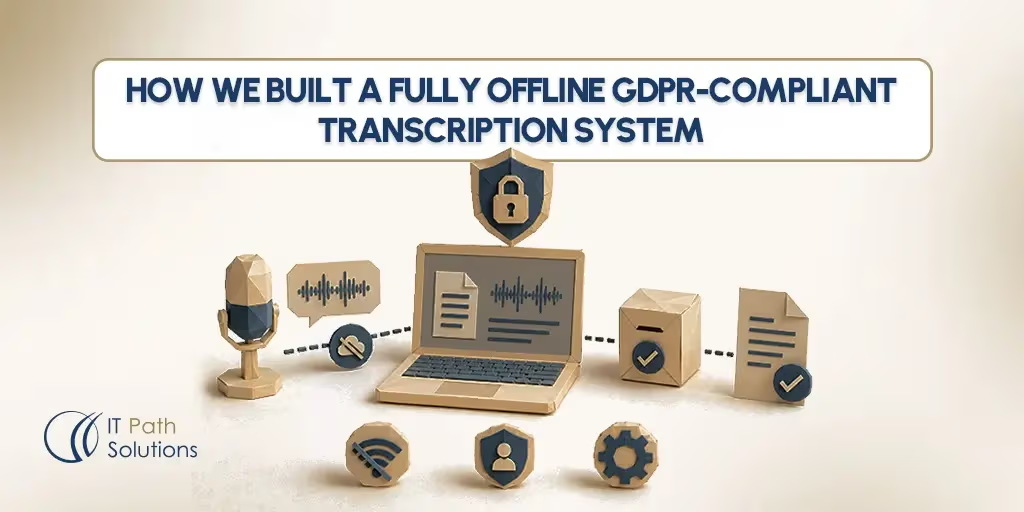
How We Built a Fully Offline GDPR-Compliant Transcription System
Keyur Patel
June 26, 2026
19 min
Last Modified:
June 26, 2026
A client came to us with a problem that sounded simple on the surface. They needed transcription software. Their team was producing a high volume of recorded interviews and meetings across two languages, Swedish and English, and they were spending significant time manually converting audio to text. The obvious answer would have been to point them toward any number of capable cloud transcription services and move on.
The obvious answer was not an option.
The recordings contained sensitive professional content that their legal and data protection teams had determined could not leave their internal network. No cloud API. No third-party processing. No audio travelling across the internet to someone else’s infrastructure, regardless of what certifications that vendor held. They needed offline transcription software, and they needed it to work at the level of a real production system, not a personal desktop tool.
That requirement shaped everything we built over the following months at IT Path Solutions.
Why Cloud Transcription Is Off the Table for Regulated Audio
Many cloud transcription vendors hold ISO 27001 and SOC 2 certifications and have invested seriously in their security practices. The issue with cloud transcription for regulated audio is not that those certifications are meaningless. The issue is more fundamental than that.
Under GDPR, voice recordings are personal data. In certain processing contexts, particularly HR investigations, healthcare consultations, and legal proceedings, they carry additional sensitivity because of what they reveal about the people speaking. When you send audio to a cloud transcription service, you are transferring personal data to a third-party processor. Article 28 of GDPR requires a signed Data Processing Agreement with that processor. The DPA covers the primary vendor, but cloud vendors also use subprocessors. Each subprocessor is another link in a chain you do not control.
The practical risk sits in that transfer itself. Once audio leaves your network, you have handed it to infrastructure you do not manage, operated by people who are not your employees, in data centers whose physical location may or may not satisfy your data residency requirements. An encrypted upload to a third-party server is still an upload to a third-party server. If that vendor suffers a breach, you are notifying your data subjects about an incident that happened on someone else’s hardware.
For the organizations where this matters most, the sectors include law firms handling privileged client recordings, healthcare providers recording patient consultations, HR teams documenting investigation interviews, public sector bodies with data residency obligations, and journalists protecting source identity. For these teams, signing a DPA with a cloud vendor and hoping for the best is not a reasonable compliance position.
For teams processing non-sensitive audio at low volume, cloud tools are often the sensible choice. This post describes what to do when they are not.
The Brief: What the Client Actually Needed
Our discovery sessions with this client took longer than usual, not because the requirements were vague, but because each requirement had a specific compliance reason behind it, and we needed to understand those reasons to make the right technical decisions.
The core requirement was complete network isolation.
No calls to external APIs, no model downloads at runtime, no telemetry, no callbacks.
The system had to function if the server’s network cable was unplugged. This eliminated not just cloud transcription services but also any locally installed tool that phoned home for licence verification or model updates.
The system needed to support multiple users working concurrently. Several team members would be submitting audio files at the same time, and they could not be waiting in the dark for something to finish without knowing how long it would take.
The two-language requirement added real complexity. The team regularly produced recordings in both Swedish and English, sometimes within the same session. Detection had to be automatic, with the option to force a specific language when the user knew what they had.
The client’s IT team needed to be able to manage the system without specialist machine learning knowledge. Updates, user management, and storage monitoring had to be straightforward enough that an internal IT administrator could handle them after handover.
And every file, every transcript, and every access event needed to stay within the client’s own hardware. That was the starting point and the non-negotiable boundary around everything else.
Architecture Overview: What We Built and How It Runs
The system we designed is a browser-based application that runs entirely on a GPU server the client owns and operates on their own premises. Team members access it through a standard web browser over the local network. There is no software to install on individual machines. When we update the server, every user gets the update automatically the next time they open their browser.
The GPU server is the heart of the system. We designed the architecture to be compatible with a range of hardware, from a workstation-class GPU up to more powerful dedicated GPU servers, depending on the volume and speed requirements of each deployment. The speech recognition processing happens entirely on that local hardware. OpenAI’s Whisper model handles the speech-to-text conversion, running locally with no connectivity required after the initial deployment.
On top of the base transcription layer, we added speaker diarization. Diarization is the process of identifying who is speaking at each point in a recording and assigning speaker labels to the transcript. Instead of receiving an undifferentiated block of text, users see a transcript organised by speaker, which makes a recorded conversation readable in the same way a script is readable.
A job queue manages concurrent submissions. When multiple users upload files at the same time, each job enters the queue and the system processes them in order, with live progress visibility for each user.
There are no per-minute API fees. There are no usage caps except the physical processing capacity of the server. That is a meaningful operational difference for a team producing regular volume. Self-hosting does transfer infrastructure responsibility to the client, and we were clear about that from the start. Hardware procurement, server maintenance, and managing model updates over time are internal costs, not zero costs.
The system is built on open models, which means there is no vendor lock-in to a proprietary speech-to-text provider. If a better open model becomes available, the client can adopt it without renegotiating a contract.
The Pipeline Decisions That Made the Difference
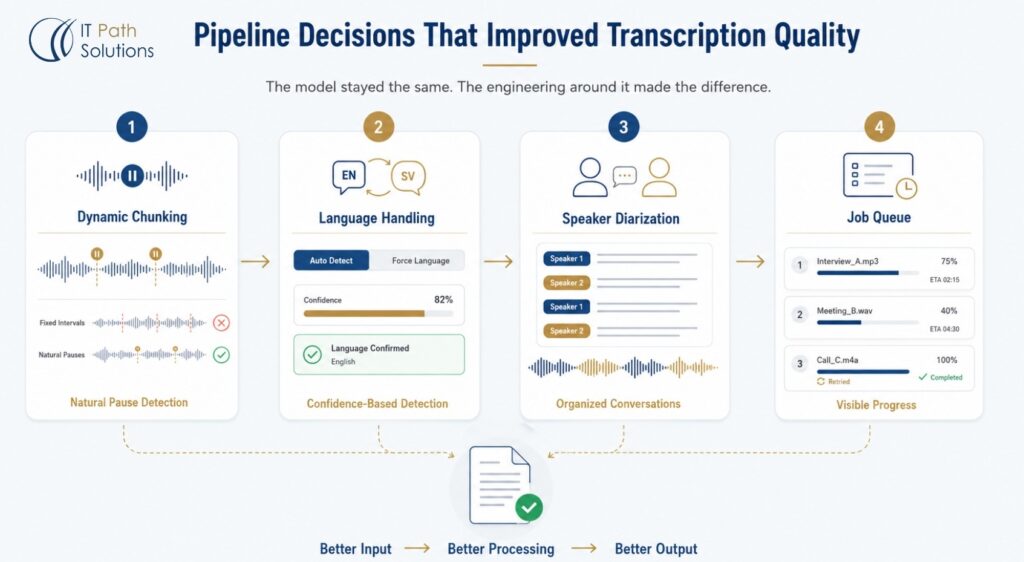
Choosing the speech recognition model is the starting point, not the end point. The quality of transcription output in a real production system depends heavily on how audio is handled before it reaches the model and how the output is structured afterward. This is where most generic descriptions of offline speech recognition stop, and where our actual engineering work began.
Dynamic Chunking
The first significant decision was how to segment audio before sending it to the model. A naive approach cuts audio at fixed time intervals, say every twenty seconds, regardless of what is being said. The problem is that this slices words and sentences mid-utterance, and the model receives fragments that lack the context to decode correctly. The output suffers in ways that are hard to post-correct because the errors are structural, not just lexical.
We implemented dynamic chunking, which analyses the audio for natural pause boundaries before segmenting. The model receives coherent segments that respect sentence structure and natural speech rhythm. The difference on long conversational recordings was noticeable. Output quality improved without any change to the model itself, simply by presenting the model with better-formed input.
Language Handling
Swedish and English present different acoustic patterns and vocabulary, and the model’s automatic language detection works well for clear, sustained audio in a single language. For short clips, heavily accented speech, or recordings that switch between languages, detection confidence can drop.
We set automatic detection as the default but gave users a language-forcing option for cases where they already know what language the recording contains. We also built a graceful fallback for low-confidence detections. Rather than silently defaulting to the wrong language and producing corrupt output, the system surfaces the confidence score and prompts the user to confirm or override. That small decision saved significant frustration during testing and in production.
Whisper’s accuracy on non-English languages is generally lower than its accuracy on English, and accuracy varies with audio quality. We documented this for the client and set appropriate expectations. Word error rates on clean audio are significantly better than on recordings captured in noisy environments, and that holds regardless of which language is being transcribed.
Speaker Diarization
Adding speaker separation was a requirement, not an enhancement. A two-person interview transcript is close to unusable as a block of undifferentiated prose. Organized by speaker label, the same transcript becomes something a team member can read, quote from, and take notes on in a fraction of the time.
We ran the diarization as a post-processing step on the Whisper output. The system assigns labels (Speaker 1, Speaker 2, and so on) based on acoustic separation. Speaker diarization can misassign labels on overlapping speech, and we told the client this. It is a known behaviour of current diarization models, not a defect specific to our implementation.
Job Queue with Progress Visibility
Multiple concurrent users submitting files of varying lengths to a single GPU server creates a scheduling problem. We built a queue that shows each user their job’s position, a live progress percentage, and an estimated time remaining. Jobs that fail due to transient errors retry automatically without requiring the user to resubmit. These feel like small details but they are the difference between a system people use confidently and one they distrust because it disappears silently when something goes wrong.
Privacy Embedded in the Architecture, Not Bolted On
The most important thing we did for GDPR compliance on this project was make it structural rather than procedural. Procedural compliance depends on people following rules. Structural compliance makes the wrong behavior architecturally impossible.
Local storage is the foundation. Audio files and transcript text never leave the server. There is no external data transfer to audit because there is no external data transfer. This is not a policy, it is a physical constraint of the system’s design.
Per-user data isolation means each user can only access files and transcripts they uploaded themselves. There is no shared library. A user cannot accidentally view a colleague’s recording or transcript, because the access control layer prevents it at the query level, not through UI visibility alone.
The separation of administrative access from content access was a deliberate architectural choice. The admin panel allows an administrator to manage users, monitor system health, and review storage. It does not allow an administrator to read individual users’ transcripts or listen to their recordings. The administrator has access to what the administrator needs to perform their role and nothing more. This directly implements GDPR’s data minimization principle. The administrator role exists to manage the system, not to access the content the system processes.
We built automatic retention controls with a ninety-day default deletion period. When storage approaches capacity, the system removes the oldest files first. Users can also delete their own transcriptions individually through their history view. Each user sees their own previous jobs with dates, filenames, and durations. The history is useful for finding past work, but it creates no shared exposure because it is scoped to the individual user’s session.
Each of these controls maps to a specific GDPR principle. Local storage serves data minimisation and transfer restriction. User isolation serves purpose limitation. Admin separation serves data minimization. Automated retention serves the storage limitation principle.
We should be clear about what these controls do and do not achieve. The architecture makes GDPR-aligned processing achievable. It does not make any deployment automatically compliant. Compliance depends on how the organization uses the system, what data they process, whether they have completed a Data Protection Impact Assessment for the relevant processing activities, and what their internal data governance looks like. The architecture removes the structural obstacles. The organization’s own governance layer is still required.
Why the Economics Increasingly Favor On-Premise
Compliance was the primary driver for this client. But there is a second, independent reason why on-premise transcription makes sense for teams producing regular volume, and it is worth being specific about it.
Cloud transcription services charge per minute of audio processed. For occasional use, those fees are negligible. For a team transcribing several hours of audio per week across multiple team members, the costs accumulate into a material ongoing operational expense that grows directly with usage. There is no ceiling unless you negotiate one, and negotiating one ties you to a particular vendor.
Self-hosted infrastructure has a different cost profile. The hardware has an upfront purchase cost and a depreciation curve. Once it is deployed and the system is running, the marginal cost of transcribing an additional hour of audio is close to zero. The variable costs are electricity and routine server maintenance.
Open models running on a single GPU can now deliver accuracy on well-recorded audio that is competitive with paid cloud APIs, particularly when the processing pipeline is engineered carefully. We are not making a general claim that local models always match cloud services. Whisper on clean audio performs well. On noisy, heavily accented, or technically complex audio, results vary, and the best pipeline in the world cannot fully compensate for poor source quality.
The breakeven point between on-premise and cloud transcription depends entirely on volume. Low-volume users processing occasional recordings may not justify the hardware cost or the setup and maintenance overhead. For those users, a carefully selected cloud vendor with a signed DPA may be the more practical answer.
Beyond cost, the on-premise model eliminates an entire category of compliance work. No DPA negotiations. No vendor compliance questionnaires. No waiting for vendor-side breach notifications about data you cannot control. That administrative simplification has a value that does not show up in a direct cost comparison but is real for teams with active compliance obligations.
Deployment, Scalability, and What Comes Next
We built the deployment model to be manageable by an internal IT team rather than requiring ongoing specialist involvement from us. Installation runs from a setup script. The system is containerised, which means the core application, the model, and the supporting services are packaged together and run predictably across different hardware configurations.
Each client deployment is fully isolated. The system runs on that client’s server with no shared infrastructure connecting it to other deployments. There is nothing centralized that could create a cross-client exposure.
The architecture is modular by design. We built the core pipeline, the queue, and the access controls in a way that allows new capabilities to be added without rebuilding the system. The features we have already scoped for future development include full-text search across a user’s transcript archive, AI-generated summaries of past recordings, and speaker naming, which replaces the generic “Speaker 1” labels with actual names once a user assigns them. Those features require additional development work. They are not automatic additions. But because the architecture does not prevent them, they are straightforward extensions rather than redesigns.
The browser-based access model means there is no endpoint software to distribute or update. When the server is updated, every user gets the update the next time they log in.
When You Should Use a Cloud Tool Instead
We have built this system and we think the architecture is sound for the use case it was designed for. We also think there are situations where a cloud tool is the right answer, and we would rather say so directly than leave it implied.
Real-time multi-party collaboration on a shared live transcript is difficult to do well in a self-hosted system without significant additional infrastructure. Cloud tools handle this well because they are built around a central server that all participants connect to simultaneously. If your primary use case is live collaborative note-taking across multiple participants, cloud tools have a genuine advantage.
Android device support for local model inference is weaker than for cloud services. If your team works primarily on Android devices, cloud tools are still the practical choice for mobile workflows.
Speaker diarization with many participants and significant overlapping speech is an area where larger cloud services with dedicated diarization models still have an edge over the open-source alternatives we used.
If your organization has no internal IT capacity to manage a server, the overhead of self-hosting may exceed the privacy benefit, particularly for audio that is not highly sensitive. Hardware goes wrong. Models need updating. Someone needs to be responsible for that.
And for very low volume use cases, occasional recordings, non-sensitive content, a cloud transcription vendor with a properly signed DPA is simpler and probably adequate.
What This Project Taught Our Team
The most useful lesson was about where accuracy problems actually come from in production. We went into the project expecting model selection to be the primary determinant of output quality. We came out of it having spent a substantial portion of our engineering time on chunking logic, language detection edge cases, and diarization post-processing. The model is important, but the pipeline around it is where production-quality output is won or lost.
The second lesson was about access control design. We initially designed the admin separation as a UI feature. During internal review, we caught that UI-level separation is not enough because it can be bypassed by querying the API directly.
We moved the separation to the data access layer, where it cannot be bypassed regardless of how the system is accessed. That change added development time but it was the right call, and it is the kind of decision that gets missed when compliance is treated as a documentation exercise rather than an engineering problem.
Conclusion
At IT Path Solutions, we delivered a fully offline transcription system that processes audio entirely on the client’s own hardware, supports concurrent multi-user access through a browser interface, handles Swedish and English with automatic language detection, and implements data isolation, retention controls, and access separation that map directly to GDPR principles.
The system is offline transcription software in the fullest sense. No audio leaves the network. No external service is involved at any stage of processing. The architecture makes GDPR-aligned transcription achievable for regulated teams who have no viable cloud option for their most sensitive recordings.
If you are evaluating on-premise AI tooling for a similar use case in a regulated environment, our team has direct experience with the architecture decisions, the pipeline engineering, and the compliance controls that make this kind of system work in production. You can also review our work across custom AI and full-stack systems or explore our broader work in AI app development for healthcare and regulated industries. If the problem we described here sounds familiar, we are happy to talk through what a similar build would look like for your organization.
Frequently Asked Questions
- Which transcription apps work offline?
Several consumer tools run offline on personal devices, including Buzz (open-source desktop, Windows/Mac/Linux), OfflineTranscribe (Windows), and Whisper Notes (iOS/Mac). These are single-user, device-based applications. For teams requiring concurrent access, job management, and GDPR-compliant data isolation, a server-hosted offline transcription system, such as the one IT Path Solutions built for a professional services client, is the appropriate architecture rather than a desktop app.
2. Is there a GDPR-compliant transcription tool?
GDPR compliance depends on whether audio data is transferred to a third party, how it is stored, and whether appropriate data processing agreements are in place. Cloud transcription tools can sign DPAs and hold relevant certifications, but audio still leaves the client’s network. A fully on-premise system, where Whisper models run locally on a GPU server and audio never transfers externally, achieves GDPR alignment by eliminating third-party data transfer entirely. IT Path Solutions has built this architecture for regulated-sector clients handling sensitive recordings.
3. Does Whisper work offline?
Yes. OpenAI’s Whisper speech-to-text model is fully open-source and can run locally on GPU hardware with no internet connectivity required. In production systems, faster implementations such as faster-whisper (via CTranslate2) or whisper.cpp are typically used rather than the original Python implementation, as they offer significantly faster inference on the same hardware. IT Path Solutions deployed Whisper locally on a client GPU server to deliver a fully offline, multi-user transcription platform.
4. What is the most secure transcription software?
The most architecturally secure transcription setup is one where audio never leaves the organisation’s own hardware. Server-hosted, offline transcription systems running open models locally eliminate third-party data transfer risk entirely, which is the core exposure point in cloud-based tools. Security also depends on user isolation controls, admin access separation, session management, and retention policies. IT Path Solutions designs on-premise transcription systems where each of these controls is built into the architecture rather than delegated to a vendor.
5. How do I keep transcription data secure?
The most effective control is preventing audio from leaving your network in the first place. Beyond that, enforce per-user data isolation so team members cannot access each other’s files. Separate administrative access from content access so administrators cannot read user transcripts. Implement automatic retention controls with defined deletion timelines and audit all access through secure session management. These are architectural controls, not vendor certifications, and they require a self-hosted system rather than a cloud tool to implement fully.
6. How does on-device speech recognition work?
On-device or offline speech recognition converts spoken audio into text using acoustic models and language models that run entirely on local hardware rather than cloud servers. Systems like OpenAI’s Whisper use an encoder-decoder Transformer architecture. Audio is converted into a log-mel spectrogram, processed by a neural encoder, and decoded into text tokens. On GPU hardware, this process runs at faster-than-real-time speeds. The key practical advantage is that no audio data is transmitted externally, which is the foundation of a GDPR-compliant transcription architecture.

Keyur Patel
Co-Founder
Keyur Patel is the director at IT Path Solutions, where he helps businesses develop scalable applications. With his extensive experience and visionary approach, he leads the team to create futuristic solutions. Keyur Patel has exceptional leadership skills and technical expertise in Node.js, .Net, React.js, AI/ML, and PHP frameworks. His dedication to driving digital transformation makes him an invaluable asset to the company.
Related Blog Posts
TypeScript 7.0 Migration Guide: What Changed, What Can Break, and Should You Upgrade?
What is SaaS? The Complete Guide to AI-Powered Software as a Service (2026)