Home
»Blog Insights
»Accelerating Software Quality with Playwright: A Scalable Automation Approach for Modern Enterprises
Accelerating Software Quality with Playwright: A Scalable Automation Approach for Modern Enterprises
Keyur Patel
April 30, 2026
21 min
Last Modified:
April 30, 2026
How forward-thinking engineering teams are replacing brittle legacy test frameworks with a faster, more reliable path to continuous quality.
Software quality is no longer a back-office concern handled by a small QA team at the end of a release cycle. In today’s digital economy, it is a front-line business imperative. Every application your company ships is a direct representation of your brand, your reliability, and your competitive standing. When that application breaks, the damage goes far beyond a GitHub issue ticket. It ripples into customer trust, revenue, and the long-term cost of your engineering operations.
At IT Path Solutions, we have spent years helping enterprises design, build, and test web applications of every shape and size. Our teams have worked with every major QA testing tool available, from the veteran Selenium framework that defined automated browser testing for two decades, to Cypress, Appium, and the newest wave of AI-assisted testing platforms. That breadth of experience gives us a clear vantage point on where the industry is heading and more importantly, which tools are genuinely delivering results for the organisations we serve.
Among the frameworks we have evaluated and deployed in production environments, one has emerged as a standout choice for teams building modern web applications at enterprise scale: Microsoft’s Playwright. This blog explains what Playwright is, why it outperforms legacy alternatives in the majority of real-world scenarios, and how your organisation can adopt it as the backbone of a truly scalable quality assurance strategy.
The Hidden Price of Poor Software Quality
Before exploring the solution, it is worth grounding the conversation in the scale of the problem. The business case for investing in robust test automation is not theoretical. The data is stark, and organisations that ignore it do so at considerable financial risk.
The numbers paint an unambiguous picture. 40% of companies report at least one critical software failure every quarter. Development teams spend 30 to 50 percent of their sprint cycles firefighting defects rather than building features. And perhaps most damningly, the CISQ reports that poor software quality cost U.S. businesses over $2.4 trillion annually, with a significant portion attributed to defects that could have been prevented earlier in the development lifecycle.
The antidote is not simply “more testing.” It is smarter testing, woven into the fabric of development from the very first line of code. That is the philosophy that drives how IT Path Solutions architects QA strategies for our clients. And increasingly, that strategy is built around Playwright.
What Is Playwright, and Why Does It Matter?
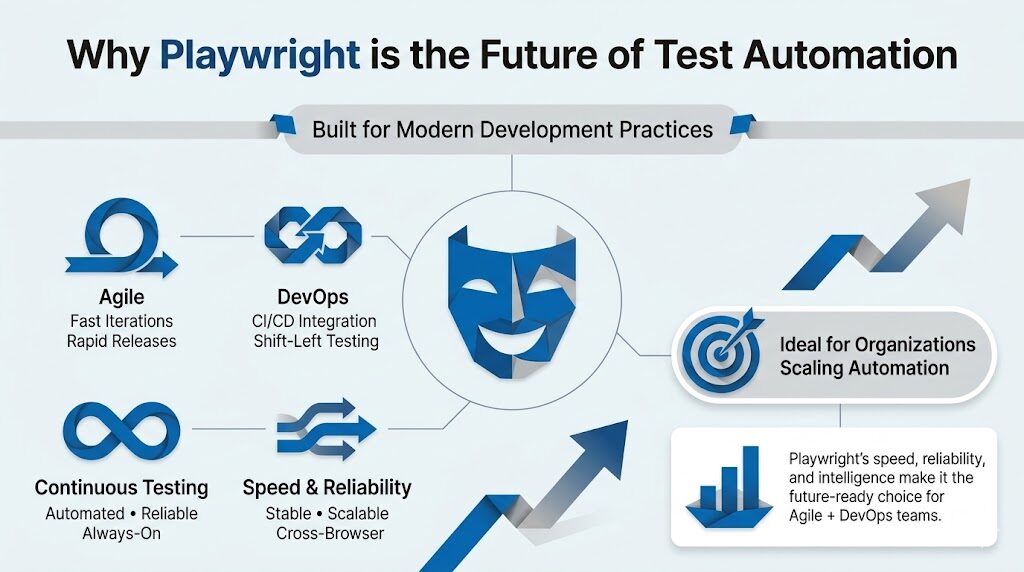
Playwright is an open-source test automation framework developed and maintained by Microsoft. First released in 2020, it was built by the same engineering team responsible for Puppeteer, the headless browser automation library for Chrome. Where Puppeteer was limited to a single browser, Playwright was designed from the ground up to be a fully cross-browser, cross-platform, cross-language automation framework suited to the demands of modern web development.
Rather than relying on the WebDriver protocol that has powered Selenium since 2004, Playwright communicates with browsers through persistent WebSocket connections using each browser’s native automation protocol. This architectural distinction is not a minor technical detail. It is the reason Playwright is consistently faster, more stable, and more capable when testing the kind of JavaScript-heavy, single-page applications that define the modern web.
“If Selenium is a reliable motorway built in the 1970s, Playwright is a high-speed rail line built for where traffic actually needs to go today. Both get you somewhere. Only one gets you there in a way that scales.”
Playwright supports Chromium, Firefox, and WebKit (Safari’s rendering engine) out of the box. It offers official language bindings for JavaScript and TypeScript, Python, Java, and .NET (C#), which covers the vast majority of enterprise technology stacks. Its built-in test runner for Node.js environments includes parallel execution, test isolation via independent browser contexts, screenshot and video capture, trace viewer, and a powerful code generator that can write test scaffolding by watching a user interact with the application in real time.
The rapid growth of Playwright in the industry reflects its genuine capabilities. At IT Path Solutions, we have experienced this shift directly. Teams that once spent days maintaining flaky Selenium test suites are shipping with Playwright pipelines that run reliably, fast, and with minimal maintenance overhead.
Playwright vs. Selenium: A Practical Comparison
IT Path Solutions has deep hands-on experience with Selenium. For many years, it was the default recommendation for any organisation building a web automation suite. It remains a technically sound choice for specific scenarios, particularly those involving legacy browser support or teams with large investments in existing Selenium infrastructure written in languages like Ruby or PHP.
However, for the majority of modern enterprise projects, Playwright delivers a decisive combination of advantages. The comparison below reflects what we observe in real-world projects, not benchmark marketing material.
| Capability | Playwright | Selenium |
|---|---|---|
| Execution Speed | ✓ 2–3× faster via WebSocket + native browser protocol | ~ Slower due to HTTP/WebDriver round-trips |
| Auto-Waiting | ✓ Built-in smart waits for element readiness | ✗ Manual explicit/implicit waits required |
| Cross-Browser Support | ✓ Chromium, Firefox, WebKit (Safari) | ✓ All major browsers including legacy IE |
| Test Isolation | ✓ Independent browser contexts per test | ~ Requires manual state management |
| Parallel Execution | ✓ Native out-of-the-box | ~ Requires Selenium Grid setup |
| Network Interception | ✓ Full request/response interception built-in | ✗ Requires third-party proxy tools |
| Mobile Emulation | ✓ Device viewport and touch emulation included | ~ Limited; requires Appium for real mobile |
| Debugging Tools | ✓ Trace Viewer, screenshots, video, inspector | ~ Plugin-dependent; steeper setup |
| CI/CD Integration | ✓ Seamless with GitHub Actions, Jenkins, Azure DevOps | ✓ Mature integrations available |
| Legacy Browser Testing | ✗ No Internet Explorer support | ✓ Full legacy browser support |
When we set up a new automation framework for a client, the first question we ask is not “which tool is most popular?” It is “what does this codebase actually demand?” For organisations running React, Angular, Vue, or Next.js applications with dynamic content, real-time updates, and complex authentication flows, Playwright is not just the better choice. In most cases, it is the only sensible one.
Also Read – Appium vs Selenium: Which Automation Tool Is Right For You?
Core Capabilities That Make Playwright Enterprise-Ready
1. Reliable Auto-Waiting That Eliminates Flakiness
Flaky tests are the single largest drain on QA team productivity. A test that passes locally but fails in CI, or passes one run and fails the next without any code change, is worse than useless. It erodes trust in the entire automation suite and forces engineers to investigate false positives rather than real defects.
Playwright’s built-in auto-waiting mechanism addresses this at the architectural level. Before executing any action on an element, whether a click, a fill, or a select, Playwright automatically waits for that element to be visible, stable, enabled, and ready. It does not simply wait for the DOM to load. It waits for the element to be genuinely interactive.
This eliminates the category of timing-related failures that teams using Selenium spend significant engineering hours trying to work around with custom wait logic.
2. True Cross-Browser Testing with One API
Playwright bundles its own versions of Chromium, Firefox, and WebKit. This means there are no external driver binaries to manage, no version mismatch issues between your browser and ChromeDriver, and no environment-specific setup.
When you install Playwright, everything you need to run tests across all three major browser engines is included. The same test script runs on all three with a single configuration change, making genuine cross-browser coverage a realistic and maintainable goal rather than an aspirational one.
3. Network Interception and API Mocking
Modern web applications are deeply connected to backend APIs, third-party services, and real-time data feeds. Testing these applications reliably requires the ability to control network behaviour, mock API responses, simulate slow connections, and test error states without depending on external services being available.
Playwright’s network interception API gives engineers full control over every HTTP request and response, enabling deterministic tests that run consistently regardless of external dependencies.
4. Parallel Execution and Sharding at Scale
Enterprise applications can have thousands of test cases. Without parallel execution, a comprehensive test suite can take hours, making it impractical for CI/CD pipelines that need fast feedback loops. Playwright’s test runner supports parallel execution natively.
Tests run in separate worker processes, each with isolated browser contexts, ensuring they do not interfere with one another. For even larger suites, Playwright supports sharding across multiple machines, enabling test runs that scale horizontally with your infrastructure.
5. The Trace Viewer: Debugging Made Visual
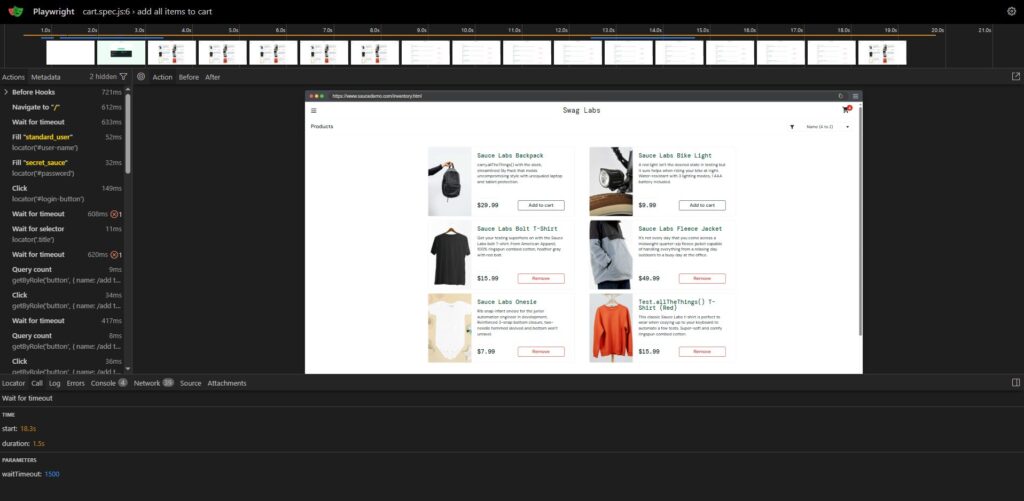
One of Playwright’s most distinctive and practically valuable tools is its Trace Viewer. When a test fails, the trace file captures a complete timeline of every action, network request, console log, and DOM snapshot from that test run. Engineers can replay the failure step by step in a visual interface, seeing exactly what the browser saw at each moment. This transforms debugging from a frustrating guessing game into a precise, efficient diagnostic process.
6. Code Generation That Accelerates Onboarding
Writing test automation code is a skill that takes time to develop. Playwright’s Codegen tool lets engineers record their interactions with a live application and automatically generates the corresponding test code. This is not a no-code silver bullet, but it is a highly effective accelerator. New team members can get productive quickly, and even experienced engineers can use it to scaffold test files for new features and then refine them to production quality.
Building a Scalable Playwright Framework: The IT Path Solutions Approach
Adopting Playwright is not simply a matter of installing the npm package and writing a few test files. For the automation suite to deliver lasting value at enterprise scale, it needs to be architected with the same discipline and rigour applied to the application code itself. At IT Path Solutions, our QA engineers follow a structured implementation methodology that has been refined across dozens of client engagements.
1. Environment and Architecture Setup
Configure Playwright with TypeScript for type safety, establish project folder structure, and integrate with your version control and CI/CD systems from day one.
2. Page Object Model Design
Implement the Page Object Model pattern to abstract UI interactions into reusable, maintainable classes. This ensures test code does not break every time the UI changes.
3. Test Data and Fixture Strategy
Define a clean test data management strategy using Playwright fixtures, environment-specific configurations, and API seeding to ensure deterministic, repeatable test runs.
4. Parallel Execution Configuration
Configure worker counts, test sharding, and browser parallelism appropriate to your infrastructure, balancing execution speed with resource consumption.
5. CI/CD Pipeline Integration
Integrate Playwright into GitHub Actions, Azure DevOps, Jenkins, or your pipeline of choice, with automated reporting and failure alerts delivered to your team.
6. Reporting and Observability
Set up Playwright’s HTML reporter, integrate with tools like Allure or TestRail, and establish dashboards that give engineering leaders visibility into test health over time.
The architecture of your test framework matters as much as the tests themselves. A poorly structured Playwright suite will become just as unmaintainable as the Selenium suite it replaced. The difference is that Playwright gives you the tools to build it correctly from the start, and our team has the experience to guide that process.
Playwright in the CI/CD Pipeline: Speed as a Quality Strategy
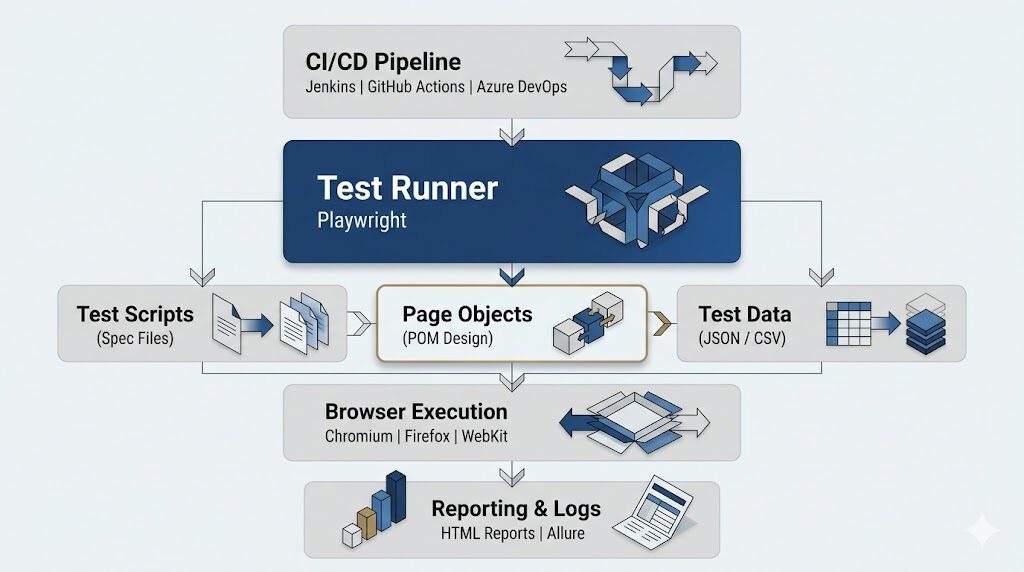
The shift to continuous integration and continuous deployment has fundamentally changed the relationship between testing and shipping. In a traditional release cycle, QA could happen in a dedicated phase at the end of development. In a CI/CD environment, testing must be fast enough to happen on every commit without becoming a bottleneck that slows deployment velocity.
This is where Playwright’s performance characteristics translate directly into business value. A comprehensive Playwright test suite running in parallel across multiple workers can cover what would take a Selenium suite 60 to 90 minutes in 30 to 40 minutes. For teams committing multiple times per day, that difference compounds into hours of recovered engineering time every week.
What This Looks Like in Practice
A single Playwright task averages approximately 290 milliseconds of execution time, compared to 536 milliseconds for an equivalent Selenium action. Across a suite of 2,000 tests, that difference means a CI pipeline completes in under 35 minutes rather than over 70, giving every developer faster feedback on every pull request without compromising coverage depth.
For enterprise teams running multiple feature branches and deployment environments simultaneously, this is not a marginal improvement. It is a strategic competitive advantage in how quickly the organisation can respond to market demands and release validated software.
IT Path Solutions integrates Playwright into CI/CD pipelines across GitHub Actions, Azure DevOps, Jenkins, CircleCI, and GitLab CI. Our engineers configure parallel execution profiles that match your infrastructure budget, set up branch-specific test strategies that prioritise high-risk areas, and build reporting pipelines that give QA leads and engineering managers real-time visibility into test health without requiring them to dig through log files.
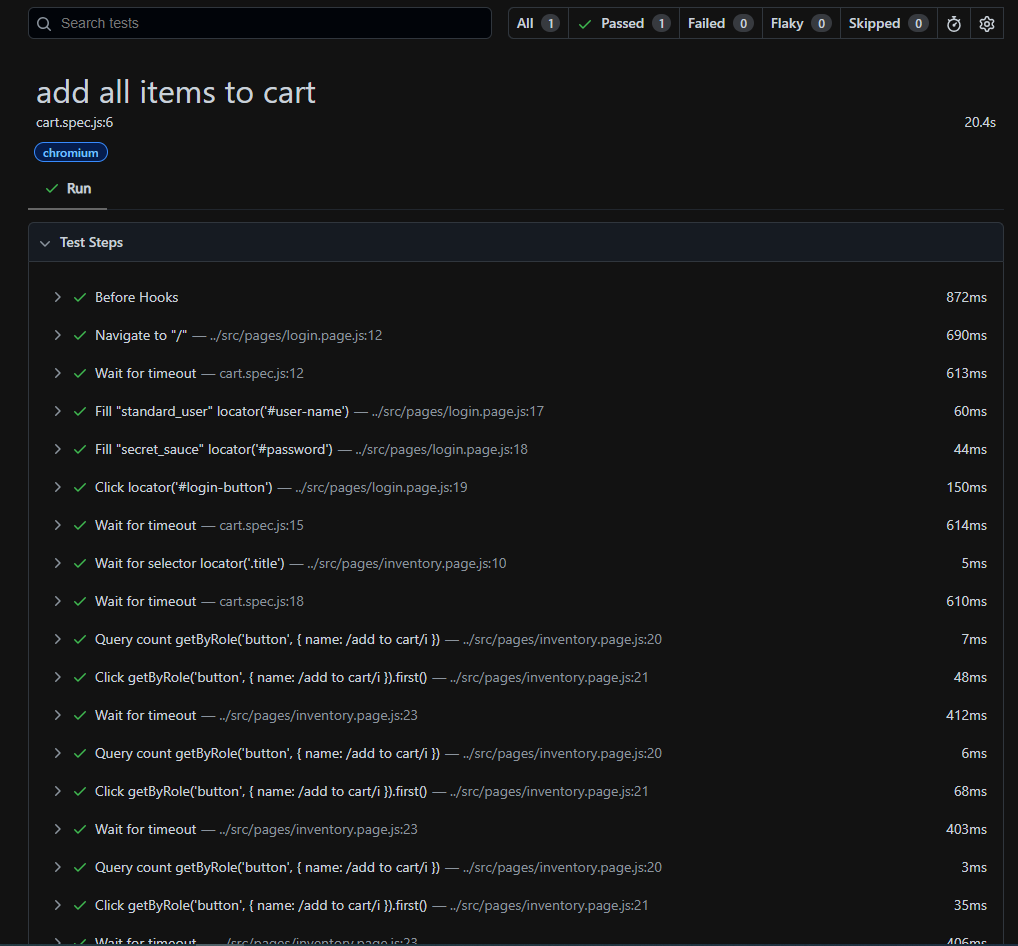
Playwright test excecution report is straightforward. You can see what passed, how long it took, and which browser it ran on without digging through logs. When something fails, the details are already there, which makes debugging quicker.
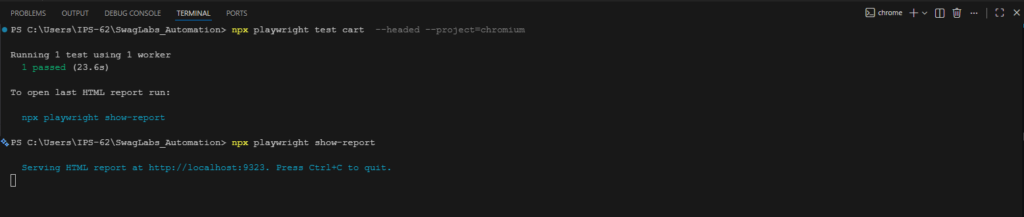
Running tests is just as simple. A single command executes the suite and generates a report. In larger projects, this runs in parallel in CI, which helps keep feedback fast even as the test suite grows.
Migrating from Selenium: A Measured, Risk-Managed Path
One concern we frequently hear from enterprise QA teams is the fear of the migration effort. “We have 3,000 Selenium tests. We cannot just throw them away.” This is an entirely valid concern, and it reflects a misunderstanding of how responsible migration actually works.
At IT Path Solutions, we never recommend a wholesale “rip and replace” migration. The risk is too high, the cost is unnecessary, and it undermines the institutional knowledge embedded in existing test coverage. Instead, we advocate for and deliver a phased migration approach that delivers value incrementally while preserving the stability of existing automation assets.
The phased approach begins by identifying the areas of the application where flakiness, maintenance burden, or coverage gaps are most acute. These become the first targets for Playwright migration, chosen because they represent the highest potential return on investment. New features built after the decision to adopt Playwright are covered by Playwright from day one, preventing the legacy problem from growing.
The existing Selenium suite continues to run in parallel during the transition, maintaining coverage continuity. Over time, as confidence in the Playwright suite builds and teams become proficient with the framework, migration extends to the remaining test areas at a pace that is sustainable and controlled.
We have used this approach with clients across the fintech, healthcare, eCommerce, and SaaS sectors, and the pattern holds consistently. Teams that adopt it see measurable improvements in test reliability within the first month of migration, and full framework transitions typically complete within two to four months depending on the size of the existing suite.
Advanced Use Cases: Where Playwright Separates Itself Further
1. Visual Regression Testing
Playwright’s built-in screenshot comparison capabilities, combined with tools like Percy or Applitools, enable visual regression testing that catches unintended UI changes before they reach users. For applications where visual consistency is critical, such as e-commerce product pages, financial dashboards, or branded consumer applications, this layer of testing provides coverage that functional tests simply cannot deliver.
2. API Testing Alongside E2E Tests
Playwright is not limited to browser-based UI testing. Its API testing capabilities allow QA engineers to write and run HTTP-level tests using the same framework and runner as their end-to-end tests. This enables unified reporting, shared test fixtures, and the ability to combine API and UI assertions within a single test flow, reflecting how users actually interact with modern applications.
3. Authentication State Management
Most enterprise applications require authenticated sessions to test meaningfully. Playwright’s storage state feature allows engineers to authenticate once, save the session state to a file, and reuse that state across every test that requires it. This eliminates the performance overhead of logging in at the start of each test, which in a large parallel suite can represent a significant time saving, and improves test isolation by ensuring each test starts from a known state.
4. Testing Behind Firewalls and in Staging Environments
Enterprise applications are rarely tested against public URLs. They live behind VPNs, internal networks, and access-controlled staging environments. Playwright’s architecture is fully compatible with these constraints, running headlessly in Docker containers, Kubernetes pods, and private CI runners without requiring any special browser configuration. IT Path Solutions routinely sets up Playwright in air-gapped and network-restricted environments for clients in regulated industries where external tooling dependencies are not permissible.
Case Study: End-to-End Playwright Automation for Electric Inventory Management System
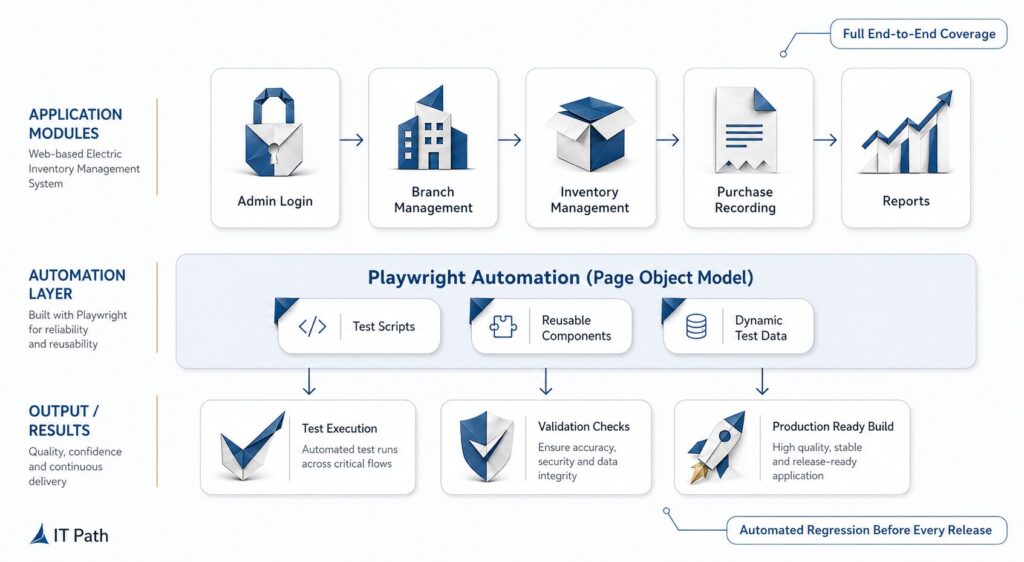
Managing electrical inventory across multiple branches is no small feat. IT Path Solutions took on the challenge of building and then rigorously automating the testing of a comprehensive, web-based Electric Inventory Management System. This multi-branch admin platform brings everything under one roof: stock tracking, purchase recording, user management, and detailed reporting, all accessible from a single, unified dashboard.
But building it was only half the story. Making sure it worked every time, across every module, before every release, that is where the real engineering began.
The Challenge: When Manual Testing Hits Its Limits
As the platform grew and expanded across multiple modules and branches, the cracks in manual testing started to show fast.
The team was spending enormous amounts of time running through repetitive test cases by hand. And despite that effort, things still slipped through. Missed edge cases led to inconsistent results. There was virtually zero regression coverage, which meant every new feature carried the risk of silently breaking something that already worked. Feedback loops were slow, leaving developers in the dark until issues had already snowballed.
And then there were the complex UI interactions like drag-and-drop column reordering that were simply impossible to validate consistently through manual effort.
Something had to change.
The Solution: A Playwright Automation Suite Built to Scale
IT Path Solutions designed and implemented a full-scale Playwright JS automation suite, architected around the Page Object Model (POM), a proven design pattern that keeps test code clean, reusable, and easy to maintain as the product evolves.
The suite was built to be environment-agnostic from day one, meaning it could run reliably regardless of which environment it was pointed at. No brittle, one-size-fits-one setups.
End-to-end test coverage was built across every critical module of the platform:
- Admin login & dashboard validation — ensuring secure access and a fully functional home base for every user session
- Branch & user management — tested with dynamic test data to reflect real-world scenarios
- Inventory column customization — including precise mouse simulation to validate drag-and-drop column reordering, one of the trickiest UI interactions to automate
- Purchase recording — with price calculation assertions to catch any logic errors before they reach users
- PDF export & theme toggle verification — validating both utility features and visual consistency across dark and light modes
The Workflow: How the Team Made It Happen
Great automation doesn’t happen in isolation. It is the result of a well-structured process carried out by the right people working in sync. Here is how the team approached it, step by step:
1. Test Suite Setup
Before writing a single test, the Playwright project was properly configured with base URLs, browser settings, timeouts, and the full Page Object Model structure, so the suite was ready to run cleanly against any environment from the start.
2. Admin Login & Dashboard
Automated login flows were built with admin credentials, followed by post-login URL validation and assertions on dashboard stats card visibility, confirming that the first thing users see is exactly what they should see.
3. Branch & User Management
Dynamic branch and user creation was tested in sequence, with search validation and success toast assertions confirming that every action registered correctly in the system.
4. Inventory & Purchase Testing
This was where some of the most technically demanding work happened. Column customization, drag-and-drop reordering, purchase recording, total price validation, and Recent Purchases panel assertion all had to work together seamlessly.
5. Report & Export Validation
The final workflow stage covered PDF export button visibility and click validation, dark/light theme toggle assertions, and comprehensive test result reporting through the Playwright HTML Reporter, giving the team a clear, shareable view of every test run.
The Team Behind It
Every great outcome is the result of the right people in the right roles. The core team that brought this automation project from vision to reality included:
- QA Automation Engineer — hands-on implementation of the test suite, writing and maintaining individual test cases
- QA Lead / Test Architect — overseeing the overall automation strategy, framework design, and quality standards
- Project Manager — keeping timelines, communication, and delivery on track
- DevOps Engineer — ensuring smooth pipeline integration and environment reliability
The Tech Stack
| Tool / Technology | Role |
|---|---|
| Playwright JS | Core automation framework |
| JavaScript | Test scripting language |
| Node.js | Runtime environment |
| GitHub | Version control and collaboration |
| Allure Reports | Test reporting and visualization |
The Result
With the Playwright automation suite in place, every feature is now validated end-to-end before each release goes out. Bugs get caught before they ever reach production. Developers get faster, cleaner feedback. And the client receives a consistently high-quality product every single time.
What used to be a slow, error-prone, and frankly stressful manual process is now a reliable, repeatable, and scalable system. The team doesn’t just hope the product works. They know it does.
Why Partner with IT Path Solutions for Your QA Transformation
IT Path Solutions was founded on the premise that great software requires great engineering at every layer, not just in feature development, but in the systems that validate, monitor, and continuously improve the quality of what gets shipped.
We are a full-service technology partner with deep expertise in web development, API architecture, and quality assurance, and that combination of skills is what makes our QA engagements different.
Our QA teams have hands-on production experience with Selenium, Cypress, Appium, Playwright, and the emerging wave of AI-assisted testing tools.
We do not recommend Playwright because it is fashionable. We recommend it where it genuinely serves the client’s technical context and business objectives. When Selenium is the right answer, we say so and explain why. When a hybrid approach is needed, we design one. Our credibility as advisors depends on our recommendations being honest, not on promoting a single technology regardless of fit.
Beyond framework selection, IT Path Solutions brings expertise in test strategy design, QA process consulting, CI/CD pipeline engineering, and quality culture building. We work with engineering teams at all stages of automation maturity, from organisations taking their first steps away from purely manual testing to teams with established suites that need to be modernised and scaled.
In every case, the goal is the same: to make software quality a reliable, repeatable, and cost-efficient asset rather than a source of anxiety, rework, and unplanned downtime.
Quality at the Speed of Modern Development
The argument for Playwright is not that it is the newest tool available, or that it comes from a company with Microsoft’s engineering pedigree, or even that its adoption numbers are climbing faster than any comparable framework. The argument for Playwright is simpler and more durable than any of those points: it solves the actual problems that real QA teams face every day.
It eliminates flaky tests by building intelligent waiting into the framework’s foundations rather than treating it as an afterthought. It makes cross-browser coverage genuinely achievable without a dedicated infrastructure team. It runs fast enough to fit into CI/CD pipelines that demand feedback in minutes rather than hours. It gives engineers the debugging tools they need to understand failures quickly rather than spending half a sprint chasing ghosts. And it scales from a small startup’s first automation suite to an enterprise-scale framework covering thousands of tests across multiple parallel environments.
The cost of poor software quality is real, measurable, and growing. The automation testing market is projected to reach $169 billion by 2034, driven by organisations that have understood what IT Path Solutions has seen at first hand: quality assurance is not a cost centre to be minimised. It is a value-generating function that, when done correctly, enables faster delivery, fewer production incidents, stronger customer relationships, and a development team that can build with confidence rather than trepidation.
Playwright is not a magic solution that makes all of that happen automatically. But in the hands of engineers who understand both the framework and the quality engineering principles that underpin effective automation, it is the most capable and scalable tool available for the web applications that enterprises are building today.
IT Path Solutions has the experience, the methodology, and the track record to make that capability work for your organisation. The question is not whether your team needs better automation. It is whether you are ready to build it the right way.
Ready to Build a Smarter QA Strategy?
IT Path Solutions delivers end-to-end QA consulting, framework design, and Playwright implementation for enterprises that want to ship with confidence. Whether you are starting from scratch or modernising a legacy Selenium suite, our team brings the technical depth and practical experience to get it right.

Keyur Patel
Co-Founder
Keyur Patel is the director at IT Path Solutions, where he helps businesses develop scalable applications. With his extensive experience and visionary approach, he leads the team to create futuristic solutions. Keyur Patel has exceptional leadership skills and technical expertise in Node.js, .Net, React.js, AI/ML, and PHP frameworks. His dedication to driving digital transformation makes him an invaluable asset to the company.
Related Blog Posts

How RivalRadar Uses AI Agents to Track Competitors Automatically

Notion Client Portal: How to Build a Branded Client Experience Without Leaving Notion