
Mobile App Development Trends for 2027
Keyur Patel
September 12, 2025
22 min
Last Modified:
September 22, 2026
Most trend lists make the next eighteen months of product planning look like a shopping list. Every technology sounds urgent, nothing tells you which choices actually change your build, and the advice ends before the real question starts. What should we do, and what will it cost?
The mobile app development trends 2027 builds will actually use are fewer than the headlines suggest. AI now shapes both what an app does and how the app gets built. Cross-platform tooling has matured to the point where the choice is an architecture decision, not a cost shortcut. Security and privacy have to be designed in from the first sprint instead of patched on before launch. Offline reliability matters for the users who work where networks fail. And a whole category of technology, from AR to beacons, only matters if your use case is specific.
This guide walks each of those areas in the same order: what changed, who benefits, what it does to cost and timeline, and an adoption call. The goal is a decision for your product, not a longer list to read next month.
6 Mobile App Development Trends That Matter for 2027
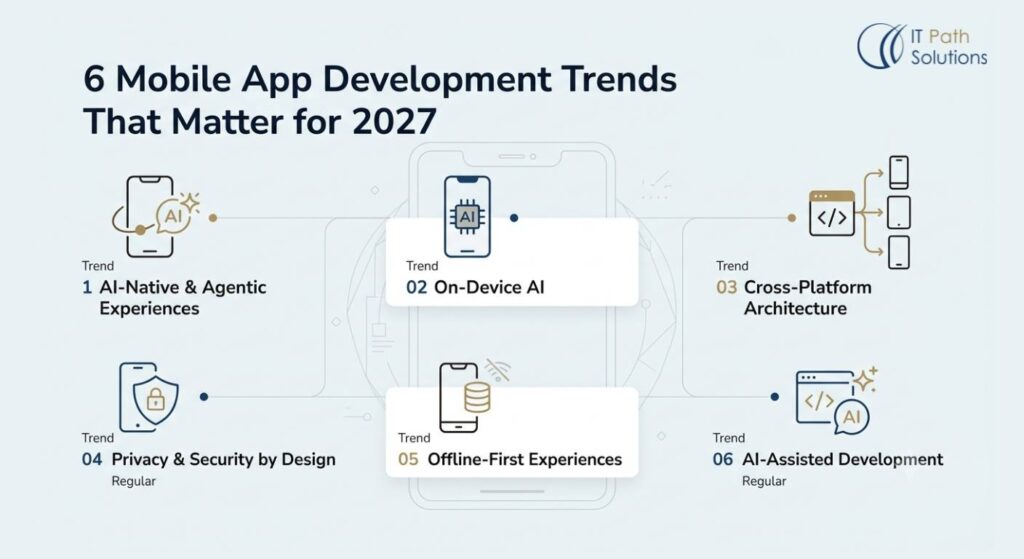
Each section follows the same structure: what changed, who benefits, the technical work, cost and timeline, and the adoption call. Of the mobile app development trends 2027 coverage will keep raising, these six deserve your planning time. If you only skim, read the adoption calls. They are the part most trend lists skip.
1. AI-Native and Agentic Mobile Experiences
Most products still treat AI as a feature, a chat box here and a summary button there. The more useful shift for 2027 is to treat AI as part of the architecture. The application is designed around the model from the start, which means deciding which data it can see, which actions it can take, what it must ask a human to do, and how you measure whether it is right.
Agentic workflows are where this shows up first. Instead of answering one question, the app can plan a short sequence of steps, call the right tools, and complete a task. A customer service app might draft a reply, check the order history, apply the refund policy, and pause for a human approval before sending.
Apple’s Foundation Models framework provides access to Apple Intelligence’s on-device language model and supports multimodal interactions, tool calling, and the creation of multimodal agentic app experiences. If iOS is on your roadmap, the platform now assumes you will build with this in mind.
This trend carries the widest budget impact of the mobile app development trends 2027 will test. The sectors that feel it first are productivity, ecommerce, customer service, fintech, enterprise workflows, field operations, and healthcare administration.
The technical work is less glamorous than the demo. You integrate a model or an API, wire up retrieval over your own data, enforce structured outputs, define tool calling with strict permissions, and build the orchestration and approval steps. Then you add evaluation, logging, and monitoring, which is the block most teams underestimate. If you cannot tell which answers the model got wrong, you cannot trust it in production. This is the core of agentic AI development, and it is engineering work, not a prompt.
The cost follows the same shape. You pay for model or API usage, backend infrastructure, and the evaluation, monitoring, and security work that keeps it safe. In narrow, high-volume use cases, the manual work you remove can offset part of that spend. Do not expect a universal discount.
The timeline effect front-loads architecture decisions. The first sprints settle data access, permission boundaries, and fallback behavior, and those are expensive to undo. I will not promise that AI cuts development time by a fixed percentage. It changes where the effort goes.
The risks are well known: hallucinated output, unpredictable behavior at the edges, data leaking through prompts or logs, agents with too much autonomy, dependence on a single model provider, and user trust that breaks after one bad answer.
Here is the adoption call
Adopt AI-native design when you have a clear, measurable use case, such as cutting support handling time. Pilot agentic workflows where the task is bounded and a human approves the final step. Wait on generic AI chat that exists because a competitor has one, not because it solves a defined problem. Teams doing this well start from a narrow custom AI development scope, one measurable outcome at a time.
2. On-Device AI and Device-Side Processing
Every AI feature in a mobile app makes one quiet choice. Does this run on the phone, on a server, or somewhere in between? The choice used to be about cost. In 2027 it is about privacy, latency, and reliability.
Cloud processing gives you the strongest models and the same experience on every device. You pay per request, and every prompt travels over the network. On-device processing keeps the data on the phone, answers in milliseconds, and works without a connection. The models are smaller, and today they are weaker at hard reasoning. Hybrid designs split the work, so routine tasks run locally and the difficult ones escalate to the cloud.
On-device and hybrid processing win in specific cases: privacy-sensitive apps such as health and finance tools, productivity apps that must work offline, camera and image processing, field apps in low-connectivity areas, accessibility features, and any real-time interaction where a server round trip would feel laggy.
The technical work is a matter of constraints. You size the model to fit device memory, check capability at runtime because your user base includes older phones, and design fallback paths for the requests the local model cannot handle. You also measure battery impact, track latency on real hardware, and plan how model updates ship.
Apple’s current Foundation Models framework provides direct access to Apple Intelligence’s on-device model and supports multimodal prompts, tool calling, and agentic app experiences. In practice, an iOS app can run a useful language model locally without sending the user’s data anywhere, which changes the design of privacy-sensitive products in a way a cloud API cannot.
Cost is where the marketing usually gets it wrong. On-device AI is not free. It can cut server costs for high-volume, low-complexity requests, which is real money at scale, but it adds complexity: more testing across device tiers, more fallback logic, more maintenance. The honest calculation compares the server bill you avoid against the engineering you add. For a small app, the cloud bill was never the problem.
The risks deserve a line each: inconsistent capability across devices, models that are simply too weak for your task, battery drain that users blame on your app, the overhead of updating models, and local security questions about data that sits on a device you do not control.
Here is the adoption call.
Adopt on-device or hybrid processing when privacy or latency is a core requirement. Pilot it for computationally demanding workloads, because a benchmark on your best test device will not predict your worst user’s phone. Wait when a cloud model clearly outperforms the local option and your users can live with the latency and the data flow.
3. Cross-Platform Development Becomes an Architecture Decision
Cross-platform development used to be sold as a cost shortcut: write once, deploy twice. The framing is outdated. The tooling is mature enough that the real question is architectural. Cross-platform is a statement about where your product’s complexity lives, and the answer should come from your product requirements, not from a budget slide.
A shared codebase makes sense when most of the app works the same on both platforms: the same screens, the same workflows, the same business logic, with modest platform differences. It also makes sense when speed and budget matter, when the team benefits from one codebase, and when platform-specific features are limited to what the frameworks can reach.
Native development makes more sense in the other situations. If you need deep hardware integration, high-performance graphics, advanced AR or VR, or platform-specific AI that only one operating system exposes, the extra engineering is usually worth it. Some products land in between, with a shared core and native modules where it counts. The conversation around hybrid mobile app development has matured for exactly this reason.
The technical implications show up in month three, not month one. Code sharing is the benefit. Native modules, plugins, and third-party packages are the risk surface, and their quality varies more than most teams expect until they integrate something that should have been simple. You also inherit a testing and maintenance story that differs from native, with more device combinations and more framework upgrade cycles.
The cost picture is real but bounded. A shared codebase reduces duplicated engineering effort on the app layer. It does not make the rest of the project disappear. The backend, the integrations, the QA, and the UX design are still there. Do not believe a claim that half the work disappears. What you are buying is less duplication on the parts that were duplicated.
On timeline, the case is strongest when you target both iOS and Android at launch and a substantial share of the app is shared functionality. One team building one codebase usually ships the first version faster than two teams building two apps, and the maintenance model afterward is simpler.
The ecosystem has consolidated around a few serious options. React Native’s current releases are centered on the New Architecture, with Hermes V1 now the default in the latest release cycle, while Kotlin Multiplatform provides stable support for Android and iOS. Teams also evaluate .NET MAUI when the shop is already invested in that stack, though .NET MAUI development experience is rarer than experience with the other two. If the prototype exposes native gaps, hiring React Native developers with native bridge experience is a normal part of the plan.
Here is the adoption call for this trend.
Consider cross-platform now, and run the evaluation early, with a working prototype of your most important screen and your most demanding integration. That prototype will tell you more than any comparison article.
4. Privacy and Security Move Into Application Architecture
Security used to be a launch-phase checklist. You added authentication, encrypted the endpoints, and called it done. The shift for 2027 is that privacy and security belong in the application architecture, and the key decisions happen before the first screen is designed.
The scope is wider than most product owners expect.
- Authentication and authorization define who is acting and what that person may do. Secure API communication and encryption protect data in transit and at rest.
- Local storage needs its own answer, because a phone is a device you do not control.
- Data minimization means deciding which fields you actually need before you collect them.
- Permissions should be the minimum the feature requires.
- Third-party SDKs are a dependency risk, and each one deserves a line in your data map.
- Secret management, device integrity checks, and auditability are table stakes for anything that touches customer data.
And with AI in the mix, there is a new question set: what does the model see, where do prompts and responses live, and can an agent act on more data than the user intended?
The stakes are highest where a breach is a business-ending event: fintech, healthcare, enterprise software, ecommerce with payment data, identity products, SaaS, and any app that handles sensitive records. In healthcare app development, the architecture question is not whether security is included, but how much compliance work you are committing to before you start.
The cost direction is counterintuitive. Doing this well increases early planning and testing effort, because threat modeling, data mapping, and the right tests are easy to defer and expensive to retrofit. The payoff is that you avoid the expensive version of the same work, re-architecting data handling three months after launch because an audit or a customer’s security questionnaire made the gap obvious. Teams that defer this do not save budget. They move it to the most expensive place it can go.
The timeline implication is simple. This work starts at discovery, not at launch. If the data model is settled before the security model, the security model gets whatever is left.
The platforms point the same way. Android’s current security guidance covers secure communications, secure local storage, authentication, app integrity, and minimizing unnecessary access to user data. When both operating systems are telling you the same thing, treat it as a design input rather than an extra.
Here is the adoption call.
It is mandatory when your app handles sensitive customer data, and a strong default even when it does not. The question is not whether to design for it, but how early.
5. Offline-First and Connectivity-Resilient Mobile Apps
Most trend coverage of connectivity starts with network speed, and the pitch is always the same: faster 5G, better coverage, smoother streams. That is the wrong question for a product decision. The question your architecture must answer is what happens when the network fails.
A delivery driver moves through tunnels and dead zones. A nurse works in a ward where the signal drops. If your app stops working the moment the connection does, those users stop working too.
Offline-first design inverts the default. The app performs its core functionality without a connection, and the network becomes a convenience for synchronization rather than a precondition. Android’s current architecture guidance defines offline-first apps as apps that can perform all or a critical subset of core functionality without internet access, and it recommends local data as the source of truth with network synchronization. The phone holds the truth, and the server catches up.
The technical work is real. You design a local database and a caching layer, build a synchronization strategy, and handle the uncomfortable parts: conflict resolution when two devices update the same record, retry queues for failed operations, battery-friendly background sync, and clear handling of stale data so a user never acts on yesterday’s number thinking it is today’s.
Logistics, field service, healthcare, travel, construction, agriculture, warehouse operations, and services in remote areas benefit significantly. A shipment tracking app development project lives or dies on how the driver’s screen behaves in a dead zone, and an online learning app development effort benefits when lessons stay downloadable for the commute. Consumer products with stable connectivity usually do not need this, and paying for it is a tax on your project.
Cost and timeline follow. An offline-first app is more complex than a network-dependent one. It needs more architecture, more state to reason about, and a test matrix that includes the disconnected device.
The risks are the familiar sync problems: data conflicts, failed synchronizations, stale information presented as fresh, and the edge cases that only appear in the field after launch.
The adoption call is use-case dependent.
If your users work where connectivity is unreliable, design for it from day one, because retrofitting offline behavior onto a network-dependent app is one of the most expensive rewrites in mobile. If your users have stable connectivity and your data tolerates a refresh, skip it and spend the budget elsewhere.
6. AI-Assisted Mobile Development Changes Delivery Economics
The first five trends change what your app does. This one changes how the app gets built, and it is the trend most lists about the future of mobile app development miss entirely.
AI-assisted development tools now sit inside the daily workflow of most engineering teams, generating boilerplate, drafting test cases, explaining unfamiliar code, scaffolding screens from descriptions, and accelerating the repetitive middle of a sprint. IT Path Solutions uses AI-assisted development tools, including Lovable, Bolt, Replit, Cursor, and GitHub Copilot, alongside its engineering teams. The honest assessment after extended use is that they change the pace of specific tasks, not the shape of the project.
The useful split is between tasks and judgment. AI accelerates parts of development, such as code generation, boilerplate, test generation for straightforward logic, documentation, debugging of obvious failures, refactoring, prototyping, UI generation from a spec, and code explanation. Human review remains essential wherever the cost of a mistake is high: architecture, security, performance, business logic, integrations with systems you cannot afford to break, production debugging, code quality, and compliance. AI can accelerate parts of development, but senior engineering review remains necessary. Hold onto that sentence.
The cost effect is real but local. Teams spend less effort on some tasks, and that is a genuine improvement. What does not happen is a fixed percentage coming off the total project cost. The expensive parts, the architecture, the integrations, the testing on real devices, the compliance work, do not get cheaper. Budget for a faster early phase, not a cheaper project.
The timeline logic is the same. Prototyping and repetitive work move faster, which is exactly the phase where speed matters most for an MVP. The failure mode is the opposite. An app ships on time with AI-generated code underneath, and then pays for it in maintenance. Hallucinated APIs, insecure code patterns, hidden bugs, technical debt, and architecture that drifts because each file came from a different prompt, these show up in month six, not month one.
The adoption call is useful with guardrails.
Review standards treat AI output the same as human output. Architectural reviews happen before generated code scales. Security scanning covers what the tools produce. And no generated integration touches production without a senior engineer’s sign-off. With those in place, the trend pays off. As a shortcut, it becomes the technical debt inherited from a sprint that only felt faster.
Technologies That Are Better Treated as Use-Case Specific
The six trends above can change how most mobile apps are designed, so they belong in every product plan. A different category keeps appearing in the same lists, and its presence is the problem. These are not bad technologies, but they are not trends in the same sense, because none of them changes the design of a typical app. Each one solves a real problem for a specific subset of products, and for the rest of the market it adds cost without adding value.
| Technology | Why it shouldn’t be a universal trend | When it makes sense |
|---|---|---|
| 5G | Connectivity standard, not an architecture by itself | Real-time/high-bandwidth experiences |
| AR/VR | High development effort and narrow use cases | Retail, gaming, training, visualization |
| Foldables | Requires adaptive UI rather than a dedicated trend strategy | Apps targeting large-screen/foldable users |
| IoT/wearables | Architecture depends on connected hardware | Healthcare, logistics, industrial apps |
| PWA | Alternative delivery model, not a universal replacement for mobile apps | Web-first products with app-like needs |
| Beacons | Niche technology | Proximity/location-specific workflows |
| On-demand apps | Business model, not a development trend | Marketplaces/service platforms |
| Quantum computing | Not relevant to most mobile product roadmaps | Research-specific scenarios |
When a technology from the table shows up in a vendor’s pitch, ask when it makes sense for your product before you ask whether it is trending. The strongest product teams pair a general architecture with market knowledge where the vertical demands it, which is why it is worth exploring industry-specific solutions for regulated or hardware-adjacent markets. The table is a filter, and it works in your favor when it says no.
How to Choose the Right Technology Direction for Your Mobile App
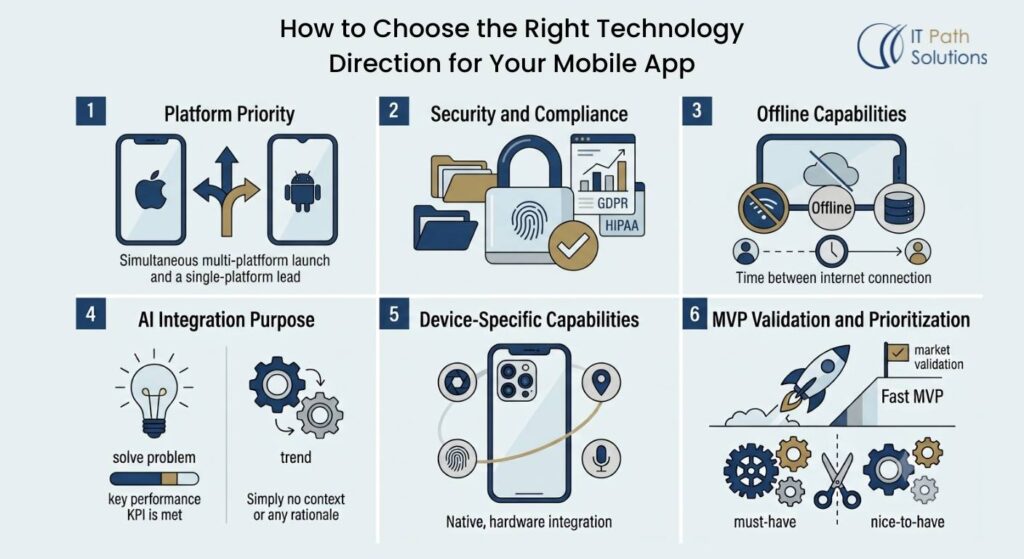
The right mobile technology depends less on what’s trending and more on what your application needs to do. The decision gets easier when you compare requirements instead of technologies. Answer seven questions honestly before you shortlist anything.
- Do you need iOS and Android at launch, or can one platform lead?
- Does the app handle sensitive data, and if so, what does that do to your security and compliance baseline?
- Must it work without reliable internet, and how long does a typical user go between connections?
- Does AI solve a specific, measurable user problem, or is it a feature you are copying?
- Do you need device-specific capabilities, such as camera pipelines, sensors, or platform-native AI?
- How fast does the MVP need to validate, and what would you cut to get there?
- What is the long-term maintenance model, who owns the codebase after launch, and how many teams will touch it?
A vehicle rental app development project shows how the answers interact. The customer base is split across platforms, so both are needed. Payments and identity data make security a discovery-phase task, not a pre-launch one. The pickup flow must survive a dead zone in the parking garage, so the critical path needs offline handling. Those answers point at a cross-platform core, security designed in from the start, and offline behavior on the critical path. Nothing in that plan requires AR, beacons, or a foldable strategy.
The point is not to keep up with the mobile app development trends 2027 lists. The point is to match technology to requirement. The table below maps the common requirements to the direction they point at.
| Business requirement | Technology direction | Priority | Main consideration |
|---|---|---|---|
| Faster multi-platform delivery | Flutter, React Native or Kotlin Multiplatform evaluation | Consider now | Shared code can reduce duplication, but native integration still matters |
| Personalized product experience | AI-native features | Pilot with a defined use case | Start with measurable user value |
| Sensitive customer data | Privacy and security architecture | Mandatory | Design data handling and security early |
| Offline or unreliable connectivity | Offline-first architecture | Use-case dependent | Requires local storage and sync strategy |
| Device-based intelligence | On-device processing | Evaluate | Check device support, battery and model capability |
| Rapid MVP validation | AI-assisted development with senior review | Useful with guardrails | Validate architecture and generated code carefully |
What These Trends Mean for Mobile App Development Cost and Timeline
By now each trend carries a note about cost and timeline. Here is the consolidated picture, the version that belongs in a board deck.
A few choices reliably increase the cost of a mobile project. AI integration adds model costs, infrastructure, evaluation, and security work, both inside the product and inside the team’s workflow. Offline synchronization adds architecture and a test matrix for the disconnected device. Advanced security adds early planning and testing. Native integrations and device-specific capabilities add the platform work you hoped to avoid. And all of it lands on QA, because every new state, new fallback, and new permission needs a test.
A different set of choices reduces time or duplicated effort. Cross-platform development removes a large share of the duplicated app-layer work when both platforms are on the roadmap. AI-assisted development accelerates prototyping and repetitive tasks. Reusable architecture makes the second feature cheaper than the first. Mature frameworks absorb platform changes so your team does not. And automated testing shrinks the regression cost of every change after launch.
Technology choice changes where the work goes. It does not make complexity disappear. A product that is genuinely complex, with sensitive data, offline behavior, and AI-driven workflows, will cost more and take longer than a simple one, no matter which frameworks it uses. The point of these choices is to make the complexity deliberate, so you pay for the parts your users actually experience, not the parts a checklist told you to build.
When you step back from the individual mobile app development trends 2027 and look at the combined effect, the story is one sentence. The work moves, and the complexity stays.
The Takeaway
Step back from the six trends and the pattern is simple. Each one is a question your product should answer, not a box to tick. AI belongs in the app when it solves a measurable user problem. Cross-platform belongs in the plan when both platforms are on the roadmap and the functionality is shared. Security belongs in the architecture from the first sprint. Offline design belongs in the app when your users are offline. And each technology that missed the list is waiting for a product that needs it.
The right mobile app architecture depends on business requirements, not a checklist of fashionable technologies. That is the standard worth holding a plan against, and it is the one the mobile app development trends 2027 will be judged by once the noise settles.
Planning a new mobile app? Start by evaluating the right architecture, technology stack and development approach for your product requirements. Our mobile development team can help you assess the options, validate the architecture and plan the development roadmap. The practical next step is to discuss your mobile app requirements with IT Path Solutions.
Frequently Asked Questions
1. What are the most important mobile app development trends for 2027?
The most important shifts for 2027 are AI-native and agentic app design, on-device AI processing, cross-platform architecture decisions, security built into the application from the start, offline-first connectivity, and AI-assisted development. IT Path Solutions treats these as architecture decisions rather than a checklist. Not every trend applies to every product, and the right combination depends on what your specific application needs to do.
2. Is cross-platform development a good choice for a new mobile app?
It often is, especially when shared functionality dominates, budget and speed matter, and platform-specific features are limited. IT Path Solutions typically recommends evaluating frameworks like Flutter, React Native, or Kotlin Multiplatform when targeting both iOS and Android from launch. Native development still makes more sense for hardware-heavy, performance-critical, or deeply platform-specific experiences, so the decision should follow the product’s requirements, not a default preference.
3. Should every mobile app include AI?
No. AI should be adopted where it solves a specific, measurable user problem, such as personalization, automation, or faster search, not added as a generic feature. IT Path Solutions advises piloting agentic or on-device AI workflows with a defined use case first, since unscoped AI features add cost, complexity, and risk (data leakage, hallucination) without a clear return.
4. Does an app need offline-first architecture?
It depends on how the app is used. Applications for logistics, field service, healthcare, construction, or other connectivity-unreliable environments benefit significantly from offline-first design, which requires local data storage and a synchronization strategy. IT Path Solutions treats this as use-case dependent rather than universal, and most consumer apps with reliable connectivity don’t need the added architectural complexity.

Keyur Patel
Co-Founder
Keyur Patel is the director at IT Path Solutions, where he helps businesses develop scalable applications. With his extensive experience and visionary approach, he leads the team to create futuristic solutions. Keyur Patel has exceptional leadership skills and technical expertise in Node.js, .Net, React.js, AI/ML, and PHP frameworks. His dedication to driving digital transformation makes him an invaluable asset to the company.
Related Blog Posts

DevExpress Web Reporting: A Complete Guide to Browser-Based Reporting
Build an App Like TaskRabbit With AI (2026): Cost, Features & Top Alternatives