How to Build n8n AI Chat Agent with RAG, Gemini & Qdrant
Keyur Patel
July 29, 2026
19 min
Last Modified:
August 19, 2026
Many businesses accumulate hundreds or even thousands of PDFs, manuals, reports, policies, and internal documents over time. Add web pages, product documentation, and knowledge base articles to the mix, and finding the right information quickly becomes a challenge. Teams often waste valuable time searching through files manually or repeatedly answering the same questions.
AI document analyzers and AI knowledge base tools solve this problem by letting users ask questions in natural language instead of searching through documents themselves. However, many of these platforms charge on a per-seat basis, making them expensive as teams grow.
An n8n AI chat agent with RAG offers the same core capability without locking you into another subscription. Instead of relying on a third-party knowledge base platform, you can build your own AI assistant that indexes your documents and web content, retrieves the most relevant information, and generates accurate responses using your own infrastructure.
This guide walks through a working implementation rather than a theoretical overview. It uses three connected n8n workflows to handle the entire process: one ingests PDFs, another processes web URLs, and the third powers the AI chat agent. Gemini generates the embeddings, Qdrant stores and searches the vector data, and MongoDB maintains the conversation history. Every configuration value covered in this guide, from chunk size to retrieval thresholds, comes directly from a production-ready template that you can download and run today.
When to Use This n8n AI Chat Agent Workflow
Not every collection of documents needs an AI-powered search system. However, once your PDFs and web resources grow to the point where finding information becomes time-consuming, an n8n AI chat agent with RAG can transform that content into a searchable knowledge base that responds to questions in natural language.
Who This Workflow Is For
This setup is built for teams or individuals who need to talk to their own PDF and web-URL knowledge base instead of searching it manually. That might mean product documentation, a research archive, legal reference material, or general internal knowledge management. The current version is scoped for a single user. There’s no multi-tenancy yet, so it fits one person or one shared account better than a full team each working from separate logins.
When This Workflow Becomes Useful
The moment your team starts repeatedly searching or asking questions against the same set of PDFs and URLs, this setup starts paying for itself. Five documents nobody has opened twice don’t need this yet. Fifty documents, with people constantly asking whether a question has already been answered somewhere, is a different story. Building an n8n AI chat agent with RAG turns that scattered knowledge into something searchable in plain language instead of something everyone has to remember exists.
Build Your AI Knowledge Base Faster
Skip the trial-and-error of building a RAG workflow from scratch. Download the complete n8n AI Chat Agent workflow with PDF ingestion, URL ingestion, and conversational search already connected and ready to configure.
Download the WorkflowWhy Finding Information Gets Harder Over Time
As businesses accumulate more documentation, finding the right information becomes increasingly difficult. Traditional keyword searches, disconnected conversations, and static documents create a knowledge base that exists but is difficult to use effectively.
The Manual Process Today
Right now, finding an answer buried in a PDF usually means opening the file, hitting Ctrl+F, and hoping the exact word you typed matches the exact word the document used.
When that fails, people fall back on tribal knowledge, asking whoever wrote the document, or whoever answered something similar last time. None of that gets written down anywhere searchable, so the next person ends up repeating the whole process.
Why This Becomes Difficult to Scale
Keyword search works fine with ten documents. It falls apart at a hundred, because it misses anything phrased differently from the original text. A document might describe “customer churn” while someone searches for “client retention” and comes up empty, even though the answer is sitting right there. There’s also no memory across sessions. Every question starts from zero, even if someone asked almost the exact same thing last week.
What Usually Breaks or Gets Missed
A few things quietly cause the most damage here. Scanned or photographed PDFs often have no extractable text layer at all, so keyword search returns nothing even though the content technically exists. Context gets lost between sessions because there’s no persistent chat history. And when someone does get an answer, there’s usually no way to trace it back to the document or page it came from, which makes it hard to trust without double-checking.
None of this is anyone’s fault exactly. It’s just what happens when a team’s collective knowledge lives in a stack of static files instead of something searchable.
Stop Searching Through Documents Manually
If your team spends too much time looking for answers across PDFs and web pages, this workflow gives you a ready-made foundation for building your own AI-powered knowledge base.
Get the WorkflowWhat’s Inside the Workflow
Rather than relying on a single automation, this solution separates document ingestion, web content ingestion, and AI-powered search into dedicated n8n workflows. This modular design makes it easier to manage, maintain, and extend as your knowledge base grows.
What This n8n Workflow Does
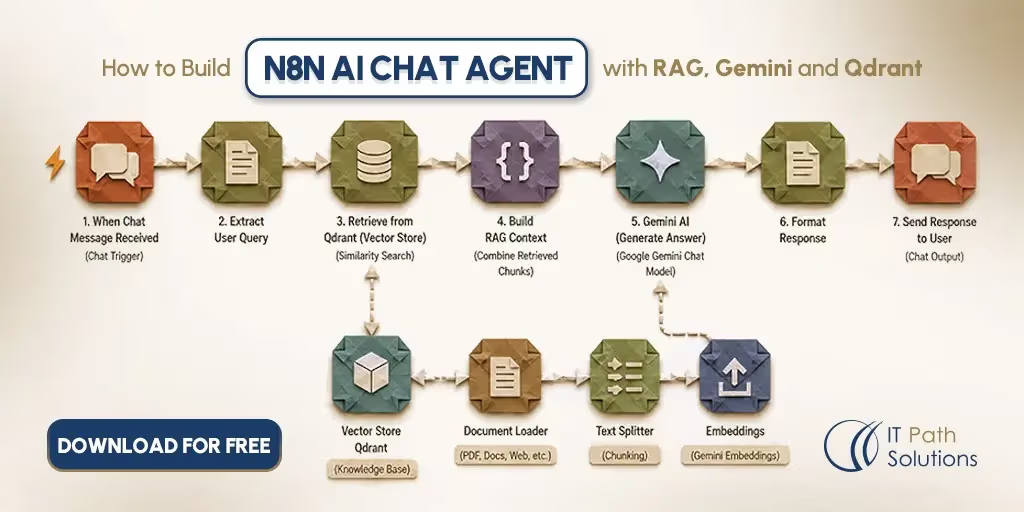
At a high level, this n8n AI chat agent with RAG takes uploaded PDFs and submitted URLs, breaks them into chunks, embeds those chunks, and indexes them in Qdrant. When someone asks a question in the chat interface, the workflow retrieves the most relevant chunks and hands them to Gemini along with the conversation history, so the response stays grounded in your actual content instead of the model’s general training knowledge.
Key Steps in the Automation
The build is really three independent sub-workflows working together:
- a PDF Ingestion Pipeline,
- a URL Ingestion Pipeline, and
- a Chat Agent Pipeline.
Each one runs on its own. The ingestion pipelines don’t need to be active at the same time as the chat pipeline, and you can trigger them separately whenever new content comes in.
Tools and Integrations Used
The stack stays fairly lean. n8n handles orchestration, Qdrant Cloud manages vector search and storage, Gemini covers both the embedding model (gemini-embedding-2) and the chat model (gemini-3.5-flash), and MongoDB persists conversation history along with a registry of ingested documents.
How the Workflow Works
Understanding how the workflow operates makes it easier to customize, troubleshoot, and extend. The following sections walk through each stage of the automation, from receiving PDFs and web URLs to generating AI responses backed by your own knowledge base.
Trigger
Three separate triggers kick off the three pipelines. A PDF Webhook listens for POST requests at /pdf-upload. A URL Webhook does the same at /url-upload. And the chat itself runs through n8n’s built-in Chat Trigger, which gives you a ready-made chat interface without building a custom front end from scratch.
Data Collection or Input
PDFs get parsed using n8n’s Extract From File node, which pulls the raw text out of the uploaded file. URLs go through a Fetch URL step followed by an HTML Cleaner, which strips out script, style, nav, and footer tags, collapses excess whitespace, and discards any line under 40 characters, since those tend to be navigation labels rather than real content.
Both pipelines include validity gates before anything moves further downstream. A Check Empty step catches PDFs with no extractable text, and a Check Length step requires at least 200 characters of usable content from a URL before it continues.
AI Processing or Logic Layer
This is where the actual mechanics of the n8n AI chat agent with RAG happen.
Once text clears the validity gates, a Chunker node splits it into 600-word windows with an 80-word overlap between consecutive chunks, roughly 13 percent, so context doesn’t get cut off mid-thought at chunk boundaries.
Each chunk passes through a Split In Batches node and then a Gemini Embedding step, which calls gemini-embedding-2 to turn the text into a vector.
A Build Qdrant Point node packages that vector with its metadata, and a Qdrant PUT step upserts it into the knowledge_base collection, configured for 384 dimensions and cosine distance.
On the chat side, the logic runs in reverse.
- An Embed Query Gemini step turns the user’s message into a vector using the same embedding model.
- A Search Qdrant step retrieves the top 6 matches with a similarity score threshold of 0.2, filtering out anything too dissimilar to be useful.
- A Trim History step pulls the last 20 turns of conversation from MongoDB.
- An Assemble Prompt step combines the system instructions, that trimmed history, the retrieved chunks, and the user’s actual message into a single prompt.
- A Call Gemini step then sends that prompt to gemini-3.5-flash, running at a low temperature to keep responses grounded rather than creative, with a timeout set at 120,000 milliseconds.
See the Complete Workflow in Action
Everything explained in this guide is included in the downloadable template, from document ingestion and vector creation to AI-powered retrieval and chat responses.
Download the Complete WorkflowOutput, Notification, or Action
On the chat side, a Return Chat Response node wraps the final answer in a simple JSON structure, {"output": "..."}. The ingestion pipelines return their own structured JSON on success or failure, something close to {"response": "PDF ingested successfully", "doc_id": "<uuid>"}, so you can confirm a document made it into the knowledge base and reference its ID later.
Error Handling and Human Review
Empty or insufficient text gets handled visibly rather than silently.
A Set PDF Empty step and a Set URL Empty step catch documents and pages that don’t have enough usable content, returning a clear error instead of pretending ingestion succeeded.
On the chat side, an IF Valid Message check catches blank messages and routes them to a Return Chat Error step. And when a Check Results step finds no vector matches above the similarity threshold, the workflow doesn’t fall back on Gemini’s general knowledge. It tells the user plainly that the answer wasn’t found in the knowledge base, which matters more than it sounds like it should.
A confident wrong answer does more damage than an honest “I don’t know.”
Put together, ingestion and a chat message each follow a clear sequence with a couple of decision points built in.
Ingesting a Document, Step by Step
- Submit a PDF or URL.
- The system extracts and cleans the text.
- Decision point: is there enough usable text? If no, the workflow returns a graceful error and stops. If yes, it continues.
- The text is chunked into 600-word windows with an 80-word overlap.
- Each chunk is embedded using gemini-embedding-2.
- The vector and its metadata are upserted into Qdrant.
- A document registry record is saved to MongoDB.
Handling a Chat Message, Step by Step
- The message is received.
- Decision point: is it blank? If yes, the workflow returns an error and stops. If no, it continues.
- The workflow loads and trims the conversation history to the last 20 turns.
- The query is embedded.
- Qdrant is searched for the top 6 matches above a 0.2 score threshold.
- Decision point: were any results above the threshold? If no, the context section explicitly states that nothing was found.
- The full prompt is assembled.
- Gemini generates the response.
- Both the user’s message and the assistant’s response are persisted to MongoDB.
- The answer is returned, with sources appended only if the user asked for them.
One thing worth flagging here: the Fetch URL step currently relaxes SSL certificate validation, which lets it reach internal systems running self-signed certificates. That’s a reasonable shortcut for pulling in internal documentation during testing, but it’s a real production consideration you’ll want to revisit before this touches anything public-facing or compliance-sensitive. More on that in the limitations section below.
How This Workflow Improves Daily Operations
Instead of changing how teams create documentation, this workflow changes how they access it. Information becomes easier to find, answers become more consistent, and every interaction is backed by indexed source material.
Spend Less Time Looking for Answers
The most obvious payoff of an n8n AI chat agent with RAG is that people stop manually searching for things the team has already documented somewhere.
Instead of digging through a folder of PDFs, they ask a question in plain language and get an answer pulled directly from the source material.
Multiply that across a team asking the same handful of documents the same recurring questions, and the time saved compounds fast, even without a specific number attached to it.
More Trustworthy Responses
Because responses stay grounded in the content you’ve actually uploaded rather than the model’s general training data, answers stay tied to what your documents say. The low-temperature setting on the Gemini call also keeps the model from getting creative when it should be sticking closely to the retrieved text.
Two people asking the same question on different days get consistent answers, since both are pulling from the same indexed source rather than whoever happens to remember the details that week.
Faster Response or Execution
gemini-3.5-flash is built for low-latency inference, so chat responses come back quickly even with the retrieval and history-loading steps happening first. That matters more than it might seem, since a RAG pipeline adds several sequential steps, embedding the query, searching Qdrant, trimming history, before the model even sees the prompt, and a slow model at the end would undo the benefit of the whole setup.
Easier Reporting and Visibility
The MongoDB documents collection doubles as an audit trail. Every ingested source gets logged with its document ID, filename or URL, chunk count, and timestamp, so you always know what’s actually in the knowledge base and when it went in.
That’s a small thing until someone asks why the agent answered a question a certain way, and you can trace it back to a specific document instead of shrugging.
Start Saving Time with AI-Powered Document Search
Instead of rebuilding this architecture node by node, start with a production-ready workflow and customize it for your own documents, teams, and business processes.
Download the n8n WorkflowCustomization Options for this Workflow
Every organization manages knowledge differently, so this workflow is developed to meet the flexibility. You can replace core technologies, adjust how information is retrieved, or build additional layers for governance and reporting as your requirements evolve.
Tools You Can Swap or Add
Nothing here is locked in. You can swap Qdrant for a different vector database, or swap the Gemini models for a different provider if you’d rather standardize on something you already use elsewhere. Adding OCR support, through the open-source Tesseract engine for example, would extend the pipeline to handle scanned PDFs. Adding hybrid search, combining traditional keyword matching (BM25) with the existing dense vector search, would help catch exact-match queries that pure semantic search sometimes misses.
Business Rules You Can Modify
A handful of values are easy to tune once you see how the workflow performs on your own content: chunk size and overlap (currently 600 words with an 80-word overlap), the number of retrieved results per query (currently 6), the similarity score threshold (currently 0.2), and the conversation history cap (currently 20 messages).
Approval Steps You Can Include
This is a suggested extension rather than something already built. The base workflow has no human-in-the-loop gate today, so responses go straight back to the user. In a regulated context, you could add a review step before an answer gets sent, giving someone a chance to check it first.
Reporting or Analytics You Can Add
A simple thumbs-up or thumbs-down feedback loop would let you tune the retrieval threshold over time based on real usage. A usage dashboard built directly on the existing MongoDB collections is also realistic, since most of the data needed for basic reporting is already being captured. None of these additions require touching the core ingestion or chat logic, which is exactly the point of building it this way in the first place.
Build on a Proven Foundation
The template gives you a working RAG implementation that’s easy to extend with OCR, hybrid search, multi-user support, approval workflows, or your own integrations.
Get the WorkflowLimitations and Things to Watch Out For With The Workflow
Several implementation details affect how this workflow behaves in production. Reviewing these before deployment can help avoid unexpected behaviour and identify areas that may require additional development.
Current Feature Limitations
The current build is single-user, with no multi-tenancy. The knowledge base is also append-only in this version. There’s no delete functionality yet, so once something is ingested, it stays there.
On the Gemini side, the call timeout is set at 120,000 milliseconds, which covers most responses comfortably but is worth knowing about if you’re ever troubleshooting a slow reply.
Data Quality and Prompt Accuracy
This version works with English-language, typed PDFs only. Scanned or photographed documents produce empty extracted text and get rejected gracefully rather than failing silently, but they won’t be usable until OCR support is added.
Minimum content thresholds are also built in: URLs need at least 200 characters of usable text, and individual chunks need at least 50 characters, to keep obviously empty or junk content out of the knowledge base.
Security, Permissions, and Compliance
This one matters enough to say plainly rather than bury it: the Fetch URL step currently relaxes SSL certificate validation to accommodate self-signed certificates on internal systems. That’s a practical workaround for internal documentation sites, but it’s a real security consideration, not a minor detail, and it’s worth reconsidering before this workflow touches anything production-facing or compliance-sensitive.
Start with the Template, Customize When You're Ready
Use the workflow as your starting point today, then adapt it as your knowledge base, users, and business requirements grow.
Download & CustomizeHow to Use the Template
The download includes the complete workflow covering all three pipelines: PDF ingestion, URL ingestion, and the chat agent itself. It’s the same build described throughout this guide, not a stripped-down demo version.
Once you download the n8n AI chat agent with RAG template, you’ll need a few things set up before it runs.
- Import the workflow into an n8n instance running version 1.x or later.
- Before activating it, configure a few credentials: Qdrant HTTP Header Auth (the header name is api-key), a Gemini API key, and a MongoDB connection string.
- You’ll also need to create the Qdrant collection ahead of time, named knowledge_base, configured for 384 dimensions and cosine distance.
Once those pieces are in place, activate the workflow and it’s ready to accept uploads.
Please Note – Credentials and a pre-created Qdrant collection are prerequisites, not optional extras. Budget an hour or so for the initial setup before you start uploading real content, most of that time goes into getting the three credentials right and confirming Qdrant accepts the first test upsert.
Need This Customized for Your Business?
The workflow in this guide provides a solid foundation for building an AI-powered knowledge base, but every business has different operational, security, and compliance requirements. While this version demonstrates the core Retrieval-Augmented Generation (RAG) architecture, production deployments often require additional capabilities such as multi-user support with secure session management, OCR for scanned documents, hybrid search, scheduled content synchronization, streaming responses, and role-based access controls.
Rather than treating these as one-off additions, they are typically designed as part of a broader AI solution that fits existing business processes, infrastructure, and governance requirements.
How IT Path Solutions Helps Businesses Build AI Solutions
Building a reliable AI application involves much more than connecting a few services together. The solution needs to integrate with existing systems, scale as your knowledge base grows, protect sensitive business data, and deliver consistent performance in production.
At IT Path Solutions, we help organizations move beyond proof-of-concept workflows by designing and developing custom AI app development solutions that are tailored to their business requirements. Whether the goal is an internal knowledge assistant, AI-powered document intelligence, customer support automation, or a domain-specific RAG application, our team focuses on building secure, scalable, and production-ready systems that integrate seamlessly with existing technology stacks.
Our experience spans organizations across multiple industries, including healthcare, fintech, manufacturing, real estate, eCommerce, and supply chain and logistics. This cross-industry experience allows us to adapt AI solutions to different regulatory, security, and operational requirements while ensuring the underlying architecture remains reliable and easy to maintain.
If this workflow aligns with your use case but requires additional functionality, IT Path Solutions can help customize, extend, and deploy it as a solution built specifically for your business.
Book your Free ConsultationFrequently Asked Questions
1. Why does this workflow use three separate n8n pipelines instead of one large workflow?
Separating PDF ingestion, URL ingestion, and the AI chat agent into independent workflows makes the solution easier to maintain, troubleshoot, and scale. New documents can be indexed whenever needed without affecting the chat experience, while updates to one pipeline can be made without disrupting the others. This modular approach also makes it simpler to extend the solution with new ingestion sources or AI capabilities over time.
2. How often should the knowledge base be updated?
That depends on how frequently your documentation changes. If documents or web pages are updated regularly, it’s a good practice to re-ingest them on a schedule so the AI assistant always retrieves the latest information. For relatively static documentation, you may only need to index new or updated content when changes are published.
3. Can this workflow be used for customer-facing AI assistants?
Yes, but most production deployments require additional capabilities before exposing the workflow to external users. Features such as authentication, role-based permissions, streaming responses, monitoring, rate limiting, and stronger security controls are commonly added to make the solution suitable for customer-facing applications.
4. How can IT Path Solutions help businesses move beyond this template?
This workflow demonstrates the core architecture of an AI-powered knowledge base, but every organization has different requirements. IT Path Solutions helps businesses design and develop AI solutions that fit their existing systems, whether that means integrating internal applications, supporting multiple users, strengthening security, or building custom Retrieval-Augmented Generation (RAG) workflows tailored to specific business processes.
5. What industries can benefit from a custom AI knowledge base?
AI-powered knowledge bases are valuable anywhere teams need quick access to large volumes of business information. IT Path Solutions has experience building AI solutions for industries such as healthcare, fintech, manufacturing, real estate, eCommerce, and supply chain and logistics, adapting each implementation to the operational, security, and compliance requirements of the business rather than applying a one-size-fits-all approach.

Keyur Patel
Co-Founder
Keyur Patel is the director at IT Path Solutions, where he helps businesses develop scalable applications. With his extensive experience and visionary approach, he leads the team to create futuristic solutions. Keyur Patel has exceptional leadership skills and technical expertise in Node.js, .Net, React.js, AI/ML, and PHP frameworks. His dedication to driving digital transformation makes him an invaluable asset to the company.
Related Blog Posts
AI Agent Error Triage: How to Automatically Classify, Diagnose, and Route AI Failures
How to Automate Meeting Notes and Action Item Distribution with AI