Home
»Blog Insights
»How to Build an Automated Content Distribution Pipeline with Dropbox, Claude, and Opus Clip
How to Build an Automated Content Distribution Pipeline with Dropbox, Claude, and Opus Clip
Keyur Patel
July 14, 2026
20 min
Last Modified:
July 14, 2026
An automated content distribution pipeline built with Dropbox, Claude, and Opus Clip works like this. A new video file uploaded to a Dropbox folder triggers an n8n workflow, which sends the file to Claude for transcript-based copywriting, routes the video to Opus Clip for short-clip generation, and then pushes the finished clips and captions out for scheduling. What used to take four to six manual steps per video happens in one upload and one review.
Publishing content consistently is no longer just about creating a great video. Every recording often needs to be transcribed, repurposed into multiple formats, clipped into short-form content, paired with engaging captions, and distributed across several platforms. As your content volume grows, these repetitive tasks quickly become one of the biggest bottlenecks in your workflow.
For creators, marketing teams, agencies, and businesses, manually moving files between tools, waiting for AI-generated copy, creating social-ready clips, and organizing assets can consume more time than the actual content production process. Beyond the time investment, manual workflows also increase the chances of inconsistent messaging, missed publishing opportunities, and unnecessary operational overhead.
Automation offers a more scalable approach. Instead of treating transcription, copywriting, video clipping, and content preparation as separate tasks, you can connect them into a single workflow that runs automatically whenever new content is available. This allows your team to focus on reviewing and refining creative output rather than repeatedly handling the same operational steps.
In this guide, you’ll learn how to build an automated content distribution pipeline using Dropbox, Claude, Opus Clip, and n8n. We’ll walk through how these tools work together to detect new video uploads, generate AI-powered marketing copy, create shareable short-form clips, and prepare your content for distribution with minimal manual effort. By the end, you’ll have a repeatable workflow that accelerates content production while maintaining consistency across your publishing process.
When an Automated Content Distribution Pipeline Makes Sense
If your team records one webinar a week and then spends the next three days turning it into social content, this is the workflow that closes that gap. It’s video content automation applied to one specific bottleneck: distribution, not production.
This pipeline connects three tools, Dropbox, Claude, and Opus Clip, tied together with n8n. It’s a video repurposing pipeline built around Dropbox as the entry point, not a general-purpose automation tool bolted onto whatever storage a team happens to use.
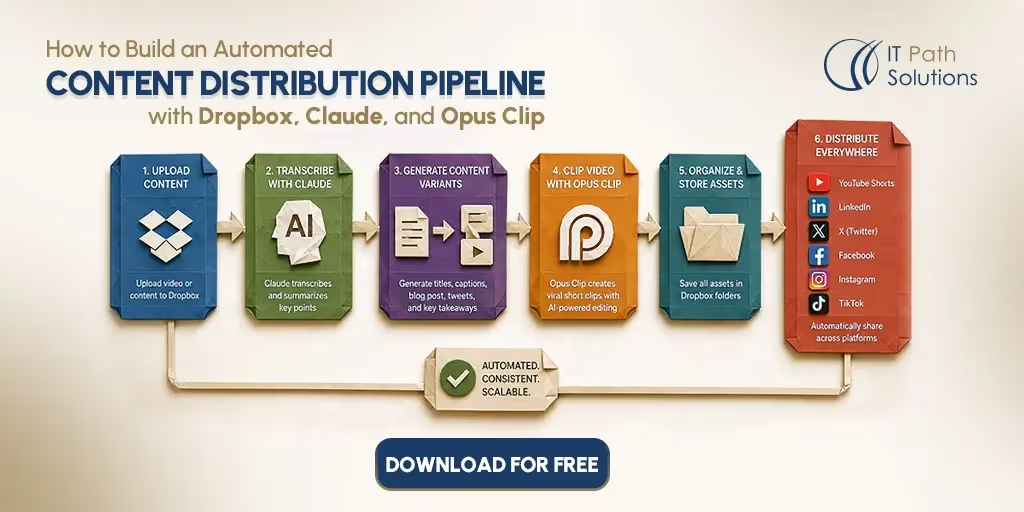
Drop a raw video file into a monitored Dropbox folder, and the workflow automatically handles the rest:
- Detects the newly uploaded video in Dropbox.
- Generates a transcript from the video.
- Creates platform-specific captions, descriptions, and copy with Claude.
- Produces short, shareable clips using Opus Clip.
- Sends the clips and copy to a Slack review channel for approval.
- Schedules or publishes the approved content through your preferred distribution workflow.
Nobody re-watches the recording to find good moments. Nobody writes five separate versions of the same caption by hand.
A typical run looks like this.
A 45-minute product webinar lands in the Dropbox folder on Monday morning. By early afternoon, five short clips sit in a review channel next to a LinkedIn post, an X thread, a YouTube description, and three title options, all written in the account’s usual voice. Someone on the team checks them, approves, and the distribution step schedules everything out.
Who This Workflow Is For
- Content teams publishing four or more videos a month, where distribution has become its own job
- Agencies handling distribution across several client accounts at once
- Solo creators trying to increase output without adding hours to the week
- Teams already using Opus Clip by hand and losing time on the captions and scheduling that come after
When This Workflow Becomes Useful
Manual distribution starts to hurt once it passes about three hours per video.
Below that threshold, most teams manage fine with a checklist and a basic scheduler. Past it, the signs show up on the calendar: clips going out late, some platforms skipped entirely during busy weeks, and one person quietly holding the whole process together with no backup if they’re out sick or on leave.
If you’re new to n8n workflow automation for business, this pipeline is a reasonable entry point, because it targets one visible bottleneck instead of trying to automate everything at once.
Turn One Video Into a Multi-Platform Content Pipeline
Automate the repetitive work behind video distribution with a ready-to-use workflow built around Dropbox, Claude, Opus Clip, and n8n.
Download the Automation BlueprintThe Challenges of Manual Content Distribution
Manual distribution isn’t a problem for every team. If you’re publishing one video a month, three hours of hands-on work is manageable. The trouble starts at higher volume, and it’s worth being specific about what that manual process actually involves before automating any of it.
What the Manual Distribution Process Looks Like
Most teams doing this by hand follow roughly the same sequence. Someone downloads the raw recording from wherever it landed. They watch it back, or skim through at double speed, looking for the three or four moments worth pulling out. Then they open a clipping tool and cut those moments manually, exporting each one separately.
Every clip needs its own caption, written to match how that specific platform actually reads, not just a shortened version of the others.
Scheduling comes last, platform by platform, since most schedulers handle bulk uploads poorly when each post needs different copy.
For a single video, that’s four to six separate manual tasks done in sequence.
When Manual Work Becomes a Bottleneck
This only becomes a real problem past a certain volume.
A team publishing one video a month absorbs three hours of manual work without much friction. The trouble starts around four videos a month, because the time cost doesn’t grow at the same rate as the output.
Doubling video volume more than doubles the distribution workload, since every additional video needs its own round of clipping, captioning, and scheduling from scratch.
Nothing carries over cleanly between videos, because each recording has different highlight moments and a different natural length.
Common Distribution Challenges Teams Face
Under that pressure, a few things happen consistently.
- Posting schedules drift, first by a day, then by whatever’s convenient that week.
- Captions start reading like transcriptions instead of native platform copy, because there’s no time left to rewrite them properly.
- Clips get exported at the wrong aspect ratio for mobile feeds, or a crop cuts off a slide the speaker is pointing to.
- Distribution windows get missed entirely during weeks when the person running the process is out sick, buried in meetings, or just behind on everything else.
How the Automated Content Distribution Workflow Works
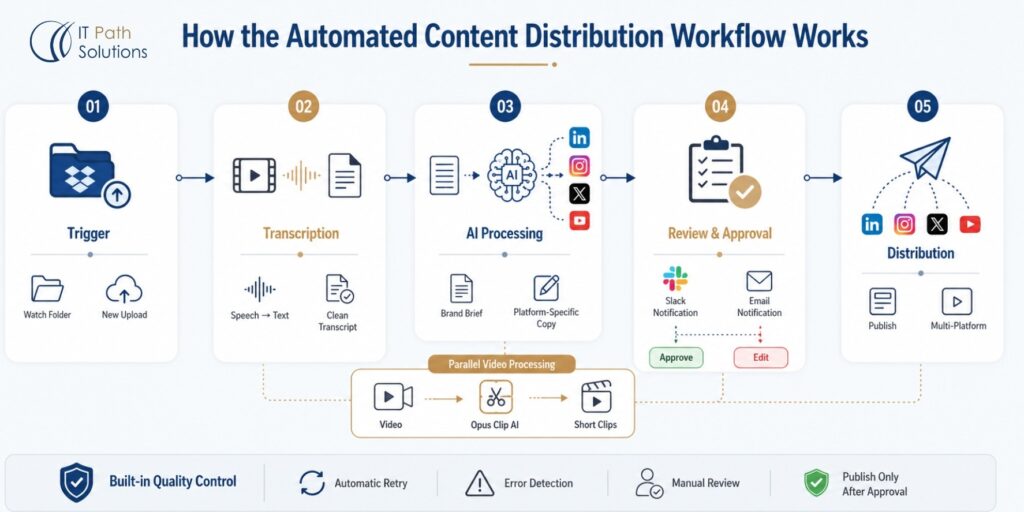
At a high level, this n8n content distribution workflow runs six connected stages, from file upload to scheduled post.
- A new video file dropped into a designated Dropbox folder starts the sequence automatically.
- From there, the file moves through transcription, AI copywriting, video clipping, a human review gate, and finally distribution to the relevant platforms.
No stage requires someone to manually hand a file from one tool to the next. The upload itself and the review gate are the only manual actions in the entire sequence.
Running this requires a few accounts and services set up ahead of time: an n8n instance, either self-hosted for free or cloud-hosted on a paid plan, a Dropbox account with API access enabled, a Claude API key, and an Opus Clip account.
None of these are optional. Skipping one means rebuilding that stage some other way.
Use This Workflow as Your Starting Point
Whether you’re managing one brand or dozens of client accounts, this workflow provides a practical foundation for building a scalable content distribution process.
Download the Workflow FileKey Steps in the Automation
| Step | What Happens |
|---|---|
| Trigger | A new file lands in the Dropbox folder and n8n detects it |
| Transcription | The video is sent out for a transcript |
| AI processing | Claude receives the transcript along with a brand brief and returns captions, a description, and title options |
| Video clipping | The video is routed to Opus Clip, which generates short clips from the source file |
| Review gate | Clips and copy are sent to Slack or email for a human to check before anything goes live |
| Distribution | Approved clips and copy are scheduled out to the relevant platforms |
Trigger
The workflow starts with n8n’s Dropbox node, set to watch one specific folder rather than the whole account. A narrower watch matters here, because a broader one picks up unrelated files and fires the workflow on things that were never meant to be processed.
The trigger fires on file creation, not file modification, so re-saving or renaming an existing file inside that folder won’t restart the sequence. A workable folder structure looks like /content-inbox/[YYYY-MM-DD]/, which keeps uploads organized by date and makes it easy to trace which run produced which output later.
Opus Clip has specific requirements around file format and length, so it helps to standardize on one export format before uploads start, rather than discovering a mismatch mid-run.
Data Collection or Input
Once the trigger fires, n8n pulls the file from Dropbox, and the video moves into the transcription step. This is where the raw recording becomes text. The transcript needs to be reasonably clean before it reaches Claude, because errors here carry forward into every piece of copy generated downstream.
A transcript that garbles a product name or mishears a key phrase produces captions with the same mistake, since Claude works from what it’s given, not from the original audio.
Whatever transcription service sits at this stage, it’s worth spot-checking its output on a few different recordings before trusting it in production.
AI Processing or Logic Layer
This is the core of the Claude AI video content workflow, since it’s where the transcript actually turns into usable copy.
Claude receives two inputs: the video transcript and a brand brief, a short document covering tone, vocabulary to use or avoid, and a few example sentences that sound like the brand.
From those two inputs, Claude generates platform-specific captions for LinkedIn, Instagram, and X, a YouTube description, and three title variants for the video itself.
The brand brief is what keeps the voice consistent, not anything built into the model. Claude has no memory of your brand between calls, so every request needs that context included fresh.
A basic prompt structure looks something like this: here is a video transcript and a brand brief, generate a LinkedIn post, an X thread, an Instagram caption, and a YouTube description, match the tone and vocabulary in the brief, and avoid a specified list of words or phrases.
Output, Notification, or Action
While Claude generates copy, the video is routed separately to Opus Clip for clipping. This stage runs on Opus Clip AI video automation, which identifies clip-worthy moments without anyone scrubbing through the timeline, then returns a set of short clips, each captioned and cropped for vertical or square formats depending on the target platform.
Once both the clips and the copy are ready, n8n packages them together and sends a notification, either to a Slack channel or by email, with preview links for someone to review. This is a conditional branch, not a straight pass-through. If the reviewer approves, the workflow continues to the distribution step.
If they reject it, the workflow pauses and flags the file for manual editing instead of pushing anything out automatically. Nothing reaches a public channel without that approval clearing first.
Error Handling and Human Review
Things go wrong at every stage of this, and the workflow needs a plan for each one. A Dropbox upload can fail partway through, or a file can land in the wrong format entirely. n8n’s retry logic catches some of these automatically, but not every failure is worth retrying.
A malformed file fails the same way every time, so the workflow should recognize that pattern and alert a person instead of looping through retries that were never going to succeed.
The most common failure points in this specific pipeline are a transcription service timing out on longer videos, Claude generating copy that reads oddly because the brand brief was too thin, and Opus Clip selecting a clip moment that works visually but not in context.
None of these are rare edge cases. They show up often enough that the review gate isn’t optional. It’s the step that catches what the automation alone would have shipped anyway.
Business Benefits of Automating Content Distribution
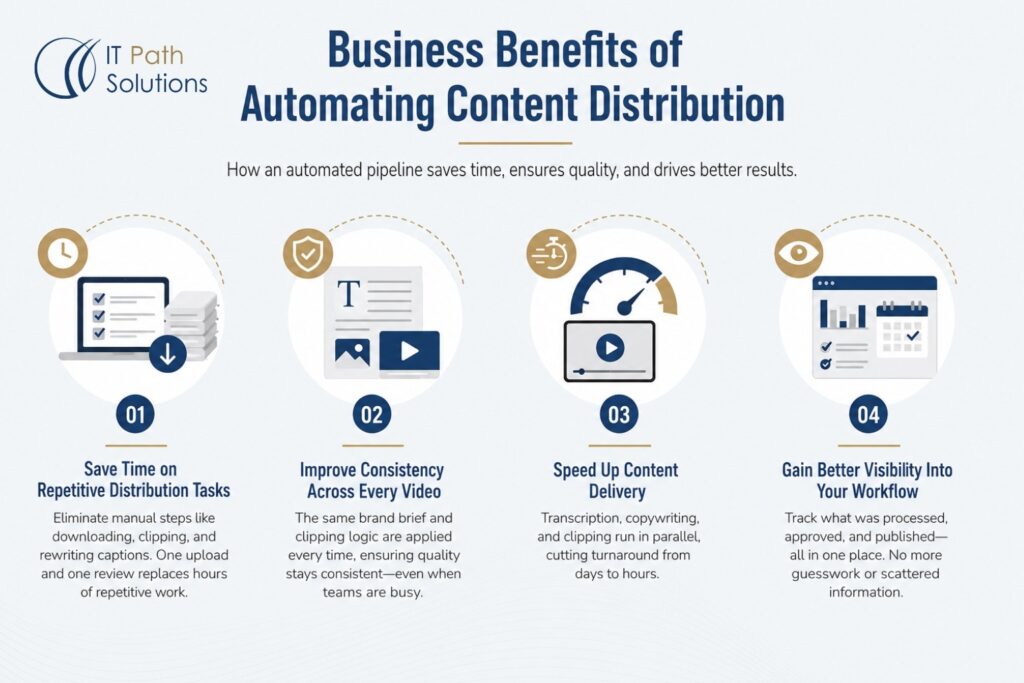
Here’s where the time and consistency gains in an automated content distribution pipeline like this one actually come from, mapped to specific steps rather than general claims.
For most teams, content automation for marketing teams starts with the highest-volume, most repetitive job, which for video-first teams is distribution, not production.
Save Time on Repetitive Distribution Tasks
The clearest gain is that the four to six manual steps described earlier collapse into one upload and one review. Someone still checks the output before it goes live, but they’re no longer downloading files, clipping video, or writing five versions of a caption by hand. Without that, the honest version is that the manual steps most teams spend hours on are the ones this pipeline removes.
Improve Consistency Across Every Published Video
A person distributing content manually during a busy week cuts corners somewhere, usually on caption quality or posting time. The pipeline applies the same brand brief and the same clipping logic to every video, whether it’s the first one that week or the fifth. That doesn’t mean the output always beats what a skilled writer would produce by hand. It means quality doesn’t drop when the team is stretched thin, because the process doesn’t depend on how much energy is left by Thursday afternoon.
Speed Up Content Delivery
Turnaround drops from days to hours for most videos, since transcription, copywriting, and clipping run in parallel rather than one person handling each step in sequence after the last one finishes. A webinar recorded Monday morning can realistically be ready for review by early afternoon instead of sitting in a queue until someone has three free hours later in the week.
Gain Better Visibility Into Your Distribution Workflow
Because everything runs through one workflow, there’s a clear record of what was processed, when it was approved, and where it was published. That visibility is hard to get from a manual process spread across a few people’s individual habits, where the only record of what went out is whatever’s left in a shared drive or someone’s memory.
Start Automating Your Content Distribution
Download the workflow and use it as a foundation for your own content automation pipeline. Feel free to reach us if you want to customize it to fit your tools, approval process, and publishing workflow.
Get the WorkflowCustomize Your Automated Content Distribution Pipeline
The workflow above is a starting point, not a fixed prescription. Here’s what can change once the base pipeline is running.
Tools You Can Swap or Add
Nothing in this content repurposing workflow, built entirely in n8n, is locked to the three tools named in the title. Dropbox can be replaced with Google Drive or a similar file storage service, as long as n8n has a node or API connection for it. Opus Clip can be swapped for another AI clipping tool if the workflow’s needs change, and Claude can be replaced with a different language model if a team already has infrastructure built around one.
Swapping any of these means re-testing the affected stage from scratch. A different transcription format, a different API response structure, or different rate limits can all break assumptions the rest of the workflow was built on.
Business Rules You Can Modify
The trigger and processing logic can carry conditions beyond a simple file upload. A common rule skips processing entirely for videos under a certain length, since a two-minute clip usually doesn’t need the same clipping and captioning treatment as a 45-minute webinar.
Another routes files differently based on naming convention, so a file tagged “internal” never reaches the distribution stage at all. These rules live inside n8n as conditional branches, not as changes to the tools themselves.
Approval Steps You Can Include
The single review gate described earlier can become more than one step if the workflow needs it. A Slack approval bot works well for teams that want a fast yes or no on each piece of content. An email-based confirmation suits teams that review content in batches rather than as it arrives.
Some teams add a second gate specifically for compliance or legal review before anything touches a public channel, which slows the pipeline down but is worth it for regulated industries.
Reporting or Analytics You Can Add
Beyond what n8n tracks on its own, a straightforward addition is logging every run to a spreadsheet or database, recording the source file, approval status, and publish time. That gives a team a searchable record without needing a dedicated analytics platform layered on top.
Limitations and Things to Watch Out For
No automated content distribution setup like this runs without friction. Here’s what to expect, and where it tends to go wrong.
API Limits and Tool Restrictions
Every tool in this chain has usage limits that eventually matter. A workflow processing one video a week rarely hits these ceilings. A workflow processing several videos a day, across multiple client accounts, can run into throttling on the Claude API or the Opus Clip processing queue, especially during a burst of uploads at the start of a week. Building in a queue or delay between requests helps, but it also means the pipeline isn’t instantaneous even when nothing is technically broken.
Data Quality and Prompt Accuracy
The pipeline is only as good as the transcript it starts from. Background noise, overlapping speakers, or a strong accent the transcription service handles poorly all degrade the copy Claude generates downstream, because Claude has no way to correct an error it can’t detect from text alone. A video file that’s too large or in an unsupported format fails before it reaches any AI step at all. None of this is a flaw specific to this pipeline. It’s a reality of any workflow built on top of a transcript rather than the original audio and video.
Security, Permissions, and Compliance
API keys for Claude and Opus Clip need to live somewhere n8n can access them securely, typically in its credentials manager rather than hardcoded into a node. Access to the Dropbox folder itself should stay limited to the people who actually need to upload content, since anyone with write access can trigger the workflow. Teams operating under GDPR or similar data residency requirements should check where each third-party service processes and stores content before routing anything sensitive through the pipeline, particularly if the source video includes information about identifiable individuals.
Need This Customized for Your Business?
The workflow covered in this guide provides a strong foundation for automating video content distribution, but every business has its own processes, approval requirements, and technology stack. As your content operations grow, you may need a workflow that goes beyond the standard setup.
For example, you might want to:
- Connect additional platforms such as your CMS, CRM, or project management tools.
- Route content through multiple approval stages for marketing, legal, or compliance teams.
- Apply different publishing rules for various brands, business units, or client accounts.
- Generate platform-specific content based on custom brand guidelines or tone-of-voice requirements.
- Build dashboards that track workflow performance, publishing status, and content output across channels.
These kinds of requirements often involve more than connecting a few applications. They require workflows that are reliable, scalable, and easy to maintain as your business evolves.
How IT Path Solutions Can Help
At IT Path Solutions, we design and implement custom automation workflows that align with the way your team operates. Whether you’re building your first automated content distribution pipeline or expanding an existing automation ecosystem, our team can help you create a solution tailored to your business processes and growth objectives.
Our expertise spans custom n8n workflow development, intelligent automation, system integrations, and AI app development, enabling us to build scalable solutions that connect cloud storage, AI models, collaboration platforms, CRMs, CMSs, and other business-critical applications into a seamless workflow.
If your requirements extend beyond the workflow covered in this guide, such as custom approval logic, multi-client architecture, advanced reporting, or deeper integrations with your existing technology stack, we’re here to help. We’ll work with you to design, develop, and optimize an automation solution that fits your operational needs while remaining flexible as your business evolves.
Looking for More Ready-to-Deploy Automation Workflows?
If you’re exploring workflow automation beyond content distribution, we’ve created additional n8n workflows that solve common marketing and business challenges. Browse our growing collection of production-ready automations and find the next workflow to streamline your operations.
Featured Workflows
- n8n SEO Automation Workflow → Automate SEO research, content generation, and optimization tasks.
- AI LinkedIn Post Automation with Gemini, DALL·E & n8n → Generate professional LinkedIn posts with AI-generated visuals from a single workflow.
- Freelancer Budget Tracking Automation Workflow → Automatically track project income, expenses, invoices, and budgets in one place.
Frequently Asked Questions
- How can I maintain my brand voice when AI generates captions and descriptions?
The workflow maintains brand consistency by providing Claude with a structured brand brief every time content is generated. Instead of relying on the model to remember previous interactions, each request includes guidance on writing style, preferred terminology, phrases to avoid, audience characteristics, and sample messaging. Because this information accompanies every API request, the generated captions, titles, and descriptions remain consistent across videos and publishing channels. Updating the brand brief is also much easier than rewriting prompts individually for every piece of content.
2. What happens if part of the workflow fails during processing?
A production-ready workflow should include error handling at every major stage. For example, a failed Dropbox upload, a transcription timeout, or an unavailable AI service shouldn’t automatically stop the entire pipeline without notification. In n8n, you can configure retry logic for temporary API failures, conditional branches for unsupported file formats, and alerts that notify your team when manual intervention is required. The approval stage also acts as an additional safeguard by ensuring that AI-generated clips and captions are reviewed before they’re published.
3. How can this workflow scale as my content production grows?
One of the biggest advantages of automating content distribution is that the workflow remains largely the same as content volume increases. Instead of adding more manual work for every new video, the automation handles transcription, copy generation, clipping, and review automatically. As your needs evolve, you can expand the workflow by adding multiple approval stages, supporting several brands or client accounts, integrating additional publishing platforms, or tracking workflow activity through reporting dashboards. Because the automation is built in n8n, these enhancements can be introduced incrementally without rebuilding the entire pipeline from scratch.
4. What types of videos work best with this workflow?
This workflow delivers the most value for long-form content that needs to be repurposed across multiple channels. Product demonstrations, webinars, podcasts, interviews, online courses, educational sessions, and recorded events are all strong candidates because they contain multiple segments that can be transformed into short-form content. Very short videos usually don’t benefit from the same level of automation since there’s less content to clip and repurpose.

Keyur Patel
Co-Founder
Keyur Patel is the director at IT Path Solutions, where he helps businesses develop scalable applications. With his extensive experience and visionary approach, he leads the team to create futuristic solutions. Keyur Patel has exceptional leadership skills and technical expertise in Node.js, .Net, React.js, AI/ML, and PHP frameworks. His dedication to driving digital transformation makes him an invaluable asset to the company.
Related Blog Posts

AI Agent Error Triage: How to Automatically Classify, Diagnose, and Route AI Failures
How to Build n8n AI Chat Agent with RAG, Gemini & Qdrant