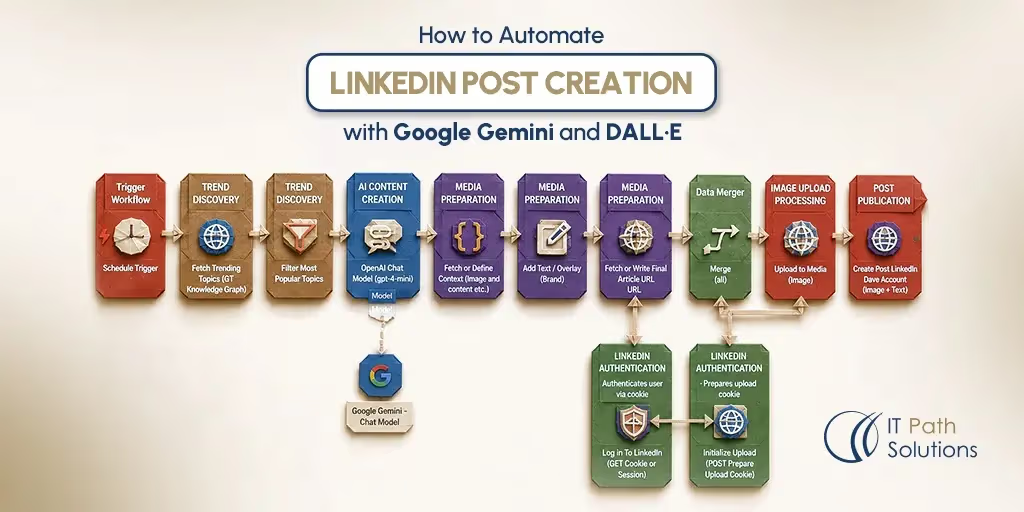
How to Automate LinkedIn Post Creation with Google Gemini and DALL·E
Keyur Patel
July 2, 2026
21 min
Last Modified:
July 7, 2026
Instead of manually brainstorming topics, writing captions, creating images, and publishing posts, why not automate the entire LinkedIn content pipeline with n8n, Google Gemini, and DALL·E?
A single workflow can generate post ideas, create LinkedIn-ready copy, produce matching visuals, and publish approved content automatically. This guide walks through the complete setup, including prompt design, image generation, approval workflows, LinkedIn publishing, and the key limitations you should understand before deploying it in production.
Posting consistently on LinkedIn takes more effort than most teams expect. Writing the caption is only half the job. You also need an image, a posting slot, and someone to actually hit publish.
The challenge is that consistency is often what drives visibility on LinkedIn. Yet only 1% of LinkedIn users post content weekly, despite those creators generating an estimated 9 billion impressions every week. That means most businesses know they should be posting regularly, but few have the time and resources to maintain a consistent publishing schedule.
This is where LinkedIn post automation comes in. Instead of doing every step by hand, you can automate LinkedIn posts with Gemini and DALL·E inside a no-code tool called n8n, and let the workflow handle the writing, the image creation, and the publishing process for you.
For marketing teams, founders, and agencies managing multiple content channels, automation can remove much of the repetitive work involved in content production. However, building an effective workflow requires more than connecting a few tools together. You need the right prompts, approval mechanisms, and publishing safeguards to ensure the content remains accurate, on-brand, and valuable to your audience.
This guide walks through exactly how that workflow works, who it makes sense for, and where it can go wrong if you skip the safety steps. By the end, you’ll know whether to build this yourself or get help setting it up properly.
Who Actually Needs This Workflow
Who This Workflow Is For
This n8n LinkedIn automation workflow is a good fit for three types of teams.
The first is a marketing team or founder at a B2B company, typically somewhere between 20 and 500 employees, who wants a steady cadence of LinkedIn content without hiring a dedicated content person. You want consistent posts going out, you understand roughly what a workflow trigger is, but you are not the person who will be maintaining Python scripts at 11pm.
The second is a digital agency that manages LinkedIn pages for multiple clients. When you are juggling five or ten company pages, the manual process becomes unsustainable fast. A scheduled AI LinkedIn post generator that runs independently for each client is a meaningful operational upgrade.
The third is an ops or growth team already running other automations on n8n or a similar platform. If you already have n8n in your stack, adding this workflow is a natural extension rather than a new tool to learn.
When This Workflow Becomes Useful
LinkedIn post automation starts making sense when posting becomes frequent enough to eat into your week. If you are publishing two or three times a week and creating a custom image for each post, the time adds up quickly.
It becomes even more useful when you manage multiple company pages or have different team members handling content. Without a clear system, tone starts to vary and posting schedules become harder to maintain.
Download the Free n8n Workflow Template
Get the ready-to-import JSON file for the LinkedIn post automation workflow. Includes the Gemini node, DALL·E node, LinkedIn publish node, and error-handling branch.
No sign-up required. Import it into your n8n instance in under five minutes.
Download the Workflow JSONWhy Manual LinkedIn Content Is a Scaling Problem
The Manual Process Today
For most B2B marketing teams, a single LinkedIn post takes more work than it seems.
You need a relevant, on-brand topic. Then someone drafts it, reviews it, revises it, finds or creates an image, and schedules or publishes the post.
And then the same cycle repeats a few days later.
When you’re posting consistently, ideation, writing, visuals, scheduling, and publishing become a weekly routine. Each step may seem small, but together, they take up a lot of time.
Why This Becomes Difficult to Scale
The manual process gets harder to manage when posting frequency increases, a second brand or product line is added, or the person handling content moves into a different role.
Scaling LinkedIn content across multiple team members creates another issue: consistency. Two people writing posts in the same week will rarely match the same tone, depth, or visual style. One post may feel perfectly on-brand, while the next feels slightly off.
It is not a dramatic failure. It is a slow loss of consistency that builds over time, until the LinkedIn presence starts feeling scattered instead of intentional.
What Usually Breaks or Gets Missed
In a manual content workflow, the first things to slip are usually the ones without hard deadlines. Posting cadence gets delayed, then inconsistent, then quietly dropped. Image quality also suffers when posts run late, often leading to a rushed stock photo that adds little to the content.
Tracking is usually missing too. Most teams do not have a clear record of what was posted, when it went live, which topics were covered, or whether the cadence was maintained. This is not a crisis when one person posts once a week, but once frequency, ownership, or volume increases, the cracks show quickly.
Want IT Path Solutions to Build This for Your Team?
If you manage multiple LinkedIn pages, operate in a regulated industry, or need this integrated with your existing CRM or marketing stack, the free template is a starting point.
IT Path Solutions can design, deploy, and maintain a production-ready version tailored to your workflows.
Talk to Our Team About Custom AutomationWhat This Automation Actually Does
What This n8n Workflow Does
This n8n workflow turns LinkedIn content creation into a scheduled pipeline. A trigger runs at your chosen interval and starts the process, ending with either a published LinkedIn post or a post sent for approval.
Gemini generates the caption first, including hashtags. That output is then used to create an image prompt for DALL·E, which generates a matching visual. The final text and image are then sent to LinkedIn through the LinkedIn API.
The workflow can either publish the post directly or route it to a review queue before it goes live.
Key Steps in the Automation
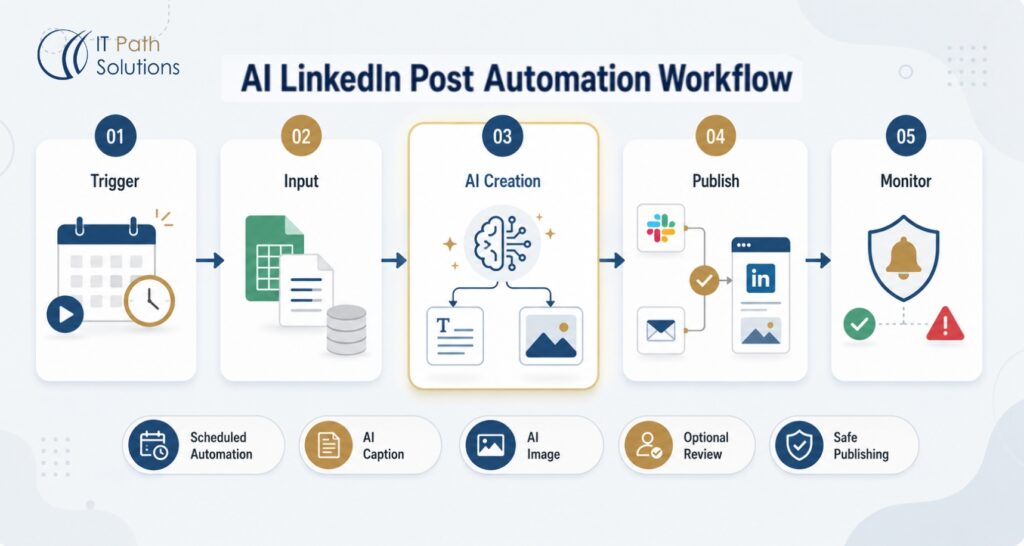
At a high level, the workflow follows five steps:
- A schedule trigger runs at your chosen cadence.
- The workflow pulls a topic from a prompt template or a source like Google Sheets.
- Gemini writes the LinkedIn caption and hashtags.
- DALL·E creates a matching image.
- The post is published to LinkedIn or sent for review first.
Tools and Integrations Used
The core tool stack for this n8n LinkedIn automation workflow is:
- n8n — the workflow automation platform that connects everything together. Available as a self-hosted open-source tool or via n8n Cloud.
- Google Gemini API — handles text generation for post topics and captions.
- DALL·E (OpenAI API) — handles image generation based on the Gemini-generated content.
- LinkedIn API — publishes the final post to the target company page via OAuth.
- Google Sheets (optional) — can be added as an input source for topic seeds or as a logging layer to track what was posted and when.
How the Workflow Works, Step by Step
Step 1: Trigger
The workflow starts with a schedule trigger in n8n. You can set it to run daily, three times a week, or on specific days like Monday and Wednesday morning.
This trigger is what makes the LinkedIn post automation work without manual effort. Once it runs, the rest of the workflow starts automatically.
Start with a conservative posting frequency, especially if you are publishing through the LinkedIn API. LinkedIn has usage limits and restrictions, so posting too aggressively through automation can create account risks.
Step 2: Data Collection or Input
Gemini can write a post from a simple prompt, but the output is usually generic. The workflow performs much better when it has clear input.
One option is to use a fixed prompt template inside n8n. This can include your industry, brand tone, target audience, post format, and content style.
A more flexible option is to pull topics from a Google Sheet. You can maintain a list of topics, themes, or company updates, and the workflow picks the next unused row each time it runs. This gives you control over the content without needing to edit the workflow.
IT Path Solutions can build this input layer around your existing process, whether that is a spreadsheet, content calendar, CRM field, or another source.
Step 3: AI Processing
This is where the AI LinkedIn post generator part of the workflow comes in.
First, Gemini receives the topic or prompt and writes the LinkedIn caption. This usually includes the hook, main post copy, and a few relevant hashtags.
Then, the Gemini output is used to create a prompt for DALL·E. DALL·E acts as the AI image generator for LinkedIn, creating a visual that matches the post instead of using a random stock-style image.
Prompt quality matters a lot here. A vague prompt will create generic content. A strong prompt with tone, audience, structure, and visual direction will produce content that feels much closer to your brand. This is one of the most important parts of building a reliable LinkedIn marketing automation workflow.
Step 4: Output and Publishing
Once the caption and image are ready, the workflow can move in one of two directions.
The first option is direct publishing. The post text and image are sent to LinkedIn through the LinkedIn API, and the post goes live automatically.
The second option is a review gate. Instead of publishing immediately, the workflow sends the content to Slack or email for approval. A team member reviews it, approves it, and only then does the post go live.
For most businesses, the review gate is the safer default. It is especially important for industries like healthcare, fintech, legal, or any business where inaccurate claims can create compliance or reputation risks.
Step 5: Error Handling and Human Review
AI output will not be perfect every time, so the workflow should be built to catch problems.
At minimum, it should flag cases where Gemini returns an empty response, DALL·E fails to generate an image, or the LinkedIn API fails because of a token issue or rate limit. When this happens, the workflow should log the error and notify someone on the team.
Fully automated publishing is possible, but it is not always the best choice. AI-generated posts can sometimes sound off-brand, include inaccurate claims, or produce visuals that do not fit the message. A human review step helps catch these issues before they reach your LinkedIn audience.
Download the Workflow JSON File
Get the complete n8n workflow template with the schedule trigger, Gemini node, DALL·E node, LinkedIn publish node, and error-handling branch already connected.
Import it into any n8n instance and add your API credentials to get started.
Download the Free TemplateWays to Customise the Workflow for Your Business
Tools You Can Swap or Add
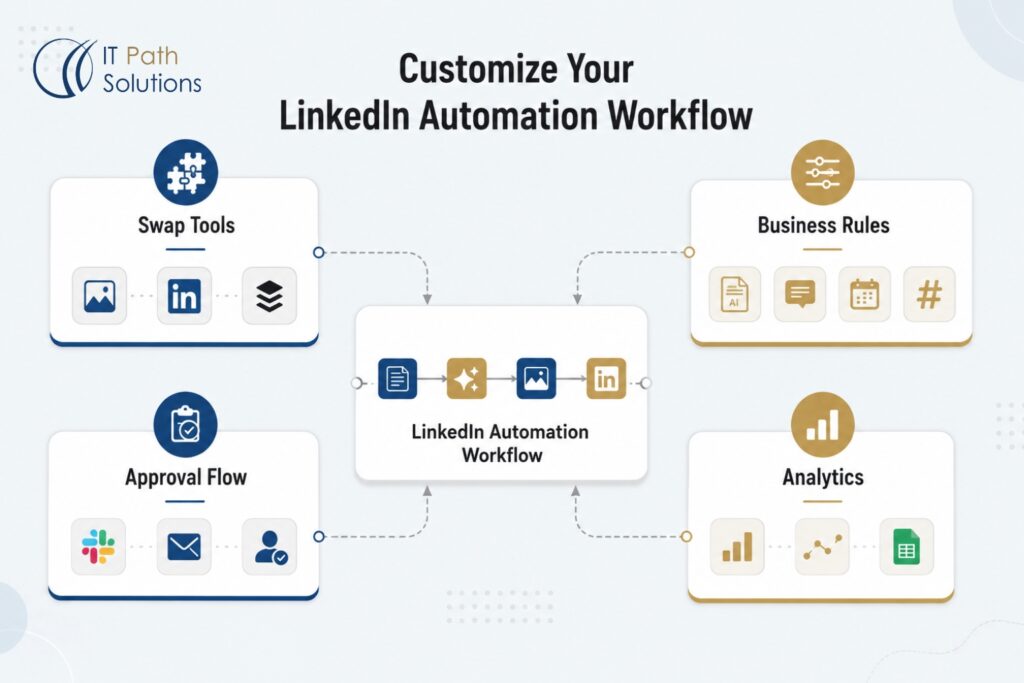
The template is built around a specific tool stack, but several components can be swapped out without rebuilding the workflow from scratch.
If you want to use a different image generation model instead of DALL·E, Stability AI’s API or another image generation service can be dropped into the same node slot, provided it accepts a text prompt and returns an image URL or file. The connection logic stays the same.
If you prefer not to publish directly through the LinkedIn API, you can replace the publish node with a Buffer or Hootsuite node that queues the post for scheduled publishing through your existing social media management tool. This is useful if you want all your social posts managed in one place.
Business Rules You Can Modify
The most impactful changes to this workflow happen at the prompt level, not the node level.
You can modify the Gemini prompt to enforce specific tone constraints like formal, conversational, technical, thought-leadership. You can include examples of posts you like so Gemini has a reference for style. You can restrict which topic categories the workflow draws from, how long the caption should be, and which hashtags should always appear.
Posting frequency is another easy lever. The schedule trigger supports any cron expression, so moving from three posts a week to five, or from daily to twice daily, is a single configuration change.
IT Path Solutions routinely sets up these business rules to mirror a client’s existing content strategy, so the output from day one sounds like the brand’s voice rather than a generic AI tone.
Approval Steps You Can Include
Adding a human approval gate is one of the most useful customisations you can make to an automate LinkedIn posts workflow, and it is also one of the most underused.
The simplest implementation routes the generated post to a dedicated Slack channel. The team member responsible for LinkedIn reviews the caption and image, and either approves or rejects the post with a single click. A rejected post can trigger a regeneration loop or simply get flagged for manual editing.
A more structured version builds an email approval flow with a direct approve or reject link embedded in the notification. This works well for teams that do not use Slack or for clients who prefer formal approval documentation.
For businesses that need audit trails which are common in healthcare and fintech, the approval step can log every decision, who made it, and when, to a Google Sheet or a connected CRM. This is the kind of workflow architecture IT Path Solutions builds when clients in regulated industries need LinkedIn automation that also satisfies their compliance requirements.
Reporting and Analytics You Can Add
The base workflow publishes and stops. With a small addition, you can turn it into a content tracking system.
Adding a Google Sheets logging node at the end of each successful run captures the post topic, caption text, image URL, publish date and time, and posting status. Over a few weeks, this gives you a searchable record of every post the workflow has produced.
From there, the log can be extended to pull in LinkedIn engagement data including impressions, clicks, and reactions, through the LinkedIn API’s analytics endpoints. Combining this with the post metadata lets you see which topics and formats consistently outperform others, which is the kind of reporting that makes AI LinkedIn post generator workflows genuinely strategic rather than just operationally convenient.
Business Benefits of LinkedIn Post Automation
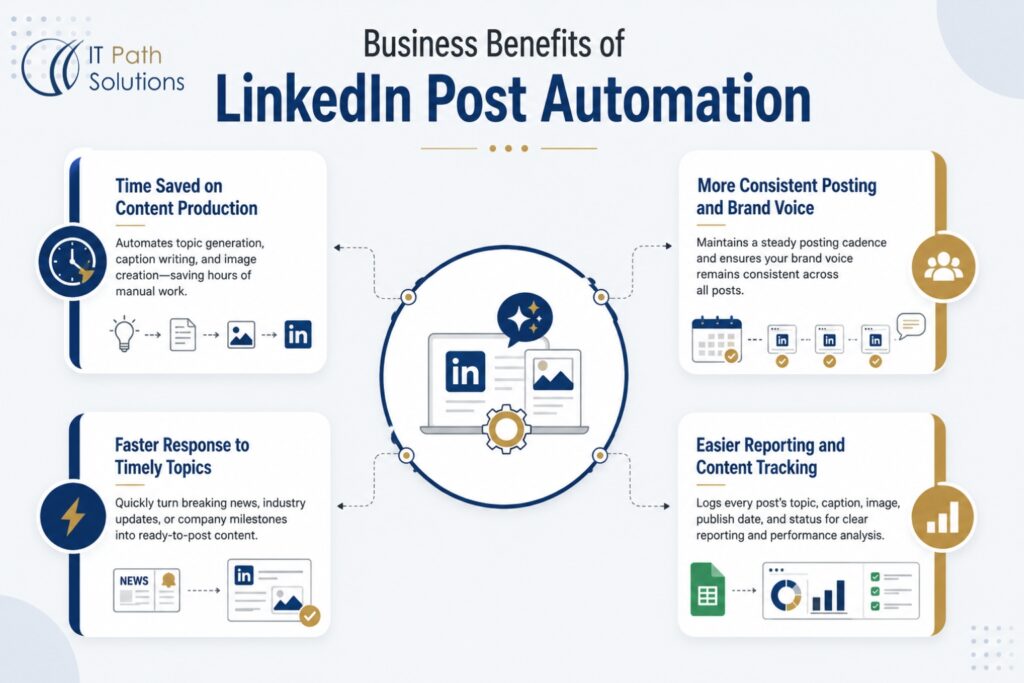
Time Saved on Content Production
The biggest benefit of LinkedIn post automation is the time it saves. Instead of creating every post from scratch, the workflow handles topic development, caption writing, and image generation.
Gemini works as the AI LinkedIn post generator, while DALL·E acts as the AI image generator for LinkedIn. Your team only needs to maintain the prompts, review the output, and make small edits when needed.
More Consistent Posting and Brand Voice
Manual posting often gets delayed when the team is busy. A scheduled workflow does not have that problem. It runs at the set time and keeps your LinkedIn activity moving.
This helps maintain a steady posting cadence, which is important for LinkedIn growth. With strong prompts and regular review, the workflow can also keep the brand voice more consistent than a manual process handled by multiple people.
Faster Response to Timely Topics
LinkedIn marketing automation also makes it easier to respond quickly to timely topics.
If a new industry report, product update, or company milestone comes up, you can add it as an input and run the workflow. Instead of waiting days for drafting, design, and approvals, you can create a post much faster.
Easier Reporting and Content Tracking
With a Google Sheets logging layer, the workflow can record every post topic, caption, image, publish date, and status.
This makes reporting much easier. Agencies can track content across client pages, while internal marketing teams get a clear record of what was posted and when. It also makes content reviews and performance analysis simpler.
Ready to See This Working in Your Stack?
IT Path Solutions can integrate this LinkedIn post automation workflow with your existing CRM, content calendar, or marketing platform, and add the approval gates, logging, and compliance controls your team actually needs.
Explore Our AI App Development ServicesHow to Use the Template
Importing the workflow into n8n is simple. Download the JSON file, open your n8n instance, go to Workflows, select Import from File, and upload the JSON. The workflow will then appear with all nodes visible.
Before you run it, add credentials for Gemini, DALL·E, and LinkedIn. Gemini needs a Google Cloud API key with the Generative Language API enabled. DALL·E needs an OpenAI API key. LinkedIn needs an OAuth connection to the company page you want to post from.
Each credential field is clearly labelled inside n8n. Once everything is connected, run the workflow manually once to check the output. After that, you can enable the schedule trigger.
To add Google Sheets input or an approval step before publishing, follow the customisation steps covered above.
Get the Workflow File
The n8n workflow JSON is free to download and import. It includes the full node structure for the Gemini, DALL·E, and LinkedIn publish steps, plus the error-handling branch.
Works with both self-hosted n8n and n8n Cloud.
Download the n8n Workflow JSONNeed This Customised for Your Business?
When a Template Is Not Enough
The free template is a solid starting point for LinkedIn post automation. If you manage one brand, post a few times a week, and do not need strict approvals, the template should work well with the right prompts.
Custom development makes sense when your setup is more complex. For example, you may need to manage multiple LinkedIn pages, each with its own tone, topic list, and approval process. You may also need stronger controls if you work in healthcare, fintech, legal, or another regulated industry where every post needs a clear review trail.
A custom build is also useful when you want the workflow to connect with your CRM, content calendar, or reporting tools. For example, your LinkedIn marketing automation workflow could pull topics from recent product updates, use an AI LinkedIn post generator to create captions, use an AI image generator for LinkedIn visuals, and then log the final post in your reporting system.
How IT Path Solutions Can Help
IT Path Solutions builds automation systems for B2B companies across healthcare, fintech, manufacturing, logistics, and other industries. You can also explore our QA automation services to see how we approach automation beyond marketing workflows.
For a standard setup, we help with workflow design, node configuration, API credential setup, prompt engineering, testing, and documentation. This helps your team use and manage the automation confidently after launch.
For more advanced needs, we can add multi-page workflows, separate approval chains, compliance logs, CRM integration, and LinkedIn performance tracking. We can also provide ongoing support if your workflow needs to be maintained as APIs, tools, or business requirements change.
If you are not sure whether the free template is enough or whether you need a custom build, IT Path Solutions can help you assess the right approach. You can contact our team to discuss your requirements.
Start Posting Smarter
LinkedIn post automation with Google Gemini and DALL·E gives B2B teams a practical way to create consistent LinkedIn content without handling every step manually.
The free n8n workflow template gives you a working starting point. If you manage one brand and are comfortable setting up API credentials, you can import it, test it, and start using it.
If you need multi-page management, compliance approvals, CRM integration, or a more reliable LinkedIn marketing automation setup, a custom build may be the better option.
Download the free n8n workflow JSON above, or speak to IT Path Solutions about customising it for your business.
Build the Right Version of This Workflow for Your Business
IT Path Solutions designs and deploys LinkedIn post automation workflows for B2B companies across healthcare, fintech, manufacturing, and logistics.
From prompt engineering to compliance logging to CRM integration, we build what the template cannot.
Frequently Asked Questions
1.Is it safe to let AI post to LinkedIn automatically without any review?
Technically yes. The workflow supports fully automated publishing. In practice, it is not recommended for most businesses. AI-generated content can drift from your brand voice, include inaccurate claims, or produce images that are unrelated to the post topic. Without a review step, those posts reach your LinkedIn audience before anyone catches the problem.
For businesses in regulated industries like healthcare or fintech, fully unattended posting is a compliance risk, not just a brand risk. IT Path Solutions recommends including an approval gate in the workflow for any business where a mistaken post would cause more than minor embarrassment.
2. What is the difference between this workflow and tools like Taplio or Hootsuite’s generator?
Consumer tools like Taplio or Hootsuite generate one caption at a time through a manual interface and do not include image generation in the same flow. You still have to initiate each post, find or generate an image separately, and publish or schedule manually.
The Gemini and DALL·E workflow running on n8n operates as a recurring pipeline. It fires on a schedule, generates matched text and image together, and can publish or queue posts without any manual initiation. The trade-off is setup complexity. Consumer tools require no configuration. This workflow requires API credentials and some prompt tuning before it produces reliable output.
3. Do I need coding skills to build this LinkedIn automation workflow?
No traditional coding is required. n8n is a no-code and low-code platform, and all node connections can be configured through a visual interface. What you do need is the ability to set up API credentials for Gemini, DALL·E, and LinkedIn, and a basic understanding of how workflow triggers and nodes connect.
If that setup process feels uncomfortable, the free template removes some of the initial configuration work. If you want the whole thing set up, tested, and documented without spending time on it yourself, that is what IT Path Solutions handles in a standard deployment.
4. What happens if Gemini or DALL·E generates something off-brand or factually wrong?
Without safeguards, an inaccurate caption or an unrelated image could publish automatically. The workflow’s error-handling branch catches API failures and empty responses, but it does not evaluate whether the content is on-brand or factually correct. That judgment requires a human.
The practical answer is to build an approval gate into the workflow so that generated content goes to a team member for review before it goes live. This adds one manual step, but it is a fast one, and it means AI output gets caught before it reaches your LinkedIn audience rather than after.
5. Can this workflow manage multiple LinkedIn company pages at once?
The base template is built for a single LinkedIn account. It can be adapted to manage multiple pages, but that requires branching the workflow so each page has its own credential set, topic pool, and approval chain. This is typically where the free template stops being the right tool and a custom-built deployment becomes worthwhile.
IT Path Solutions has built multi-page LinkedIn automation setups for agencies managing client accounts. The architecture is straightforward but does require proper credential isolation and separate approval flows for each brand.
6. What LinkedIn API limits should I know about before going live?
LinkedIn restricts certain automated posting behaviours and has rate limits on how frequently a company page can publish through the API. Posting too aggressively through an automated pipeline can flag your account.
The specific limits change periodically. Before going live with your LinkedIn post automation workflow, check LinkedIn’s current API documentation for the applicable rate limits on the Organisation Share endpoint and confirm that your intended posting frequency falls within those limits.

Keyur Patel
Co-Founder
Keyur Patel is the director at IT Path Solutions, where he helps businesses develop scalable applications. With his extensive experience and visionary approach, he leads the team to create futuristic solutions. Keyur Patel has exceptional leadership skills and technical expertise in Node.js, .Net, React.js, AI/ML, and PHP frameworks. His dedication to driving digital transformation makes him an invaluable asset to the company.
Related Blog Posts

How RivalRadar Uses AI Agents to Track Competitors Automatically
Notion Client Portal: How to Build a Branded Client Experience Without Leaving Notion