Home
»Blog Insights
»Programmatic SEO Content Generation: Build an AI-Powered Content Publishing System with n8n and WordPress
Programmatic SEO Content Generation: Build an AI-Powered Content Publishing System with n8n and WordPress
Keyur Patel
July 10, 2026
21 min
Last Modified:
July 15, 2026
Publishing ten SEO articles a month is manageable. Publishing forty is a different challenge.
As your content strategy grows, so does the amount of repetitive work behind it. Finding the next keyword, generating a first draft, formatting the content, creating WordPress drafts, and keeping track of publishing status can quickly consume hours that could be spent improving content quality or refining your SEO strategy.
This is where an n8n SEO workflow makes a real difference. Instead of handling every step manually, the workflow automates your content pipeline from end to end. It reads keywords from a structured Google Sheets database, generates SEO-friendly drafts using AI, creates draft posts in WordPress, and notifies your team when each article is ready for review. The result is a faster, more consistent content production process with human oversight built in.
In this guide, you’ll see how our n8n SEO workflow is designed, what each stage of the automation does, and the safeguards that help keep the process reliable. You’ll also learn where human review still plays an important role before any content goes live.
Most importantly, you won’t have to build this automation from scratch. At the end of this guide, you can download the complete n8n workflow JSON and adapt it to your own SEO content pipeline, helping you save hours of setup and get started much faster.
Who This n8n SEO Workflow Is For
This workflow was built for teams that already have more keywords than they have time to write about.
That is a specific kind of bottleneck. It is not a lack of ideas or a weak content strategy. It is a production capacity problem, where the keyword list keeps growing faster than the team’s ability to turn it into published posts. It is also different from automating a single blog post here and there. This setup treats a keyword list as production input for programmatic content creation, run through the same pipeline over and over, rather than generating one piece on demand.
Where This Workflow Fits
You are likely a good fit if your team looks like one of these:
- Content teams publishing more than 8 to 10 SEO articles a month, where one or two writers can no longer keep pace
- Agencies managing several client content calendars at once, each with its own keyword list and deadline
- SaaS or ecommerce companies targeting long-tail keyword clusters, where hundreds of near-identical pages need to exist for search visibility, organized by city, product category, or use case
- Teams sitting on a keyword list that already has strategic direction behind it, but no spare hours to draft against it
When You’re Ready for It
This n8n SEO workflow earns its place once the bottleneck is production speed, not strategy.
If your team is still deciding which keywords to target, start there first. Keyword research and prioritization need to happen before automation, not instead of it. This guide assumes that work is already done and the list is sitting in a spreadsheet waiting to be written.
It also works best when your content structure is consistent enough to template. Service pages, location pages, and product category articles all follow a predictable shape, which makes them easier to generate reliably. A deeply reported feature story does not fit this model, and forcing one through the pipeline tends to produce something flat and generic.
Last, this setup assumes your team has editorial capacity to review drafts, even if it does not have capacity to write them from scratch. That distinction comes up again throughout this guide, because it is the difference between a workflow that saves time and one that quietly damages your site’s credibility.
See the Workflow Before You Build Anything
Reading about a workflow and seeing it running are two different things.
The downloadable n8n JSON at the bottom of this post already has the trigger, AI generation step, and WordPress publish node connected, so you can open it in your own n8n instance and follow along as you read.
→ GET THE FREE WORKFLOWWhy Manual SEO Publishing Breaks Down at Scale
What Publishing One Post Actually Takes
Before automating anything, it helps to see what the manual version of this process actually looks like.
A single SEO blog post usually passes through several hands and several tools before it goes live. Someone assigns the keyword. A strategist researches the SERP and writes a brief. A writer drafts the post. An editor reviews it for accuracy and tone. Someone checks it against SEO requirements, including the title tag, meta description, header structure, internal links, and focus keyword placement. An image gets sourced or created. The whole thing gets uploaded into WordPress, formatted, and the meta fields get filled in one at a time. Only then does it go live.
That adds up to six or seven handoffs for one article, often spread across three or four different tools, from a project management board to a document editor to an SEO plugin to the CMS itself.
Why Manual Production Doesn’t Scale
The math here is straightforward. Output scales roughly with headcount. If you want to publish twice as many posts, you generally need close to twice the writing capacity, unless you accept a drop in quality or consistency.
Consistency is its own problem. When three or four writers are handling different keywords, their posts read differently. Structure drifts. Tone drifts. Some writers are more thorough about internal linking than others. None of this is anyone’s fault. It is just what happens when the same process runs through different people.
What Usually Gets Missed
Under enough volume pressure, certain steps get skipped first, usually the ones that feel optional in the moment but matter for search visibility:
- Meta descriptions left blank on lower-priority posts
- Featured images never added, or added without alt text
- Internal links skipped because nobody has time to find a relevant post to link to
- Posts stuck in draft indefinitely because the SEO review step has no owner and no deadline
These are not hypothetical failure points. They are the specific problems an n8n SEO automation pipeline is built to remove, because the fields that get skipped under pressure are populated automatically, every time, as part of the workflow itself.
What This n8n SEO Workflow Does, Start to Finish
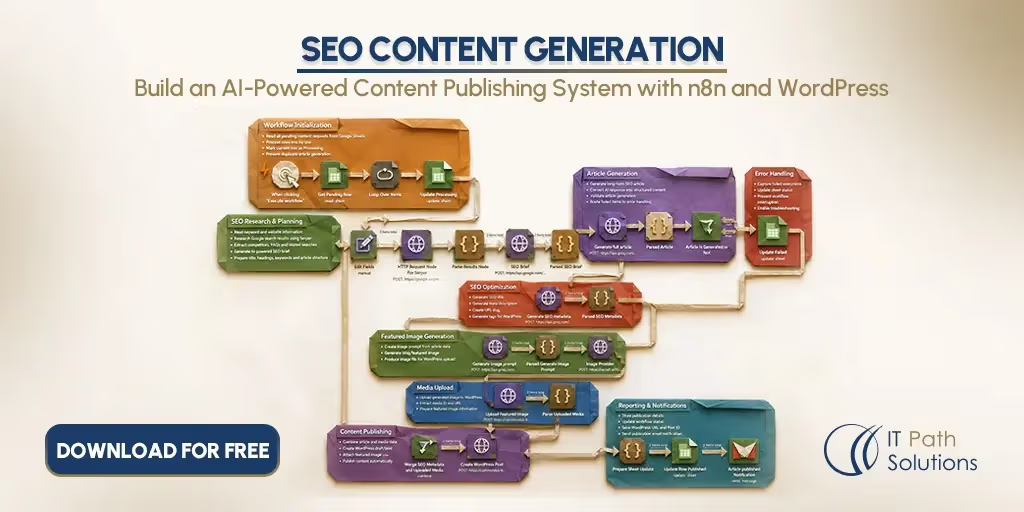
At a high level, the workflow takes a keyword from a spreadsheet, sends it to an AI model along with a structured content brief prompt, and turns the response into a fully populated WordPress draft, ready for human review.
The Five Stages, at a Glance
If you prefer to think in stages rather than individual steps, the pipeline breaks down into five parts:
- Trigger: the workflow starts, either on a schedule or from a webhook
- Input: a keyword row gets pulled from the spreadsheet
- AI layer: the keyword is sent to an AI model, which returns structured content
- WordPress publish: the response is parsed into individual fields, a featured image is uploaded to the media library, and a draft post is created through the WordPress REST API with every SEO field populated
- Review: a human reviewer gets notified and checks the draft before it goes live
Each stage is a separate concern in n8n, which makes the workflow easier to debug and easier to modify later. If the AI layer starts producing weak content, you can rework the prompt without touching how the trigger or the publishing step function.
Tools and Integrations in the Stack
The version of this n8n WordPress automation covered in this guide uses:
- n8n itself, self-hosted or on n8n Cloud
- Google Sheets, as the keyword input list
- An AI model such as OpenAI or Claude for the generation layer
- The WordPress REST API, for publishing
- Slack or email, for the review notification
- Rank Math or Yoast, for SEO meta fields, depending on which plugin the WordPress site runs
Stop Rebuilding This From Scratch
Every piece described above, the trigger, the AI prompt structure, and the WordPress publish step, is already wired together in the downloadable template.
Building this from a blank n8n canvas usually takes a full day of trial and error with node configuration and API authentication. Importing it takes a few minutes.
→ DOWNLOAD THE WORKFLOWHow Our Experts Built This n8n SEO Workflow
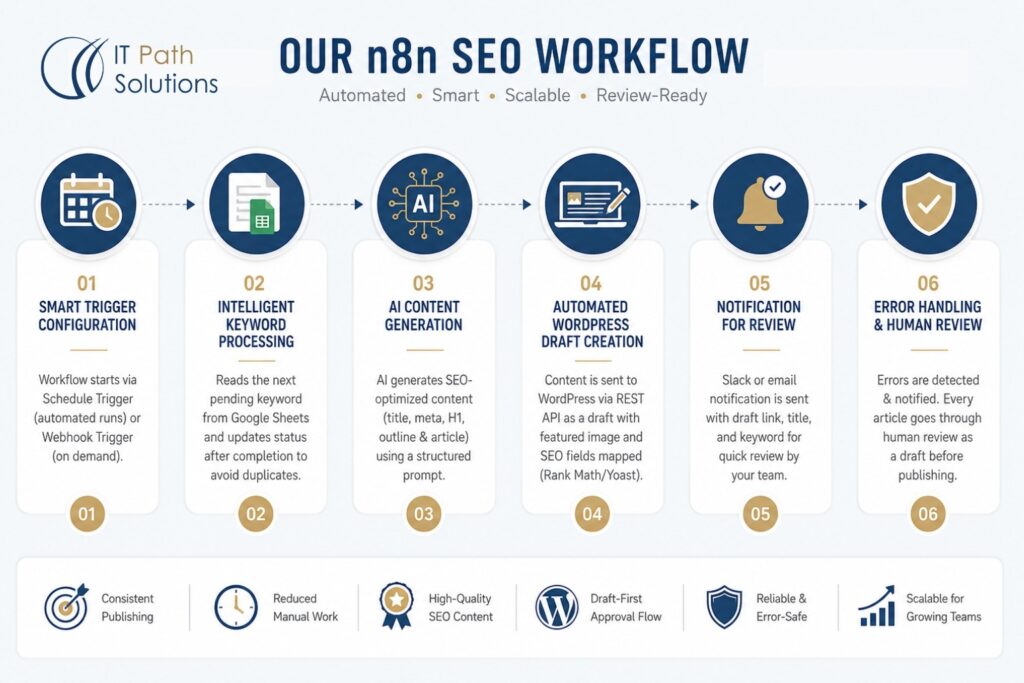
Behind every reliable automation is careful planning. Our team designed this workflow to automate SEO content creation while keeping the process structured, scalable, and easy to review. Every stage has been configured to reduce manual work without sacrificing content quality.
Smart Trigger Configuration
The workflow supports two practical ways to start the automation.
A Schedule Trigger is ideal for teams that want content generated on a consistent publishing schedule. For example, it can run once every day to process the next pending keyword automatically.
A Webhook Trigger is available for teams that prefer on demand generation. This makes it possible to start the workflow from a form submission, a Slack command, or another internal system whenever new content is needed.
Regardless of how the workflow starts, its first job is to read the next eligible keyword from the connected Google Sheets database.
Intelligent Keyword Processing
Our workflow is designed around a structured Google Sheets database that keeps content production organized.
Each row contains the information required for content generation, including the target keyword, URL slug, content type, and processing status.
The status field plays an important role because it prevents duplicate content generation. The workflow automatically identifies pending keywords, processes them one at a time, and updates their status after completion so the same keyword is not selected again during future runs.
AI Content Generation That Follows Your Requirements
Content quality depends heavily on how the AI receives its instructions. That is why our workflow includes a carefully structured prompting system instead of relying on generic requests.
The workflow combines a detailed system prompt with keyword specific information to guide the AI toward producing content that follows your preferred SEO structure, writing style, word count, and formatting requirements.
The generated output includes essential SEO elements such as the title, meta description, H1, H2 outline, and the complete article in a structured format like HTML or Markdown. The workflow then separates each element into its appropriate field so the content is ready for the next stage without additional manual formatting.
Rather than leaving prompt design to trial and error, our workflow already includes a structured foundation that helps generate more consistent first drafts while still giving you the flexibility to customize prompts for your own requirements.
Automated WordPress Draft Creation
Once the content has been prepared, the workflow automatically sends it to WordPress through the REST API.
The post is created as a draft instead of being published immediately, allowing your team to review and approve the content before it goes live.
The workflow also supports uploading featured images to the WordPress media library and attaching them to the post.
SEO fields can be mapped for plugins such as Rank Math or Yoast where supported by the site’s configuration.
Authentication is handled using WordPress Application Passwords, providing a secure way to connect the workflow without exposing administrator credentials.
After the draft is created, the workflow sends a Slack or email notification containing the post title, draft link, and original keyword so reviewers can begin editing without searching through WordPress.
Built With Reliable Error Handling and Human Review
Production automations need safeguards just as much as they need speed.
Our workflow includes error handling that can detect issues such as AI API timeouts, expired WordPress authentication, or Google Sheets quota limits. Instead of allowing failures to go unnoticed, separate error workflows can notify your team so problems are addressed quickly.
Every generated article enters your review process as a draft first, not a published post. That single gate is what keeps the automation safe to run unattended.
Test It on One Keyword Before You Commit
You do not need to trust this workflow with your entire keyword list on day one.
Run it against a single row first, review the draft it produces, and adjust the prompt if needed. Most teams get a feel for it within one or two test runs.
→ START AUTOMATINGThe Business Case for an Automated SEO Content Pipeline
Time Saved Per Post
The clearest benefit of automated blog post writing through this pipeline is time. A manual SEO post, from brief to publish, typically takes somewhere between two and four hours of combined work across writing, editing, and formatting. The AI generation and publish steps in this workflow run in roughly thirty minutes to an hour per post.
That gap compounds at volume. Twenty posts a month is a meaningful number of hours recovered, hours that can go toward strategy, SERP research, or the editorial review the content still needs. It shows up most clearly on trending or time-sensitive keywords, where the gap between spotting the opportunity and having a published draft shrinks from days to hours, instead of sitting in a slow manual queue until the opportunity has mostly passed.
Better Accuracy and Consistency
SEO fields get populated the same way on every single post, because the workflow does not get tired at 4 PM on a Friday the way a person does. Meta descriptions don’t go missing because someone ran out of time. Focus keywords and schema fields get set by default, not left blank because someone forgot.
A Built-In Publishing Log
The Google Sheets status column updates automatically after each successful publish, which turns the keyword list itself into a running publishing log. Combined with the Slack notifications, you get a rough audit trail of what got generated, when, and from which keyword, without maintaining a separate tracking document.
None of this eliminates the need for content staff. What it removes is the repetitive production work, so editorial judgment can go toward the parts that actually require it.
Put the Time Savings to Work
If your team is spending hours a week on formatting and meta fields instead of strategy, that time is recoverable starting with your first automated draft.
Once the workflow is running, that time can go straight back into research, strategy, or the editorial review this content still needs.
→ USE THIS WORKFLOWCustomizing the n8n SEO Workflow for Your Stack
Swapping Tools In and Out
The base template uses Google Sheets, but Airtable, Notion, or a database webhook all work as a keyword input source with some reconfiguration.
The same goes for the AI layer. This guide uses OpenAI as the example, but Claude, Gemini, or a self-hosted model reachable by API can sit in that same slot.
If your team wants stronger topical grounding before generation, you can add a SERP research step using DataForSEO or a Google Search API call, which feeds real ranking data into the AI prompt instead of generating blind. An image generation step using DALL-E or a similar API can replace manual image sourcing entirely.
Business Rules You Can Adjust
A few settings are easy to change without touching the workflow’s core logic:
- Trigger frequency, whether that is daily, weekly, or purely on-demand
- A word count column in the Google Sheet, so different post types get different length targets
- A content type column, which lets you switch between blog post prompts, FAQ page prompts, and location page prompts from the same workflow
Adding an Approval Step
Teams in regulated industries, or teams that simply want more control, can add a formal approval gate. After the AI generates a draft, an email goes to a reviewer with approve and reject links, and n8n’s Wait node pauses the workflow until a response comes back.
A secondary AI step can even score the draft against a rubric before it reaches a human reviewer at all, catching obvious problems earlier.
Reporting and Analytics
Publish records can write out to a separate Google Sheet or Airtable base to track publishing velocity over time. Connecting the Google Search Console API lets you pull ranking data for published posts back into that same sheet, so you can see which generated posts are actually earning visibility. A monthly execution summary sent to Slack rounds this out, giving the team a quick view of volume without opening n8n directly.
Make the Workflow Fit Your Content Process
The template is a starting point, not a fixed system.
Swap in the tools your team already uses, adjust the prompt to match your voice, and shape the approval process around however your editorial team already works.
→ TRY THE WORKFLOWThings to Watch Out For With The Workflow Use
API Limits You’ll Run Into
Every external service in this stack has a ceiling. OpenAI and comparable AI APIs enforce rate limits, and a high-volume publishing run can hit them, especially if you are processing dozens of keywords in one scheduled batch.
The WordPress REST API can also need extra plugin configuration before it exposes every SEO meta field you want to set, since Rank Math and Yoast do not surface all fields through their REST extensions by default.
Google Sheets itself has read and write quotas, which puts a practical limit on how frequently your trigger can poll the sheet without errors.
Data Quality and Prompt Accuracy
AI-generated content contains factual errors, and that risk goes up for technical topics, emerging trends, or anything that requires primary research the model was never trained on. The output is also only as good as the prompt behind it. A generic prompt produces generic content, no matter which model you are running it through.
This workflow does not perform SERP research by default. It generates against a keyword without knowing what is already ranking for it, which means the resulting draft can miss context a human writer researching the same keyword would catch immediately. Publishing that output without editing also risks thin content penalties, particularly if dozens of AI-generated posts end up looking structurally identical to each other.
Security and Compliance
The WordPress Application Password used for this integration should be treated as a real secret, not a convenience setting, and rotated on a regular schedule. n8n credentials for AI APIs should carry the minimum permissions needed for the workflow to function, nothing broader.
If this workflow is publishing into a regulated industry, healthcare, finance, or legal content, human review before every single post goes live is not optional. AI models produce plausible-sounding claims that are not necessarily accurate ones, and in those industries, the cost of an unverified claim reaching a live page is real.
Why Human Oversight May Still Be Needed
The workflow generates drafts efficiently. It cannot verify factual accuracy, judge whether something matches your brand voice, or assess whether a piece of content genuinely helps the person reading it.
Internal links, calls to action, and any references to your own products or services still need to be added during review, since the AI model has no visibility into your internal linking structure or your current campaigns.
A workflow with no human review gate will eventually publish something wrong. That is not a hypothetical. It is closer to a matter of when than if, which is exactly why the review step earlier in this guide is not optional either.
Download the n8n SEO Workflow Template
Everything covered in this guide is already pre-built in this download: the trigger, the AI prompt structure, the WordPress publish logic, and the review notification.
Import it, add your credentials, and run your first test post today.
→ DOWNLOAD FOR FREEWhat’s in the Download
The download includes the complete n8n workflow JSON file, which imports directly into n8n Cloud or a self-hosted instance without rebuilding anything from scratch.
Node connections come pre-configured for the Google Sheets trigger, the AI generation step, the WordPress REST API publish action, and the Slack notification. A README walks through the credentials you will need and the setup steps to get your first test run working.
How to Use the Template
Getting started takes four steps:
- Import the JSON file into n8n through Settings, then Import Workflow
- Add your own credentials: Google Sheets OAuth, your AI provider’s API key, a WordPress Application Password, and a Slack webhook if you want review notifications
- Set up your Google Sheets structure to match the column names the template expects
- Run a single test execution against one keyword before turning on the scheduled trigger
Need This n8n SEO Workflow Customized for Your Business?
The downloadable workflow covers the core SEO content generation pipeline, but every business has different requirements. If your content operations involve custom systems, approval processes, or complex integrations, the workflow may need additional configuration to fit seamlessly into your existing environment.
Some common customization scenarios include:
- Processing keyword lists with hundreds or thousands of entries that require batching, deduplication, or advanced queue management.
- Publishing to a WordPress site that uses custom post types or custom metadata beyond the standard REST API structure.
- Connecting the workflow with an existing CMS, CRM, analytics platform, or other internal business applications.
- Adding approval workflows for regulated industries where every draft must pass through multiple review stages before publication.
In many of these cases, extending the workflow involves more than adding a few extra n8n nodes. It often requires updates to your WordPress implementation, API integrations, authentication methods, and the overall automation logic so every system works together reliably.
Built by the Automation Experts at IT Path Solutions
The workflow you are downloading is built by the automation specialists at IT Path Solutions, a team that designs and deploys production-ready n8n workflows for content teams, ecommerce businesses, and enterprise organizations.
Beyond workflow development, the team helps businesses configure secure integrations, manage credentials, implement error handling, optimize AI-powered automations, and train internal teams to maintain their workflows with confidence.
If your business needs a solution that goes beyond the downloadable template, IT Path Solutions can customize the workflow around your existing processes, whether that involves advanced n8n automation, AI development, or WordPress development for a non-standard website setup.
If your requirements are unique, a short discovery call is usually enough to understand your workflow, identify the necessary customizations, and recommend the best implementation approach.
Continue Your Automation Journey
Your SEO workflow is just the beginning. Create AI-powered LinkedIn posts automatically to promote your content, or automate freelancer budget tracking to spend less time managing projects. Discover more ready-to-use n8n workflows built for real business use cases.
View LinkedIn Workflow | View Budget Tracking WorkflowWhere to Go From Here
A programmatic SEO content generation pipeline like this will not replace the judgment your content team brings to a keyword list, and it should not try to. What it removes is the repetitive part: the copying, the formatting, and the meta fields filled in one at a time across dozens of posts a month.
If you have read this far, you probably already have a keyword list somewhere with more entries than your team can currently write against. That is the exact gap this workflow was built to close.
Import the template, connect your credentials, and run it against a single keyword first. Look at what the draft produces. Adjust the prompt if it needs adjusting. Then decide whether it is ready to run against the rest of your list.
Frequently Asked Questions
- How do I automate SEO tasks with n8n?
n8n connects a keyword source, an AI model, and a publishing platform into one workflow. It pulls a keyword from a Google Sheet, sends it to an AI model with a structured prompt, and publishes the result to WordPress as a draft through the REST API — no manual handoff between tools.
2. Can n8n publish SEO content to WordPress automatically?
Yes, through the WordPress REST API using Application Password authentication. It can set the title, body, categories, tags, and featured image, and populate SEO meta fields if the site runs Rank Math or Yoast. Posts publish as drafts first, so a human reviewer approves before anything goes live.
3. What are the best tools for automated content creation in 2026?
The common stack is n8n as the orchestration layer, an AI model (GPT-4o, Claude, or Gemini) for generation, Google Sheets for keyword input, and WordPress as the publishing destination. Teams doing more upfront research often add DataForSEO or Google Trends.
4. Can automated content generation replace human content creators?
No. It handles drafting, formatting, and publishing at scale, but not editorial judgment, subject-matter expertise, or strategy. AI models can’t verify factual accuracy or judge what genuinely helps a specific reader. Most production setups automate the draft and keep a person reviewing before publish.
5. What SEO tools can be connected with n8n?
DataForSEO for keyword and backlink data, Google Search Console for ranking data, Rank Math and Yoast for meta fields via REST API, and Google Sheets for keyword tracking and a running publish log.

Keyur Patel
Co-Founder
Keyur Patel is the director at IT Path Solutions, where he helps businesses develop scalable applications. With his extensive experience and visionary approach, he leads the team to create futuristic solutions. Keyur Patel has exceptional leadership skills and technical expertise in Node.js, .Net, React.js, AI/ML, and PHP frameworks. His dedication to driving digital transformation makes him an invaluable asset to the company.
Related Blog Posts

AI Agent Error Triage: How to Automatically Classify, Diagnose, and Route AI Failures
How to Build n8n AI Chat Agent with RAG, Gemini & Qdrant