
Home
»Blog Insights
»We Fixed a Bolt.new App the Night Before a Product Launch. Here’s the Full Timeline.
We Fixed a Bolt.new App the Night Before a Product Launch. Here’s the Full Timeline.

Keyur Patel
March 30, 2026
16 min
Last Modified:
April 9, 2026
A founder came to us the night before their app launch. The app, built on Bolt.new, had been tested, refined, and appeared ready for real users.
What surfaced next wasn’t one issue, but three at the same time.
The authentication flow started failing as soon as multiple users attempted to log in. The payment system appeared to work, but transactions were not being recorded reliably. And when it came time to deploy, the build failed without a clear explanation.
None of these problems were visible during development. All of them appeared the moment the app was put under real-world conditions.
Over the next five hours, two senior engineers worked through each issue in sequence stabilising authentication, fixing the payment flow, and getting the deployment to pass. By early morning, the app was live and ready to handle incoming users.
This was not a case of a broken product. It was a case of an app that had reached the limits of what the builder environment could validate.
Disclaimer: This is a post-mortem. It is written for founders who built with Bolt.new and are either in crisis right now, or who want to understand what crisis looks like before it finds them.
It is not a take down of Bolt.new. The tool did exactly what it was designed to do: it got a working prototype in front of real users faster than any traditional dev team could have managed. The problem was never the tool. The problem was the gap between “works in the builder preview” and “works for 400 strangers at 9am.”
That gap is real, it is predictable, and it is fixable. Here is the exact shape of it.
The Setup: A Product Launch That Could Not Move
The founder, a solo operator, non-technical, running a B2C productivity app had spent six weeks building on Bolt.new. The app connected users to a workflow automation layer, handled subscriptions via Stripe, and required account creation with role-based access.
The landing page was tight. The copy was sharp. A mid-tier tech newsletter had confirmed a feature slot for the morning of the launch.
That newsletter reached 90,000 readers. The launch was not moving.
By 11:15pm the night before, the founder had three problems and no solutions.
The Triage Call: Identifying What Had Actually Failed
Our first step on any emergency engagement is a 15-minute triage call before touching a single line of code. This is not courtesy. It is how you avoid spending two hours fixing the wrong thing.
We asked four questions:
- What does broken mean to you right now? “Users can’t log in. Or they log in and then get kicked out. It’s not consistent.”
- When did it last work correctly? “It always worked when I was testing it myself. I’m the only one who’s tested it.”
- What changed between then and now? “I invited six people from my network to try it tonight. That’s when it started.”
- What is connected to this app that we have not seen yet? “Stripe, for subscriptions. And I have a Zapier automation that fires when a new user signs up.”
In about half and hour or so, we had a complete picture. The app had never been tested with concurrent users. The auth layer was the immediate symptom. The Stripe webhook and the Zapier trigger were time bombs waiting behind it.
We triaged in this order: auth first, payments second, deployment third.
Problem 1: The Auth Layer: Where the Login Flow Started Breaking
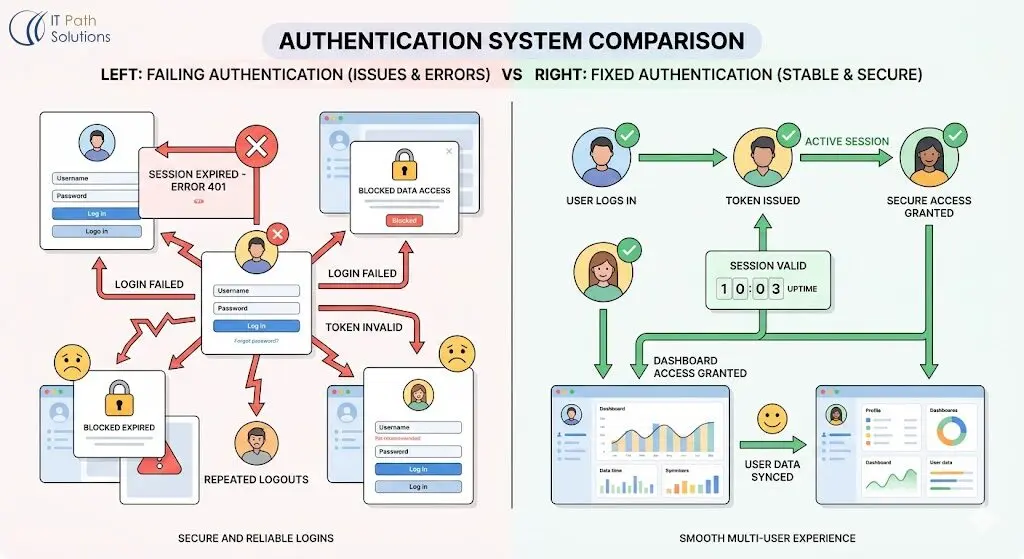
What the founder saw: Users logging in and being immediately redirected to the login screen. Or logging in successfully, navigating to a second page, and being kicked back out. The behavior was inconsistent, some users stayed logged in, others didn’t.
What was actually happening:
Bolt.new’s default authentication scaffolding uses Supabase under the hood. Supabase is a solid backend platform (which was not the problem), it was the default session configuration Bolt.new generates for single-builder use.
Supabase uses Row Level Security (RLS) which means database-level rules that control which users can see which data and which cannot, for the data protection.
When you (admin) are the only user, and you are always logged in as yourself, RLS policies that are misconfigured are invisible. The builder session effectively bypasses the gaps.
The moment a second user arrives, RLS policies apply to them differently. If those policies have a gap, specifically, if the session token validation is not enforced at the policy level, Supabase will authenticate the user but then refuse data requests silently. As a result, the user sees a blank page or gets kicked back to login.
With couple of concurrent users by the evening, the gap became visible from multiple angles at once.
What we fixed:
We audited the RLS policies on every table the app reads from during the auth flow. Three tables had policies that relied on auth.uid() matching a user row, correct in principle, but the policies were not accounting for the initial session propagation delay that happens when Supabase first sets a JWT (a JSON Web Token, the credential that proves who you are) after login.
The fix was adding a session refresh call on the client immediately after login confirmation, before any redirect. This gave Supabase’s auth layer the 300-400 milliseconds it needed to propagate the session token to all the tables the app reads on first load.
We also found one table, the user preferences table, that had no RLS policy at all. It was readable by anyone. We locked it.
Time to fix: It almost took an an hour and quarter past it for us to fix it. Most of that time was reading the existing policy structure, not writing the fix.
The Shape of the Problem, Generalised
Before moving to payments, here is the table that applies to almost every Bolt.new app we have seen with auth failures.
If your app is behaving inconsistently across different users or sessions, start here.
| Symptom | Root Cause | Diagnostic Step | Fix |
|---|---|---|---|
| Users log in but get redirected back to login | RLS policy gap on session-read tables | Check Supabase dashboard > Authentication > Policies for every table your app reads on load | Add auth.uid() match policy; add session refresh post-login |
| Some users stay logged in, others don’t | JWT propagation delay on first session | Check network tab for 401 errors on first data fetch after redirect | Add 300ms session refresh before redirect |
| Admin sees data, regular users see blank page | Missing role-differentiated RLS | Inspect policies for user_role or is_admin columns | Add explicit policies per role, not just per uid |
| Logged-in users see other users’ data | No RLS policy on a table (common in Bolt.new scaffolds) | Run select * from pg_policies in Supabase SQL editor — missing tables show no rows | Add RLS policy; restrict to auth.uid() |
| Login works in preview, fails in production | Auth callback URL not updated for production domain | Check Supabase > Authentication > URL Configuration | Update Site URL and Redirect URLs to production domain |
That last row. Check it now if you have not deployed to a custom domain yet and you are planning to. It catches founders at launch more often than any other single issue.
Problem 2: The Stripe Webhook: The Hidden Failure Behind Successful Payments
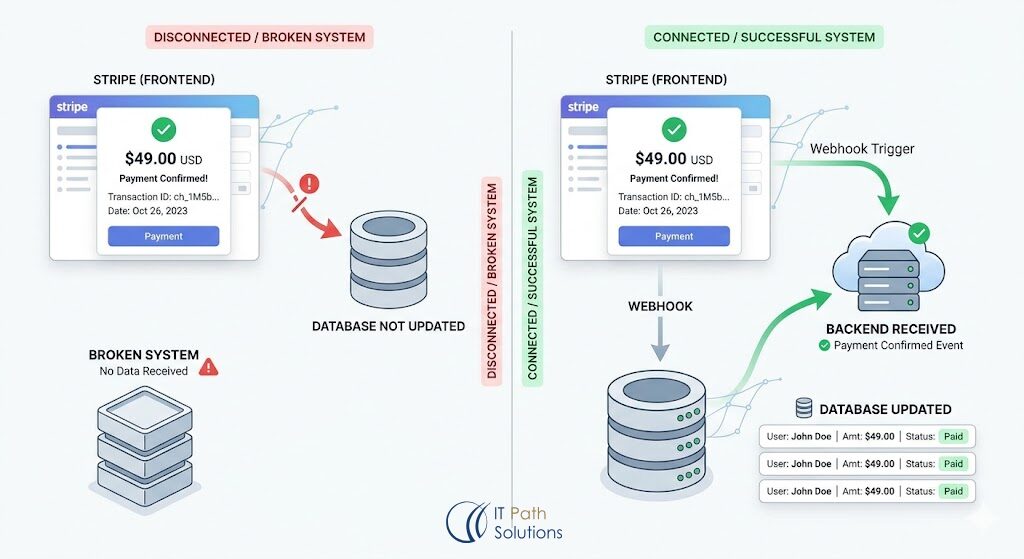
With auth stable, we moved to payments.
What the founder saw: Nothing. The Stripe integration “worked fine” in testing.
What was actually happening:
Bolt.new’s Stripe integration scaffolding handles the checkout session cleanly. A user clicks “Subscribe,” goes through Stripe’s hosted checkout, and the payment processes. The part Bolt.new does not handle reliably is what happens after Stripe sends a webhook (a notification) back to your app to say “this payment completed, update your database.”
Webhooks require your app to have a publicly accessible endpoint that Stripe can POST to. During Bolt.new’s preview and builder mode, that endpoint often does not exist in the way Stripe expects. Founders test in the Stripe test environment, see the checkout complete, and assume the integration is working.
What they are not seeing is whether the webhook reached their app and whether their app processed it correctly.
In this case, the webhook endpoint existed. But it was not validating the Stripe signature which is a cryptographic check (using a secret key) that confirms the webhook actually came from Stripe, not from someone else.
Without signature validation, most production hardening setups will silently drop the webhook.
No error. No log. The payment completes on Stripe’s side. Your database never knows.
The founder had processed three test payments during their own testing. Two of them had not updated the database. They did not know because they had manually checked their own account each time and seen it update but that was coincidence, not reliability.
What we fixed:
We added Stripe signature validation to the webhook endpoint. This required the STRIPE_WEBHOOK_SECRET environment variable a key Stripe provides in the dashboard that your app uses to verify incoming webhooks. It was not in the environment. We walked the founder through generating it and adding it to the Bolt.new environment configuration.
We also added idempotency handling a check that ensures if Stripe sends the same webhook twice (which it does, as a retry mechanism), your app only processes it once. Without this, a user can end up with two subscription records or two credits added to their account.
We tested with Stripe’s CLI webhook forwarding tool, which lets you replay webhook events locally and see exactly what your endpoint receives and returns. Three test events, three successful processes.
Time to fix: 95 minutes.
Problem 3: The Final Block Before Launch
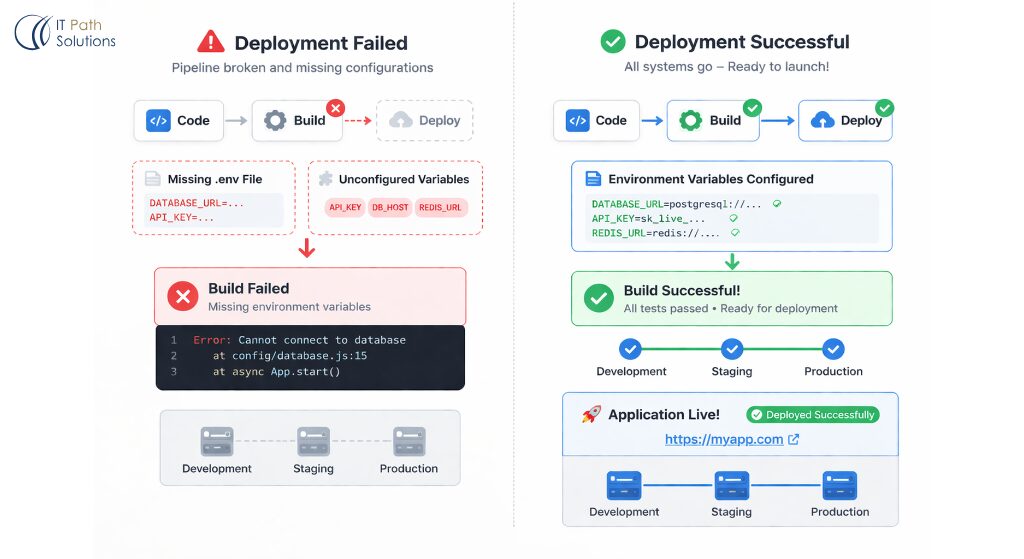
The auth was working. Payments were processing. The app needed to go to production.
What the founder saw: The Bolt.new deployment pipeline was throwing a build error. The error message was generic: Build failed. Check logs.
What was actually happening:
The build had a missing environment variable in the production environment. Bolt.new’s deployment tooling uses a build-time check for critical variables, if one is missing, the build fails with a generic error rather than naming the specific missing variable.
The missing variable was the Supabase ANON_KEY a public identifier your frontend uses to communicate with Supabase. It had been set in the development environment automatically when the project was created. It had never been set in the production environment because the founder had not deployed to production before tonight.
The second issue was a dependency version conflict. One of the packages the app used had a peer dependency, a required companion package, that had been updated in the last two weeks. The package version pinned in the project’s package.json (the file that lists all the software your app depends on) was now incompatible with the updated peer dependency. The build failed at the install step.
We pinned the dependency to the last known compatible version and set the missing environment variable. The build passed.
Time to fix:
75 minutes, including testing the deployment twice.
What We Handed Back
In the final hours before launch, the founder had:
- An auth layer that handles concurrent sessions correctly, with RLS policies audited across every table
- A Stripe webhook that validates signatures, processes correctly, and handles retries without duplication
- A working production deployment with environment variables documented
- A list of five things to do in the first week after launch (not emergencies, but known debt)
The app went live at 6:30am. The newsletter hit inboxes at 9:00am. The app handled 380 signups in the first four hours without an auth failure.
What You Need to Know Before You Launch
Here is what you need to know right now.
Your app is probably not broken. It hit a known wall. Bolt.new builds excellent apps for one user — the builder.
The moment you have real users arriving through different browsers, different devices, and different network conditions, three systems have to work that never had to work during your testing: concurrent session management, payment webhook processing, and production environment configuration.
Almost every Bolt.new app we see at this stage has gaps in all three. That is not a failure of the tool. It is a gap the tool was not designed to close.
The gap is closeable. We do it regularly. It takes hours, not days.
If your launch is tomorrow and your app is not working the way it needs to work, Book a Free Session.
You do not need to rebuild. You need senior engineers who have seen this exact failure pattern before.
Also Read – How Senior Engineers Evaluate Agentic AI Systems: The Checklist Experts Follow
The Five-Hour Breakdown
| Time | Action | Duration | Engineer Focus |
|---|---|---|---|
| 11:20am | Triage call — four questions, full picture | 15 min | Both engineers |
| 11:35am | RLS policy audit — read existing Supabase config | 40 min | Engineer 1 |
| 12:15pm | Auth fix — session refresh + policy correction + table lockdown | 55 min | Engineer 1 |
| 1:10pm | Stripe webhook audit — replay test events, identify missing validation | 30 min | Engineer 2 |
| 1:40pm | Webhook fix — signature validation + idempotency + environment variable | 65 min | Engineer 2 |
| 2:45pm | Deployment audit — read build logs, identify missing variable + dependency conflict | 30 min | Both engineers |
| 3:15pm | Deployment fix — pin dependency + set production environment + rebuild | 45 min | Engineer 1 |
| 4:00pm | End-to-end test — auth, payment, deployment | 20 min | Both engineers |
| 4:20pm | Handoff — documented fixes + post-launch debt list | 15 min | Both engineers |
Total: 4 hours 55 minutes from first contact to a stable, production-ready app.
What This Looks Like Before It Becomes a Crisis
The same issues that created a 4am engineering session are detectable before they become emergencies. If your Bolt.new app is not yet in crisis but you are planning a launch in the next 30 days, run this check now.
- Auth:
Log in as a test user on a different device, in a browser where you have never been logged in before. Navigate to at least three pages. Log out, log back in on the same device. Do this with two different accounts simultaneously. If anything behaves differently from your builder testing, the RLS layer has a gap.
- Payments:
Use Stripe’s webhook CLI to replay a checkout.session.completed event against your production webhook endpoint. Check your database before and after. If the database row did not update, your webhook is not processing. Do not assume it works because the Stripe test mode checkout completed.
- Deployment:
Deploy to production at least a week before your launch. Not a preview. Production. With your real domain. Read every environment variable your app uses and confirm each one is set in the production environment configuration. Run through the full signup-to-payment flow on the production URL, not the preview URL.
The Debt List We Left Behind
Every engagement like this produces two outputs: the fixes for tonight, and the list of things that are not emergencies but are real issues. Here is what we documented for this founder to address in the first week after launch.
- No error monitoring. The app had no way to know when something broke unless a user reported it. We recommended Sentry, a free-tier error tracking tool, integrated into the frontend. When something breaks, you get an email with a stack trace (a record of exactly where and why something failed) rather than a confused user message.
- No rate limiting on the auth endpoint. Anyone could attempt login with an unlimited number of email and password combinations. A basic rate limit, 10 attempts per IP per minute, would prevent credential stuffing attacks (automated attempts to break in using stolen passwords from other websites).
- The Zapier automation was firing on every new row insert, not on confirmed signups. If a user started the signup process but did not confirm their email, Zapier was sending them a welcome email anyway. This creates a confusing experience and pollutes the email list.
- No database backups configured. Supabase’s free tier does not include automatic backups. A manual export schedule, or upgrading to a paid Supabase plan with point-in-time recovery was on the list.
- The
package.jsondependency versions were all unpinned. Unpinned dependencies update automatically, which means a future build could break for the same reason tonight’s did, with no warning. We recommended pinning all versions and adding a weekly dependency review to the maintenance calendar.
None of these would have stopped the launch. All of them will matter within 90 days.
What Bolt.new Gets Right (And Where the Gap Always Is)
Bolt.new is not the problem in this story. It is genuinely one of the most capable no-code-to-deployed tools available right now. For solo founders, it compresses six weeks of development into days. The product that launched the morning after this engagement was a real product, with real functionality, that a traditional dev shop would have quoted at three to four months of work.
The gap is not in what Bolt.new builds. It is in what Bolt.new cannot test.
Production multi-user behaviour cannot be tested in a builder preview. Webhook reliability cannot be tested without a real publicly-accessible endpoint. Environment variable configuration cannot be validated until you try to build in a production environment for the first time.
These are not Bolt.new failures. They are the known edges of the no-code model. Senior engineers who have worked in that model understand where those edges are. That is the value we bring: not replacing the tool, but knowing exactly where the tool ends and where engineering judgment has to take over.
When to Call Us?
You do not need us if your app is working correctly in production, you have tested it with real users on real devices, and you have run a payment end-to-end. That is a shipped product. Keep shipping.
You need us if:
- Your app behaves differently for different users or different devices
- Your Stripe integration works in test mode but you have never confirmed a real webhook hit your database
- You have never deployed to your production domain and your launch is within 72 hours
- Something broke in the last 24 hours and you do not know what changed
Those are fixable problems. They are also the problems that do not get easier with time. A broken auth flow on launch day with 400 users arriving is significantly harder to diagnose than the same broken auth flow the night before, when you have five hours and no public traffic.
If your launch is coming and your app is not where it needs to be, get in touch with us.

Keyur Patel
Co-Founder
Keyur Patel is the director at IT Path Solutions, where he helps businesses develop scalable applications. With his extensive experience and visionary approach, he leads the team to create futuristic solutions. Keyur Patel has exceptional leadership skills and technical expertise in Node.js, .Net, React.js, AI/ML, and PHP frameworks. His dedication to driving digital transformation makes him an invaluable asset to the company.
Related Blog Posts

Things to ALWAYS Do Before Your No-Code App Debut: Your Ultimate Checklist