Home
»Blog Insights
»Automating Azure Infrastructure Deployment Using Azure DevOps Pipelines and Bicep
Automating Azure Infrastructure Deployment Using Azure DevOps Pipelines and Bicep

Keyur Patel
November 2, 2026
18 min
Last Modified:
November 2, 2026
Azure DevOps Pipelines and Bicep can help your team spend less time setting up Azure infrastructure manually and make changes easier to review before they go live. Once the pipeline is running, though, it’s easy to assume the setup is taken care of.
A pipeline that works today may still need an update. Microsoft is retiring selected older tasks in Azure DevOps Services on November 24, 2026. They may keep running for a while, but will no longer receive updates or security fixes. From March 15, 2027, pipelines using those removed tasks will fail. If yours was set up years ago, now is a good time to check what it uses.
Meanwhile, Microsoft now recommends a dedicated Bicep Deploy task for new pipelines. It lets teams check infrastructure definitions, preview changes and deploy Bicep files directly.
These updates raise a useful question: how much of your deployment process is repeatable, reviewed and maintained?
We’ll explore that through an Azure integration project our team delivered. You’ll see how we organized the infrastructure, managed differences between environments and handled deployment changes, along with what your team should consider before taking a similar approach.
What manual infrastructure really costs the business
Manual infrastructure looks cheap because nobody sends an invoice for it. The cost shows up in three other places.
Repeated work: Each environment may require the same manual setup, often from memory or a half-updated wiki page. Development, test and production can involve repeating the same steps. When something breaks, the team may need to repeat that work again.
Release uncertainty: If staging and production are not configured consistently, a successful staging test proves less than it seems. Teams compensate with extra checks and longer release windows. Missed infrastructure changes can still delay a planned release.
Dependence on a few engineers: The knowledge of how production is configured often lives with one or two people. When they are busy, on leave or move on, releases slow down. New team members may struggle to make changes safely because the documentation does not fully explain what exists and why.
There is also a governance cost. When changes are made directly in the portal, it is hard to answer simple audit questions: who changed this, when, and was it approved?
When automation is worth it, and when it is not
Infrastructure automation is an investment. It pays back quickly in some situations and slowly in others. The question is how much work your current process creates, and whether that work is likely to grow.
| Signal | Automation is worth considering | A simple manual setup may be enough |
|---|---|---|
| Environments | Dev, test and production that need consistent configurations | One environment, or a short-lived prototype |
| Change frequency | Infrastructure changes every sprint or month | Changes are infrequent |
| Team | Several engineers or teams make changes in Azure | A small, stable setup has clear ownership |
| Governance | Reviews, approvals and change records are required | Change-control needs are straightforward |
| Recovery | Infrastructure needs to be recreated within a defined recovery window | A documented manual rebuild meets recovery needs |
| Growth | New clients, regions or applications are planned | The solution is stable and not expected to grow |
A practical rule: If your team repeats the same setup across environments and regularly checks for missed changes, you have a useful starting point for automation. Compare that ongoing effort with the work needed to create and maintain the automated process.
If you run a single small app that rarely changes, a well-documented manual setup can be a sensible choice for now. You can still automate later, and existing resources can often be brought under code without rebuilding them, provided their current configuration is carefully assessed first.
The assessment should consider your application’s architecture and release process together. Our Cloud and DevOps services cover infrastructure automation and deployment workflows.
Azure DevOps Pipelines and Bicep
Think of it as a recipe and a kitchen process.
Bicep is the recipe: a written description of the Azure resources you want.
Azure DevOps Pipelines follows the process: it checks the recipe, runs the deployment and records the result.
Bicep: describing what you want
Bicep is Microsoft’s language for Infrastructure as Code (IaC) on Azure. Instead of clicking through the portal, you write a short file that says, for example, “I need a Key Vault, a managed identity and a Logic App, with these settings.” Bicep is declarative: you describe the end state, and Azure works out how to reach it.
Three features matter most:
- Modules let you define a resource configuration once, such as a Key Vault with your security defaults, and reuse it across applications.
- Parameter files hold the values that differ between environments, such as names, sizes and regions. The template stays the same; the parameters change.
- Repeatable deployments let you apply the same definitions again to update the intended resources, rather than recreate them manually.
Azure DevOps Pipelines: managing the deployment
A pipeline is an automated sequence of steps defined in a YAML file and stored with your code. For infrastructure, it typically retrieves the Bicep files, validates them, previews proposed changes, waits for approval where required and deploys to the target environment.
Pipeline runs provide a deployment history. Combined with code reviews and approval records, this helps the team trace what was changed, who reviewed it and when it was deployed.
How they work together
- An engineer changes a Bicep file or an environment’s parameter file in Git.
- The change goes through a pull request for review, like application code.
- The pipeline connects to Azure through a service connection, using an identity with the required permissions.
- It validates the files and runs a what-if preview to help reviewers assess the proposed changes.
- After any required approval, Azure Resource Manager (ARM) deploys the configuration to the target environment.
The infrastructure definitions, environment parameters and pipeline instructions are kept together in the repository. Create reusable modules where they help; a separate module for every small resource can add unnecessary overhead.
How we used Bicep and Azure DevOps on an integration project
For one of our clients, our team built an Azure integration platform that receives requests from a partner system and passes them to a backend ERP. The platform needed consistent infrastructure across development, test and acceptance environments.
The work went beyond creating Azure resources. Request checks, access permissions, secret references and environment settings also needed to be managed together. We defined these in Bicep and deployed them through Azure DevOps Pipelines.
What we managed through code
| Area | What the deployment covered |
| Infrastructure | API Management, Service Bus, Logic Apps and supporting resources |
| Request security | Subscription-key requirements and signature checks for incoming requests |
| Secrets | Key Vault references for sensitive values |
| Access | Managed identities and role assignments for access between services |
| Environment settings | Backend URLs and other values that differ between environments |
| Monitoring | Logging configuration and connections to Application Insights |
How the infrastructure was organized
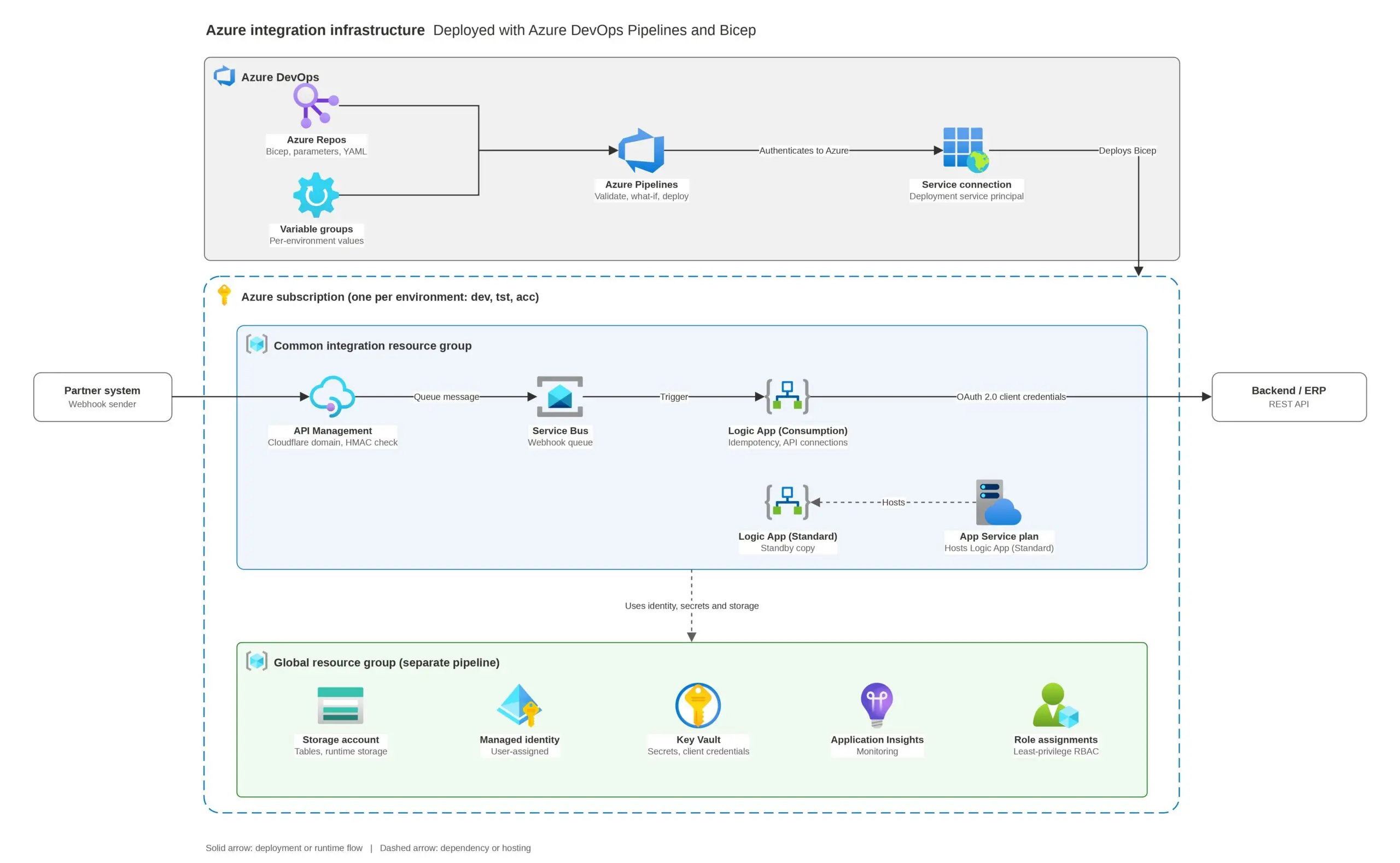
Azure DevOps held the Bicep templates, pipeline instructions and environment-specific settings. The pipelines used these to deploy the platform across development, test and acceptance.
We separated the resources into two groups:
- Shared infrastructure: Storage, a managed identity, Key Vault and Application Insights, managed through a separate pipeline.
- Integration resources: API Management, Service Bus and Logic Apps, configured to use those shared services.
Keeping the infrastructure reusable across environments
Development, test and acceptance needed the same core infrastructure, with differences such as resource names and backend URLs managed separately. We kept the reusable infrastructure definitions in Bicep and supplied the appropriate configuration during each environment’s deployment.
The files served three purposes:
- The main Bicep file brought the infrastructure definitions together and connected resources that depended on one another.
- Reusable modules defined individual resources or related groups of resources, such as a managed identity or Key Vault.
- Environment configuration supplied the values that needed to differ between deployments.
A simplified parameter file shows how those environment differences can be supplied:
// infrastructure/parameters/test.bicepparam
using ‘../main.bicep’
param environment = ‘test’
param location = ‘westeurope’
param storageAccountName = ‘stintegrationtest’
The using statement connects this parameter file to the main infrastructure template. The remaining lines supply values for that deployment: the environment, Azure region and storage account name.
The main template then passes the relevant values into its modules. This keeps the resource definitions reusable while making intended differences between environments explicit.
For example, a change to a shared resource definition can be reviewed once and deployed through each environment using its corresponding settings. Engineers do not need to repeat the same portal changes separately and remember which values to substitute.
This does not mean every setting should be identical. Resource capacity, network restrictions and connections to external systems may legitimately differ. Those differences need to be deliberate and documented so the team can distinguish them from configuration that has drifted unintentionally.
Sensitive values also need separate handling. Passwords and client secrets should not be written into ordinary parameter files or committed to Git. In the integration project, Key Vault references formed part of the configuration, while environment-specific settings were supplied through Azure DevOps variable groups.
The code above illustrates the parameter-file approach rather than reproducing the client’s deployment files. The underlying principle is the same: reuse the infrastructure definitions, keep environment differences explicit and control sensitive values separately.
What happens when a request arrives
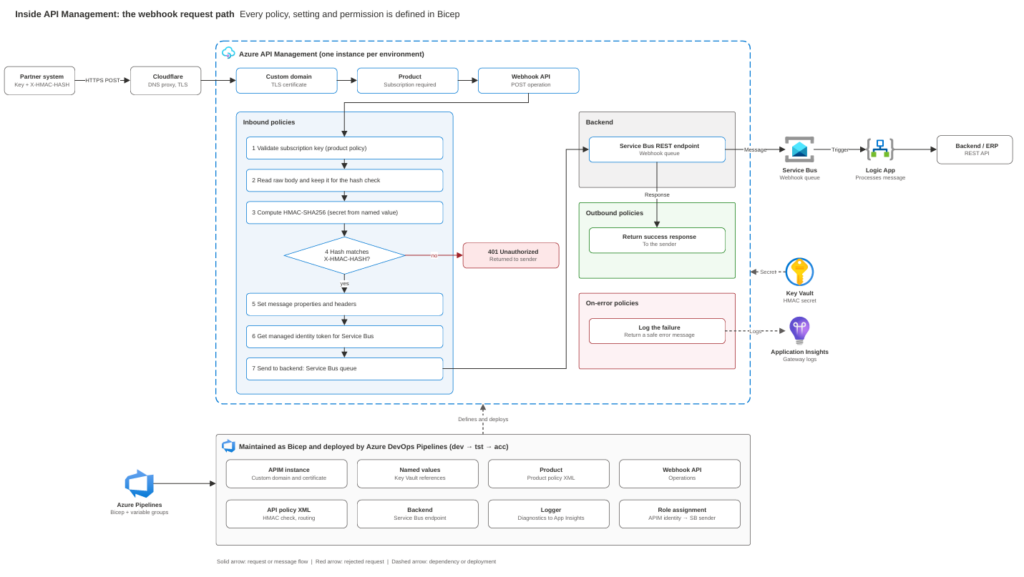
A partner system sends a request to API Management. Before accepting it, the platform checks the subscription key and verifies a signature supplied with the request. The signature check helps confirm that the sender holds the shared secret and that the request contents have not been altered.
If the signature does not match, the request is rejected. Valid requests are sent to a Service Bus queue using a managed identity, so that connection does not require a stored connection string.
A Logic App then picks up the message and calls the ERP. The workflow includes an idempotency check to help prevent the same request from being processed more than once.
The queue separates receiving the request from processing it. The partner can receive confirmation that its message was accepted without waiting for the ERP operation to finish. That confirmation means the message has been accepted, rather than that the ERP has completed the work.
These connections are part of the wider enterprise application integration design, which determines how the application works with existing business systems.
How changes to the platform were managed
The API policies, secret references, logging configuration and access permissions were defined alongside the infrastructure. A change to a request check could therefore follow the same review and deployment process as a change to an Azure resource.
The repository gave the team a shared record of the managed configuration. Engineers could review changes through pull requests and trace deployment activity through pipeline history.
It also provided a repeatable foundation for setting up another environment. Data, secret values, certificates and external dependencies still needed their own setup or recovery arrangements.
How to move from manual setup to automated deployment
You do not need to automate everything at once. Start with one application, establish the process and then decide where to expand. The steps below describe a general implementation approach, including production deployment where applicable.
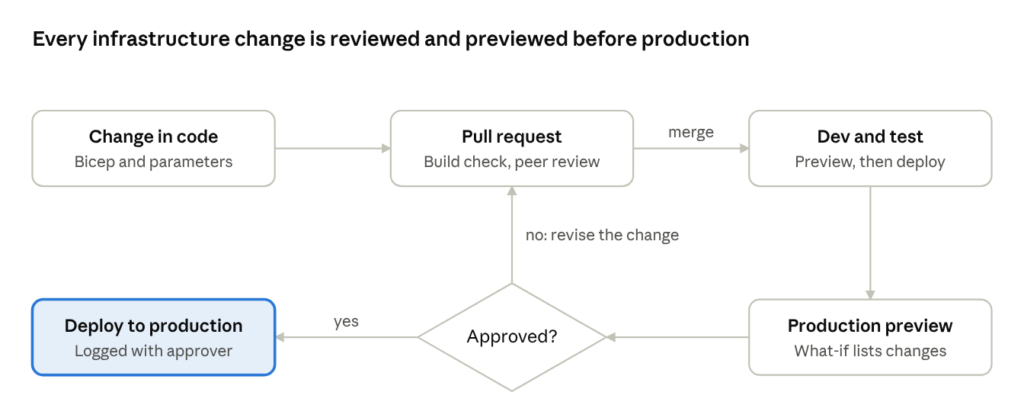
The flowchart shows how infrastructure changes move through review, testing and approval. Before a team can follow that process, it needs to understand the existing setup and bring the relevant configuration under code.
1. Assess the current setup
List the Azure resources the application uses, how they were created and who changes them. Compare the environments side by side to identify differences.
Note what is shared between applications, such as networks, Key Vaults or API gateways, and what each application owns. This defines the scope of the first implementation and helps avoid changing shared resources unintentionally.
Choose an application that changes regularly and causes release friction, but is not your most critical system.
2. Describe the infrastructure and environment settings
Write the infrastructure definitions in Bicep, starting with the resources the application owns. Separate environment-specific values from reusable definitions, as illustrated in the project above.
Existing resources need careful assessment. Some can be referenced without being managed by the template; others may be brought under code. Compare the definitions with the live configuration before allowing the pipeline to update them.
Use what-if previews to investigate proposed changes. A preview is useful evidence, but it does not replace checking dependencies or testing the application.
3. Review the change before deployment
An engineer opens a pull request containing the proposed infrastructure changes. Automated checks validate the Bicep files, while a colleague reviews what is being added or changed.
The review should cover more than whether the code is valid. Does the application need this resource? Are the permissions appropriately scoped? Are any existing settings being changed unintentionally?
Keep the change small enough for the reviewer to understand its effect.
4. Deploy and test across environments
After review, deploy to development and then test. Use the same infrastructure definitions with the appropriate settings and access permissions for each environment.
Check the application’s important functions after deployment. For an integration like the one described above, that includes confirming that a valid request reaches the queue and is processed by the workflow. Rejected requests and failed processing also need testing.
For web applications, automated browser testing with Playwright can complement these checks by testing important user journeys as part of the release process.
A successful infrastructure deployment confirms that Azure accepted the deployment. It does not, by itself, confirm that the application works as intended.
5. Approve production with evidence
Configure the production environment to require approval where appropriate. Before approving, the release owner should review the production what-if results and the evidence from earlier testing.
Unexpected changes need investigation before proceeding. Once approved, the pipeline deploys the configuration and records the deployment activity.
The team then checks the application and monitoring results. If the deployment fails or the application behaves unexpectedly, follow the agreed recovery process rather than repeatedly rerunning the pipeline without understanding the cause.
6. Document the process and hand it over
Write down how a change moves from pull request to deployment, who approves it, how to read deployment results and what to do when something fails. Keep these instructions alongside the code.
Agree how urgent manual changes will be handled, too. If someone changes a live resource during an incident, that change needs to be reviewed and reflected in the infrastructure definitions afterward.
This helps keep the repository useful as a shared record of the managed configuration, rather than another document that gradually falls behind the live environment.
The decisions that need experience
The tools are well documented. The harder part is deciding how they should work with your existing resources, access controls and release process.
Bringing existing resources under code
Most organizations are not starting from an empty Azure subscription. Production already exists, often with data that cannot be lost.
Bicep can reference an existing resource without managing its configuration, or define that resource so future deployments manage it. Choosing between those approaches requires care.
Before the first deployment:
- Compare the template with the live resource configuration.
- Identify settings added manually that must be preserved.
- Confirm which resources the deployment should manage.
- Review unexpected changes in the what-if preview.
An existing resource should not be treated as safe to update simply because its name matches the template.
Giving the pipeline the right permissions
The pipeline needs enough access to deploy, and no more. Creating resources and assigning access permissions are different responsibilities and may require different privileges.
Giving the deployment identity broad access is convenient, but increases the potential impact of a mistake or compromised pipeline.
The setup should establish:
- Which resources each deployment identity can change.
- Who can edit and run the pipeline.
- Which changes require approval.
- How the pipeline authenticates without relying on long-lived stored credentials where possible.
Keep deployment identities separate from the identities applications use while running.
Managing environment settings and secrets
Environments should share a consistent structure, with deliberate differences such as resource names, capacity, regions and network rules.
Decide where each type of configuration belongs:
- Parameter files: Reviewed, non-sensitive values used by the infrastructure templates.
- Pipeline variables or variable groups: Settings needed to run and coordinate deployments.
- Key Vault: Secrets that need controlled access and lifecycle management.
Avoid maintaining the same setting in several places. Otherwise, the team can end up tracing conflicting values across files, variable groups and the live environment.
Planning for failed deployments
A deployment can fail because a name is unavailable, a quota has been reached, permissions are missing or a dependency is not ready. Some resources may already have been updated when the failure occurs.
A failed pipeline does not necessarily leave the environment as it was before the run.
The team needs a clear response:
- Identify what failed and what changed. Review deployment errors and check the affected resources.
- Assess the application’s condition. Establish whether users or connected systems are affected.
- Choose the recovery action. Correcting the cause and rerunning may be appropriate, but only after checking that it is safe.
- Verify the result. Confirm both the infrastructure state and the application’s important functions.
Reverting a Git commit is not a complete rollback plan. Redeploying an earlier template may restore some settings, but it does not automatically remove newly created resources or recover lost data.
Agree who makes recovery decisions, what needs backing up and which recovery procedures must be tested before relying on the pipeline for production.
How IT Path Solutions can help
Bringing existing infrastructure under code, setting appropriate permissions and preparing for failed deployments all require decisions specific to your application.
At IT Path Solutions, our Azure and DevOps engineers help teams through that transition:
- Deployment assessment: We review your current Azure setup, compare environments and identify where manual steps, configuration differences and dependence on individual engineers create release risk.
- Bicep and pipeline implementation: We develop reusable Bicep modules and Azure DevOps pipelines, with what-if previews, environment approvals and environment-specific configuration.
- Adoption of existing resources: We assess live resources and bring the agreed configuration under code in stages, reviewing proposed changes before deployment.
- Access and secret management: We configure deployment identities, service connections and secret handling around the access your applications and pipelines need.
- Handover and enablement: We document the process and work alongside your team so they can operate and extend the automation.
For applications built on Microsoft’s stack, our .NET engineers can also support the application changes and integrations that accompany the deployment work.
Releases waiting on manual infrastructure work?
Start with one application. We can review its current deployment process with your team and identify what to automate, which existing resources need care and how the implementation should be tested.
Discuss Your Azure Deployment SetupYour first step: pick one application
You do not need a company-wide programme to start. Pick one application whose deployments involve repeated manual work, frequent configuration checks or dependence on one person.
Ask three questions:
- Could another engineer recreate its infrastructure using the available code and documentation?
- Are differences between development, test and production deliberate and documented?
- Can the team trace infrastructure changes, their purpose and any required approvals?
If any answer is “no” or “not sure,” that application is worth assessing. Start with a manageable scope, test the deployment process and use what you learn before extending it to other applications.
Frequently asked questions
What is the difference between Bicep and ARM templates?
Bicep is a more concise way to define Azure infrastructure. It compiles into ARM templates, which Azure Resource Manager uses to deploy resources. Both use the same underlying deployment platform; Bicep makes the definitions easier to write, read and maintain.
Do we need to switch to Bicep if we already use Terraform?
Not necessarily. Terraform is also an option for managing Azure infrastructure. If your existing setup works well, adopting Bicep may not be necessary. Assess your requirements, team experience and maintenance effort before deciding whether a change is worthwhile.
Can we automate resources that already exist in production?
Yes. Bicep can reference existing resources or define their configuration for future management. First, assess the live setup and review proposed changes carefully. A what-if preview helps, but testing and configuration checks are still needed before production deployment.
What happens if a deployment fails halfway?
Some resources may already have changed. Review the deployment errors, check the application and decide whether correcting the cause and rerunning is safe. Redeploying an earlier template is not a complete rollback strategy, so recovery procedures need to be agreed and tested beforehand.
How do we keep secrets out of the repository?
Store secrets in Azure Key Vault and grant applications access through managed identities where supported. Keep ordinary parameter files free of sensitive values. If the pipeline needs a secret, use an approved secret-handling mechanism and ensure it is not exposed in logs or deployment outputs.

Keyur Patel
Co-Founder
Keyur Patel is the director at IT Path Solutions, where he helps businesses develop scalable applications. With his extensive experience and visionary approach, he leads the team to create futuristic solutions. Keyur Patel has exceptional leadership skills and technical expertise in Node.js, .Net, React.js, AI/ML, and PHP frameworks. His dedication to driving digital transformation makes him an invaluable asset to the company.
Related Blog Posts
TypeScript 7.0 Migration Guide: What Changed, What Can Break, and Should You Upgrade?

How We Built a Fully Offline GDPR-Compliant Transcription System