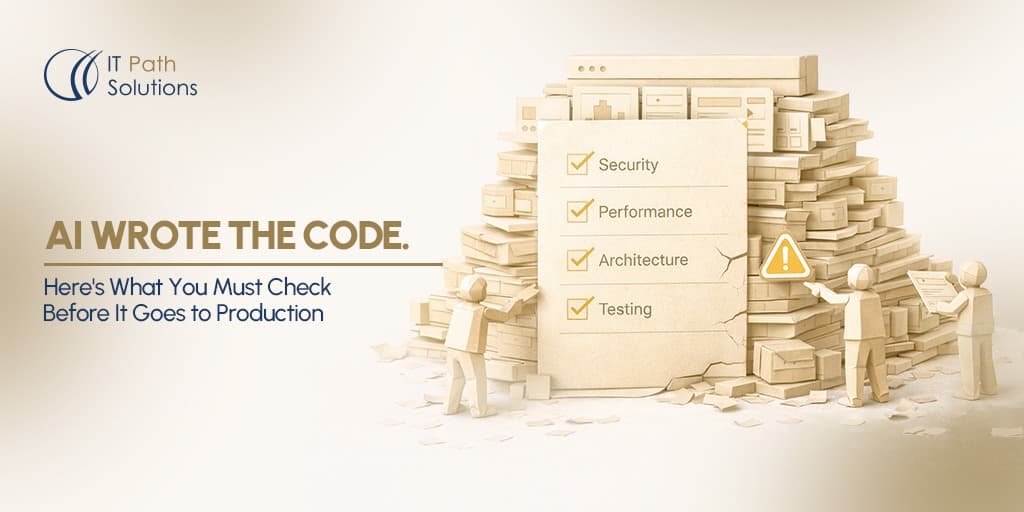
AI Wrote the Code. Here’s What You Must Check Before It Goes to Production
Keyur Patel
March 26, 2026
20 min
Last Modified:
April 9, 2026
Here is what a typical code review looks like on a team that has adopted Cursor or Claude Code or GitHub Copilot: a developer opens a PR, a teammate reads through it, checks that the logic looks right, confirms the tests pass, and approves. Thirty minutes, maybe less.
That process works for code a senior engineer wrote from scratch, drawing on years of context about your architecture, your past incidents, your implicit decisions. They know which libraries you avoid and why. They know which patterns caused problems six months ago. They know where the sharp edges are.
AI tools know none of that. They write code that is correct in the abstract, optimised for the general case, consistent with patterns they have seen across millions of repositories. What they cannot know is whether those patterns are correct for your specific codebase your security posture, your database structure, your performance constraints, your team’s agreements.
The result is code that passes review and causes incidents.
A study by Stanford University found that developers using AI coding assistants were significantly more likely to introduce security vulnerabilities into their code. In controlled tasks, code written with AI assistance was correct only 67 percent of the time, compared to 79 percent for developers working without AI.
More concerningly, participants using AI tools were also more confident in the security of their code, even when it contained vulnerabilities. This gap between confidence and correctness makes these issues harder to detect during review, especially when the flaws are subtle.
This is not an argument against AI tools. The same teams that produced those vulnerabilities also shipped features twice as fast. The argument is for a different kind of review, one that knows where AI-generated code is unreliable and looks there first.
That is what this checklist is.
Before the Checklist: What Makes AI-Generated Code Different
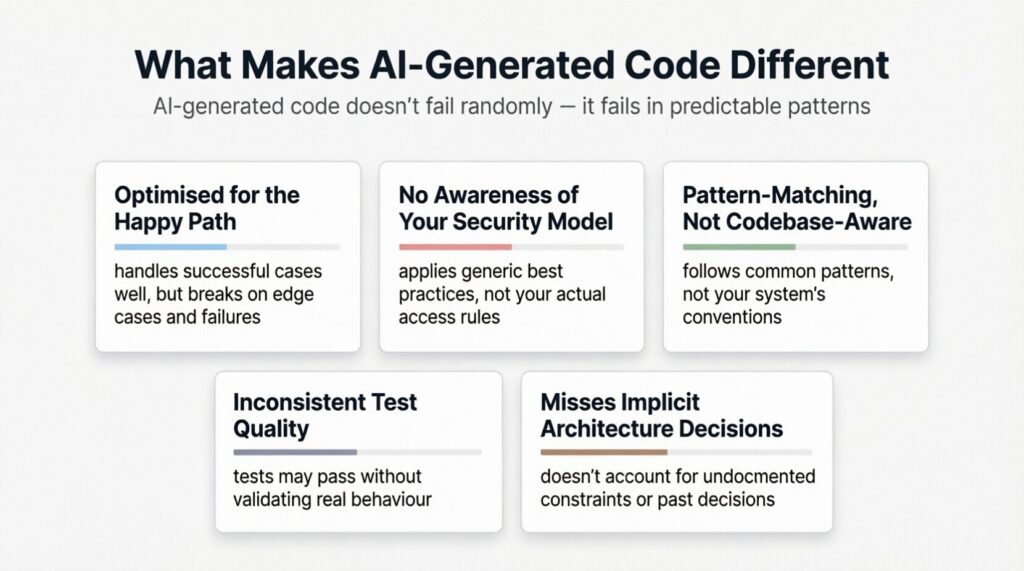
To review AI code well, you need to know where it consistently gets things wrong. These are not random failures. They cluster in predictable places.
- AI tools optimise for the happy path. The function that processes a successful payment, the handler that receives a valid request, the query that returns results all of these tend to be well-written. The error handler, the retry logic, the branch that fires when something unexpected arrives, these are where the quality drops.
- AI tools don’t know your security model. They know general security best practices. They do not know that your application has a specific row-level security policy, or that a particular endpoint is supposed to be accessible only to admin-role users, or that your team made a decision last quarter never to expose internal IDs in API responses. If you don’t tell them, they won’t apply it.
- AI tools pattern-match across the internet, not across your codebase. A module generated by Cursor looks correct against the patterns in its training data. It may introduce a third or fourth approach to the same problem your codebase already solves in two different ways. Inconsistency at this scale is how codebases become unmaintainable.
- AI tools are inconsistent about tests. Sometimes they write comprehensive test suites. Sometimes they write tests that assert the wrong things, or tests that always pass regardless of the implementation. Passing tests are not the same as correct tests.
- AI tools miss your implicit architecture decisions. Every codebase has rules that are not written down: the libraries you prefer, the patterns you deprecated, the performance constraints that came out of that incident in Q3. AI tools cannot read a Confluence doc you haven’t written. They infer from what they can see, and what they can see is almost never the full picture.
None of this means AI-generated code is bad. It means it needs a different checklist.
Also read – Things to ALWAYS Do Before Your No-Code App Debut: Your Ultimate Checklist
The 10-Point Checklist for AI-Generated Pull Requests
Run every item on this list on every AI-generated PR before you approve it. Not selectively. Every item, every time. The ones that seem least relevant are often the ones that catch the highest-severity issues.
1. Does This Code Know When It’s Wrong?
The first thing to check is not whether the code works, it’s whether the code knows how to fail.
Look for every place the code could receive unexpected input, encounter a network error, hit a database timeout, or get a response it didn’t plan for. For each one, ask: what does the code do?
If the answer is “nothing” or “crash silently,” that is a gap. AI tools write the successful branch in detail and gesture vaguely at error handling. The gesture almost never holds up in production.
What to look for:
try/catchblocks that catch everything and log nothing (catching errors without logging them means you will never know when something breaks)- Error handlers that swallow exceptions and return a 200 status code to the caller (this is how silent failures become invisible outages)
- Missing null checks before accessing nested object properties, the classic
cannot read property X of undefinederror that only fires when a specific edge case arrives - API calls with no timeout specified (an external API that stops responding will hang your function indefinitely without one)
The diagnostic question: Can you describe, in one sentence, what this function does when the thing it depends on fails? If you cannot answer that without reading the code carefully, the error handling needs work.
2. Is Every Secret, Key, and Credential Handled Correctly?
AI tools move fast and sometimes hardcode things they should not. This check takes three minutes and has caught critical security issues on codebases we have reviewed.
Open the diff. Search for these strings directly:
sk_, pk_, API_KEY, SECRET, PASSWORD, TOKEN, PRIVATE, Bearer
Any of these appearing as literal values in the code not as references to environment variables is a critical finding. Hardcoded credentials get committed to version control, where they live forever in the git history even after you delete them from the file.
Also check:
- New environment variables the PR introduces that are not yet documented in your
.env.exampleor secrets manager - API keys being passed as URL query parameters rather than request headers (query parameters appear in server logs; headers do not)
- Secrets being included in log statements,
console.log('Calling API with key:', apiKey)is a real pattern AI tools produce
The diagnostic question: If this PR were merged today and the repository were made public tomorrow, would any secret be exposed? If you are unsure, assume yes and check.
3. Does This Code Respect Your Data Access Rules?
This is the check that matters most and gets skipped most often.
AI tools do not know your authorisation model. They know what authorisation models generally look like. The code they generate may check whether a user is authenticated, if they are logged in without checking whether that authenticated user is authorised to access the specific resource they are requesting.
These are different things. Authentication answers “who are you?” Authorisation answers “are you allowed to do this?” A bug in authentication blocks everyone. A bug in authorisation lets the wrong people in.
What to look for:
- Database queries that fetch records by ID without filtering by the authenticated user’s account (a user who knows another user’s record ID should not be able to retrieve it)
- Admin-only endpoints that check for authentication but not for admin role
- Bulk operations that return all records when they should return only records belonging to the current user
- New API endpoints that the PR introduces with no access control at all (AI tools sometimes scaffold the endpoint and leave the auth as “TODO”)
The diagnostic question: Log in as a non-admin user. Can that user, using this code, access data that belongs to a different user or a different account tier? If you cannot answer no with confidence, the access control needs review.
4. Does the Test Suite Test the Right Things?
Tests that pass are not the same as tests that catch bugs. AI tools are capable of writing tests that verify their own implementation rather than the intended behaviour tests that will pass even when the code is wrong.
What to look for:
- Tests that mock the entire implementation and then assert the mock was called (this tests that mocking works, not that the code works)
- Tests that only cover the happy path, the input that succeeds with no tests for invalid input, missing fields, or boundary conditions
- Tests with assertions like
expect(result).toBeDefined()orexpect(result).not.toBeNull()these confirm something returned, not that the right thing returned - Test file coverage numbers that look complete but test helpers and utilities rather than business logic
- Snapshot tests on UI components generated without reviewing what the snapshot actually asserts
The test that matters: Write one test yourself. One test that specifically targets a failure mode you would care about in production which are a missing field, an unauthorised request, an unexpected null. If the existing test suite catches it, the coverage is probably real. If your test fails but the AI’s tests all pass, the test suite needs work.
5. Will This Scale or Does It Assume Zero Load?
AI tools write code that works correctly with one user, one record, and one request at a time. They do not naturally think about what happens when your product works, when real load arrives and the assumptions embedded in the code are tested simultaneously.
What to look for:
- Database queries inside loops fetched a record for each item in an array, one query at a time, instead of fetching all records in a single query (this is called the N+1 problem, where N database queries fire instead of one, multiplying with every user action)
- No pagination on endpoints that return lists of records (an endpoint that returns every record from a table will eventually time out as the table grows)
- Missing database indexes on columns the new code filters or sorts by (an index is a database structure that speeds up lookups; without one, every query scans every row)
- In-memory caching of data that should be stored in a shared cache (if each server instance caches independently, your cache has no effect under load-balanced traffic)
- Synchronous calls to external APIs inside request handlers that could block for seconds
The diagnostic question: What does this code do at 100x your current request volume? If the answer is “I don’t know,” that is the right time to find out, before merge, not after your next launch.
6. Is This Pattern Consistent With Your Codebase?
AI tools introduce architectural inconsistency silently. A PR that adds a fourth way to handle API errors, a third state management pattern, or a second database client does not look wrong in isolation. It looks wrong in context and reviewing it in context is the part that gets skipped.
What to look for:
- New utility functions that duplicate functionality that already exists in your codebase (search for similar functions before approving any new one)
- A different error handling pattern from the one the rest of the codebase uses
- A different way to structure API responses different field naming conventions, different envelope formats, different HTTP status codes for the same conditions
- New library imports for functionality that an existing library in your stack already provides
- Naming conventions that differ from your team’s established patterns (camelCase vs snake_case, verb-first vs noun-first function names)
The diagnostic question: If a new engineer read only this PR and then read the rest of the codebase, would they encounter contradictions? If yes, which pattern is right and which instance needs to be updated?
7. Does the Logging Tell You What You Need to Know in an Incident?
Production incidents are diagnosed from logs. If your logs do not contain the right information, incidents take longer to resolve, and the same bugs resurface because you cannot determine their root cause.
AI tools log what seems natural in the context of the function they are writing. They do not know what information you will need at 2am when something breaks.
What to look for:
- Log statements that record the action but not the context (“Payment processed” vs “Payment processed for customer_id: 123, amount: $49, plan: Pro”)
- Missing correlation IDs like a unique identifier attached to a request at entry and carried through every log statement, so you can trace a single request through your entire system
- Log levels mismatched to severity (using
infofor errors,debugfor critical state changes) - Sensitive data in log statements: user emails, payment details, access tokens
- No logging at all around external API calls, you cannot diagnose an integration failure without knowing what was sent and what was received
The diagnostic question: If this code caused a production incident tonight, could you determine the root cause from logs alone? If the answer is no, add the logging before merging.
8. Has the Migration Been Thought Through End to End?
If a pull request changes the database structure, it is more critical to review carefully because mistakes can have bigger consequences.
Migrations are the class of change most likely to cause irreversible production problems, and they are the class of change AI tools handle most inconsistently.
A migration is a script that changes the structure of your database: adding a column, renaming a table, adding a constraint, removing a field. Once a migration runs in production, it is difficult or impossible to reverse cleanly.
What to look for:
- Migrations that add a
NOT NULLcolumn without a default value (this will fail immediately on any table that already has rows, because existing rows have no value for the new column) - Migrations that lock tables during execution (some operations require an exclusive lock on a table for their full duration; on a large table, this can take minutes and block every query that touches that table)
- Migrations with no corresponding rollback plan (if the migration causes a problem, how do you undo it?)
- Data migrations that transform existing records without a backup step
- Schema changes that are not backwards compatible with the version of the application currently running in production (during a rolling deploy, old code and new code run simultaneously; the schema has to work for both)
The diagnostic question: If this migration fails halfway through on a production table with 500,000 rows, what is the recovery procedure? If there is no answer, the migration is not ready.
9. Have You Read the Diff as an Attacker?
This check takes ten minutes and is the one most engineers skip because it feels like paranoia. It is not paranoia. It is the perspective your next security incident will be written from.
Read the diff again. This time, do not ask “does this do what it’s supposed to do?” Ask “how would I misuse this if I wanted to?”
What to look for:
- Endpoints that accept user-supplied input and use it directly in a database query without sanitisation (SQL injection: an attacker who controls the input controls the query)
- HTML rendering that includes user-supplied content without escaping (XSS which is Cross-Site Scripting: an attacker who can inject HTML can run arbitrary JavaScript in your users’ browsers)
- File upload handlers that do not validate file type, file size, or destination path
- Redirect handlers that accept a URL parameter and redirect to it without validating that the URL is on your own domain (open redirect: an attacker can craft a link that appears to be yours but redirects to a phishing page)
- Rate limiting absent from endpoints that trigger expensive operations or send communications (email, SMS, payment processing)
The question you are asking: If this code were the only entry point into your system that an attacker could reach, what would they do with it? You do not need to find every answer. Finding one is worth the ten minutes.
10. Does Anyone on Your Team Actually Understand This Code?
This is the last check and the most uncomfortable one to apply.
AI tools write code that is functional and opaque. A function that would take a senior engineer a day to write from scratch can be generated in five minutes. The generation time is not correlated with how long it takes to understand the code or to maintain it, or to debug it when something goes wrong.
If no one on your team can explain, without reading the code, what a piece of AI-generated logic is doing and why it is doing it that way, you have a problem that will compound. That code will be untouchable. It will accumulate around it. When it breaks, the debugging will start from zero.
What to look for:
- Functions over 60 lines with no inline comments explaining non-obvious logic
- Algorithmic implementations without a reference to the algorithm’s name or a link to documentation (if the code implements a specific approach, name it)
- Architectural decisions embedded in implementation without explanation (“we batch these updates instead of making individual calls because of rate limits on the external API” needs to be a comment, not an implicit assumption)
- Logic that works but that the PR author cannot explain when asked in the review
The diagnostic question: Ask the developer who opened the PR to explain the three most complex functions in it, without looking at the code. If they cannot, the code needs documentation at minimum and possibly a rethink.
The Full Checklist at a Glance
Run this on every AI-generated PR. No exceptions.
| # | Check | What You Are Looking For | Severity If Missed |
|---|---|---|---|
| 1 | Error handling | Silent failures, swallowed exceptions, missing null checks | High — production incidents |
| 2 | Secrets and credentials | Hardcoded keys, tokens in logs, secrets in URLs | Critical — security breach |
| 3 | Authorisation | Wrong-user data access, missing role checks, unprotected endpoints | Critical — data breach |
| 4 | Test quality | Tests that assert the wrong things, happy-path-only coverage | High — regressions go undetected |
| 5 | Performance assumptions | N+1 queries, missing pagination, no indexes, sync external calls | High — degrades under load |
| 6 | Codebase consistency | Duplicate utilities, inconsistent patterns, new dependencies | Medium — compounds into unmaintainability |
| 7 | Logging quality | Missing context, no correlation IDs, sensitive data in logs | High — incidents take longer to resolve |
| 8 | Migration safety | NOT NULL without defaults, table locks, no rollback plan | Critical — irreversible production damage |
| 9 | Security posture | SQL injection surface, XSS vectors, open redirects, missing rate limits | Critical — attacker entry points |
| 10 | Code comprehension | Unexplained logic, no comments, no one can describe it cold | Medium — compounds into technical debt |
Why Teams Skip This And What It Costs
The most common objection we hear to running a checklist like this on every AI-generated PR is that it adds review time. If you’re generating twice as many PRs because of AI tooling, doesn’t a longer review process erase the speed gain?
The honest answer is: a deeper review takes 20 to 30 minutes per PR. Debugging a production incident caused by a PR that skipped it takes four to eight hours, affects real users, and burns the kind of trust that is slow to rebuild.
Teams that use AI effectively don’t skip reviews, they just spend less time on easy parts and focus more on the areas where AI is likely to make mistakes.
That calibration is a skill. It takes time to build. The checklist above is a shortcut to the version of it that we have accumulated across dozens of AI-assisted codebases.
When the Problem Is Bigger Than the PR
This checklist addresses AI-generated code at the PR level. But some teams we work with have a problem that has already escaped PR review and months of AI-generated code that shipped without adequate scrutiny, accumulating into structural debt that shows up not in one incident but in a general slowdown across every sprint.
If your team’s velocity has been declining since month three or four of serious AI tool adoption, the issue is probably not any single PR. It is the aggregate pattern across dozens of them. That is a different intervention: a codebase audit, followed by targeted refactoring, followed by structural guardrails that prevent the same patterns from recurring.
If you are someone facing similar situation like this, contact us and lets our experts handle both the sprint-level review and the codebase-level debt problem.
Making This Checklist Part of Your Process, Not Just a One-Time Read
A checklist you read once and then forget is not a process. Here is how to make this one stick.
- Add it to your PR template. Most teams use GitHub, GitLab, or Linear, all of which support pull request templates. Add the ten items as a checkbox list. The PR author checks off each item before requesting review. The reviewer confirms before approving. This takes two minutes to set up and makes the checklist automatic rather than optional.
- Create a separate PR label for AI-generated code. Any PR where the majority of the logic was generated by an AI tool gets the label. This flags it for the deeper review. PRs without the label go through your standard process. Over time, this gives you data on where AI-generated code is producing more incidents and where your team’s prompting has improved enough that the gap is closing.
- Rotate the security check. Assign the security check to different team members each time. The person reviewing should not be the one who wrote the code or knows what it is supposed to do, as a fresh perspective helps catch issues. When people are too familiar with the code, they are more likely to miss security problems.
- Run the performance assumptions check before merging and the error handling check before launch. Performance issues often do not appear until real traffic hits the system. If you are close to a launch or expecting higher traffic, run the performance check again on any AI generated code from the past two weeks. Issues like N+1 queries may not show up with a small number of users but can become serious at scale.
The Standard You Are Holding AI Code To
AI tools have changed how code gets written, but they have not changed what it takes to ship reliable systems.
The difference between teams that move fast and teams that break things is not whether they use AI. It is whether they adjust their review process to match how AI actually behaves. Code that looks correct is no longer enough. It has to be correct in your system, under your constraints, and at your scale.
This checklist is not about slowing teams down. It is about focusing attention where it matters most. Error handling, security, performance, and data access are not areas where assumptions hold. They are where systems fail.
If there is one takeaway, it is this. Do not lower your standards because AI wrote the code. Raise them where AI is most likely to be wrong.
Do that consistently, and AI becomes a force multiplier. Skip it, and the speed it gives you will be paid back in incidents, regressions, and time lost fixing what should have been caught before merge.
Book a free session with and let us help you with your project.

Keyur Patel
Co-Founder
Keyur Patel is the director at IT Path Solutions, where he helps businesses develop scalable applications. With his extensive experience and visionary approach, he leads the team to create futuristic solutions. Keyur Patel has exceptional leadership skills and technical expertise in Node.js, .Net, React.js, AI/ML, and PHP frameworks. His dedication to driving digital transformation makes him an invaluable asset to the company.
Related Blog Posts
How We Shipped a Full Stripe Integration in 3 Days Using Cursor (And What We Would Do Differently)