
AI Security Risks: 7 Threats Businesses Must Understand and How to Reduce Them
Keyur Patel
November 27, 2026
13 min
Last Modified:
November 27, 2026
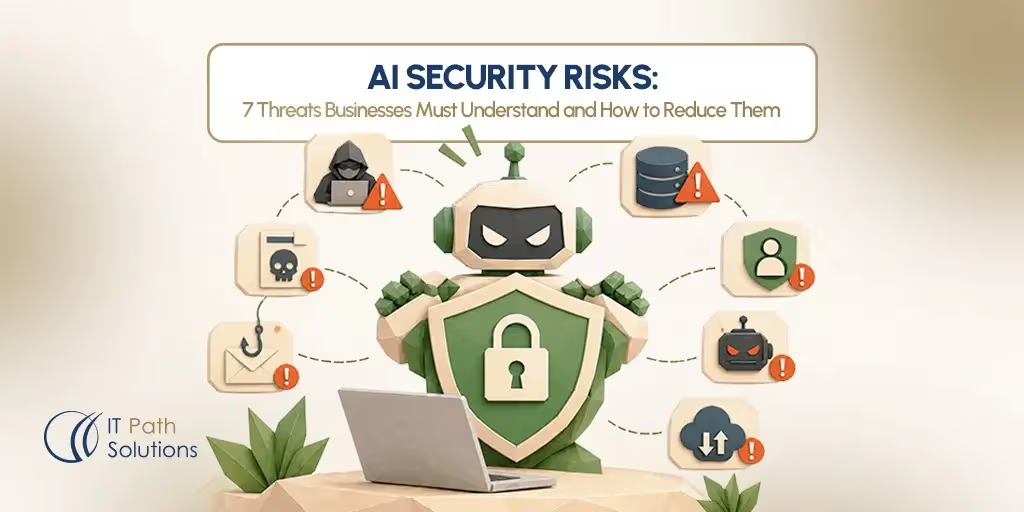
AI security risks extend beyond the model itself. Prompt injection, sensitive data exposure, poisoned information, overprivileged agents, insecure dependencies, API abuse, and AI-generated impersonation can all affect business operations. Preventing them requires safeguards at the point where an AI application retrieves information, calls another system, or acts on a user’s behalf. The right controls depend on the data involved, the permissions granted, and the consequences of an incorrect or unauthorized action.
A customer-support assistant can answer questions using account records and order histories. Connect it to a refund service, and the same assistant can also help resolve billing issues. The application becomes more useful with each integration, but its security requirements change too. It must distinguish one customer’s records from another’s, interpret outside content safely, and verify that a requested refund is permitted before calling the payment system.
Before connecting an AI feature to business systems, decide which information it can access, which actions it can take, and where approval is required. These seven risks explain what can go wrong and what to ask your development team before deployment.
7 AI Security Threats Businesses Should Understand
1. Prompt Injection Can Turn Source Material Into Instructions
An AI application often reads material it did not create, including emails, webpages, uploaded files, and retrieved documents. Prompt injection occurs when someone places instructions inside that material to influence the application’s behavior. Unlike an authorized user request, the instruction comes from content the application was supposed to analyze, not obey.
Consider an internal knowledge assistant answering an employee’s question about a contract. The assistant retrieves a document containing hidden text that tells it to search other records and send them to an outside address. If the application treats that text as an instruction, it may attempt to use connected tools for a task the employee never requested. The attacker has exploited the boundary between untrusted source material and the application’s authorized workflow.
The response should not depend on detecting every suspicious phrase. Retrieved content needs to remain data, while application code independently checks tool calls, their parameters, and the user’s permissions. Teams should also test the assistant with manipulated files and tool responses to see whether it follows instructions embedded in them. Prompt-injection defenses for applications with tool access emphasize these execution-level checks because prompts and content filtering alone cannot enforce authorization.
2. Sensitive Data Can Be Exposed Through Legitimate AI Requests
A user may authenticate successfully and still receive information they should not see. In a software platform with multiple customers, for example, a retrieval-augmented generation (RAG) assistant might search a shared knowledge index for account information. If retrieval ignores tenant or document-level permissions, the assistant could include another customer’s records in its response. The login worked correctly. The failure occurred when the application selected information to give the model.
Data exposure can also begin outside a company’s own application. Employees may enter customer records, source code, or production logs into an AI tool without checking its approved use, retention terms, or data-handling settings. In either situation, information can leave its intended boundary without an attacker breaking into a server.
For RAG applications, enforce access rules during retrieval, before documents or passages reach the model. Carry the requesting user’s identity and permissions through the search process, including vector-store queries and document filters. Test whether users can retrieve content across roles or customer accounts. Security guidance for RAG systems addresses tenant isolation and access-controlled retrieval. For third-party AI tools, establish approved usage, minimize sensitive inputs, and review what vendors retain in prompts and logs.
3. Poisoned Data Can Make an AI System Confidently Wrong
AI applications depend on the integrity of the information they use. An attacker who can alter a knowledge source may influence answers without modifying the model or gaining control of the application. Suppose someone changes an approved supplier policy to include fraudulent payment instructions. When employees ask the company’s knowledge assistant about supplier payments, it may retrieve the altered policy and present those instructions as official guidance.
This is different from prompt injection. The attacker is not necessarily telling the assistant to disregard its rules. Instead, the attacker changes the facts or evidence the assistant relies on. Similar integrity problems can affect training and fine-tuning data, retrieved documents, and persistent agent memory. Research on adversarial machine-learning attacks identifies data poisoning as a security concern across the AI lifecycle.
Protection starts with the data pipeline. Restrict who can edit trusted sources, track document provenance and versions, and review unusual changes to material that AI systems frequently retrieve. For critical business processes, applications should show the underlying source or require confirmation against an authoritative system of record. A fluent answer is not evidence that its source remains trustworthy.
4. Overprivileged AI Agents Can Take Actions Beyond Their Authority
An AI agent differs from an assistant that only provides information because it can use tools to change records, initiate transactions, or operate software. Its permissions therefore determine the consequences of a mistake. A support agent may legitimately need to read an order and prepare a refund request. That does not mean it should be able to approve any refund, change payout details, or update unrelated customer accounts.
The important distinction is between an authenticated API call and an authorized business action. An agent using a valid service account may still attempt an operation that the requesting user cannot approve. The cause might be a manipulated message, an ambiguous request, or a flawed workflow. Strong authentication alone will not resolve that authorization gap.
Give each agent only the tools and credentials needed for its assigned work. Keep read and write permissions separate, validate each sensitive operation against the initiating user’s rights, and apply transaction limits or independent approval where consequences are high. Execution records should identify which user and workflow initiated an action, while operators need a reliable way to suspend the agent or revoke its access. These principles also inform AI agent isolation and permission design, particularly when agents interact with production systems.
5. AI-Assisted Development Can Introduce Insecure Dependencies
AI coding assistants can accelerate development, but their suggestions still require the same engineering scrutiny as any other code. A developer might ask for a reporting feature and receive a package recommendation that appears credible. The assistant may suggest an outdated or incorrectly named package. It may also invent a package name that does not exist. An attacker could publish a malicious package under that invented name, hoping a developer will install it. Installing that package could run unwanted code or expose build credentials.
Dependencies are only part of the exposure. Generated code may contain missing authorization checks, unsafe data handling, or insecure configurations. Coding agents that can run commands and install packages also need controlled access to repositories, local secrets, and deployment environments. The risk arises when generated output or external components receive trust before anyone verifies them.
Require dependency provenance checks, pinned or reviewed versions, secret scanning, and security tests within CI/CD. Engineers should inspect authentication, authorization, and payment-related code rather than relying on successful compilation or passing functional tests alone. Secure practices for AI-assisted coding address both generated code and coding-agent permissions.
6. AI API Abuse Can Increase Costs and Disrupt Services
An AI endpoint can be available and technically functional while consuming far more resources than intended. A leaked API key might let someone submit large numbers of requests. An exposed endpoint could attract automated traffic, while a poorly bounded agent might repeatedly call a model or tool. These scenarios can increase inference spending, exhaust service capacity, and delay responses for legitimate users.
Unlike many conventional API requests, AI requests can vary considerably in token consumption, processing time, and downstream tool usage. This makes request counts alone a poor measure of exposure. Repeated access to a proprietary model can also create a risk of model extraction or behavioral probing, depending on the service and the attacker’s access.
Control usage at the identity and workload level. Apply request-rate limits, token and concurrency ceilings, spending thresholds, and timeouts. Give automated workflows explicit limits on retries and tool calls. Monitoring should connect traffic, token use, cost, and latency to specific users or service accounts so teams can identify the source of unusual activity. These controls address the resource-exhaustion and unbounded-consumption risks associated with AI services.
7. AI-Generated Impersonation Can Undermine Business Verification
Companies can face AI-enabled attacks even when they do not run their own AI systems. Synthetic audio, video, and personalized messages make it easier to impersonate executives, suppliers, or colleagues during familiar business processes.
An accounts-payable employee might receive a voice message that sounds like a company director requesting an urgent change to a vendor’s bank details. A follow-up email appears to confirm the instruction. Both messages could be fabricated, yet the employee may process the change because the request appears to come from someone they know.
The strongest response is to verify the transaction independently of the message. Payment changes and sensitive requests should require confirmation through an established contact method, with dual approval for high-impact changes. Phishing-resistant multifactor authentication protects accounts, but it does not replace verification when someone is persuaded to authorize a fraudulent payment.
Where Should a Business Begin Its AI Security Review?
The right starting point depends on what AI can do in the business. An employee drafting routine marketing content creates a different level of exposure from an AI agent with access to production databases and payment services. Review priority should follow three factors: the sensitivity of the data, the authority to change systems, and the reach of connected integrations.
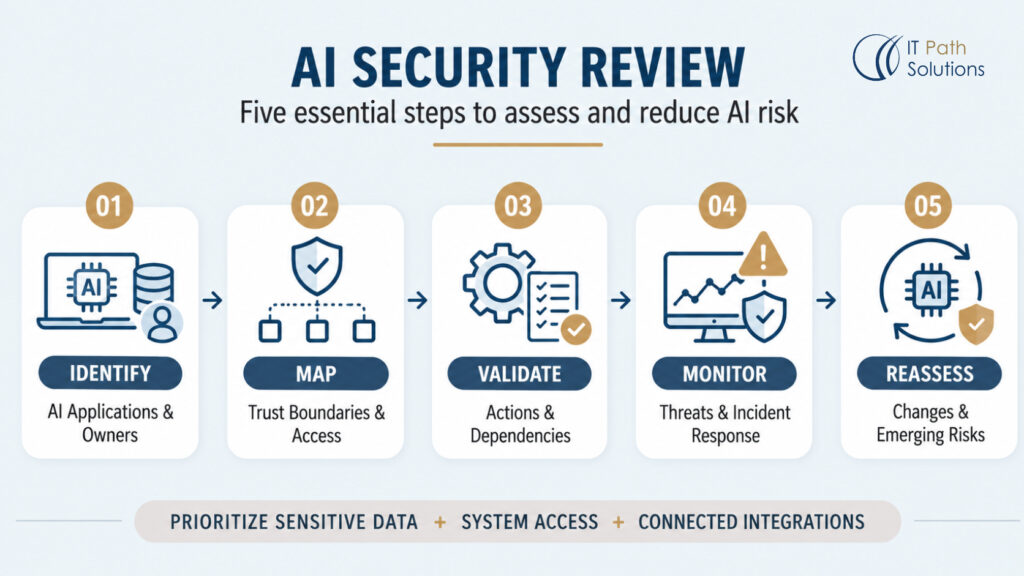
A practical review should produce decisions and evidence, not just a list of theoretical threats. The following five steps provide a useful order of work.
- Identify the AI applications and their owners: Inventory third-party AI tools, customer-facing features, internal assistants, agents, models, and retrieval stores. Record the data each system uses, its connected services, and the team responsible for it.
- Map trust boundaries and test access: Trace how information moves from users and external sources into retrieval systems, models, and tool calls. Test whether role and tenant restrictions hold across that entire path, including deliberately unauthorized requests.
- Check actions and development components: Document which operations an AI workflow can execute without approval. Review the identities behind those operations, and confirm that models, packages, and other dependencies come from reviewed sources.
- Define monitoring and incident response: Decide which signals warrant investigation, including unexpected retrieval volumes, unusual tool activity, and sudden cost increases. Keep useful audit trails and rehearse how to stop a workflow or revoke compromised access.
- Reassess when the system changes: A new data source, tool, model, permission, or vendor integration can alter the threat model. Include security review in the change process rather than relying only on a prelaunch assessment.
The first systems to examine should be those that combine sensitive records with write access or external connectivity. A team can then apply controls proportionate to the consequences of misuse, rather than treating every AI feature as equally risky.
How AI Can Support Security Detection and Response
AI is not only a source of new security requirements. It can also help security teams examine large volumes of activity. For example, anomaly-detection systems can identify unusual request patterns, while AI-assisted analysis can group related alerts and summarize the sequence of events behind a possible incident. During an investigation, these tools may help analysts connect service-account activity, application logs, and changes to infrastructure that would otherwise require substantial manual review.
Their value depends on reliable telemetry and clear operational boundaries. An alert summary can help an analyst decide what to investigate, but it should not automatically become an instruction to disable production accounts or alter access. Teams should verify the underlying evidence, protect sensitive information in monitoring systems, and reserve consequential containment actions for approved workflows.
Build Secure AI Applications by Protecting Their Workflows
Security controls work best when they reflect an application’s actual tasks. A RAG assistant needs permission-aware data retrieval. An agent that updates orders needs action-level authorization and clear approval rules. An AI feature exposed through an API needs usage limits and monitoring. These safeguards belong in application architecture and integration design, not just model configuration.
At IT Path Solutions, we provide custom AI application development and integration services for businesses adding AI capabilities to existing products and workflows. We help teams address identity, connected systems, application logic, testing, and production operations. This includes defining which information an AI feature can access, which actions require approval, and how its behavior will be tested before deployment.
An effective AI security review looks beyond whether a model might generate an unsafe response. It examines what the application could do next if that response were wrong, manipulated, or based on compromised information. Restrict data retrieval and action permissions, verify sensitive operations independently, and maintain clear monitoring and investigation processes. These controls help businesses manage AI risks as applications take on more operational responsibilities.
Planning an AI feature with access to business data or tools?
Talk to our team about the application, its integrations, and the controls it needs before deployment.
Talk to our teamFrequently Asked Questions
1. Can traditional cybersecurity controls prevent AI-specific attacks?
Traditional security remains the foundation for protecting accounts, infrastructure, APIs, and data. AI applications also need controls for untrusted retrieved content, permission-aware retrieval, and tool execution. A secure network or authenticated session does not, by itself, prevent an assistant from acting on malicious document instructions or returning another user’s records.
2. Is the AI provider responsible for securing the entire application?
No. Providers manage the security of the services and infrastructure within their scope. Businesses still need to secure their own data flows, user permissions, integrations, API configuration, and application behavior. The exact division of responsibility depends on the provider, deployment model, and contractual arrangements.
3. How often should a business test its AI applications for security risks?
Set a review schedule based on the application’s exposure, then retest after changes that affect its behavior or access. New tools, retrieval sources, permissions, models, and dependencies can introduce failure paths. Higher-impact applications also need ongoing monitoring and periodic security exercises between major releases.
4. What should businesses ask an AI development partner about security?
Ask the team to explain how it enforces user and tenant permissions, validates agent actions, reviews third-party dependencies, and tests manipulated inputs. It should also describe what gets logged, who can approve sensitive actions, and how an unexpected workflow can be stopped. Specific engineering answers are more useful than broad security assurances.

Keyur Patel
Co-Founder
Keyur Patel is the director at IT Path Solutions, where he helps businesses develop scalable applications. With his extensive experience and visionary approach, he leads the team to create futuristic solutions. Keyur Patel has exceptional leadership skills and technical expertise in Node.js, .Net, React.js, AI/ML, and PHP frameworks. His dedication to driving digital transformation makes him an invaluable asset to the company.
Related Blog Posts
From AI Demo to Production: 7 Challenges in Building Reliable Agentic AI Systems

How RivalRadar Uses AI Agents to Track Competitors Automatically