
Home
»Blog Insights
»Notion Client Portal: How to Build a Branded Client Experience Without Leaving Notion
Notion Client Portal: How to Build a Branded Client Experience Without Leaving Notion
Keyur Patel
September 8, 2026
19 min
Last Modified:
September 8, 2026
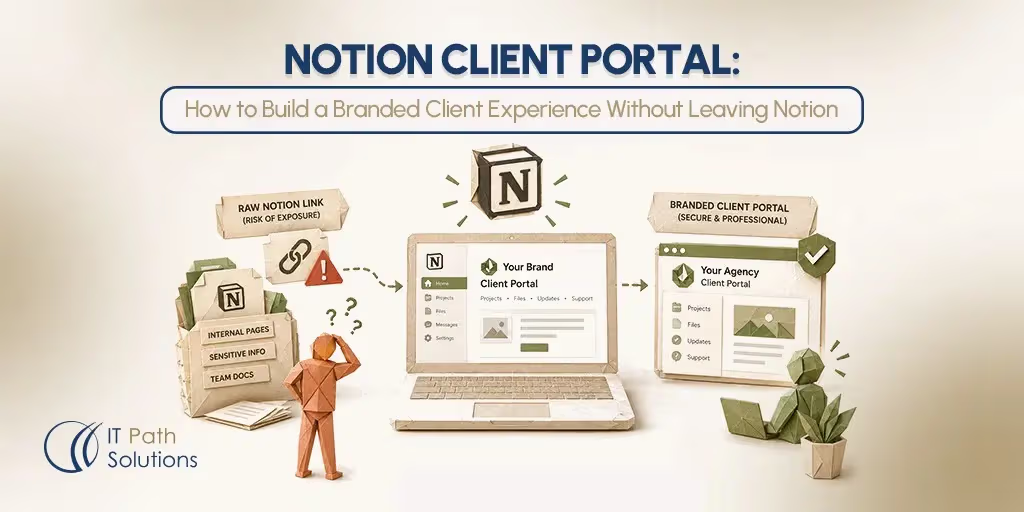
Your agency runs on Notion. Every project has a database, every SOP has its own page, and your team moves through the workspace without thinking twice about it. Then a client asks for portal access, and the cracks show. You either hand over a raw Notion link and hope they don’t stumble onto a page meant for internal eyes, or you spend an afternoon rebuilding permissions so nothing sensitive leaks through. Neither option feels like the experience you want a paying client to have.
This is the moment most agencies hit once their internal tool has to start doing double duty as a client-facing one. This post walks through what a notion client portal can realistically do out of the box, where it genuinely falls short, and what a custom-built portal layer adds once your agency has outgrown the basics.
Why Agencies Use Notion as Their Operational Hub
Before any portal conversation makes sense, it helps to look at why so many agencies build their entire operation inside Notion in the first place.
Most agencies use Notion databases to track every active client project. A single database can hold project status, deadlines, assigned team members, and linked deliverables, all filterable by client, stage, or owner. Instead of scattered spreadsheets and separate project boards, everything lives in one connected system that updates as the team works, not once a week when someone remembers to update a tracker.
Notion also becomes the documentation layer for the agency itself. Standard operating procedures, onboarding checklists, brand guidelines, and internal process notes usually end up as Notion pages too, because the same tool that tracks projects can also hold the instructions for running them. New hires read through a handful of linked pages instead of asking a colleague to explain the process from memory.
Then there is the collaboration layer. A comment on a task, an @mention pulling a teammate into a discussion, a shared page that two departments edit at once, this is how the daily back-and-forth of agency work happens without a separate chat tool for every conversation.
Put those three pieces together, project tracking, documentation, and collaboration, and it’s easy to see why Notion becomes the single source of truth for so many agencies. Tool sprawl drops because fewer systems means less duplicate data entry and fewer places for information to go stale. Visibility improves because anyone on the team can open one workspace and see where a project actually stands, rather than piecing it together from three different apps.
That strength is exactly what creates the tension this post is about. A system built for total internal visibility and flexible structure is not automatically ready to be handed to a client who should see a small, curated slice of it. The same qualities that make Notion excellent for your team, open navigation, linked databases, shared context, are what make it awkward as a client-facing tool without some adjustment.
Where Notion Succeeds and Falls Short as a Client Portal
Once an agency starts sharing Notion pages directly with clients, instead of just using Notion internally, a mixed picture appears fast. Some parts work well immediately. Others create friction that only shows up once you’re managing several clients at once.
| What Notion Does Well | Where Notion Falls Short |
|---|---|
| Project dashboards: status, milestones, and task tracking are easy to organize and easy for a client to scan. | Clients see more than they should: internal structures, linked databases, and workspace navigation can be exposed unintentionally. |
| Document sharing: contracts, deliverables, and reports stored in one place instead of scattered across email threads. | Limited branding and professional presentation: the experience looks like generic Notion rather than something built for your agency. |
| Collaboration features: comments and shared documentation keep feedback attached to the right context. | Advanced workflows: native Forms handle basic intake and can collect file uploads, but conditional logic is limited to Business and Enterprise, while structured approvals and payment workflows require additional tooling. |
| Easy setup and maintenance: a client can be looking at a shared page within minutes, no development work required. | Permission and security challenges: keeping access tight and avoiding accidental sharing gets harder as the client list grows. |
None of this means native Notion is a bad choice by default. For an agency working with one to five clients, sharing a well-organized page with careful permissions is often genuinely sufficient. The friction shows up at scale, once you’re managing enough clients that a single sharing mistake, or a client who can’t find what they need, starts costing real time.
The core issue is that Notion was built as an internal workspace tool first. Every capability that makes it fast for your team, deeply linked pages, database views nested inside other pages, a sidebar that shows the whole workspace structure, works against you the moment someone outside your organization is looking at the same interface. A client doesn’t need, and shouldn’t see, your entire operational structure just to check on their one project.
The Real Limitations of Using Notion as a Client Portal
1. Clients see more than they should.
This is usually not intentional. An agency shares a parent page, and the client clicks through a linked database view meant for internal reporting, landing on a page listing pricing notes for another client or an internal team retrospective. Because Notion’s sharing model is based on page hierarchy rather than strict content boundaries, one loose permission setting can expose an entire branch of the workspace.
2. Limited branding and presentation flexibility.
Notion Sites allow a custom domain as a paid add-on, along with a custom favicon, simplified navigation, and removal of the Notion watermark. That’s a real improvement over a raw shared page. But it stops short of full brand control. There’s no way to apply your own fonts, build a fully custom color palette across every element, write custom CSS, or design a login screen that looks like your product instead of Notion’s. Clients still recognize the underlying interface.
3. Missing client-facing workflows.
These gaps show up as soon as a project needs more than passive viewing. Notion’s native Forms now cover basic intake, with responses stored directly in a connected database and support for common property types and file uploads. However, conditional logic is limited to Business and Enterprise plans, and native Forms do not provide the kind of structured approval workflow or payment handling that many client-facing processes require. A custom portal can add those more advanced workflows while still writing the resulting data back to Notion.
4. Permission and security challenges.
These compound as the client list grows. Record-level database permissions, where each client only sees their own rows in a shared database, require a Business or Enterprise plan. Agencies on Free or Plus plans manage access through careful page-by-page sharing instead, which works fine for a handful of clients and gets fragile past that point. Sharing errors, a client accidentally seeing another client’s page, are a recurring complaint in practitioner reviews of Notion as a client-facing tool.
None of these limitations are deal breakers on their own. Together, they explain why agencies managing a growing client roster eventually look for something more structured than a shared page.
Is a Notion Client Portal Right for Your Business?
Before deciding whether a custom build makes sense, it’s worth running through a short, honest checklist. A custom Notion client portal is a real investment, and it only pays off if your agency has actually outgrown what a shared page can do.
Signs You’ve Outgrown Shared Notion Pages
- More than ten active clients, each expecting a similarly polished experience.
- Clients regularly emailing for status updates despite already having Notion access, which suggests they can’t easily find what they need inside the workspace.
- At least one accidental sharing incident, however minor, where a client saw something not meant for them.
- Noticeable time spent managing permissions and page structure rather than doing billable client work.
- Clients expressing confusion about navigating the shared pages, even after being walked through them.
If two or more of these sound familiar, a custom portal is worth serious consideration. If none of them do, native Notion is probably still doing its job.
A custom portal makes the most sense in a few specific situations: when your brand needs to show up consistently at every client touchpoint, not just in your marketing but in the day-to-day tool clients use to check on their project; when your workflows genuinely require structured approvals or feedback collection rather than an email thread; or when compliance or confidentiality requirements demand access controls tighter than page-level sharing can reliably provide.
Before committing to a build, answer a few questions honestly. What does a client currently handle by email that should instead happen inside the portal? Which Notion databases hold information a client should never see, and how confident are you that current permissions actually prevent that? Does the portal need to work well on a phone, given how often clients check status between meetings?
If your checklist score is low, the honest answer is that a DIY setup or a lightweight SaaS overlay, something like Softr or PortalWith, will likely serve you better than a custom build, at least for now. The rest of this post assumes you’ve genuinely outgrown that stage.
Benefits of a Custom Notion Client Portal
When a custom portal is the right move, the benefits show up in ways that are easy to notice within the first few weeks of use.
The most immediate difference is a more professional client experience. Instead of a generic Notion interface, clients log into a portal carrying your agency’s logo, color scheme, and custom domain. It’s a small detail that changes how the entire relationship feels from the client’s side.
Less email back-and-forth follows naturally. When clients can open a dashboard and see project status, next steps, and any outstanding approvals without asking, account managers spend less time writing status update emails and more time on the work those emails were describing.
Client visibility improves because the portal pulls from your existing Notion databases through the Notion API. There’s no duplicate data entry, and updates made by the internal team can be reflected in the client portal within moments, depending on the integration and caching setup.
Centralizing communication and documents in one place matters more than it sounds. Instead of a project file in Google Drive, feedback in an email thread, and a status update in Slack, everything a client needs sits on one portal page.
Over time, these pieces add up to improved client retention. Clear, well-structured reporting makes progress and value easy to verify at a glance. Proactive updates on results, risks, and decisions reduce the uncertainty that often drives clients to second-guess a renewal. Together, these habits build the kind of confidence that makes clients more likely to expand an engagement rather than shop around.
Which Agency Types Benefit Most From a Custom Portal
1. Marketing agencies
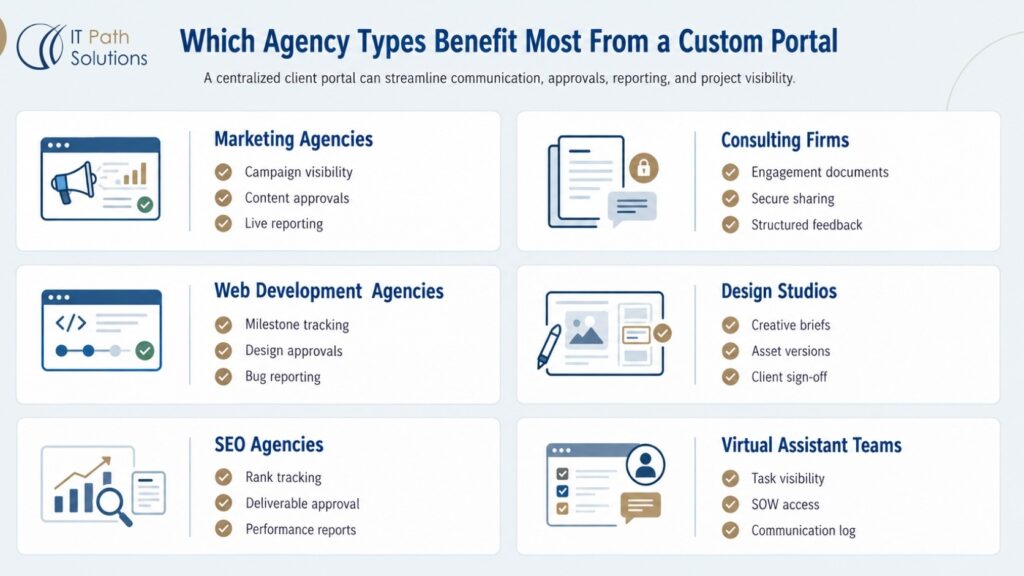
They typically use a custom Notion client portal for campaign status dashboards that clients can check without pinging the account team. Content approval workflows sit inside the same portal, so a client reviewing an ad copy draft can approve or request changes in one click, with the decision written straight back into the agency’s Notion database. Monthly reporting access rounds this out, giving clients an always-current view of performance instead of a static PDF that’s outdated within a week.
2. Consulting firms
Such firms lean on the portal for engagement documentation that needs to stay organized across a long project timeline. Confidential deliverable sharing matters more here than in most agency types, since consulting engagements often involve sensitive strategic material that should be visible only to specific stakeholders on the client side. Structured feedback collection replaces the scattered email chains that usually accompany a strategy deliverable, keeping every round of comments attached to the document it refers to.
3. Web development agencies
Agencies center the portal on project milestone tracking, since development work moves through clearly defined phases a client wants visibility into. Design review and approval happens inside the portal too, letting a client comment directly on a mockup or staging link and sign off without a separate tool. Bug report submission is a natural addition, giving clients a structured way to flag issues post-launch instead of an ad hoc email to whoever answers first.
4. Design studios
Studios use the portal primarily for creative brief storage and version-controlled asset delivery, so a client always knows which file is the current approved version. Client annotation and sign-off features let a client mark up a design directly and approve it formally, creating a clear record of what was agreed at each stage.
5. SEO agencies
Agencies build the portal around keyword ranking dashboards that update automatically as positions shift, saving the account team from manually compiling ranking reports each month. Deliverable sign-off and monthly report access round things out, giving clients a single place to review content deliverables and track progress against agreed targets over time.
6. Virtual assistant teams
Teams can use the portal for task assignment visibility, so a client can see exactly what’s being worked on without asking for a status check. SOW document access keeps the agreed scope of work easy to reference, and a communication log gives both sides a running record of requests and responses that doesn’t get lost in a Slack channel or a full inbox.
How IT Path Solutions Built a Custom Client Portal for a Consulting Firm
A consulting firm working with IT Path Solutions ran into a familiar version of the problem this post describes. The firm needed a secure client portal to streamline communication, document sharing, and project collaboration, all while holding to the strict confidentiality standards common in consulting engagements. Clients were receiving raw Notion links and reporting genuine confusion about where to find current project information, and internal and external content weren’t clearly separated, which created both a security concern and a poor client experience.
IT Path Solutions built a customized client portal that centralized project information, standardized status reporting, and enforced role-based access controls to meet the firm’s confidentiality requirements. Rather than replacing the firm’s existing Notion setup, the portal worked as a layer on top of it, giving clients a single, current view of deliverables, timelines, and decisions without exposing the underlying workspace.
The result reduced the need for recurring status update emails by giving clients real-time visibility into project progress. Onboarding steps became standardized across new engagements instead of varying by whoever set up the client relationship, and documents, timelines, and decisions lived in one place that both the team and the client could trust as current.
For the consulting firm, the change was less about adding a new tool and more about finally giving clients an experience that matched the quality of the work itself. The confidentiality controls that mattered most to a consulting engagement stayed intact throughout, while the day-to-day friction of managing access and answering status questions dropped noticeably for the internal team.
How IT Path Solutions Builds Custom Notion Client Portals
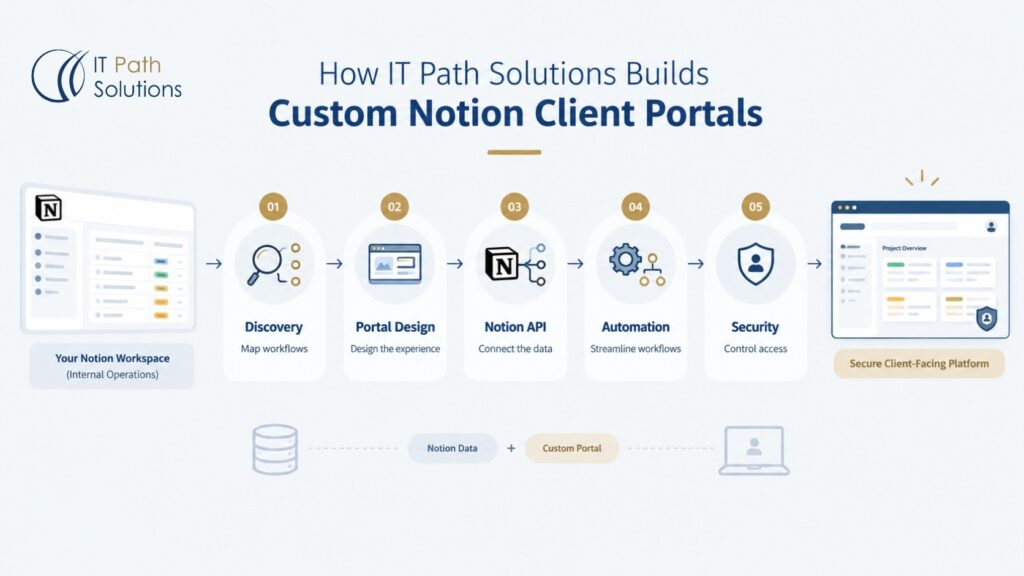
Building a custom Notion client portal is a structured process, not a single configuration change. Here’s what that process typically looks like.
Discovery and workflow mapping
This phase means identifying which Notion databases actually contain client-relevant data, mapping how clients currently communicate with the agency (mostly email, occasional Slack, the odd shared document), and defining exactly which of those workflows the portal needs to replace. Skipping this step is the most common reason a portal ends up mirroring internal complexity instead of simplifying things for the client.
Portal design and branding
This is where a client-facing design layer takes shape: a custom domain, a UI matching the agency’s brand colors and typography, and a navigation structure built around what a client actually needs to find, not the agency’s internal page hierarchy. Done well, clients experience this as the agency’s own product. They aren’t thinking about Notion at all.
Notion API integration
This connects that design layer to the agency’s existing Notion databases. Portal content is sourced from Notion, so when the internal team updates a project status or adds a deliverable, the client-facing portal can reflect those changes shortly afterward. There’s no duplicate entry, while the integration and caching layer can be designed to keep the portal closely aligned with the underlying Notion data.
Workflow automation
This phase configures the client-facing workflows that go beyond what native Notion can handle on its own, such as structured approval submissions, advanced request routing, feedback workflows, and automated notifications. Native Forms can already send responses into Notion databases and support basic intake, so the custom layer is most valuable where the process needs more logic, control, or a client experience that extends beyond a standard form.
Security and user management
Each client is scoped to see only the project data they are authorized to access, with access control enforced server-side in the portal layer rather than relying solely on the Notion interface. This keeps client-specific visibility separate from the agency’s internal workspace structure and allows the portal to apply access rules appropriate to each engagement. This foundation can be supported through tailored web and mobile app development services, ensuring the portal works securely across the devices and environments clients use.
Each phase builds on the one before it. A portal that skips discovery to jump straight to design usually needs expensive rework once real client workflows surface. Getting the sequence right the first time is a large part of what makes the resulting portal actually hold up in daily use. Where intelligent automation can improve those workflows, AI app development can also be incorporated at the right stage rather than added as an afterthought.
Turning Notion Into a Client-Facing Platform
Notion is an excellent operational backbone for agencies, and nothing in this post is meant to argue otherwise. For agencies managing a small number of straightforward client relationships, a well-organized shared page with careful permissions is often genuinely enough. The limitations only become real problems at scale, when client count grows, when workflows need structured approvals rather than email threads, and when brand consistency starts to matter at every client touchpoint.
A custom development approach built on the Notion API addresses exactly that gap. It preserves the internal workflow your team already relies on while giving clients a professional, branded experience that never exposes the underlying workspace.
IT Path Solutions builds custom Notion client portals for agencies at that stage: discovery and workflow mapping, portal design and branding, Notion API integration, workflow automation, and security and access controls, all developed around the agency’s existing Notion setup rather than replacing it.
If your team recognizes more than a couple of the signs described earlier in this post, more clients emailing for updates than the portal should require, permission management eating into billable time, it may be worth a conversation about what a custom build would actually look like for your specific workflows.
Frequently Asked Questions
- How do I create a client portal in Notion?
Build a dedicated workspace page for each client using linked database views that pull from your internal project, document, and task databases, then share the page with the client using “Can view” or “Can comment” permissions. On the Free plan, Notion allows up to 10 external guests, while paid plans offer unlimited guests. Separately, granular database permissions that let collaborators access only specific rows require the Business or Enterprise plan, regardless of how many clients you have. Third-party tools such as Softr, Sotion, or PortalWith can add custom branding and login functionality on top of this structure.
2. Can Notion be used as a client portal?
Yes, for agencies with simple needs such as document sharing, project status visibility, basic collaboration, and straightforward information intake. Notion’s native Forms can collect responses directly into connected databases, including file uploads, but more advanced capabilities can be limiting for client-facing workflows. Conditional logic is available only on Business and Enterprise plans, and agencies that need structured approvals, payment handling, a fully branded experience, or more controlled client-specific access may need a custom portal or additional tooling.
3. Does Notion have a white label option for client portals?
Not natively. Notion pages display Notion’s own interface regardless of custom icons or cover images added. Custom domain functionality is available through Notion Sites, but a fully white-labeled login experience with the agency’s logo, colors, and domain requires either a third-party overlay tool (Softr, Sotion, PortalWith) or a custom-developed portal front end built on the Notion API.
4. What is the difference between a client portal and project management software?
Project management software, tools like Asana, ClickUp, or Notion’s own database system, is designed for internal team workflows: task assignment, sprint planning, team-level reporting. A client portal is a client-facing interface designed to show clients only the information relevant to their engagement: project status, deliverables, documents, and communication. The distinction matters because exposing internal PM tools directly to clients typically results in information overload, visibility into sensitive pricing or internal notes, and a poor client experience.
5. What should a client portal include?
A client portal for agencies should include project status dashboards, a document and deliverable repository, a structured feedback or approval workflow, a communication thread, and clearly labeled next steps for the client. For agencies handling sensitive engagements, role-based access controls, audit logging, and confidential document handling matter too. The portal should contain only client-relevant information; internal task assignments, team notes, and pricing data should never be visible to portal users.
6. What is the best client portal for a marketing agency?
It depends on scale and workflow complexity. For small agencies with straightforward needs, native Notion with a third-party overlay (Softr or PortalWith) provides a fast, low-cost solution. For agencies managing ten or more active clients, requiring structured campaign approval workflows, or needing a fully branded experience with a custom domain, a purpose-built platform (Assembly, SuiteDash, or ManyRequests) or a custom-developed Notion API portal offers more reliable performance. IT Path Solutions builds custom Notion client portals for agencies that want to preserve their existing Notion workflows while delivering a professional client experience.

Keyur Patel
Co-Founder
Keyur Patel is the director at IT Path Solutions, where he helps businesses develop scalable applications. With his extensive experience and visionary approach, he leads the team to create futuristic solutions. Keyur Patel has exceptional leadership skills and technical expertise in Node.js, .Net, React.js, AI/ML, and PHP frameworks. His dedication to driving digital transformation makes him an invaluable asset to the company.
Related Blog Posts

Beyond Basic RAG: Building a More Reliable Retrieval Pipeline With Hybrid Search

LLM Inference on Limited GPU Memory: What We Learned From Layer-Wise Model Streaming
