
Home
»Blog Insights
»AI-Powered Inventory Replenishment for Shopify: Forecast Demand Before You Run Out of Stock
AI-Powered Inventory Replenishment for Shopify: Forecast Demand Before You Run Out of Stock
Keyur Patel
June 24, 2026
37 min
Last Modified:
June 24, 2026
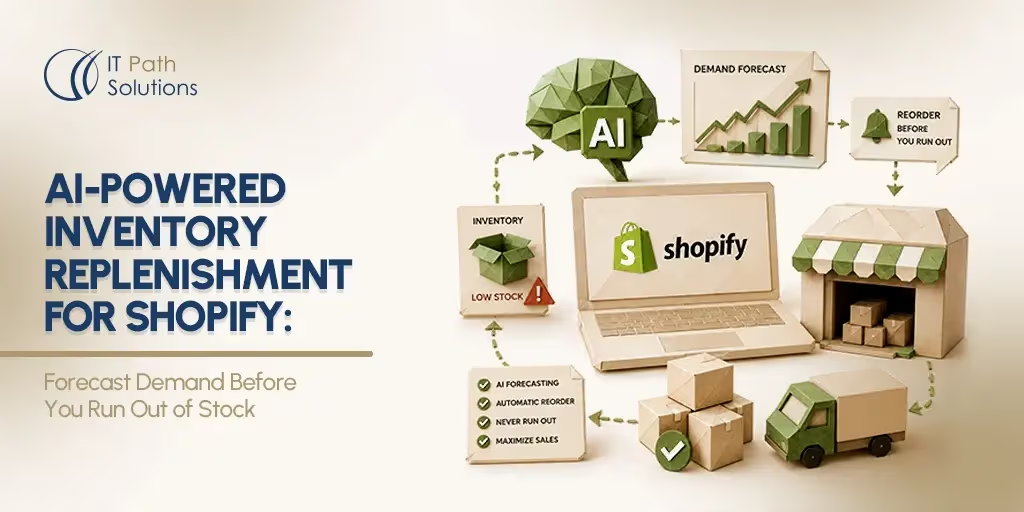
Shopify’s native alerts tell you when stock has already dropped. They do not predict when it will run out, account for supplier lead times, or adjust for seasonal demand shifts. Generic forecasting apps apply one-size-fits-all algorithms that cannot distinguish your December bestseller from a slow March SKU, or model a six-week overseas vendor lead time at the product level. This guide covers how a custom AI-powered demand forecasting model built on your store’s own data closes that gap.
Shopify tells you when you are out of stock. It does not tell you when you are about to be.
That distinction is the operational gap this guide addresses. Shopify’s native inventory alerts fire when stock drops to a preset quantity. By the time that alert arrives, the demand trend driving the depletion has been underway for days or weeks. If your supplier needs six weeks to fulfill a purchase order, a low-stock notification is not an early warning. It is confirmation that a stockout is already in progress.
AI inventory forecasting works differently. A model trained on your store’s own sales history predicts when each SKU will reach zero, factors in your supplier-specific lead times, and generates a reorder recommendation early enough for your team to act. The output is not a notification after the fact. It is a weekly replenishment plan your purchasing team can execute before stock runs short.
This guide explains how that process works at a technical level, where it fits within the Shopify solution landscape, and how to determine whether your store is ready for it.
Why Inventory Management Becomes Difficult as Shopify Stores Grow
Inventory planning at scale is not simply-more-of-the-same-work. It is qualitatively different. A merchant managing 20 SKUs from a single supplier can track reorder timing in a spreadsheet without much difficulty. But a merchant managing 150 SKUs from six suppliers, each with different lead times and demand patterns, is running an operation where the variables multiply faster than any manual process can track.
These problems exist even in well-run operations. The point is not that growing stores are managed poorly. Scale amplifies the consequences of every forecasting error, and the tools that worked at lower volume stop performing reliably as catalog complexity increases.
1. The Cost of Stockouts
When a customer arrives at a product page and finds it out of stock, the most common outcome is not that they wait for restock. They leave. For categories where alternatives are readily available, the likelihood of recovering that sale drops significantly once the customer has navigated away.
The customers most affected by stockouts are repeat buyers. Someone who has purchased from your store before arrives with existing trust and purchase intent. A stockout during that visit does not just lose one sale. It introduces friction into a relationship that otherwise had high lifetime value potential. Winning that customer back through paid marketing often costs more than the profit lost from the original sale.
The financial damage from stockouts also compounds through the customer acquisition side of the business. Every lost buyer who does not return must be replaced, which means more spend on advertising or promotions to sustain revenue. That cost is rarely attributed to the stockout event directly, but the connection is real.
2. The Hidden Cost of Overstocking
Overstocking is often treated as a safer error than a stockout, and in some contexts it is. But it carries its own financial drag that operations teams tend to underestimate until it accumulates.
Capital tied up in slow-moving inventory is capital that cannot be deployed elsewhere. For a store funding inventory through working capital or a line of credit, excess stock means higher carrying costs and reduced flexibility to purchase fast-moving items when the opportunity arises.
Storage and warehousing costs compound for slow-moving SKUs. If a product sits in a fulfillment warehouse for six months instead of two, the storage fees for that product may meaningfully erode the gross margin on the eventual sale. For products with shelf lives or trend sensitivity, the situation is worse. A fashion SKU that sits unsold through a season may need to be discounted to move at all, converting a profitable item into a margin-negative clearance event.
Why Seasonal Demand Makes Forecasting Harder
The most common failure mode for growing Shopify stores is not bad forecasting on stable products. It is bad forecasting during demand transitions. Holiday windows, promotional events, and product lifecycle changes create periods where historical averages are not useful baselines.
A product that sells steadily from January through October might concentrate the majority of its annual volume into a six-week window from mid-November through December. A product that drives strong Q4 revenue may be largely irrelevant in March.
Tools that set reorder levels based only on average monthly sales often make mistakes around peak seasons. They tend to keep stock levels too low before demand increases and too high after demand drops. Both can create problems, but running out of stock before a busy season is usually the bigger risk.
Promotional periods add a second layer of complexity because they require modeling demand uplift on top of the seasonal baseline. A promotional event does not follow the same demand curve as a standard week in the same month. Without a system that can distinguish between organic seasonal trends and promotion-driven spikes, both get averaged together and the next forecast is distorted.
Product lifecycle changes create a third category of forecasting challenge. When a new SKU gains traction or an established product begins declining, the historical pattern is no longer the right model for the future. A forecasting system that cannot detect these shifts will continue generating recommendations based on data that no longer reflects how the product actually sells.
Where Shopify’s Native Inventory Alerts Fall Short
Shopify’s built-in inventory tools are designed for a specific use case: tracking what you have and notifying you when a product reaches a predefined quantity. For merchants with simple, stable-demand catalogs at early stages of growth, these tools are appropriate. The limitations described below are specific to stores with seasonal products, multiple suppliers, and SKU catalogs in the 50 to 200 range and beyond.
1. Threshold-Based Alerts Are Reactive
Shopify’s low-stock alerts trigger when a product’s inventory quantity falls to a level you set in advance. At that moment, an alert fires. There is no mechanism within the native platform that projects when that level will be reached, or what the demand trend looked like in the days or weeks before it was triggered.
The fundamental problem is that by the time the alert fires, the depletion trend is already well underway. If you sell an average of 15 units per day of a high-velocity SKU and your supplier needs four weeks to process and ship a purchase order, the threshold alert is not an early warning. It is confirmation that a stockout is coming and there is not enough time to prevent it.
For low-velocity, stable-demand products, threshold-based alerts work adequately because the response window is wide. For seasonal or fast-moving SKUs, the model breaks down precisely when the operational stakes are highest.
2. No Demand Forecasting Capabilities
Shopify’s inventory reports are historical documents. They show what has been sold, in what quantities, over what time periods. They do not generate projections of what will be sold in the next 30, 60, or 90 days.
This distinction matters because inventory purchasing decisions are forward-looking by definition. A merchant placing a purchase order today is committing capital based on a prediction about future demand. Shopify’s native reports do not support that prediction. They describe what has already happened.
Merchants who want to forecast forward demand on a Shopify store must build that capability on top of Shopify’s data, either through a third-party app or a custom-built system connected to Shopify’s API.
Spend Less Time Managing Inventory and More Time Growing
Every store has different products, suppliers, lead times, and purchasing processes. Generic inventory tools often force merchants to adapt their operations to software limitations.
IT Path Solutions develops custom Shopify inventory solutions designed around your existing workflows, helping your team manage purchasing, replenishment, supplier coordination, and inventory planning more efficiently.
Let's Build a Solution That Fits Your Store3. No Supplier Lead Time Intelligence
This is the most operationally dangerous limitation in Shopify’s native toolset, and it receives almost no attention in standard discussions of Shopify inventory management.
Shopify’s alerts do not know anything about your suppliers. They do not know that one vendor ships within 10 days while another requires six weeks from a single overseas factory. They cannot factor that information into a reorder recommendation because there is no mechanism to store or use it.
The consequence is that a merchant using only Shopify’s native tools will apply a single threshold across all products regardless of which supplier fulfills them. For suppliers with short lead times, this produces excess safety stock. For suppliers with long lead times, particularly overseas vendors with 40 to 45-day windows, it produces stockouts. The threshold that protects you against a domestic supplier cannot protect you against the one that needs six weeks to ship.
4. No Seasonality Analysis
Shopify calculates reorder thresholds without adjusting for the time of year. The platform does not know that November is categorically different from June for your specific product catalog, or that Q1 represents a predictable demand slowdown that should reduce safety stock requirements.
This uniform treatment of time produces predictable errors at both ends of the seasonal curve. Thresholds set during slower months will be too low entering peak season. Thresholds maintained through a peak period will generate unnecessary purchase orders once demand normalizes. Across a catalog with meaningful seasonal variation, the cumulative cost of these mismatches is substantial.
The Inventory Planning Gap for Mid-Sized Shopify Businesses
The solution landscape for Shopify inventory management splits into two tiers that leave the most commercially relevant merchant segment without a good fit.
At the lower end, basic Shopify apps handle threshold-based reordering and purchase order management. At the upper end, enterprise systems offer sophisticated demand planning integrated into full ERP environments. Neither tier serves the mid-scale Shopify merchant well, and the reasons differ by tier.
1. Enterprise Systems Are Often Overkill
ERP-integrated demand planning tools are designed for multi-warehouse, multi-currency, multi-entity operations. The forecasting functionality within platforms like NetSuite is real and capable. But it exists inside a system architecture built for organizations with dedicated IT teams, implementation consultants, and operational processes that require months to configure.
For a Shopify-native brand doing $1M to $5M in annual revenue, the overhead of enterprise software adoption is disproportionate to the problem being solved. Implementation costs alone often exceed what the forecasting capability would return in the first year. Ongoing licensing, training, and maintenance add recurring costs that the business has not yet grown into. The forecasting function exists in these platforms, but accessing it requires accepting significant surrounding complexity that a focused Shopify operation does not need.
2. Generic Forecasting Apps Have Limitations
Off-the-shelf Shopify forecasting apps, including Inventory Planner by Sage and Prediko, make forecasting more accessible than building from scratch. Both are legitimate tools with genuine utility for the stores they are designed to serve.
The limitation is in how their models are built. Generic forecasting apps use algorithms calibrated to perform reasonably well across a broad range of Shopify stores. They are not trained on your store’s specific data in a way that captures your particular seasonal profile, your supplier-specific lead time structure, or your product category’s unique demand behavior.
Here is where the gap becomes concrete. A store’s bestselling SKU in December may be almost entirely irrelevant in March. A generic algorithm that smooths demand across the full year will neither capture the Q4 concentration accurately nor recognize that March orders for that SKU should be minimal.
Separately, if a specific SKU is sourced from a single overseas vendor with a six-week lead time, a generic app cannot model that constraint at the SKU level. It applies a one-size-fits-all replenishment logic that does not account for the fact that a late reorder on that product means six weeks of stockout, not one.
For stores with standard demand patterns, that generality is acceptable. For stores where demand is concentrated in narrow seasonal windows, where different product lines behave completely differently across the calendar, or where vendor lead times vary significantly between suppliers, generic algorithms produce recommendations that are accurate on average but wrong for the specific products and timing decisions that matter most.
Why Niche Product Businesses Need Customized Forecasting
A store selling specialty outdoor apparel has fundamentally different demand physics than a store selling commodity household consumables. Seasonal concentration, promotional response patterns, customer repeat rates, and purchase cadence all differ. No off-the-shelf algorithm is optimized for both simultaneously.
When a generic model encounters a niche product category with unusual buying patterns, its forecasts degrade because the historical patterns informing its predictions do not match the input data it receives. The model is looking for signals it was trained to find in a population that does not include your store.
This is the specific technical case for customized forecasting. It is not that generic tools are built poorly. It is that they are built for a center of the distribution that may not include your store’s demand behaviour.
It is also worth being direct about the opposite case. For stores with fewer than 50 SKUs, stable year-round demand, and a single supplier with a consistent lead time, an off-the-shelf forecasting app is likely the right choice. A custom system would not deliver enough accuracy improvement to justify the investment under those conditions.
How AI-Powered Inventory Replenishment Works
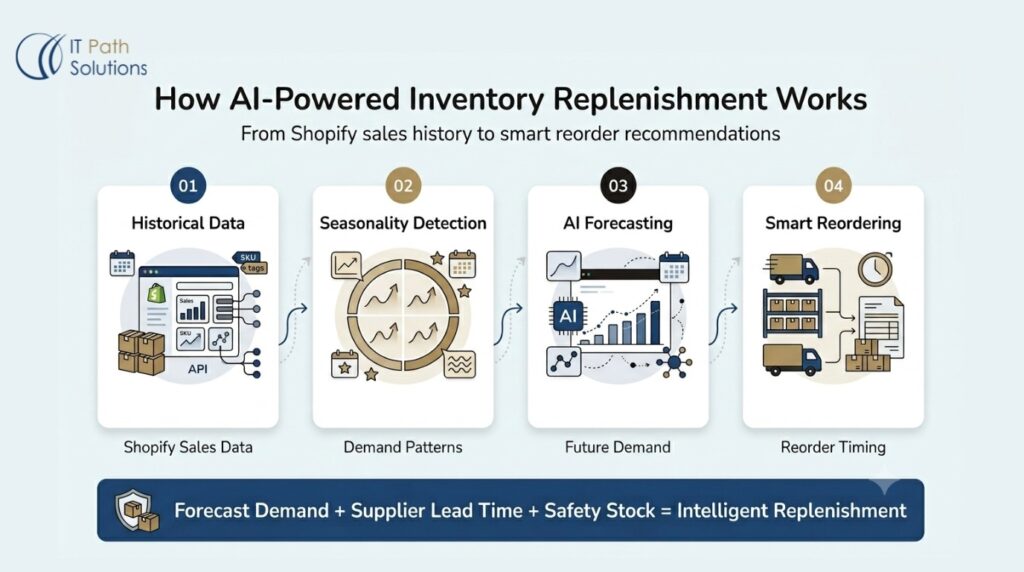
AI inventory forecasting is not a black box. It is a describable process with specific inputs, specific model types, and specific outputs that an operations team can evaluate and act on. Understanding the mechanics is necessary for evaluating whether a forecasting system is producing reliable recommendations.
1. Collecting Historical Shopify Sales Data
The starting point for any demand forecasting system is historical order data. For seasonal pattern detection to work reliably, the model needs at least 12 months of SKU-level order history. For patterns that span multiple years, 24 months produces meaningfully more stable seasonal signals.
That data is accessed via Shopify’s Admin API, which exposes order history, inventory quantities by location, product and variant details, and fulfilment records. The API connection pulls structured data directly into a forecasting pipeline without manual CSV exports.
Data quality at this stage determines forecast quality downstream. Raw Shopify order data commonly contains anomalies that must be handled before modelling: cancelled orders, test transactions, bulk orders from wholesale buyers that do not reflect typical consumer demand, and periods of artificial stockout where inventory reached zero and suppressed recorded sales independently of actual demand. Cleaning and structuring this data is not an optional step. A model trained on uncleaned data will learn the noise as signal and produce forecasts that reflect it.
2. Identifying Seasonal Demand Patterns
Once cleaned data is structured into a time series at the SKU level, time-series decomposition separates that series into its component parts: trend, seasonality, and residual variation. Trend reflects the underlying direction of demand over time. Seasonality captures the repeating calendar-based pattern. Residual captures what is left after both are accounted for.
For a typical mid-scale Shopify store, this decomposition produces usable seasonal indices for each SKU or product category. A product that historically concentrates the majority of its annual volume in Q4 will generate a Q4 seasonal index that reflects that concentration. The model then uses that index to weight its demand projections for the coming quarter accordingly, rather than applying a flat average.
Holiday peaks and promotional periods require separate treatment. If these events are folded into the seasonal baseline, the underlying seasonal pattern gets distorted. Standard practice is to flag these periods as special events and model their demand uplift separately, so the baseline remains clean and representative of organic demand.
3. Forecasting Future Demand Using Time-Series Models
With seasonal patterns identified and the demand series prepared, the model generates forward projections. The output is specific: a projected sales volume, by SKU, for a defined forward window. If the forecast horizon is 30 days, the model outputs an estimated unit count for each product over that period.
Common model families used for this task include ARIMA variants, exponential smoothing methods such as Holt-Winters, and gradient boosting approaches that can incorporate external features alongside the historical time series.
Model selection depends on the demand characteristics of the specific store’s catalog. Products with stable, recurring seasonal patterns tend to respond well to classical time-series methods. Products with more irregular demand may benefit from models that can incorporate additional explanatory signals.
Forecast horizon is matched to operational need. If a supplier requires a six-week lead time, a 30-day forecast is insufficient to drive replenishment decisions for products sourced from that vendor. The horizon must cover at least the longest supplier lead time in the catalog to produce actionable recommendations.
4. Incorporating Supplier Lead Times
This is the element of AI inventory forecasting that receives the least attention in general discussions of the topic, and it is operationally the most important.
A demand forecast tells you how much you will need. It does not tell you when to order. To determine when to order, the model needs to know how long it will take to receive stock after a purchase order is placed.
In a custom-built system, supplier lead times are entered as model inputs at the vendor level. A domestic accessories supplier might have a 10-day lead time. An overseas outerwear manufacturer might require six weeks. These values are used to calculate the reorder point for each product that flows through that supplier.
The reorder point formula is: projected demand during the lead time window plus safety stock. Safety stock is the buffer quantity required to cover demand variability during the replenishment period. A product with high demand variability needs more safety stock than a stable-demand product with the same average velocity, because the downside risk of demand exceeding the forecast during the lead time window is larger.
When this calculation runs at the SKU level across all supplier relationships, it produces a reorder date for each product that accounts for both what you will need and how long it will take to get it. That is the gap that threshold-based alerts cannot close.
Forecasting accuracy is not uniform across all products and conditions. Stores with fewer than 12 months of data will see lower initial model accuracy because seasonal patterns cannot be reliably identified from a partial year. Products with highly irregular or unpredictable demand are also more difficult to forecast accurately. These are known limitations of the approach, not edge cases.
Is AI Inventory Forecasting Right for Your Shopify Store?
Not every Shopify merchant needs a custom forecasting system. Making that case honestly is important because recommending a solution to a store that does not need it serves no one. The questions below are designed to help you evaluate fit accurately, not to steer you toward a specific outcome.
1. Signs You Have Outgrown Basic Inventory Alerts
The strongest indicator that your current tools are no longer adequate is repeated stockouts on products you believed were sufficiently stocked. If you regularly enter a peak season with what seems like enough inventory based on prior thresholds and still run out before demand peaks, the threshold-setting process is not capturing the actual demand pattern.
Other indicators include manually adjusting reorder points in spreadsheets each month based on your own read of the season, managing suppliers with lead times that differ by more than two weeks while applying a single threshold across all of them, and spending significant operations time each week on inventory planning tasks that are not producing proportional accuracy improvements.
Carrying more than 50 active SKUs is not automatically a threshold for needing custom forecasting, but it is a scale at which manual processes and generic tools begin showing consistent gaps, particularly when those SKUs are sourced from multiple suppliers with different lead times.
2. When Forecasting Delivers the Biggest Return
Custom AI inventory forecasting delivers the highest return in three conditions.
First, when demand is strongly seasonal with a significant gap between peak and off-peak velocity. The wider that gap, the more valuable it is to have a forward projection rather than an average.
Second, when supplier lead times are long. A six-week lead time from an overseas vendor means that a wrong reorder decision today affects stock availability a month and a half from now, and the cost of that error is correspondingly high. Third, when gross margin per unit is high. A stockout on a high-margin product represents more lost contribution per missed sale than the same event on a low-margin commodity item.
Questions to Ask Before Implementing a Forecasting System
Before committing to a custom forecasting build, four questions are worth answering honestly.
- Do you have at least 12 months of clean, SKU-level order history in your Shopify store?
If significant data gaps exist, the model’s initial accuracy will be limited until it accumulates more data through ongoing operation.
- Do you know the lead time for each of your major suppliers, and is that information consistently tracked somewhere your team can reference?
Supplier lead time data is a required model input. If it does not exist in a structured form, it needs to be collected before modeling can produce accurate reorder timing.
- Does your operations team have a process for acting on weekly replenishment recommendations?
A forecast that generates outputs no one has time to review will not produce results. The system requires a human owner in the purchasing process.
- Are you prepared to invest in initial model setup and treat the first full demand cycle as a calibration period?
The model will produce directionally useful forecasts from the start, but per-SKU precision improves meaningfully after the system has observed one complete seasonal cycle.
If your store has fewer than 50 SKUs, experiences relatively stable demand throughout the year, and sources from a single supplier with a consistent lead time, an off-the-shelf forecasting app is almost certainly the better choice. The accuracy improvement from a custom model does not justify the development investment under those conditions.
Building a Custom Shopify Demand Forecasting System
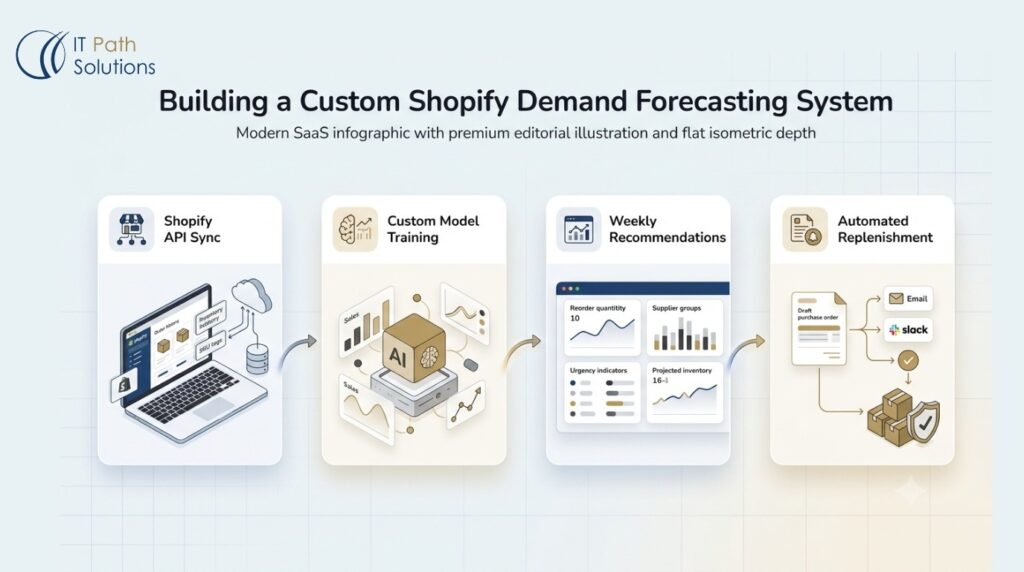
Custom-built forecasting systems are not the right choice for every Shopify store. But for merchants where off-the-shelf apps have demonstrably failed to capture the complexity of their demand patterns, a system built specifically for their catalog and supplier relationships can deliver accuracy that generic tools cannot match.
This is not a SaaS subscription applied to your store’s data. The model is trained on your store’s own sales history, calibrated to your seasonal patterns, and configured around your specific supplier lead times. The output belongs to your operation, not to a platform serving thousands of merchants simultaneously.
1. Connecting Directly to Shopify APIs
A custom forecasting system connects to Shopify through the Admin API, which returns order history, inventory levels by location, product and variant metadata, and fulfillment data. Establishing this connection creates a data pipeline that keeps the forecasting model synchronized with live store data without requiring manual exports.
The pipeline runs on a defined schedule, typically nightly or weekly depending on the forecast refresh frequency required. This means the model’s inputs are always current, and recommendations generated from those inputs reflect actual inventory positions and recent sales patterns.
2. Training Models on Your Store’s Actual Data
The technical distinction between a custom-trained model and a generic off-the-shelf algorithm is not one of sophistication. Both can use comparable modelling techniques. The distinction is in what data the model has learned from.
A generic forecasting app is trained on patterns observed across many Shopify stores and calibrated to perform well on average across that population. A custom model is trained exclusively on your store’s SKU history, capturing your seasonal profiles, your product-specific demand shapes, and your promotional response patterns.
For niche products, this difference is significant. If your store’s top-selling Q4 SKU follows a demand curve that looks nothing like the average Shopify store’s Q4 pattern, a model trained on your data will capture that curve. A model calibrated to average patterns will not.
Initial training usually requires a couple months of data for seasonal modelling to work reliably. Stores with shorter histories can still use the system, but seasonal components will be less confident until the model has observed at least one full demand cycle.
3. Generating Weekly Inventory Recommendations
The output of the forecasting system is a weekly replenishment recommendation. For each SKU where the projected demand during the lead time window plus required safety stock exceeds current inventory, the system generates a recommendation that includes the product identifier, the suggested reorder quantity, and the date by which the order should be placed to avoid a stockout.
These recommendations are organized by supplier, so the purchasing team receives a consolidated view of what needs to be ordered from each vendor. Urgency is tiered: items requiring immediate action appear separately from items with a two-week window, which appear separately from items that are adequately stocked and require only monitoring.
The format is designed for operations staff without a data science background. The team does not need to understand how the model works to act on its outputs. They need to know what to order, how much, and by when.
4. Creating Automated Replenishment Workflows
Recommendations can feed into automated workflows that reduce the gap between a forecast output and a purchasing action. Depending on the integrations in place, this can include draft purchase orders populated with the supplier name, SKU, and recommended quantity, or email and Slack notifications to the purchasing team when an item moves into the immediate-action tier.
Human approval remains part of the process. The system generates a draft and a team member reviews and approves it before submission. This preserves operational control while eliminating the manual step of translating a forecast into a purchase order from scratch.
Better Inventory Decisions Start With Better Visibility
When inventory information is scattered across reports, spreadsheets, and third-party tools, purchasing decisions become slower and riskier.
We help Shopify merchants create centralized inventory systems that provide clear visibility into products, suppliers, stock levels, and purchasing priorities.
Let's Discuss Your Inventory ChallengesOutputs Your Team Can Actually Use
A forecasting system that produces accurate predictions but delivers them in a format the operations team cannot use effectively has not solved the problem. The usability of the output matters as much as the accuracy of the model behind it.
1. Weekly Replenishment Reports
The core deliverable is a weekly report listing every SKU requiring attention in the coming ordering window. Each line includes the recommended reorder quantity, the suggested order date, the supplier the order should go to, and an urgency classification.
Organizing by supplier rather than by product category reflects how purchasing decisions actually get made. A buyer placing a weekly order with a specific vendor wants to see all items from that supplier consolidated in one view, not distributed across a category-organized report that requires cross-referencing.
The urgency tier reduces the cognitive load on the purchasing team. Not every recommendation requires immediate action. Distinguishing between items that need to be ordered today, items that need attention within two weeks, and items that are adequately covered ensures attention goes where it is most needed first.
2. Automated Google Sheets Forecasting Dashboards
A spreadsheet-based dashboard connected to the forecasting system allows operations staff to explore the data behind the weekly recommendations. The dashboard refreshes automatically when new forecast data is generated, so team members are always working from current information rather than a static snapshot.
Filters allow the team to slice the data by product category, supplier, forecast horizon, or urgency level. A buyer preparing for a planning conversation with a specific vendor can filter to that vendor’s products and see projected demand, current stock levels, and recommended order quantities in a single view.
The advantage of a spreadsheet-based delivery format is accessibility. No proprietary software is required, and any team member with access to the shared document can work with the data or export it for use in other planning documents.
3. Inventory Planning Reports
Monthly and quarterly planning cycles benefit from a formatted report that presents the forecast in a structure suitable for sharing across finance, operations, and purchasing teams. A report includes demand trend charts at the category level, a seasonal outlook for the coming period, and safety stock recommendations by supplier tier.
This format serves a different audience than the weekly replenishment report. Where the weekly report drives tactical purchasing decisions, the quarterly planning report supports budget discussions, cash flow projections, and supplier relationship conversations that require a longer-horizon view.
4. Draft Purchase Orders Generated Automatically
When a replenishment recommendation moves into the immediate-action tier, the system can generate a pre-populated purchase order draft. The draft includes the supplier name, each SKU being ordered, the recommended quantity, and the requested ship date calculated from the order date and the supplier’s lead time.
The team member responsible for purchasing reviews the draft, makes any adjustments based on information the model does not have access to, such as a supplier communication about a production delay or an upcoming promotional event that will affect demand, and approves it for submission. The manual work of creating the purchase order from scratch is eliminated. The human judgment that catches model errors remains in the process.
Representative Scenario: Seasonal Inventory Planning for a Niche Shopify Store
When IT Path Solutions designs custom AI inventory forecasting systems for Shopify merchants, the goal is not simply to predict future sales. The objective is to help operations teams make better purchasing decisions by combining historical sales patterns, seasonality, supplier lead times, inventory levels, and SKU-level demand signals into a forecasting workflow tailored to their business.
The following scenario demonstrates how a custom forecasting implementation can be structured for a seasonal ecommerce operation. The forecasting logic, inventory planning considerations, and operational workflows are based on the types of challenges these systems are built to address.
The Challenge
A Shopify store selling specialty outdoor apparel carries approximately 120 active SKUs across hiking, camping, and cold-weather product lines. Demand is heavily concentrated in two seasonal windows: spring from March through May, and fall from September through November. Outside those periods, sales velocity drops substantially across most of the catalog.
The store sources from five suppliers. Lead times range from 12 days for domestic accessories to 42 days for technical outerwear manufactured by a single overseas vendor. The purchasing team had been managing replenishment through a combination of Shopify’s native alerts and a manually maintained spreadsheet updated weekly by the operations manager.
The recurring failure mode was predictable. Entering the fall season, the team would underestimate demand for key outerwear SKUs, place orders too late given the six-week overseas lead time, and run out of stock during the peak selling weeks. The same top-selling SKUs that drove Q4 revenue were largely irrelevant by February, but the spreadsheet was not adjusting thresholds to reflect that seasonal shift. End-of-season overstock on cold-weather variants then required markdown pricing to clear, eroding margin on products that had already been profitable just weeks earlier.
The AI Forecasting Approach
The forecasting system was built by connecting directly to the store’s Shopify Admin API and pulling 24 months of SKU-level order history. The data cleaning phase identified two categories of anomalies requiring handling before modelling: a promotional event in the prior year that produced an atypical demand spike, and a stockout period for a high-velocity SKU that had suppressed recorded sales below actual demand during that window.
With cleaned data, seasonal decomposition identified the demand curves for each product category. Technical outerwear showed a pronounced fall concentration with a secondary spring peak. Accessories showed a flatter, more distributed pattern across the year. These distinct curves were modelled separately rather than averaged together at the category level.
Supplier lead times were entered at the vendor level. The 42-day lead time for the overseas outerwear supplier meant that reorder dates for those SKUs needed to be calculated significantly earlier relative to peak season start than the domestic accessories supplier. The model generated SKU-level demand projections for the 90 days preceding each seasonal peak, with reorder dates calculated backwards from the projected peak start date by the relevant supplier lead time.
The Outcome
The purchasing team received weekly replenishment reports organized by supplier, with urgency tiers clearly distinguishing between orders requiring same-week action and those with a two-week planning window. In the first full season following deployment, stockouts on peak-season outerwear SKUs occurred only for items affected by a supplier-side production delay that was outside the model’s visibility.
End-of-season overstock on slow-moving colour variants was reduced because the model generated per-variant forecasts rather than category-level aggregates, making it possible to right-size orders at the SKU level.
It is important to acknowledge what the first full cycle looked like from an accuracy standpoint. The model’s seasonal projections were directionally correct but not precise at the SKU level for products with short or inconsistent historical records. The purchasing team treated the recommendations as informed guidance and adjusted quantities based on their own knowledge of specific products.
After the first full demand cycle, those SKU-level histories were richer and the model’s next round of forecasts benefited from the additional data.
Key Benefits of Custom AI Inventory Forecasting
Each benefit below connects to a specific mechanism described in the preceding sections. These are operational outcomes that follow from specific system capabilities. They are realized with higher confidence after the model has completed one full demand cycle. Early-stage model outputs should be treated as informed guidance, not certainties.
1. Reduce Stockouts Before They Happen
The mechanism is lead time-aware forward projection. Because the model calculates when each SKU will reach zero inventory and compares that date to when a replenishment order would arrive given the supplier’s lead time, it can identify the gap before it becomes a stockout. The output is an early reorder recommendation timed to the specific vendor’s fulfilment window, not a generic threshold alert.
2. Improve Cash Flow Management
Right-sized inventory ordering follows directly from accurate demand forecasting. When the model’s quantity recommendations are calibrated to actual projected demand rather than conservative estimates or manual approximations, the gap between what is ordered and what is needed narrows. Less capital sits in slow-moving stock, and the working capital that would otherwise be tied up in excess inventory remains available for faster-moving priorities.
3. Optimize Purchase Order Timing
Vendor-specific lead times as model inputs mean that purchase order timing is calculated per supplier rather than assumed from a single generic threshold. An order for a product sourced from an overseas manufacturer with a six-week lead time goes out well before the projected stockout date. An order for a product sourced from a domestic supplier with a 10-day lead time can go out considerably later. This differentiation is not possible with a single threshold applied across all products and all suppliers.
4. Increase Forecast Accuracy Over Generic Tools
A model trained on your store’s 12-month demand history will take couple of months to learn your seasonal curves. promotional response patterns, and product-specific demand shapes. A generic algorithm has learned what is statistically common across many stores. For niche products, concentrated seasonal demand, or unusual buying cycles, the gap between these two sources of training data translates directly into forecast accuracy at the SKU level.
5. Scale Inventory Planning Without Hiring More Staff
The manual version of what a forecasting system does is a substantial recurring time commitment. Reviewing SKU velocities, updating reorder thresholds, checking lead times by supplier, and building purchase orders from spreadsheet data all require regular attention. Automated weekly replenishment recommendations consolidate that work into a review-and-approve process that takes a fraction of the time. As the catalog grows, the system scales with it without a proportional increase in operations headcount.
How IT Path Solutions Builds Custom Shopify Inventory Forecasting Systems
The development process follows a defined set of phases, each requiring specific inputs from the client and producing specific outputs. The engagement is structured to move from API connection to a working forecasting system within approximately six weeks, which is a meaningful difference from enterprise software implementations that can stretch across quarters.
1. Shopify API Integration
The engagement begins with establishing the data connection between the client’s Shopify store and the forecasting system. The Shopify Admin API provides access to order history, inventory levels by location, product and variant metadata, and fulfilment records. The integration is configured to run on a recurring schedule, keeping the forecasting system continuously updated with the latest store data.
The client is responsible for ensuring that Shopify product data is accurate and consistently maintained. Variant-level data quality, in particular, affects forecasting precision for stores where different sizes or configurations of the same product have meaningfully different demand patterns.
2. Data Modelling and Forecast Development
Once the data pipeline is established, the modelling phase begins with data cleaning and preparation. Anomalies are identified and handled, the time series is structured at the appropriate granularity, and seasonal decomposition is run to extract the components the model will use for forward projection.
Model selection is based on the demand characteristics of the specific store’s catalog. Stores with stable, predictable seasonal patterns tend to respond well to classical time-series methods. Stores with more irregular demand or multiple interacting variables may benefit from approaches that can incorporate additional explanatory features alongside the historical series. The client receives documentation on the modeling approach used, so the outputs are not opaque to the team acting on them.
Initial model training requires 12 to 24 months of historical SKU-level order data. Clients with significant gaps in their order history, due to platform migrations, data loss, or catalog restructuring, should expect lower initial accuracy until the model accumulates sufficient new data.
3. Automated Reporting and Replenishment Recommendations
Once the forecasting model is ready, the system is configured to deliver inventory recommendations in a format that fits the merchant’s existing workflow. This may include weekly replenishment reports, forecasting dashboards, or draft purchase order recommendations that help teams plan inventory purchases more efficiently.
Instead of manually reviewing sales data and stock levels, the team receives clear recommendations on which products need to be reordered, how much inventory may be required, and when purchase decisions should be made based on projected demand and supplier lead times. This allows Shopify merchants to make faster inventory decisions, reduce the risk of stockouts, and maintain healthier stock levels throughout the year.
4. Ongoing Model Refinement
Forecasting models are not static. As new sales data accumulates, model accuracy improves because the training dataset grows and becomes more representative of the store’s actual demand behaviour. IT Path Solutions supports model updates on a scheduled basis following initial deployment, incorporating new data and recalibrating parameters where actual versus forecast variance indicates the model’s assumptions should be adjusted.
The client is responsible for flagging events that fall outside normal operating patterns. Significant promotions, supply disruptions, and catalog restructuring all affect the demand signal and should be communicated so these periods can be treated as outliers rather than incorporated into the baseline pattern.
Merchants evaluating the technical capabilities that underpin this kind of development work can explore IT Path Solutions’ Shopify developer skills to understand the technical foundation from which these systems are built.
Conclusion
Shopify’s native alerts tell you when stock is already low. A custom-built forecasting system predicts when inventory will run out and when to reorder, before the stockout happens rather than during it.
The distinction matters most for stores where the consequences of a wrong timing decision are significant: concentrated seasonal demand windows, long supplier lead times, and product lines where a stockout during peak weeks represents a meaningful revenue loss.
Custom AI inventory forecasting models trained on your store’s own sales history deliver more accurate replenishment recommendations than generic off-the-shelf tools because they are calibrated to your seasonal patterns, your supplier relationships, and your product-specific demand shapes, not to the average across thousands of unrelated stores.
IT Path Solutions builds custom AI development for eCommerce forecasting systems connected directly to your Shopify store’s API, trained on your own data, and structured to produce weekly replenishment recommendations your operations team can act on. The engagement moves from initial API connection to a working forecasting system in approximately six weeks.
If you want to understand whether your store’s data and demand patterns are a good fit for this approach, we are happy to have that conversation without any obligation attached. Book a Free Consultation to discuss your specific forecasting requirements, and we will give you an honest assessment of where a custom system would help and where a simpler tool would serve you equally well.
Frequently Asked Questions
- What is inventory forecasting in Shopify?
Inventory forecasting in Shopify is the process of using historical order data from a Shopify store to predict future demand by product, so merchants can determine how much stock to reorder and when. Shopify’s native tools include inventory reports and sales reports that describe past sales. To generate forward demand projections, particularly across seasonal cycles or catalogs with 50 or more SKUs, which are complex inventory requirements, connecting a custom-built forecasting system to Shopify’s API is very much helpful. At IT Path Solutions, we have often used the approach, in which we have used store-specific sales, inventory, and supplier data to generate replenishment recommendations that reflect the realities of the business rather than generic forecasting assumptions.
2. Does Shopify have built-in demand forecasting?
Shopify does not have a built-in demand forecasting feature as of 2026. Its inventory reports track historical quantities sold and flag low stock levels at preset thresholds, but the platform does not generate forward-looking demand predictions, seasonal adjustments, or supplier lead time-aware reorder recommendations. As a result, merchants often supplement Shopify with forecasting software or custom forecasting workflows. Many of the inventory forecasting systems implemented by IT Path Solutions are designed specifically to address these gaps.
3. What is AI-based inventory forecasting?
AI-based inventory forecasting uses machine learning models, typically time-series algorithms, trained on a store’s historical sales data to predict future demand by product. The models identify seasonal patterns, promotional impacts, and underlying demand trends to generate forward projections for each SKU. When combined with supplier lead time data and current stock levels, the system calculates reorder quantities and order timing recommendations, replacing manual spreadsheet forecasting with automated, data-driven replenishment planning.
4. How does machine learning improve demand forecasting?
Machine learning improves demand forecasting by identifying complex patterns in historical sales data that rule-based methods miss, including seasonal cycles, promotional uplift, and multi-variable demand interactions. Unlike a formula with fixed weights, a machine learning model adjusts its predictions as new sales data becomes available, improving accuracy over time. For Shopify merchants with seasonal products or irregular demand patterns, IT Path Solutions create a custom demand forecasting model with, ML models trained on store-specific data produce more reliable forecasts than one-size-fits-all algorithms used in generic forecasting apps.
5. Can AI predict stockouts?
Yes, AI forecasting systems can predict stockouts by calculating a projected depletion date for each SKU based on current stock levels, forecasted demand velocity, and supplier lead times. If the model projects that a product will reach zero inventory before a replenishment order can arrive given the supplier’s delivery window, it flags the risk in advance and recommends an earlier reorder date. This predictive capability is the core operational difference between AI-powered replenishment and threshold-based low-stock alerts.

Keyur Patel
Co-Founder
Keyur Patel is the director at IT Path Solutions, where he helps businesses develop scalable applications. With his extensive experience and visionary approach, he leads the team to create futuristic solutions. Keyur Patel has exceptional leadership skills and technical expertise in Node.js, .Net, React.js, AI/ML, and PHP frameworks. His dedication to driving digital transformation makes him an invaluable asset to the company.
Related Blog Posts
Beyond Basic RAG: Building a More Reliable Retrieval Pipeline With Hybrid Search

LLM Inference on Limited GPU Memory: What We Learned From Layer-Wise Model Streaming