
Material Design 3: Elevating the Aesthetics of Android Apps
Keyur Patel
September 12, 2025
6 min
Last Modified:
October 13, 2025
In the ever-evolving world of mobile app development, aesthetics play a pivotal role in shaping user experiences. The visual appeal of an app, its design, and overall look and feel can be the deciding factor between users falling in love with it or swiftly uninstalling it. In this context, Material Design, a design language introduced by Google in 2014, has consistently served as the guiding star for creating visually appealing, user-friendly Android apps.
However, as with any design philosophy, Material Design has evolved over time. The recent release of Material Design 3 brings with it not only a new design language but also updates to Material Design components. It’s the perfect time to delve deep into this design philosophy, understand its core principles, and gather valuable tips for crafting beautiful Android apps that users will adore.
Understanding Material Design
Material Design is more than just a set of guidelines; it’s a design philosophy grounded in three foundational principles:

Fig-2 Foundational principles
Material is the Metaphor
Material Design is deeply rooted in the metaphor of paper and ink. In this design philosophy, elements on the screen are akin to sheets of paper, and user interactions are like ink on paper. This metaphor brings a tactile and intuitive quality to the design, making users feel like they are interacting with physical objects. It’s about creating an experience that is both digital and tangible.

Fig-3 Use of Elevation for Material Shadow
Explanation: Elevating a view creates a shadow, mimicking the idea of layers of material. This adds a tactile feel to the design, making it visually appealing and intuitive.
Bold, Graphic, and Intentional
Material Design encourages bold use of color, typography, and imagery. The emphasis here is on clear, deliberate design choices that guide users through the app and create a hierarchy of information. Bold and intentional design elements not only look attractive but also help communicate the app’s purpose and enhance user engagement.

Fig-4 Bold Typography and Clear Design Choices
Explanation: Emphasizing bold typography and clear design choices helps guide users through the app and establishes a hierarchy of information, making the interface more intentional and user-friendly.
Motion Provides Meaning
Motion is a significant component of Material Design. It’s not merely about eye-catching animations; it’s about using motion to guide user attention, provide feedback, and create a sense of continuity and connectedness within the app. Well-executed motion design enhances the user experience and adds that extra layer of engagement.
Consider implementing shared element transitions or other motion effects using the ‘MotionLayout’ or ‘Transition’ classes in Android.

Fig-5 Motion for User Feedback

Fig-6 Motion in Kotlin Code
Explanation: Incorporating motion not only makes the app visually engaging but also serves a functional purpose, such as providing feedback on user actions. In this example, the button animates when clicked, giving the user a sense of interaction and continuity.
Tips for Material Design in Android Apps
With a solid grasp of the core principles of Material Design, let’s now dive into practical tips for implementing Material Design in your Android apps. These tips are especially pertinent with the recent release of Material Design 3:
Consistency is Key
Consistency is the bedrock of Material Design. It’s crucial that your app’s design elements maintain a coherent look and feel. This includes consistent spacing, typography, and color schemes throughout the app. When users encounter familiarity in your mobile app’s design, they find it easier to navigate and interact with your app as they intuitively understand the visual language.
Leverage Dynamic Theming
A significant enhancement with Material Design 3 is the concept of dynamic theming. Dynamic theming allows users to personalize the look and feel of your app. You can offer options for light and dark themes, and perhaps even allow users to select primary and accent colors. This personalization not only enhances the user experience but also makes your app feel like it’s tailored to individual preferences, creating a more engaged user base.

Fig-7 Switch from M3
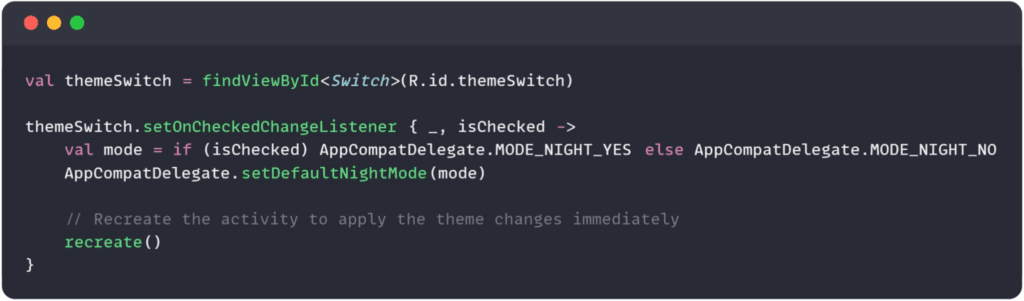
Fig-8 Kotlin code to toggle between light and dark themes
Utilize Material Design Widgets
Google provides a comprehensive set of Material Design widgets that you can seamlessly integrate into your app. These widgets are pre-built UI components that follow Material Design guidelines. They not only save you development time but also ensure that your app adheres to the Material Design principles. It’s a win-win situation – you save time, and your app maintains a cohesive design language.
Prioritize Accessibility
Accessibility is not just a nice-to-have; it’s a fundamental aspect of Material Design. Your app should be accessible to all users, including those with disabilities. This means providing alternative text for images, ensuring proper color contrast, and making navigation intuitive for screen readers. Prioritizing accessibility enhances your app’s usability and inclusivity.
Stay Updated with Material Design 3
With the release of Material Design 3, it’s essential to stay updated with the latest design trends and guidelines. Material Design 3 introduces a new design language, which brings fresh elements and concepts to the table. By exploring these updates, you can keep your app’s design in sync with current trends and user expectations.
Embrace Material Design for Beautiful Android Apps
Material Design is not merely about aesthetics; it’s about creating a user-centric, visually pleasing, and functional experience for your app’s audience. By adhering to the principles of Material Design and implementing the tips mentioned in this guide, Android App developers can craft Android apps that users will find not only visually appealing but also easy to use. Beautiful design combined with excellent functionality is the recipe for success in the competitive world of Android app development.
So, go ahead, embrace Material Design, and create stunning Android apps that users will love. Explore the Material Design documentation and stay up-to-date with the latest design trends to keep your apps beautiful and user-friendly.
Conclusion
Material Design is not just a set of design guidelines; it’s a philosophy that transforms the way users interact with and experience your Android apps. It elevates the aesthetics, making your app visually appealing and user-friendly. With the release of Material Design 3, there’s a new wave of possibilities to explore and incorporate into your app development process.
Remember, Material Design is more than just a visual style; it’s about creating a cohesive and intuitive user experience. The use of dynamic theming, Material Design widgets, accessibility features, and staying updated with the latest design trends are essential steps to ensure your app stands out in the competitive world of Android app development.
So, whether you are building a new app or updating an existing one by Android app developer, consider embracing Material Design as your go-to design language. Your users will appreciate the beautiful and intuitive experience you provide, and your app will stand out as a shining example of Android app development excellence.
Happy Designing!!

Keyur Patel
Co-Founder
Keyur Patel is the director at IT Path Solutions, where he helps businesses develop scalable applications. With his extensive experience and visionary approach, he leads the team to create futuristic solutions. Keyur Patel has exceptional leadership skills and technical expertise in Node.js, .Net, React.js, AI/ML, and PHP frameworks. His dedication to driving digital transformation makes him an invaluable asset to the company.
Related Blog Posts
DevExpress Web Reporting: A Complete Guide to Browser-Based Reporting

Build an App Like TaskRabbit With AI (2026): Cost, Features & Top Alternatives