
Why D2C Brands Are Automating Order, Inventory & Customer Support Workflows
Keyur Patel
November 25, 2026
10 min
Last Modified:
November 25, 2026
D2C brands are automating order, inventory, and customer support workflows to manage growth without increasing operating costs at the same pace. Order automation applies fulfilment rules and moves routine purchases towards dispatch. Inventory automation keeps available stock accurate and helps purchasing teams respond to changing demand. Customer support automation provides timely order updates and simplifies returns. Connecting these workflows also gives departments a shared view of what is happening across the business. Together, these improvements reduce avoidable work, protect margins, and give employees more time for planning, customer relationships, and decisions that need their experience.
Growing sales should create room for a D2C brand to expand. Yet higher order volumes also bring more fulfilment decisions, stock movements, and customer requests. The costs of managing these activities can rise quietly, especially when employees spend time moving information between systems or repeating checks that follow established rules.
Linnworks’ 2026 survey of 500 US and UK ecommerce decision-makers found that 39% of respondents seeking more automation identified poor integration between existing systems as a barrier. That finding highlights the value of connecting the applications a brand already uses. With orders, inventory records, and customer communications working together, teams can manage higher volumes with greater consistency. The business case becomes clearer when we look at the work each department can automate.
Why D2C Brands Are Moving Beyond Manual Workflows
Consider a team that checks the same order details before every dispatch. Each verification takes only a few minutes, yet those minutes add up across hundreds of daily orders. When order information meets predefined requirements, an automated workflow can verify the details and move the purchase to its next stage. Employees see the transactions that need their attention, rather than reviewing an entire queue.
The same principle applies across the business. Stock records can update as orders are confirmed, shipment events can trigger customer notifications, and approved requests can move to the relevant team. Department heads also gain a clearer view of completed work, pending approvals, and overall performance. By establishing consistent rules and reliable data, brands can make everyday operations easier to manage as volumes grow.
Order Automation Helps Control Fulfilment Costs
Order automation is especially valuable for brands selling across multiple channels or dispatching from more than one location. Once a purchase is confirmed, the workflow can check stock availability, apply shipping rules, and send fulfilment instructions to the appropriate warehouse. This reduces repeated coordination between sales and operations while making dispatch decisions more consistent.
Take a brand with two warehouses. Both locations carry the same product, but the best dispatch point depends on more than distance. Stock levels, shipping charges, promised delivery dates, and the other items in the basket also matter.
Automated routing can weigh these factors using rules set by the business. If one warehouse can ship the complete order within the delivery window, the system can prioritise that route and help avoid an unnecessary split shipment.
Keep Routine Orders Moving While Managing Exceptions
Order workflows can also distinguish straightforward purchases from those needing a closer look. Rules for address verification, payment status, stock availability, and approvals determine the appropriate next step. Standard orders proceed towards fulfilment, while specific cases appear in a review queue with the reason clearly identified.
This gives operations teams an organised way to manage exceptions while keeping established verification requirements in place. Employees resolve the cases that need a decision, and the rest of the order flow continues. The result is less routine handling, fewer avoidable corrections, and a more predictable dispatch process.
Inventory Automation Improves Stock Accuracy and Replenishment
Order decisions are only as useful as the inventory information behind them. D2C brands need a dependable view of what is available to sell, what has been committed to orders, and what is expected from suppliers. Inventory automation keeps these figures aligned as stock moves through purchasing, warehousing, and sales.
For example, a warehouse may physically hold 500 units of a product. Some units may already be reserved for confirmed orders, while others may be unavailable for sale. Automated updates account for these commitments so sales channels reflect the quantity customers can actually purchase. This supports more accurate order promises and helps inventory managers plan the next replenishment cycle.
Make Purchasing Decisions With Current Demand Data
Replenishment becomes more precise when brands combine stock levels with sales trends, outstanding purchase orders, and supplier lead times. A product with 200 units remaining may look well stocked today. If orders are increasing and the next delivery is several weeks away, the purchasing team needs to see that change early. An automated workflow can bring these signals together and highlight when a reorder is approaching.
The same visibility helps businesses identify slower-moving products and adjust purchasing plans before excess stock ties up working capital. For larger catalogues, AI-based inventory management can add demand forecasts to this process. Purchasing managers can use these forecasts alongside budgets and supplier commitments, with approval rules built into the workflow where needed. Automation supports faster action because the relevant information is already organised.
Connected Demand Data Helps Production Teams Plan Ahead
For brands that manufacture their own products, inventory information also affects production schedules. Sales forecasts, raw-material availability, manufacturing capacity, and existing commitments all influence how much a business can produce and when. Connecting these inputs allows production managers to plan with a more complete picture.
Imagine a brand preparing for a promotional campaign. Forecast demand for one product is higher than its finished-goods stock. A connected workflow can compare that requirement with available materials and scheduled production, then flag the quantities and dates that need attention. Managers can coordinate purchasing, adjust production volumes, or refine schedules before the campaign begins. This is particularly valuable for products with long manufacturing cycles or materials that must be ordered well in advance.
Customer Support Automation Makes Service More Proactive
Customers want clear answers about their purchases, especially after placing an order. Dispatch confirmations, tracking links, and delivery notifications can provide those answers automatically. Customers spend less time looking for updates, while support agents receive fewer routine tracking enquiries.
The benefit becomes even clearer when delivery information changes. If a carrier reports a delay, a connected workflow can update the order record and notify the customer using the available shipment details. Support staff can see the same information when someone contacts them. They can respond with context instead of checking with the warehouse or carrier each time.
Simplify Returns, Exchanges, and Refund Updates
Returns generate substantial follow-up work for online retailers. The National Retail Federation’s 2025 retail returns research estimated that 19.3% of online sales would be returned that year. A well-connected return process can reduce the administrative effort behind each request while keeping customers informed.
When a return meets the brand’s policy, automation can issue instructions, record the request, and notify the receiving team. After the item is inspected, an approved refund or exchange can advance through the relevant steps. Requests needing individual assessment can follow a separate review path. This gives support representatives more time for customer conversations while customers receive clearer status updates throughout the process.
Connected Workflows Create Value Across Departments
D2C brands gain another level of efficiency when order, inventory, and customer support systems work together. Each application serves a different function, but the information they share can move an entire customer request forward. Integration helps turn separate automated tasks into one coordinated process.
Consider an exchange. Customer support records the request and initiates the return. The warehouse confirms receipt and inspection, inventory records update, and the replacement order moves towards dispatch under the brand’s approved rules. Each confirmed event triggers the relevant next action. Teams can follow the exchange from beginning to end without manually passing the same details between departments.
For growing brands, connecting existing applications can unlock more value from technology investments they have already made. It also gives managers a clearer view of how a single customer request affects stock, fulfilment, and service. Information entered once can support several departments, creating a smoother process from the first customer interaction through to final resolution.
How to Identify the Best Workflows to Automate
The strongest starting points are recurring activities with measurable operating costs, clear rules, and reliable information. The priority will look different across D2C businesses. A brand shipping from several warehouses may focus on order routing, while another may gain more from replenishment planning or automated customer updates.
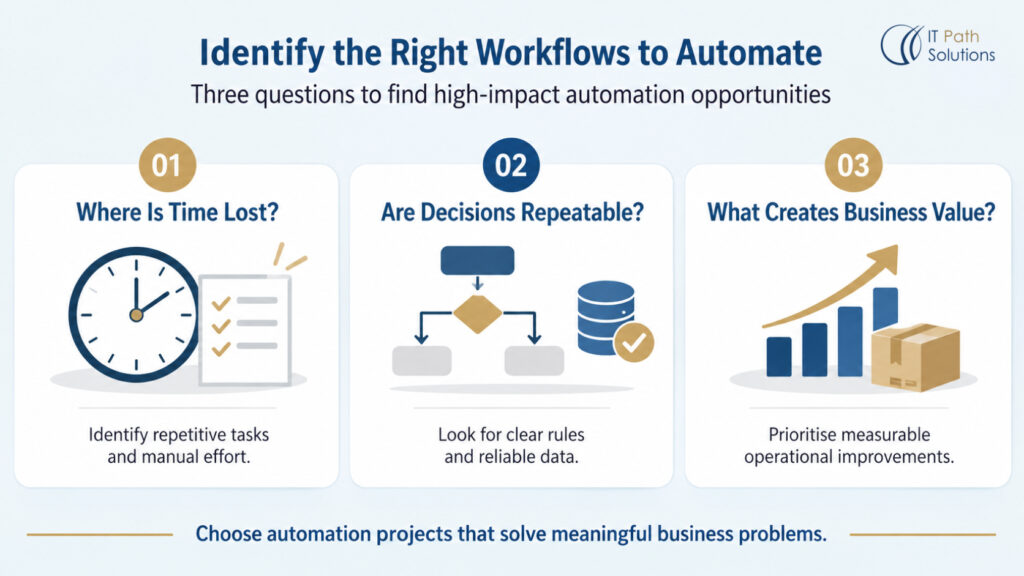
A practical assessment can focus on three questions:
- Where does the team spend the most avoidable time? Review task volumes, handling time, and the effort spent correcting or following up on completed work.
- Which processes have repeatable decisions and dependable data? Identify the rules, approvals, and system information needed to move each activity forward consistently.
- What improvement would make the biggest business difference? Set a clear target, such as lower fulfilment costs, more accurate stock commitments, faster purchasing decisions, or fewer repeat enquiries.
These answers help management teams choose projects that address a meaningful business need. They also establish the operational measures that will show whether the investment is delivering results.
Choose the Right Level of Automation for Your Business
Many D2C platforms already offer useful automation capabilities. Brands can start with built-in features for notifications, stock alerts, customer segmentation, or common order events. For instance, in November 2026, Shopify expanded its existing automation capabilities by adding new “updated” workflow triggers for orders, refunds, returns, and inventory changes. Using available platform features can be an efficient way to automate familiar tasks.
Integration extends those capabilities across the wider business. It can connect an eCommerce store with warehouse management, inventory, customer support, and production systems so that information flows between them.
Custom development becomes necessary when existing connectors cannot accommodate a brand’s specific order routing rules, approval processes, or production requirements. It can also help when employees still reconcile conflicting records across systems, older applications lack suitable integrations, or failed updates require manual investigation and recovery.
Addressing these challenges does not always require rebuilding the entire workflow. Improving an existing integration, adding custom business logic, or introducing automated error detection and recovery mechanisms may be enough. The right approach depends on the gaps in the existing setup and the operational requirements of the business.
Measure Automation Through Operational Results
The value of automation should appear in day-to-day performance. Order teams can measure handling time, fulfilment corrections, and shipping costs per order. Inventory managers can monitor stock accuracy, replenishment timing, and excess inventory. Production heads can track material-related schedule changes, while support managers can measure repeat enquiries and resolution times.
Management should compare these operational improvements against implementation costs, platform subscriptions, ongoing maintenance, and the cost of remaining manual work. Time savings alone do not determine the return on investment. The financial benefits of automation must also justify the total cost of implementing and maintaining it.
Recording these measures before implementation gives the business a useful comparison point. Teams can also monitor workflow completion, data accuracy, and the frequency of manual review to identify where further refinements will help. This turns automation into an ongoing source of operational improvement, supported by clear evidence rather than the number of tasks completed automatically.
Build Automation Around Your Business Priorities
D2C brands are investing in workflow automation because growth is more sustainable when teams can handle increasing demand efficiently. Automated order routing, accurate stock updates, connected production planning, and proactive customer communication each contribute to that goal. When these processes work together, businesses gain better coordination across departments and more time for the decisions that drive growth.
At IT Path Solutions, we help brands connect ecommerce platforms with inventory, fulfillment and customer support systems. If one workflow is causing repeated delays or manual work, bring us the process and the applications involved. We can help determine whether existing platform features, an integration or custom development would address the gap.

Keyur Patel
Co-Founder
Keyur Patel is the director at IT Path Solutions, where he helps businesses develop scalable applications. With his extensive experience and visionary approach, he leads the team to create futuristic solutions. Keyur Patel has exceptional leadership skills and technical expertise in Node.js, .Net, React.js, AI/ML, and PHP frameworks. His dedication to driving digital transformation makes him an invaluable asset to the company.