Custom EHR & EMR Software Development Services
Keyur Patel
September 12, 2025
16 min
Last Modified:
September 21, 2026
Most off-the-shelf EHR systems force a clinic to adapt its workflows to the software, not the other way around. That trade-off works fine for a single-location general practice, but it breaks down fast for multi-specialty groups, diagnostic imaging providers, and behavioural health clinics whose documentation and care workflows don’t match a generic template. This is where custom EHR development comes in. It means building a platform around your specific clinical workflows, integrations, and compliance obligations instead of forcing your team into someone else’s design.
IT Path Solutions works with practice groups, hospital departments modernizing legacy systems, and early-stage digital health startups building their first patient-facing platform. The work covers full EHR development services, from ground-up builds to HL7 and FHIR integration, data migration, and HIPAA-ready security architecture, with interoperability and security treated as core requirements from day one rather than features added near the end. If your current system is limiting how your team works, it’s worth talking through your requirements with a development partner early.
What Does Custom EHR/EMR Development Include?
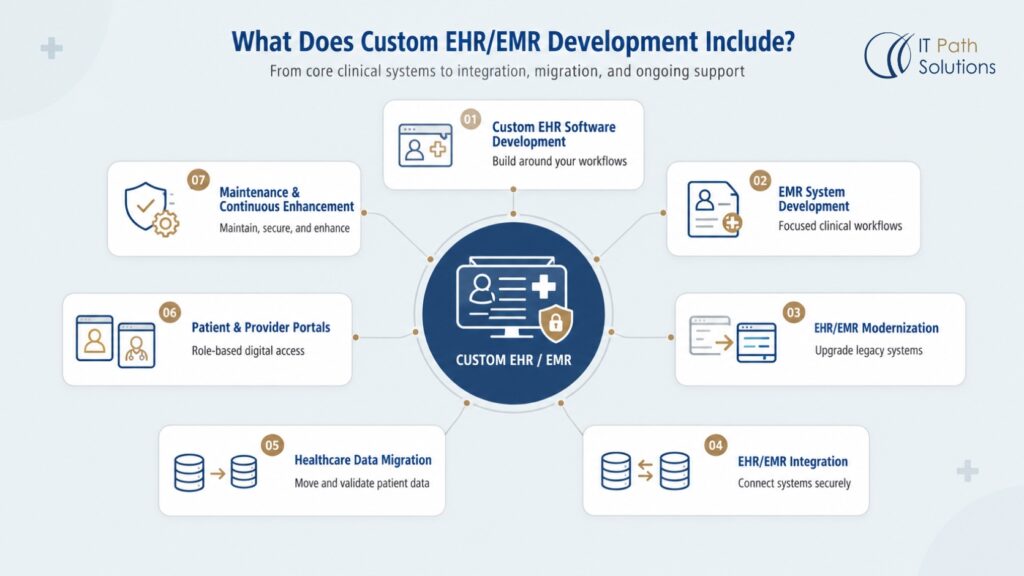
Whether you need full custom EHR development or focused EMR software development for a single practice, the underlying process looks similar. It starts with discovery, moves into workflow mapping, and continues through build, integration, and ongoing support. Here’s the full range of work that typically falls under this umbrella.
1. Custom EHR Software Development
Building a new EHR platform from the ground up means the system is designed around your organization’s clinical workflows from day one, rather than retrofitted later. Patient records, scheduling, clinical documentation, and role-based access get built to match how your providers and staff actually work.
2. EMR System Development
EMR development focuses on the record-keeping and clinical workflow needs of a single practice or provider group, rather than the broader interoperability an EHR requires. It’s a common starting point for specialty clinics that need a system tailored to one set of workflows without added complexity.
3. EHR/EMR Modernization
Not every legacy system needs to be replaced. Modernization work upgrades outdated interfaces, adds missing integrations, or replaces individual components like reporting or scheduling modules while keeping the parts that still work well. It’s usually the more practical option when the underlying data model is sound but the user experience has fallen behind.
4. EHR/EMR Integration
Connecting an existing EHR or EMR to labs, pharmacies, billing platforms, telehealth tools, or medical devices usually means building integrations around HL7 or FHIR standards. The goal is structured, secure data exchange between systems that weren’t originally built to talk to each other.
5. Healthcare Data Migration
Moving patient records from one system to another involves more than copying files. It requires mapping fields between old and new data models, validating data quality, and reconciling records so nothing gets lost or duplicated. This matters most when replacing a legacy system that’s been in use for years.
6. Patient & Provider Portals
Patients and providers often need different views into the same underlying data, with different permissions and workflows. A patient portal might focus on scheduling, messaging, and viewing results, while a provider portal handles documentation, order entry, and care coordination.
7. Maintenance & Continuous Enhancement
Custom EHR development doesn’t end at launch. Ongoing maintenance covers security patching, compliance updates, and performance monitoring, while continuous enhancement adds new modules as the organization’s needs change. A system built five years ago rarely matches what a growing practice needs today.
When Does Custom EHR/EMR Development Make Sense?
Custom development isn’t automatically the right answer for every healthcare organization. Plenty of practices are well served by an established EHR platform, and switching to custom development without a clear reason usually adds cost and risk without a matching benefit. That said, there are a handful of situations where custom EHR development tends to make more sense than continuing with an off-the-shelf system.
1. Specialized clinical workflows
Behavioral health, physical therapy, and diagnostic imaging practices often have documentation needs that generic EHR templates don’t handle well. When your team spends more time working around the software than with it, that’s usually a sign the workflow doesn’t fit the platform.
2. Limitations of the existing EHR
If your current system can’t add the fields, reports, or automation your practice needs, and the vendor’s roadmap doesn’t include it, you’re stuck waiting on someone else’s release schedule for changes that matter to your operations.
3. Complex interoperability requirements
Organizations that need to exchange data with multiple labs, specialty systems, or partner networks sometimes find that off-the-shelf integration options don’t cover every connection they need, particularly with older systems.
4. Multi-location or multi-specialty operations
Running several locations or specialties under one system often means reconciling different workflows, reporting needs, and permissions that a single generic configuration can’t handle cleanly.
5. Custom reporting and automation
Some organizations need reporting or automation beyond what a standard EHR’s built-in tools offer, whether that’s specific compliance reports or workflows tied to internal processes.
6. Need for greater control over workflows and integrations
Organizations planning long-term growth sometimes want direct control over their platform’s roadmap rather than depending on a vendor’s release cycle and pricing changes.
Essential Features of Custom EHR/EMR Software
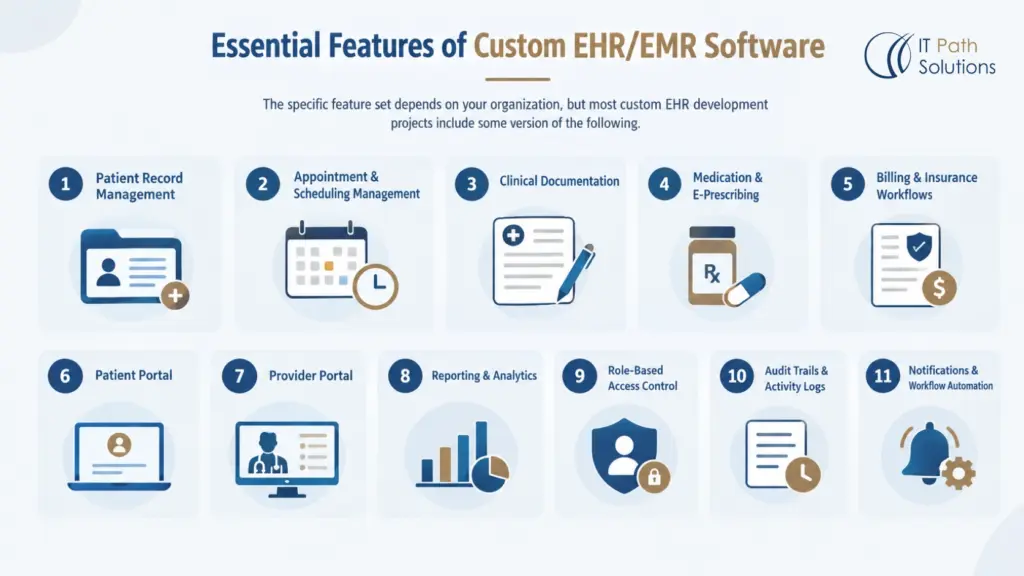
The specific feature set depends on your organization, but most custom EHR development projects include some version of the following.
1. Patient Record Management
Centralized, structured storage for demographics, history, diagnoses, and encounter notes, built so authorized staff can find what they need quickly instead of searching across multiple systems.
2. Appointment & Scheduling Management
Calendar and booking tools that handle multiple providers, locations, and appointment types, with reminders and rescheduling built in to reduce no-shows.
3. Clinical Documentation
Templates and structured fields for progress notes, assessments, and care plans that match how your clinicians actually document, rather than generic forms that need workarounds.
4. Medication & E-Prescribing
Electronic prescribing tied to a patient’s medication history and allergy records, reducing manual entry and giving providers a clearer view of potential interactions.
5. Billing & Insurance Workflows
Claims generation, coding support, and insurance verification built into the same system as clinical documentation, so billing staff aren’t re-entering information already in the record.
6. Patient Portal
A separate, permissioned view for patients to book appointments, message their care team, view test results, and manage account details.
7. Provider Portal
A clinician-facing view built around documentation, order entry, and care coordination, with permissions that make sense for providers rather than administrative staff.
8. Reporting & Analytics
Operational and clinical reporting that reflects the metrics your organization actually tracks, whether that’s patient volume, outcomes data, or compliance reporting.
9. Role-Based Access Control
Permissions structured around job function, so a front-desk employee, a nurse, and a physician each see only the data relevant to their role.
10. Audit Trails & Activity Logs
A record of who accessed or modified patient data and when, supporting both internal accountability and compliance documentation.
11. Notifications & Workflow Automation
Automated alerts for tasks like appointment reminders, lab result delivery, or follow-up scheduling, reducing the manual tracking that otherwise falls on staff.
EHR/EMR Interoperability and Integrations
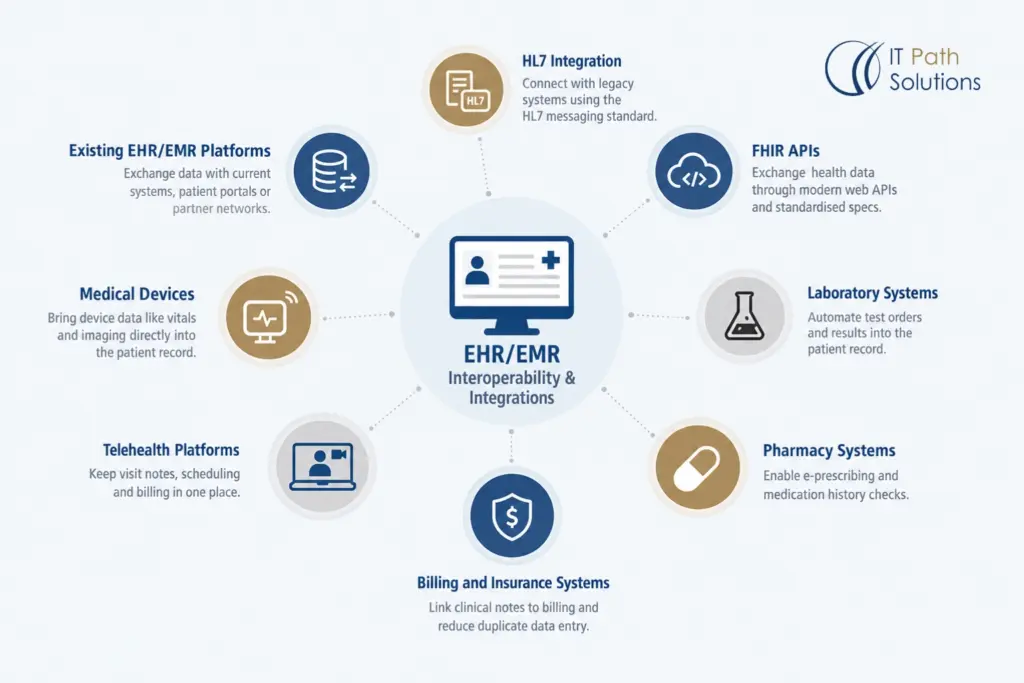
Most content covering EHR integrations focuses on software features rather than how the connections actually get built. From a development partner’s perspective, interoperability comes down to a handful of recurring integration points.
1. HL7 Integration
HL7 is the long-standing messaging standard for exchanging clinical data between systems, and a lot of legacy healthcare infrastructure still runs on it. Custom EHR development often means building HL7 interfaces to connect a new system with older platforms that aren’t going away anytime soon.
2. FHIR APIs
FHIR is a newer standard built around modern web APIs, designed to make clinical and administrative health data easier to exchange between systems through a defined set of API specifications. It tends to be faster to implement than older HL7 messaging where systems support it, though many organizations still need both.
3. Laboratory Systems
Connecting to lab systems means structured, automated delivery of test orders and results into the patient record, instead of staff manually re-entering results from a separate portal.
4. Pharmacy Systems
Integration with pharmacy systems supports electronic prescribing and medication history checks, reducing the manual steps between a provider writing a prescription and a patient receiving it.
5. Billing and Insurance Systems
Linking clinical documentation to billing and insurance verification systems cuts down on duplicate data entry and reduces the gap between a visit and a submitted claim.
6. Telehealth Platforms
Integrating a telehealth tool with the EHR keeps visit notes, scheduling, and billing in one place instead of managing a separate system for virtual visits.
7. Medical Devices
Some organizations need device data, such as vitals monitors or imaging equipment, flowing directly into the patient record, which usually requires custom interface work depending on the device manufacturer.
8. Existing EHR/EMR Platforms
Organizations that aren’t replacing their current system outright often need it to exchange data with a new patient portal or partner network, which is its own integration project separate from a full migration.
If HL7 and FHIR integration work sounds like the piece your team is missing, our HL7 and FHIR integration services can help with custom services.
Security and Regulatory Requirements for EHR/EMR Software
Security and compliance content in this space is frequently imprecise, particularly the phrase “HIPAA certified.” There’s no such certification. What can be built is HIPAA-ready architecture, meaning technical, administrative, and physical safeguards that align with the HIPAA Security Rule’s requirements.
1. HIPAA-Ready Architecture
The current HIPAA Security Rule covers administrative, physical, and technical safeguards, including access control, audit controls, authentication, and transmission security. A custom EHR/EMR platform can be architected to support these requirements, but compliance also depends on your organization’s policies and staff training, not just the software itself.
2. Encryption
Data should be encrypted both at rest and in transit, so patient information stays protected whether it’s sitting in a database or moving between systems during an integration.
3. Access Control and Authentication
Role-based permissions combined with strong authentication limit who can view or modify sensitive records, reducing the risk of unauthorized access from both outside the organization and within it.
4. Audit Trails
Beyond the operational logging covered earlier, security-focused audit trails need to capture enough detail to support a compliance review, including who accessed a record and what changed.
5. Data Protection and Privacy
ePHI requires handling that goes beyond general data protection, including how data is stored, who it’s shared with, and how long it’s retained, all of which need to be built into the system’s data model rather than added afterward.
6. Security Testing and Risk Management
Regular security testing and risk assessments help catch vulnerabilities before they become incidents, which matters more in healthcare than in most industries given the sensitivity of the data involved.
Please note – HHS has proposed updates to the Security Rule, but as of now, those remain proposed changes rather than finalized law, so any compliance planning should be based on the current rule, not the pending one.
EHR/EMR Software Development Process
Custom EHR development isn’t a simple design, code, and launch sequence. It typically moves through several distinct phases, shaped by workflow analysis, interoperability needs, and compliance requirements rather than a generic software build process.
- Discovery & Requirements Gathering. Understanding your current systems, workflows, and pain points before any design work starts, so the project scope reflects your actual needs rather than assumptions.
- Clinical Workflow Mapping. Documenting how your team actually moves through patient visits, documentation, and administrative tasks, which shapes how the system gets structured.
- UX/UI & Architecture. Designing interfaces for each user type and establishing the technical architecture that will support your integrations, data volume, and security requirements.
- Development. Building the platform in stages, usually starting with core record management before layering in additional modules and integrations.
- Integration & Interoperability. Connecting the platform to labs, pharmacies, billing systems, or existing EHR platforms using HL7 or FHIR as appropriate.
- Security & Quality Testing. Testing for functional correctness alongside security vulnerabilities, since both matter before handling real patient data.
- Data Migration. Moving and validating existing patient records if you’re replacing a legacy system, with reconciliation to confirm nothing was lost.
- Deployment & Rollout. Rolling the system out in a way that limits disruption to daily operations, often in phases rather than all at once.
- Maintenance & Continuous Improvement. Ongoing support, security updates, and feature additions after launch, since a system’s needs keep changing as your organization grows.
How Much Does Custom EHR/EMR Development Cost?
There isn’t one reliable number for custom EHR development cost, and any vendor page that gives you a flat figure upfront is skipping the variables that actually determine price.
Key Cost Factors
Pricing is shaped by:
- feature scope,
- the number of user roles the system needs to support,
- HL7 or FHIR integration requirements,
- data migration complexity,
- security and compliance requirements,
- whether the system runs in the cloud or on premise,
- whether you need mobile access alongside web, and
- the amount of testing and ongoing maintenance involved.
A limited MVP with one or two integrations costs meaningfully less than a full platform supporting multiple locations and several external systems.
How to Get a More Accurate Estimate
A development team needs a reasonably clear picture of your current workflows, the systems you need to integrate with, your user types and permission needs, and your compliance obligations before it can give you a meaningful estimate.
Share your workflows, integrations, and required modules with IT Path Solutions to discuss scope and get a project estimate that reflects what you actually need built.
How Long Does Custom EHR/EMR Development Take?
Timeline follows the same logic as cost. It depends on what you’re building. A limited MVP with core record management and one or two integrations moves through discovery, design, and development considerably faster than a full platform supporting multiple locations, several HL7 or FHIR connections, and a full data migration from a legacy system.
The main variables are the number of modules involved, integration complexity, whether legacy data needs to be migrated and validated, the depth of security and regulatory testing required, and how the rollout gets staged across your organization. A phased rollout, where one location or department goes live before the rest, tends to take longer overall but reduces the risk of disrupting operations everywhere at once.
Rather than committing to a fixed number of months before requirements are defined, a realistic timeline usually comes out of the discovery and workflow mapping phase, once the actual scope is clear. That’s also when project phases, discovery, design, development, integration, testing, migration, and rollout, start to map onto your specific calendar.
Why Choose IT Path Solutions for EHR/EMR Development?
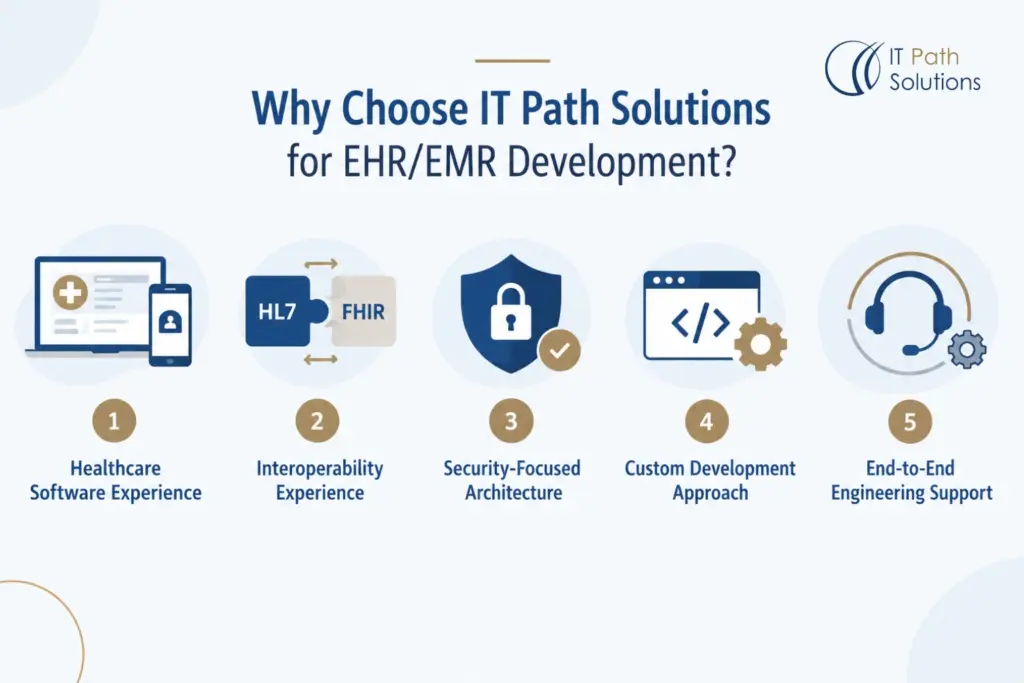
Most EHR development company pages in this category lean on self-reported claims like “years of experience” or “trusted by leading providers” without pointing to anything specific. Here’s what can actually be said about IT Path Solutions without overstating it.
1. Healthcare Software Experience
IT Path Solutions develops custom web, mobile, and software solutions for businesses and organizations, including development, integration, AI implementation, e-commerce, and ongoing technical support based on each client’s requirements. That broader healthcare software development work is where this EHR/EMR practice sits, though project scope, timelines, technologies, compliance obligations, and expected outcomes are always agreed upon individually rather than following a fixed package.
2. Interoperability Experience
Given how much of this guide focuses on HL7 and FHIR integration work, that experience is reflected in IT Path Solutions’ published integration material, which covers the practical side of connecting healthcare systems rather than treating interoperability as a checkbox feature.
3. Security-Focused Architecture
Security is built into the architecture from the start rather than added on before launch, following the HIPAA-ready approach described earlier in this guide.
4. Custom Development Approach
EHR/EMR development is one part of IT Path Solutions’ broader custom software development practice, so the same engineering discipline applied to other complex, integration-heavy projects carries over into healthcare work.
5. End-to-End Engineering Support
Support covers the full arc from discovery and development through integration, deployment, and maintenance, rather than handing off a finished build and disappearing after launch.
Closing Thoughts
Custom EHR development isn’t really about replacing paper records with digital ones anymore. It’s about building a system around your specific workflows, interoperability needs, security requirements, and long-term plans for growth, rather than adapting your operations to fit someone else’s template. That might mean building a new platform from scratch, adding targeted integrations with your current system, or phasing in modernization of what you already have.
If your team is running into the kinds of limitations covered in this guide, whether that’s specialized workflows, complex integrations, or a system that can’t keep up with how you actually operate, it’s worth discussing your requirements with IT Path Solutions. Share your workflows, integrations, and project scope, and we’ll help you figure out what actually makes sense to build.
Frequently Asked Questions
How long does custom EHR development take?
It depends on the product scope, integrations, data migration needs, security requirements, testing, and deployment model. A limited MVP typically moves faster than a full platform with multiple HL7 or FHIR integrations. We provide a realistic estimate after discovery and workflow mapping rather than committing to a fixed timeline before your requirements are actually defined.
How much does custom EHR/EMR development cost?
Cost varies based on features, user roles, integrations, data migration, security requirements, testing, deployment, and ongoing support. IT Path Solutions provides an estimate after reviewing your project scope and technical requirements, since a discovery discussion is needed before any number would be meaningful.
Can you integrate with an existing EHR?
Yes. IT Path Solutions builds integrations between existing EHR/EMR platforms and other systems, including labs, pharmacies, billing, telehealth tools, and medical devices, using standards like HL7 and FHIR APIs for secure, structured data exchange instead of manual workarounds.
Do you support HL7 and FHIR?
HL7 and FHIR integration requirements can be assessed for most healthcare applications, depending on available documentation, APIs, data formats, and authentication methods. Depending on the use case, this might involve mapping clinical data, connecting EHR/EMR systems, handling authentication, and testing the data exchange itself.
Can legacy patient data be migrated?
In most cases, yes, though feasibility depends on the source system, data format, volume, data quality, and applicable privacy requirements. The approach typically includes data assessment, field mapping, transformation, validation, a test migration, and reconciliation before a controlled transfer. IT Path Solutions reviews these details during discovery to confirm scope and timeline.
Can you modernize an existing EHR/EMR system?
Often, yes, and usually in stages rather than all at once. Depending on the platform’s architecture and available APIs, that might mean improving interfaces, adding integrations, upgrading specific components, or introducing new workflows without replacing the entire system. We review the existing system during discovery to confirm what’s feasible and how to phase it.
What is the difference between EHR and EMR software?
An EMR is a digital patient record typically used within a single practice, with limited external sharing. An EHR is built for broader information sharing across multiple providers and care settings. IT Path Solutions develops both, depending on an organization’s scope and interoperability needs.

Keyur Patel
Co-Founder
Keyur Patel is the director at IT Path Solutions, where he helps businesses develop scalable applications. With his extensive experience and visionary approach, he leads the team to create futuristic solutions. Keyur Patel has exceptional leadership skills and technical expertise in Node.js, .Net, React.js, AI/ML, and PHP frameworks. His dedication to driving digital transformation makes him an invaluable asset to the company.
Related Blog Posts
Cloud Computing in Healthcare: A Practical Guide
AI Healthcare Chatbot Development: Benefits, Use Cases, HIPAA Compliance, Challenges & How to Build One