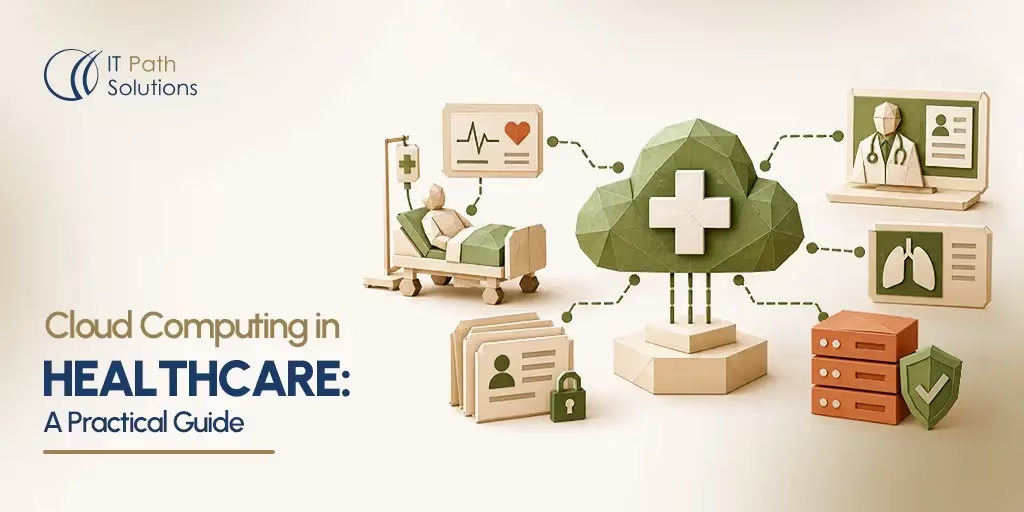
Cloud Computing in Healthcare: A Practical Guide
Keyur Patel
September 15, 2026
23 min
Last Modified:
September 16, 2026
Cloud computing in healthcare means running clinical and administrative systems, patient data, and applications on infrastructure owned and operated by a third-party provider rather than on servers a hospital or clinic owns and maintains itself. That shift touches almost everything a healthcare organization does with technology, from where electronic health records live to how a radiologist pulls up a scan taken at a different facility.
This guide walks through what cloud computing actually looks like inside a healthcare organization, where it helps and where it creates new work, and what a realistic migration and vendor selection process involves. It’s written for people who make technology decisions in healthcare but don’t necessarily configure cloud infrastructure themselves.
What Is Cloud Computing in Healthcare?
Cloud computing in healthcare isn’t just storing files somewhere other than a local hard drive. It refers to running actual healthcare workloads, patient record systems, imaging archives, scheduling platforms, analytics pipelines, on infrastructure managed by a cloud provider instead of hardware sitting in a hospital basement or a clinic’s server closet.
What moves to the cloud varies by organization, but it typically includes some mix of: the databases that hold patient records, the application servers that run an EHR or a patient portal, the storage that holds medical images, and the compute resources used for analytics or machine learning. What doesn’t automatically move is responsibility. A cloud provider manages the physical data centers, the underlying hardware, and often the operating system and network layer. The healthcare organization still owns decisions about who can access patient data, how that data is encrypted, how long it’s retained, and whether its use of the cloud meets its regulatory obligations.
It helps to separate four layers people often lump together under “the cloud”:
- Cloud infrastructure is the raw compute, storage, and networking a provider rents out, the equivalent of virtual servers and hard drives.
- Cloud platforms are managed environments built on top of that infrastructure, things like managed databases or container orchestration, where the provider handles more of the operational work.
- Cloud applications are finished software products delivered over the internet, such as a cloud-based scheduling tool or a hosted EHR.
- Cloud-hosted systems is a broader term for any healthcare system, custom-built or off-the-shelf, that runs on cloud infrastructure rather than on-premises hardware.
A hospital’s EHR might be a cloud application from a vendor, while a health system’s own data warehouse might run on cloud infrastructure the IT team configures directly. Both count as cloud computing in healthcare, but they come with different levels of control and different responsibilities.
How Is Cloud Computing Used in Healthcare?
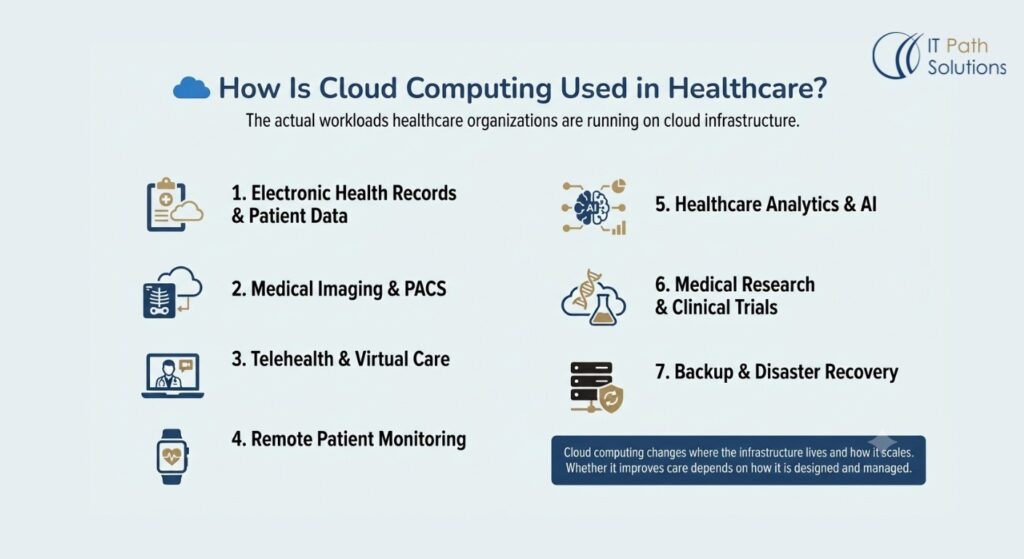
The use cases below aren’t hypothetical. They’re the workloads most healthcare organizations are already running on cloud infrastructure in some form, each with its own practical trade-offs.
1. Electronic health records and patient data
Cloud infrastructure lets EHR data be accessed from multiple facilities, clinics, and remote care settings without each location maintaining its own copy of the database. The practical consideration is access control: a cloud-hosted EHR still needs the same rigor around who can view which patient’s record as an on-premises one, and misconfigured access permissions are a common source of exposure.
2. Medical imaging and PACS
A Picture Archiving and Communication System, or PACS, stores and retrieves medical images like X-rays, CT scans, and MRIs. Moving PACS to the cloud can reduce the burden of storing large imaging files locally and make it easier for radiologists to review scans from outside the originating facility. Image files are large, though, and organizations need to plan for bandwidth and retrieval speed, particularly for time-sensitive cases like stroke imaging.
3. Telehealth and virtual care
Cloud infrastructure provides the video, scheduling, and data-sharing backbone for virtual visits. It allows a telehealth platform to scale up when demand spikes without a provider buying and running its own video infrastructure. The trade-off is that video quality and platform reliability now depend partly on the patient’s own internet connection, something a cloud provider can’t control.
4. Remote patient monitoring
Devices that track things like heart rate, blood glucose, or blood pressure typically stream that data to a cloud platform for storage and review. This lets a care team monitor a patient’s condition without requiring in-person visits for every data point. A real limitation is data volume and noise: continuous monitoring generates far more data than a clinician can manually review, so these systems need thresholds and alerting logic built in, not just raw data collection.
5. Healthcare analytics and AI
Cloud platforms provide the compute power needed to run analytics across large datasets, from population health trends to models that flag patients at risk of readmission. The practical limitation is data quality. An analytics or AI system is only as useful as the data feeding it, and healthcare data is often incomplete or inconsistent across systems.
6. Medical research and clinical trials
Cloud infrastructure supports the data collection, storage, and sharing that multi-site clinical trials require, letting researchers at different institutions work from the same dataset. Data governance becomes more complex here, since trial data often needs to meet both privacy regulations and research-specific data integrity standards.
7. Backup and disaster recovery
Storing backups in the cloud, ideally in a location physically separate from primary systems, protects against data loss from hardware failure, natural disasters, or ransomware. The consideration organizations often miss is testing: a backup that’s never been restored in a test scenario is not a reliable backup, regardless of where it’s stored.
Cloud computing doesn’t automatically make any of these use cases better for patients. It changes where the infrastructure lives and how it scales. Whether that translates into better care depends on how the organization designs and manages the systems running on it.
Cloud Service and Deployment Models for Healthcare
Two separate sets of decisions get made when an organization adopts cloud computing in healthcare: what level of the technology stack the provider manages (the service model), and where the infrastructure physically sits and who else shares it (the deployment model).
Service Models: IaaS, PaaS, and SaaS
| Model | What the provider manages | Healthcare fit | Trade-off |
|---|---|---|---|
| IaaS (Infrastructure as a Service) | Physical servers, storage, networking | A health system running its own custom applications, like an internally built data warehouse, on rented virtual servers | Maximum control, but the organization’s own team handles OS patching, security configuration, and scaling |
| PaaS (Platform as a Service) | Infrastructure plus the runtime environment, such as a managed database or application platform | A development team building a custom patient portal without managing database servers directly | Faster development, less operational burden, but less control over the underlying environment |
| SaaS (Software as a Service) | The entire application, delivered ready to use | Most cloud-based EHRs, practice management systems, and scheduling tools | Least IT overhead, but the healthcare organization has little say over how the underlying infrastructure is configured or secured |
None of these is inherently the right choice. A small clinic adopting a SaaS EHR is handing over most infrastructure decisions to the vendor, which is often appropriate given limited in-house IT capacity. A hospital system building custom clinical decision support tools may need the flexibility of IaaS or PaaS to meet specific integration or performance requirements.
Deployment Models: Public, Private, Hybrid, and Multi-Cloud
| Model | Description | Where it fits in healthcare | Advantage | Trade-off |
|---|---|---|---|---|
| Public cloud | Shared infrastructure operated by a provider like AWS, Microsoft Azure, or Google Cloud, used by many customers | General-purpose applications, analytics workloads, non-sensitive workflows | Lower cost, fast to provision, scales easily | Shared infrastructure requires strict configuration to isolate healthcare data properly |
| Private cloud | Dedicated infrastructure used by a single organization | Systems with strict data isolation or performance requirements | More control over configuration and data placement | Higher cost, more operational responsibility |
| Hybrid cloud | A mix of public and private cloud, often with some on-premises systems, connected together | Organizations migrating gradually, or keeping certain workloads local for latency or regulatory reasons | Flexibility to place each workload where it fits best | More complex to manage and secure across environments |
| Multi-cloud | Using more than one public cloud provider | Organizations avoiding dependence on a single vendor, or using different providers for different strengths | Reduces vendor lock-in risk | Increases operational and skills complexity |
However, private cloud does not necessarily mean on-premises hardware. Major cloud providers offer private cloud options, dedicated infrastructure that isn’t shared with other customers, without the organization owning or physically hosting any of it. The distinction is about who else uses the underlying hardware, not where it physically sits.
When evaluating which deployment model fits a given workload, a few questions tend to matter more than general preference.
- Does the workload need to talk to legacy on-premises systems in real time?
- Does it have unusually strict latency requirements?
- Is the organization trying to avoid dependence on one vendor’s pricing and roadmap?
A hybrid approach often ends up being the practical answer for organizations mid-migration, not because it’s the “best” model in the abstract, but because it lets them move workloads over in stages instead of all at once.
Benefits of Cloud Computing in Healthcare
1. Scalability and flexibility
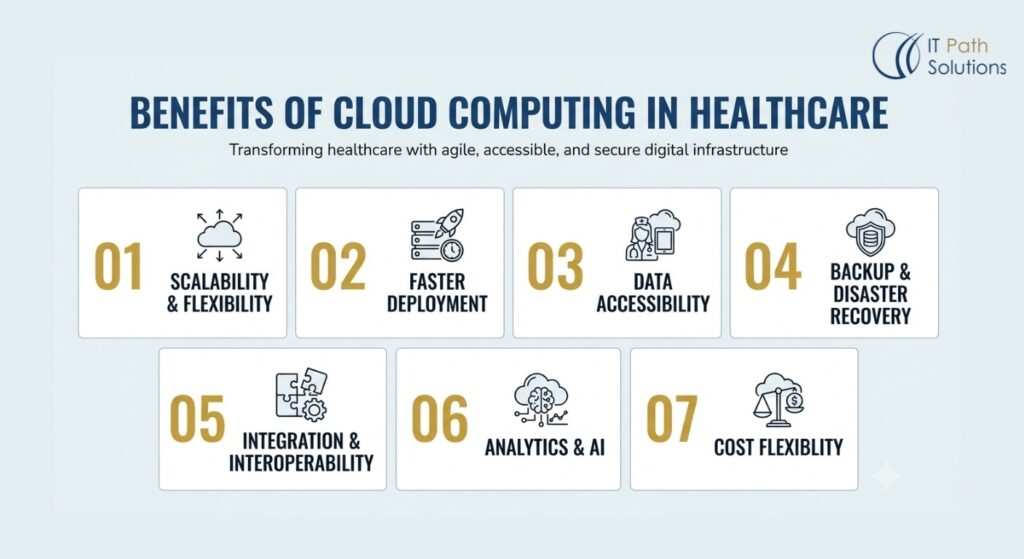
Cloud infrastructure can expand or contract based on demand, which matters for workloads like telehealth platforms that see usage spikes, or seasonal patterns like flu-season call volume. An organization isn’t stuck sizing its infrastructure for peak demand year-round.
2. Faster deployment
Provisioning a new server or environment in the cloud can take minutes instead of the weeks a physical procurement process might require. This shortens the timeline for launching new applications or standing up temporary environments for testing.
3. Data accessibility
Cloud-hosted systems can be reached from multiple locations, supporting care delivered across a health system’s facilities or by remote and traveling clinicians, provided access controls are configured correctly.
4. Backup and disaster recovery
Cloud providers typically offer built-in tools for replicating data across geographically separate locations, which reduces the risk of losing patient data to a single point of failure like a fire or flood at one facility.
5. Integration and interoperability
Many cloud platforms offer built-in support for healthcare data standards and pre-built connectors to common systems, which can reduce some of the custom integration work needed to connect an EHR, a lab system, and a billing platform.
6. Analytics and AI
Cloud computing in healthcare gives organizations access to processing power for large-scale analytics and machine learning that would be expensive to build and maintain in-house, particularly for smaller organizations without a dedicated data science team.
7. Cost flexibility
Cloud infrastructure shifts spending from large upfront capital purchases to ongoing operating costs tied to actual usage. That’s genuinely useful for organizations that don’t want to over-provision hardware for growth that may or may not happen. It is not the same thing as guaranteed savings. Cloud environments that aren’t actively monitored and governed can end up costing more than the on-premises systems they replaced, particularly when unused resources are left running or data transfer costs aren’t accounted for.
None of these benefits arrives automatically just from moving a workload to the cloud. They depend on how the environment is architected and managed afterward.
Risks and Challenges of Cloud Computing in Healthcare
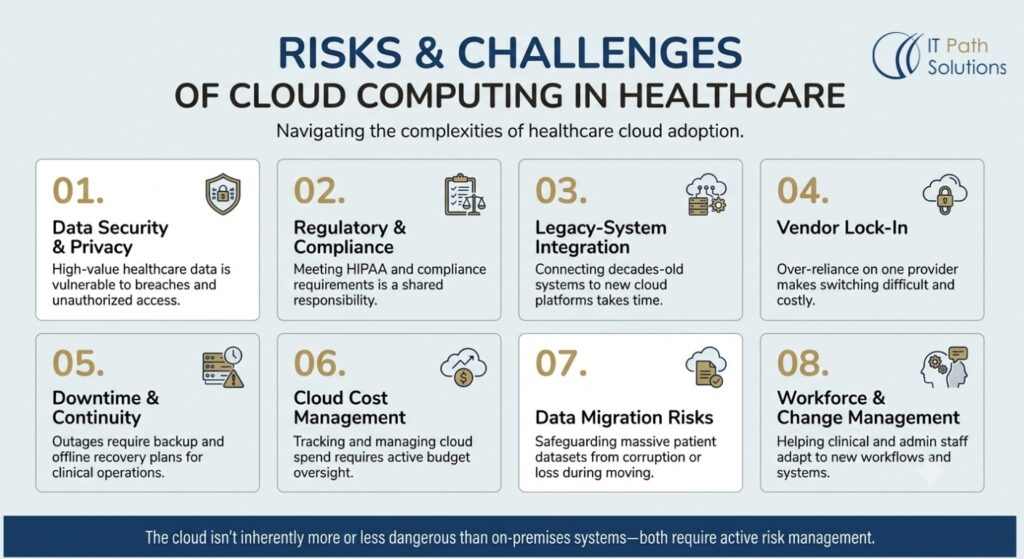
1. Data security and privacy
Healthcare data is a high-value target, and moving it to the cloud introduces new points where it could be exposed, from misconfigured storage buckets to compromised credentials. This risk is manageable with proper access controls and monitoring, but it doesn’t disappear just because a reputable provider is involved.
2. Regulatory and compliance requirements
HIPAA and other regulations don’t change based on where data is hosted, but the responsibility for meeting them becomes shared between the organization and its cloud provider. Misunderstanding where that line falls is one of the more common compliance gaps organizations run into.
3. Legacy-system integration
Many healthcare organizations run systems that are years or decades old and weren’t designed to connect to cloud platforms. Integrating them usually requires middleware or a phased approach, and can be more time-consuming than initial project plans assume.
4. Vendor lock-in
Building deeply on one provider’s proprietary services can make it expensive and technically difficult to switch providers later. This is manageable by designing for portability where it matters, though full portability often comes at some cost in convenience or performance.
5. Downtime and business continuity
Cloud providers experience outages, and a healthcare organization dependent on cloud-hosted systems for clinical operations needs a plan for what happens when access is temporarily lost. This is addressed through redundancy, failover planning, and, in some cases, maintaining offline access to critical information.
6. Cloud cost management
Without active oversight, cloud spending can grow in ways that are hard to trace back to specific departments or workloads. Regular cost reviews and clear ownership of cloud budgets help keep this in check.
7. Data migration risks
Moving large volumes of patient data carries risk of corruption, loss, or mismatched records if not validated carefully. This is why migration projects need dedicated validation steps rather than treating the move as a simple copy operation.
8. Workforce and change management
Clinical and administrative staff who are used to certain workflows may resist changes introduced by new cloud-based systems. Training and clear communication about what’s changing, and why, reduces friction but takes real time and planning to do well.
The cloud isn’t inherently more dangerous than on-premises infrastructure, and it isn’t inherently safer either. Both introduce risk that has to be actively managed, just in different places.
Healthcare Cloud Security: What Needs to Be in Place?
Using a cloud provider does not, on its own, make a healthcare organization HIPAA compliant. A provider’s HIPAA-eligible services and its willingness to sign a Business Associate Agreement, or BAA, are necessary conditions, not proof of compliance. Compliance depends on how the organization configures and uses those services.
That distinction comes from the shared responsibility model that governs most cloud relationships. In general terms, the cloud provider is responsible for the security of the cloud, physical data center security, hardware maintenance, and the integrity of the underlying infrastructure. The healthcare organization is responsible for security in the cloud, meaning how it configures access controls, encrypts data, manages user permissions, and monitors for suspicious activity. Exactly where that line sits varies by service model. A SaaS product shifts more responsibility to the vendor than an IaaS deployment does, but some responsibility always remains with the customer.
A serious healthcare cloud security posture typically includes:
- Identity and access management (IAM) to control who can access which systems and data, tied to individual user identities rather than shared accounts.
- Least-privilege access, meaning users and systems get only the permissions they need for their specific role, not broad administrative access by default.
- Multi-factor authentication for anyone accessing systems that contain patient data.
- Encryption in transit, protecting data as it moves between systems, and encryption at rest, protecting data stored on disk.
- Key management practices that control who can access encryption keys and how those keys are rotated.
- Audit logging that records who accessed what data and when, which is both a security control and a HIPAA documentation requirement.
- Continuous monitoring for unusual access patterns or potential intrusions.
- Backup and disaster recovery processes that are tested, not just configured.
- Vulnerability management, including regular scanning and patching of systems the organization controls.
- Incident response planning that defines what happens, and who does what, if a breach is detected.
None of this is a one-time setup. A cloud environment that was properly configured at launch can drift out of compliance over time as new services are added, permissions accumulate, or staff turn over. Ongoing review matters as much as the initial architecture.
Healthcare Interoperability and Cloud Integration
Interoperability is the ability of different healthcare systems, an EHR, a lab system, a pharmacy platform, a billing system, to exchange data in a way that each system can actually use. Cloud computing hasn’t solved interoperability by itself, but it has made certain kinds of data exchange more practical, largely through standardized APIs.
1. HL7
HL7 refers to a family of technical standards, developed by HL7 International, for exchanging healthcare information between systems. Older HL7 versions, particularly HL7 v2, are still widely used for messaging between systems like lab orders and results, even though the format can be inconsistent between implementations.
2. FHIR
Fast Healthcare Interoperability Resources (FHIR) is a newer HL7 standard built around modern web APIs and structured data formats like JSON. FHIR R4 is the version referenced by current U.S. federal interoperability rules, including requirements tied to the 21st Century Cures Act, and it’s what most certified EHR platforms now expose for API access. It’s accurate to describe a system as supporting the FHIR standard or using FHIR-based integration. Describing a system as “FHIR compliant” is imprecise, since FHIR is a technical specification, not a regulatory requirement with a compliance certification attached to the term.
3. DICOM
Digital Imaging and Communications in Medicine standard governs how medical images and related data are formatted, stored, and transmitted. It’s what allows a CT scan taken on one vendor’s equipment to be opened and reviewed on a different vendor’s PACS viewer.
The practical problem these standards solve is straightforward: without them, connecting two healthcare systems requires custom, one-off integration work for every new connection.
With shared standards, a cloud-based FHIR API can, in principle, be built once and used to connect to multiple systems that also support FHIR, cutting down on repeated custom development. In practice, healthcare data exchange still often relies on middleware, integration engines that translate between older HL7 v2 messages, newer FHIR APIs, and various pharmacy and billing system formats.
Cloud platforms increasingly offer managed tools for this kind of integration work, which is one of the more tangible interoperability benefits of moving to the cloud rather than maintaining integration infrastructure on-premises. Organizations weighing this often look for a partner with direct healthcare system integration experience rather than treating integration as an afterthought in a broader project.
None of this removes the need for legal review of data-sharing agreements or compliance with HIPAA’s own rules about permitted disclosures. Technical interoperability standards and regulatory compliance are related but separate concerns.
How to Move a Healthcare Workload to the Cloud
Healthcare cloud migration is not a matter of copying data and switching a system on. A migration that skips steps tends to surface problems later, in production, when they’re more disruptive and more expensive to fix.
Assess workloads and data
Start by cataloging what actually exists: which systems hold which data, how they’re used, and how critical each one is to daily operations. This step is often more time-consuming than expected, particularly in organizations with systems that have accumulated over many years.
Classify compliance and risk
Not all data carries the same regulatory weight. Identifying which systems contain PHI, which don’t, and what specific regulatory requirements apply shapes every later decision about architecture and security controls.
Assess dependencies
Map out which systems talk to each other. A scheduling system that depends on a legacy billing platform can’t be migrated in isolation without breaking that connection, at least not without a plan for how they’ll continue to communicate during and after the move.
Select architecture
Based on the workload’s requirements, decide on the service model (IaaS, PaaS, or SaaS) and deployment model (public, private, hybrid, or multi-cloud) that fits. This is where the earlier decision framework applies directly, weighed against the specific workload’s latency, compliance, and integration needs.
Design security controls
Before any data moves, the access controls, encryption approach, and monitoring for the new environment need to be designed and tested, not retrofitted after the migration is complete.
Plan migration and integration
Build out the specific technical plan for how data will move, how existing integrations will be preserved or rebuilt, and what the sequence of steps looks like.
Pilot the workload
Migrate a limited, lower-risk piece of the system first, or run the new environment in parallel with the old one, to catch problems before they affect the whole organization.
Validate and migrate
Once the pilot confirms the approach works, complete the full migration with explicit data validation steps to confirm nothing was lost or altered in the move. A rollback plan should exist and be understood by the team before this step begins, in case something goes wrong partway through.
Monitor and optimize
After migration, ongoing monitoring covers both security and cost. Cloud environments tend to accumulate unused resources and configuration drift over time if nobody is actively watching.
Downtime planning deserves specific attention throughout this process. Even a well-planned migration usually requires some window of reduced availability, and healthcare organizations need to decide in advance how clinical operations will continue during that window, whether that means a temporary manual process or a planned maintenance period scheduled outside peak care hours.
There are also situations where delaying a migration is the more sensible choice, at least temporarily. That’s worth considering when legacy system dependencies aren’t yet fully understood, when security controls for the target environment aren’t mature, when it’s unclear who owns specific data sets or decisions about them, when integration requirements haven’t been mapped, when no rollback or business continuity plan exists yet, or when cloud cost controls and budget ownership haven’t been established. These aren’t rigid rules. They’re practical checkpoints that tend to separate migrations that go smoothly from ones that don’t.
Organizations further along in cloud migration and modernization work often treat this checklist as a gate before committing to a full-scale move, not just a nice-to-have.
How to Choose a Healthcare Cloud Service Provider or Development Partner
Selecting a cloud provider and selecting a development partner to help with migration or integration are related but different decisions. A cloud provider gives you infrastructure. A development partner helps you use it correctly for your specific systems and regulatory situation.
What to look for in a partner:
- Healthcare experience, specifically with the kinds of systems involved, EHRs, imaging, telehealth, rather than general cloud experience alone.
- Cloud architecture expertise across the service and deployment models relevant to your situation.
- Security and compliance knowledge, including a clear understanding of the shared responsibility model and HIPAA’s requirements around business associates.
- Integration capability, particularly experience connecting systems using HL7, FHIR, and DICOM standards.
- Migration experience, ideally with a track record of the kind of phased approach described above.
- Disaster recovery planning, not just as a checkbox but as a demonstrated part of past projects.
- Relevant case studies from healthcare engagements, which a credible partner should be able to speak to specifically rather than in general terms.
A few direct questions tend to surface useful information during vendor conversations:
- What healthcare systems have you integrated, and using which standards?
- How do you handle migration rollback if something goes wrong mid-project?
- Who owns security configuration responsibilities once the project is live, your team or ours?
- How do you validate that migrated data matches the source system?
- How do you monitor and report on cloud costs after go-live?
- What disaster recovery processes are included, and how are they tested?
- Can you share healthcare case studies relevant to our situation?
Healthcare Cloud Partner Evaluation Checklist
| Evaluation area | What to confirm |
|---|---|
| Healthcare domain experience | Specific systems worked on (EHR, PACS, telehealth, etc.) |
| Compliance understanding | Clear explanation of shared responsibility and BAA requirements |
| Integration standards | Working experience with HL7, FHIR, and DICOM |
| Migration methodology | A defined, phased process with pilot and rollback steps |
| Security practices | IAM, encryption, monitoring, and incident response capabilities |
| Post-launch support | Ongoing monitoring, cost management, and optimization services |
| References | Willingness to share specific, checkable case studies |
Vague answers to these questions, or answers that consist mostly of marketing language rather than specifics, are worth treating as a signal to ask harder follow-up questions.
How IT Path Solutions Can Help With Healthcare Cloud Solutions
IT Path Solutions works across healthcare software and cloud infrastructure, including healthcare software development covering telemedicine platforms, hospital management systems, EHR-integrated dashboards, and clinical trial management systems, alongside its Cloud & DevOps practice, which covers cloud migration for legacy applications, infrastructure built on providers like AWS, and CI/CD pipeline setup.
For organizations planning a healthcare cloud migration, this combination matters because migrating infrastructure and modernizing the healthcare-specific application logic sitting on top of it are often treated as separate problems when they’re really connected. A hospital management system moving to the cloud usually needs both infrastructure work and attention to how it handles healthcare application development concerns like EHR integration, patient data access controls, and compliance-relevant audit logging.
This isn’t a claim that any technology partner, including this one, can guarantee HIPAA compliance or specific outcomes. Compliance depends on decisions the healthcare organization itself makes about data governance, access policy, and ongoing monitoring. What a partner with relevant experience can offer is fewer surprises during migration and integration work, informed by having handled similar healthcare workloads before.
Organizations exploring this kind of engagement typically start with a scoping conversation focused on their specific systems, current infrastructure, and compliance requirements, rather than a generic proposal.
Start a journey with us
If your organization is considering a transition to the cloud or seeking to modernize existing systems, IT Path Solutions can help you assess your specific environment and outline a realistic path forward.
Contact us to start the conversation
Frequently Asked Questions
What is cloud computing in healthcare?
It’s the practice of running healthcare systems and data, such as EHRs, imaging archives, or analytics platforms, on infrastructure managed by a third-party cloud provider instead of on hardware owned and maintained on-site.
Is cloud computing secure for healthcare data?
It can be, but security depends entirely on how the environment is configured and managed. A cloud provider secures its own infrastructure, while the healthcare organization is responsible for access controls, encryption, and monitoring on its side of that relationship.
Is cloud computing HIPAA-compliant?
Cloud computing itself isn’t something that can be HIPAA compliant or non-compliant. A specific implementation can meet HIPAA’s requirements, provided a Business Associate Agreement is in place with the cloud provider and the organization configures its use of the cloud correctly. A provider offering HIPAA-eligible services doesn’t automatically mean any given deployment is compliant.
What’s the difference between public and private cloud in healthcare?
Public cloud uses infrastructure shared among many customers, while private cloud uses infrastructure dedicated to a single organization. Private cloud doesn’t necessarily mean the hardware is physically on-site. Both can be configured to meet healthcare security requirements, but they involve different cost and control trade-offs.
What are HL7 and FHIR?
HL7 is a family of standards for exchanging healthcare data between systems, and FHIR is a newer HL7 standard built on modern web APIs. FHIR R4 is the version most current U.S. interoperability requirements reference.
What are the benefits of cloud computing in healthcare?
Common benefits include scalability, faster deployment of new systems, easier data access across locations, stronger backup and disaster recovery options, and access to analytics and AI infrastructure that would be costly to build in-house. None of these are automatic, they depend on how the environment is set up.
How does healthcare cloud migration work?
A sound migration moves through defined stages: assessing existing workloads and data, classifying compliance requirements, mapping system dependencies, choosing an architecture, designing security controls, piloting the migration on a limited scale, validating data, and then monitoring the environment after go-live.

Keyur Patel
Co-Founder
Keyur Patel is the director at IT Path Solutions, where he helps businesses develop scalable applications. With his extensive experience and visionary approach, he leads the team to create futuristic solutions. Keyur Patel has exceptional leadership skills and technical expertise in Node.js, .Net, React.js, AI/ML, and PHP frameworks. His dedication to driving digital transformation makes him an invaluable asset to the company.
Related Blog Posts
AI Healthcare Chatbot Development: Benefits, Use Cases, HIPAA Compliance, Challenges & How to Build One
Medical Tourism In The Digital Age: How Technology And Apps Are Transforming Patient Care