
Home
»Blog Insights
»How to Build AI-Powered Visualization Software for Real Estate and Interior Design
How to Build AI-Powered Visualization Software for Real Estate and Interior Design

Keyur Patel
October 27, 2026
13 min
Last Modified:
October 27, 2026
Picture an agent uploading a photo of an empty living room. A few moments later, the room has a sofa, a rug and warm lighting. It looks ready for a listing. Then the agent compares it with the original. One window has disappeared.
The image is attractive, but the agent cannot publish it. A designer reviewing the same room would have another question: can the sofa change without disturbing everything else? A retailer would want to know whether that sofa is even available to buy. These are the questions that turn an image-generation experiment into a software project.
To build AI-powered visualization software for real estate and interior design, define one visual job (staging, redesign, or renovation preview), choose a hybrid architecture that combines a generative image model with spatial controls, add a furniture and cost layer, test for lighting and geometry realism, label AI output, and launch with CRM or listing integrations.
Most guides help you choose a visualization tool. Here, we will follow what happens when you need to build one, starting with whether a subscription could do the job.
What AI-Powered Visualization Software Does in Real Estate and Interior Design
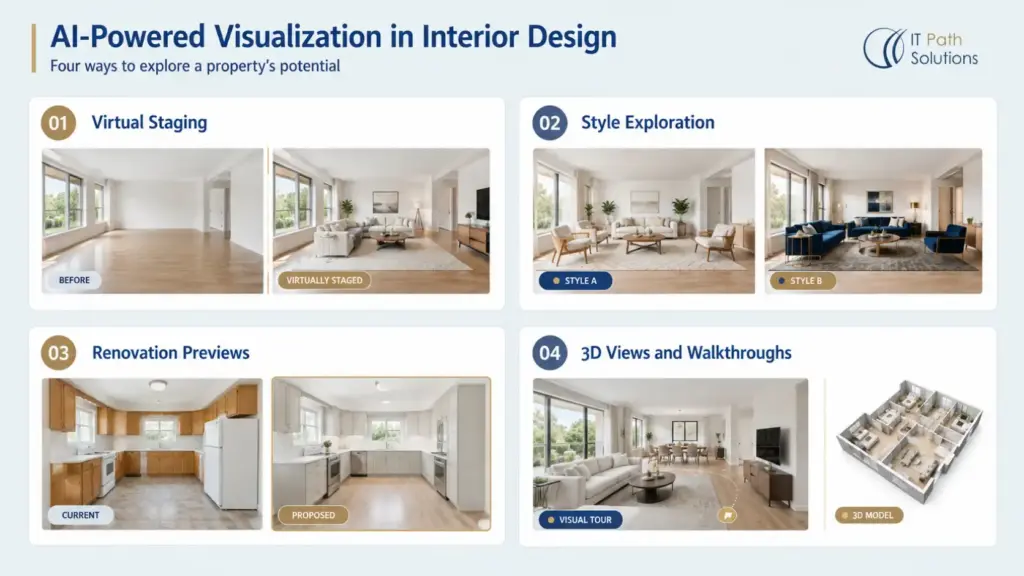
The agent needs a listing photo; the designer wants to explore a proposal. They need different controls. Products such as Stagify.ai, Roomdesigner AI and Interior AI already serve this market, so identify the task your product must handle.
Virtual staging adds furniture and decor to an existing property photo. The room should remain recognizable, with its permanent features intact.
Photo or sketch-based redesign explores another style. A designer might change the palette and furniture while keeping the layout. A sketch can guide appearance, but does not necessarily supply reliable measurements.
Renovation previews show proposed changes, such as different flooring or kitchen finishes. These need an unmistakable distinction between the property’s current condition and a proposed design.
3D views and walkthroughs help someone explore a space beyond a single image. A generated flythrough may look convincing without containing a dependable, editable 3D model. Decide whether you need a presentation video or a navigable scene with consistent dimensions.
Behind each experience is a similar sequence. The system accepts an input, works out where surfaces and objects belong, generates a visual and sends it through review and export. Understanding the room is what helps the software place a chair on the floor rather than through a wall.
Step 1 Define the Visual Job the User and the Build Versus Buy Decision
Imagine the brokerage asks for a tool its agents can use before publishing listings. Start there. Which rooms do they stage, who approves the images, and where do approved files go? Answering those questions gives the project a clearer scope than promising every kind of property visualization.
Before commissioning software, let those agents try existing subscriptions with real work. Include the narrow room nobody knows how to furnish and the photograph taken against a bright window. Watch where they get stuck and how much effort a usable result takes.
Subscription tools create a meaningful baseline. At the time of checking, Interior AI lists Premium at $99 per month on monthly billing. Stagify.ai advertises about eight seconds per photo. That is a vendor claim, not a guaranteed benchmark for your images or a custom product.
For standard staging used by a few agents, subscribing is usually the better choice. Compare the subscription with the ongoing engineering, support and quality review a custom system requires.
The decision changes if agents keep downloading images, renaming them and emailing a manager for approval. Perhaps the missing piece is a connection to the brokerage’s listing system. Or perhaps a design firm needs its own furniture catalog and control over client photos. These requirements can justify a custom build within a broader real estate software development project.
Need visualization connected to your catalog and pricing?
Talk to IT Path Solutions about bringing image generation, product data and editing into your application.
Plan Your Custom Visualization ToolStep 2 Choose an Architecture That Matches the Required Control
Once the workflow is clear, the technical team needs to decide how to produce the images. An early prototype might use an external image service. A product promising exact layouts needs more control. Compare these approaches using the same difficult rooms.
Use a hosted model API for an early product
For an initial version, your application could send the room photo and editing instructions to a hosted model API. The provider runs the model and returns the result, which can shorten the path to a working prototype.
What happens while the agent waits, or if generation fails? Who can access the photograph afterward? Include these questions, provider charges and retries when scoping AI app development services.
Adapt a model for a narrow requirement
Fine-tuning uses suitable training examples to adapt a model. It may help with a consistent style or specialized output, but requires licensed data and evaluation.
It does not guarantee accurate furniture dimensions or faithful reproduction of catalog products. Test reference-image conditioning and controlled placement before assuming model training is necessary.
Combine generation with spatial or 3D controls
A hybrid pipeline uses room information to guide generation. The ControlNet research demonstrates conditioning with inputs such as edges, depth and segmentation. These provide guidance about boundaries, distance and regions of an image; they do not guarantee geometric accuracy.
If reliable BIM or CAD data exists, use it as a geometric reference. BIM is a building information model containing structured building data. For measured walkthroughs, retain geometry in a 3D scene and use generation selectively for appearance.
Stable Diffusion and DALL-E are examples of generative model families, rather than an architecture by themselves. Verify current editing capabilities, availability and licensing before selecting a model. No approach eliminates testing or human review.
Step 3 Build the Input and Spatial Understanding Layer
Suppose the agent’s photo includes a doorway, a radiator and bright afternoon sunlight. The sofa must fit without blocking access. The radiator must remain visible. New furniture should cast shadows that agree with the room.
Now consider what the agent actually uploads. A clear photograph and a distorted screenshot should not receive the same treatment. Set file and image-quality requirements, and explain when another photo is needed. Start with photos if they serve the MVP; accepting sketches, floor plans and BIM files adds processing work.
Before furnishing the room, identify what must stay. Detection and segmentation tools can help mark surfaces and objects, but users need a way to correct them. If the software mistakes a mirror for a window, the agent should be able to fix the selection.
Lighting and material assignment need similar care. Wood grain should follow the surface; reflections should not invent another room. A photograph alone usually cannot establish dependable dimensions, so request measurements when actual fit matters.
For floor-plan uploads, retain dimensions and wall relationships as structured data. If the product generates a proposed plan, distinguish it from the supplied plan and route it for professional review. A plausible drawing is not evidence of structural feasibility.
The agent then asks for a smaller sofa. If the next image changes the floor and moves the doorway, the editing experience has failed. Keep revisions tied to the same room, retain the original and protect details that have already been approved.
Simpler photo tools may omit an explicit spatial layer and rely mainly on the model. That can suit inspiration. Consistent layouts and measured output require more engineering and stronger checks.
Step 4 Add Catalogs Cost Estimates and Editing
The client likes the room and asks where to buy the sofa. A concept image can contain invented furniture. A shopping experience needs a dependable connection between the picture and the product.
Decide whether furniture is illustrative or tied to actual products. For a shoppable experience, connect each placed item to a catalog record with dimensions, variants, availability and permitted imagery. Use controlled assets where exact product identity matters.
Give designers controls for style, palette, lighting and furniture density. They should be able to save alternatives, compare them with the original and share the approved version.
Cost estimates need their own data layer. A generated kitchen image cannot establish installation costs. Build quotations from selected products, quantities, regional rates and explicit assumptions. Identify exclusions such as delivery, taxes or site preparation.
If the client swaps the sofa, its linked price should change too. When a supplier price is missing or outdated, show that gap. Do not let the model fill it with a plausible number or make an early estimate look like a confirmed quotation.
For an MVP, prioritize upload, constrained generation, editing, review and export. Put extensive catalog coverage, purchasing and detailed renovation quotations into later phases unless they are the central use case. Catalog licensing and price maintenance remain ongoing responsibilities.
Need visualization connected to your catalog and pricing?
Talk to IT Path Solutions about bringing image generation, product data and editing into your application.
Plan Your Custom Visualization ToolStep 5 Test Realism and Label AI-Generated Content
Before the agent publishes the room, put both versions side by side. The new sofa may look convincing, but has the system widened the doorway or covered damage? Include awkward rooms in testing, because a gallery of successful images tells you little about what users will have to reject.
Your review checklist should cover:
- Fixed features: windows, doors and permanent fixtures remain accurate.
- Scale: furniture proportions and clearances are plausible.
- Lighting: shadows and reflections agree with the scene.
- Geometry: walls, corners and floor boundaries remain consistent.
- Editing: changing one item preserves previously approved details.
- Catalog fidelity: named products match their approved assets.
The National Association of REALTORS’ guidance on enhanced listing photos draws attention to misleading alterations and disclosure. Adding furniture and hiding property defects are materially different actions. A label does not make a deceptive image acceptable.
Build visible AI or virtual-staging labels into exports. Retain originals, revision history, model information and reviewer decisions. Check applicable jurisdiction and MLS requirements with legal counsel.
Image ownership also needs careful terms. The U.S. Copyright Office’s AI guidance distinguishes human-authored contributions from purely generated material. Provider permission to use an output does not automatically establish copyright protection. Review input rights, catalog licenses and output terms before launch.
Step 6 Integrate Launch and Measure
The first pilot should follow an agent through an actual listing task. Can they find the property, upload its photos, get a manager’s approval and return the finished images to the right record? Observe the whole task before expanding access.
CRM, property management and marketing integrations should preserve property identifiers, permissions and approval status. Draft images must not silently become published listing photos. If mobile capture is central, assess custom mobile app development against a responsive web upload flow before committing to both.
Start timing when the agent begins the task and stop when an approved image is ready to use. Include review and retries. Track what accepted images cost, which ones are rejected and how much editing they need. Compare equivalent work with the subscription or manual process you tested earlier.
Keep failed jobs recoverable and give users a way to flag errors. Use those reports to improve controls and evaluation examples. Recheck quality after model updates.
When a Custom Build Makes Sense and What to Ask a Development Partner
By now, the original room has done its job. It has helped expose where a subscription is sufficient and where your workflow needs more. If agents can get acceptable images with reasonable review, there may be no reason to own a custom platform.
Custom AI visualization software development becomes worthwhile when important requirements remain: protected property data, exact catalog products, internal approvals or an experience embedded in your platform. Define acceptance criteria before choosing a partner.
Ask prospective teams:
- Which model strategy fits our inputs and output requirements?
- How will fixed features and approved edits be preserved?
- Who owns the data, code and infrastructure accounts?
- How are failed generations and provider changes handled?
- What will demonstrate quality beyond a curated demo?
- How will disclosure, permissions and deletion work?
IT Path Solutions builds web, mobile and AI applications, with 13+ years of experience across industries including real estate. Our work includes property platforms, virtual tours and agent workflows.
Our contribution to HomeDesignsAI includes work on a home design and visualization platform. For a new product, we would start with the specific workflow, test representative inputs and use those findings to agree the implementation scope.
If you are weighing a custom build, talk to our team about the task your current tools cannot complete.
Frequently Asked Questions
How much does it cost to build AI virtual staging software?
There is no reliable single price without a scope. A model API application needs less custom engineering than a platform with measured scenes, catalog matching and quotation workflows. Ask for separate estimates covering discovery, development, licensing, hosting, model usage and quality review. Include the cost of retries and ongoing maintenance, rather than comparing only initial development with a subscription fee.
How does AI virtual staging work?
A user uploads a room photo, selects the intended style and requests a furnished result. The system generates furniture and decor, ideally using controls that preserve permanent features and lighting. A reviewer checks the output before sharing it. Without verified dimensions or product assets, the result is a visualization, not confirmation that particular furniture fits or can be purchased.
Can AI-generated listing photos be used legally in real estate?
Their use depends on local law, advertising requirements, image rights and MLS policies. Do not present a staged or materially altered image as an unchanged photograph. Preserve originals and disclose alterations clearly. Have legal counsel review the intended workflow and markets. Requirements vary, and disclosure does not excuse changes that misrepresent the property’s condition or permanent features.
Should I build custom AI visualization software or use an existing tool?
Use an existing tool when standard staging or redesign meets your team’s needs. Consider building when proprietary catalogs, internal approvals, data restrictions or embedded workflows create a meaningful gap. Test subscriptions with representative inputs first. Compare accepted output quality and operating costs, including review effort, against the responsibilities of owning and maintaining a custom application.
What technology is needed to build AI interior design software?
Core components include image generation, secure uploads, room controls, editing, storage and an application interface. Add catalog and pricing services where users need purchasable products or estimates. Floor plans and BIM inputs require further processing; consistent measured walkthroughs need a suitable 3D scene. The architecture should follow the required output accuracy rather than a preferred model name.
Does IT Path Solutions build AI visualization software for real estate and interior design?
IT Path Solutions provides custom web, mobile and AI development, with real estate and design-and-architecture among its industries. A visualization engagement can cover generation workflows, editing, catalogs and sharing, subject to technical assessment and agreed scope. Our published HomeDesignsAI portfolio entry describes a contribution to an existing visualization platform. For a new project, we assess your inputs, accuracy requirements and integrations before proposing the implementation.

Keyur Patel
Co-Founder
Keyur Patel is the director at IT Path Solutions, where he helps businesses develop scalable applications. With his extensive experience and visionary approach, he leads the team to create futuristic solutions. Keyur Patel has exceptional leadership skills and technical expertise in Node.js, .Net, React.js, AI/ML, and PHP frameworks. His dedication to driving digital transformation makes him an invaluable asset to the company.
Related Blog Posts

AI-Powered Personalized Learning: How It Works and What EdTech Platforms Need

Automated Lead Qualification By Phone: AI vs. Human Reps