
DBStan Enhancements: Catching Database Problems Before They Impact You

Keyur Patel
April 3, 2026
9 min
Last Modified:
April 22, 2026
Most database problems do not announce themselves. They develop quietly in the background and only surface once your application is under real load. Slow queries start appearing. Data inconsistencies become hard to trace. Index bloat silently grows.
Collation mismatches cause subtle bugs in joins. And in some cases, integer ID columns begin approaching their maximum limits without anyone noticing.
The original DBStan release gave Laravel developers a fast, read-only way to analyze their schema and catch structural issues early. This release builds on that foundation. Nine new and enhanced checks have been added across architecture, performance, and schema design, all focused on the kind of problems that go undetected during development but become costly in production.
This blog walks through what changed, what each new check does, how to use the tool, and what the growing community activity signals about the direction of the project.
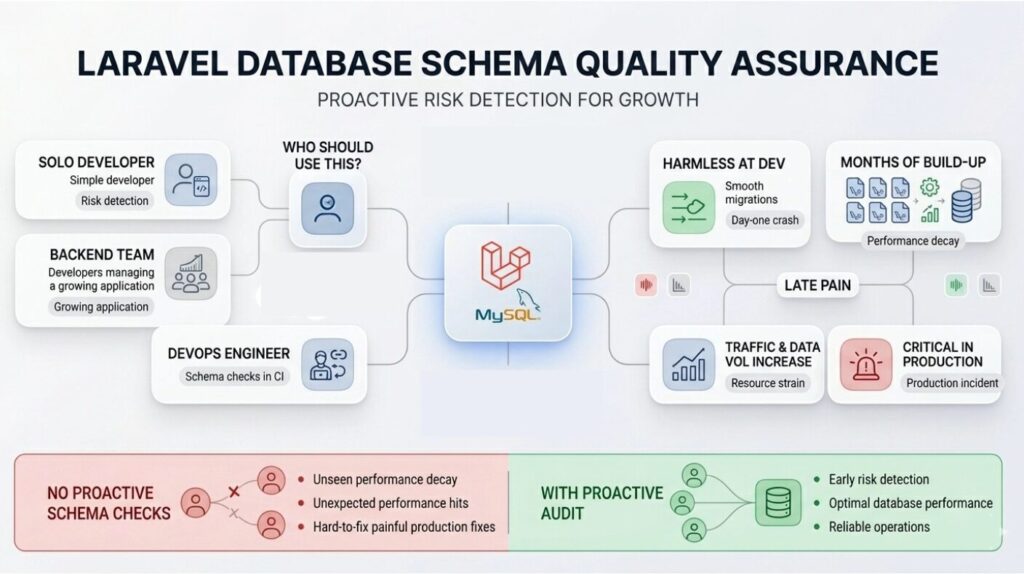
Who Should Use This?
This release is aimed at Laravel teams working with MySQL databases in staging or production environments.
Whether you are a solo developer, a backend team managing a growing application, or a DevOps engineer looking to include schema quality checks in a CI pipeline, these additions are designed to surface risks that most standard code reviews would miss.
What Problems Does This Release Target?
Most database problems are not dramatic. They do not crash your app on day one. They build up slowly over months of migrations, new features, and growing data. By the time they cause real pain, they are much harder to fix.
This release focuses specifically on what you could call “late pain” issues. These are the problems that look harmless during development but become critical once traffic and data volumes increase. The goal is to surface them early, before they turn into production incidents.
The 9 New and Enhanced Checks
Note: All thresholds and values mentioned below are examples. You can tune them using DBStan’s configuration file based on your own workload.
1. Storage Engine Consistency
DBStan now checks whether all your tables use InnoDB, and flags any tables that use a different engine, like MyISAM.
This matters because transactions and foreign keys require InnoDB. If some of your tables use a different engine, you lose those guarantees silently.
users  → InnoDB
orders → MyISAM ❌
2. Charset and Collation Consistency
This check looks for mismatches between utf8 and utf8mb4, and for mixed collations across tables.
Collation mismatches are easy to miss and hard to debug. They cause subtle sorting bugs and comparison failures when doing joins across tables with different collations.
users.name → utf8_general_ci
orders.customer_name → utf8mb4_unicode_ci ❌
3. Auto-Increment Risk Analysis
INT columns used as auto-increment primary keys have a maximum value of 2,147,483,647. As a table approaches that limit, inserts will begin to fail.
This check monitors how close your tables are to that ceiling and flags those that carry a growth risk, recommending a migration to BIGINT where appropriate.
INT max = 2,147,483,647
Current = 2,100,000,000 ⚠️
4. Index Cardinality Analysis
This check flags indexes on low-cardinality columns. A column like status that only has two possible values does not benefit from a standard index the same way a high-cardinality column does.
INDEX(status) ❌ -- only 2 values
Low-cardinality indexes can actually hurt performance rather than help it, because MySQL ends up scanning most of the table anyway.
5. Composite Index Recommendation
When DBStan detects queries that filter on multiple columns, it can suggest composite indexes that would serve those queries better.
For example, a query like this:
SELECT * FROM orders
WHERE user_id = 10 AND status = 'paid';
Would be served better by:
INDEX(user_id, status)
Rather than two separate indexes.
This check identifies patterns where composite indexes would improve query performance.
6. Database Size Analysis
As a database grows, it becomes important to have visibility into total storage consumption. This check monitors overall database size against configurable thresholds and surfaces suggestions for archival strategies, partitioning, or index cleanup when size becomes a concern.
7. Table Size Monitoring
Beyond total database size, DBStan now also monitors individual table sizes. A single table consuming a disproportionate share of your database is worth knowing about early.
orders table = 80% of DB size ❌
A table like this is usually a sign that archival or partitioning should be on your roadmap.
8. Primary Key Presence Check
This check flags tables that have no primary key defined.
CREATE TABLE logs (
  message TEXT
); ❌
Tables without primary keys can cause duplicate rows, replication issues, and poor query performance. InnoDB also handles these tables less efficiently internally.
9. Smart Data Type Detection
DBStan now looks at column names and their assigned data types to identify common mismatches.
| Column Name | Current Type | Recommended |
|---|---|---|
| price | INT | DECIMAL |
| is_active | VARCHAR | BOOLEAN |
| created_at | VARCHAR | DATETIME |
| INT | VARCHAR |
Storing prices as integers causes rounding problems. Storing dates as strings makes comparisons and sorting unreliable. These are the kinds of decisions that seem fine initially but quietly cause bugs as the application grows.
How to Run DBStan
Running an analysis is a single command:
php artisan dbstan:analyze
If you have configured DBStan for remote database analysis, you can also use URL-based mode.
If you are new to DBStan and want the full picture of what the tool does, including how it works internally, what all 26 checks cover, how to install it, and how to read the output, the main blog covers all of that in detail: Is Your Laravel Schema Ready for Prime Time?
The Principles Behind These Checks
These nine checks share a few common design goals:
- Practical. Every check targets a real production issue, not a theoretical one. Storage engine mismatches, collation bugs, and ID overflows are things that have hurt real applications.
- Early warning. The checks are designed to surface risks while they are still easy to fix. A warning about an auto-increment column at 98% capacity is far more useful than discovering it after inserts start failing.
- Configurable. Every threshold can be adjusted. Larger applications have different tolerances than smaller ones, and DBStan is designed to fit your workload, not the other way around.
- Safe. All analysis is read-only. DBStan never modifies your database. It reports and you decide.
What This Means for Teams
With these additions, DBStan covers more of the schema quality surface area that teams often miss until it hurts.
The practical benefits are straightforward: better schema consistency across your tables, fewer silent performance bottlenecks, earlier visibility into scalability risks, and a database that is easier to maintain and reason about over time.
None of these are glamorous. But they are the kind of thing that separates a database that holds up at scale from one that creates incidents.
Community Traction
As of April 2, 2026, here is where the project stands:
- 33 GitHub stars
- 4 contributors
These numbers are small, but they are pointing in the right direction. Stars suggest growing developer interest. The project is actively maintained, with pull requests consistently reviewed and resolved within the same day.
It is early, but the momentum is healthy.
What Types of Pull Requests Are Getting Merged
Two categories of PRs are being accepted:
- Ecosystem and compatibility updates. The most recent example is support for PHP 8.5 and Illuminate v13. Keeping DBStan current with the PHP and Laravel ecosystem is a clear priority.
- Runtime and configuration correctness fixes. For example, a fix for correct usage of the migration table config. These are the kinds of low-drama, high-value fixes that keep a tool reliable in production environments.
This tells you something about the project’s direction. Compatibility improvements are welcome. Reliability fixes get prioritized. Reducing production risk is the core focus.
How the Package Is Growing
Growth is happening across three areas:
- Product depth. Each release adds checks that address real-world database risks. The 9 checks in this release are a good example. They are not theoretical additions. They target the specific class of “silent, slow-building” problems that hurt production applications.
- Ecosystem coverage. Support for newer PHP and Laravel versions keeps the tool useful for teams on modern stacks. Falling behind on compatibility is one of the fastest ways for a developer tool to become irrelevant.
- Community. More stars, more contributors, and more PR activity all point to a growing base of developers who find the tool useful enough to engage with.
The Next Growth Step
The immediate priority is to continue shipping small, high-impact checks paired with clear examples and thorough release notes. This approach supports faster adoption because developers can immediately understand what a new check does and whether it applies to their project.
It also creates a tighter feedback loop, allowing the team to learn from real usage and improve subsequent releases. The result is consistent, incremental value delivery rather than infrequent large updates.
A Practical Adoption Flow
If you want to start using these checks, here is a reasonable order of operations:
- Run on staging first. Get a picture of your current schema health without any production risk.
- Fix the critical issues first. Storage engine mismatches, collation inconsistencies, and missing primary keys are the highest-priority items. These affect data integrity and should be addressed before anything else.
- Review the growth risks. Look at auto-increment levels and table size distribution. These do not need immediate fixes, but they need a plan.
- Apply improvements gradually. Data type corrections and index recommendations can be introduced over time, alongside normal development work.
- Add it to your CI pipeline. Once you have addressed the initial findings, running DBStan as part of your CI process means new schema issues get caught before they reach production.
Final Thoughts
Database problems rarely come from a single bad decision. They come from small, silent gaps in schema design that accumulate over time and only become visible under pressure.
A missing index here, a wrong data type there, a table approaching its ID limit without anyone noticing: these are the kinds of issues that do not fail fast but eventually fail hard.
This release of DBStan adds nine targeted checks that address exactly these risks. Combined with the original 26 checks from the first release, the tool now covers a broad range of structural, integrity, performance, and architectural concerns in a single read-only analysis pass.
If you are building or maintaining a Laravel application with MySQL, running DBStan on your schema today is a low-effort, high-value step. Install it with composer require itpathsolutions/dbstan, run php artisan dbstan:analyze, and see what your schema has been quietly holding back.

Keyur Patel
Co-Founder
Keyur Patel is the director at IT Path Solutions, where he helps businesses develop scalable applications. With his extensive experience and visionary approach, he leads the team to create futuristic solutions. Keyur Patel has exceptional leadership skills and technical expertise in Node.js, .Net, React.js, AI/ML, and PHP frameworks. His dedication to driving digital transformation makes him an invaluable asset to the company.
Related Blog Posts

What’s New in Laravel 13? Complete Guide to Features & Updates

Best Laravel Development Tools for Building High-Performance Web Apps