
AccessDoor – Smart Admin Login & URL Control
Keyur Patel
February 6, 2026
6 min
Last Modified:
February 6, 2026
AccessDoor is here!
Smarter WordPress Admin Security by IT Path Solutions
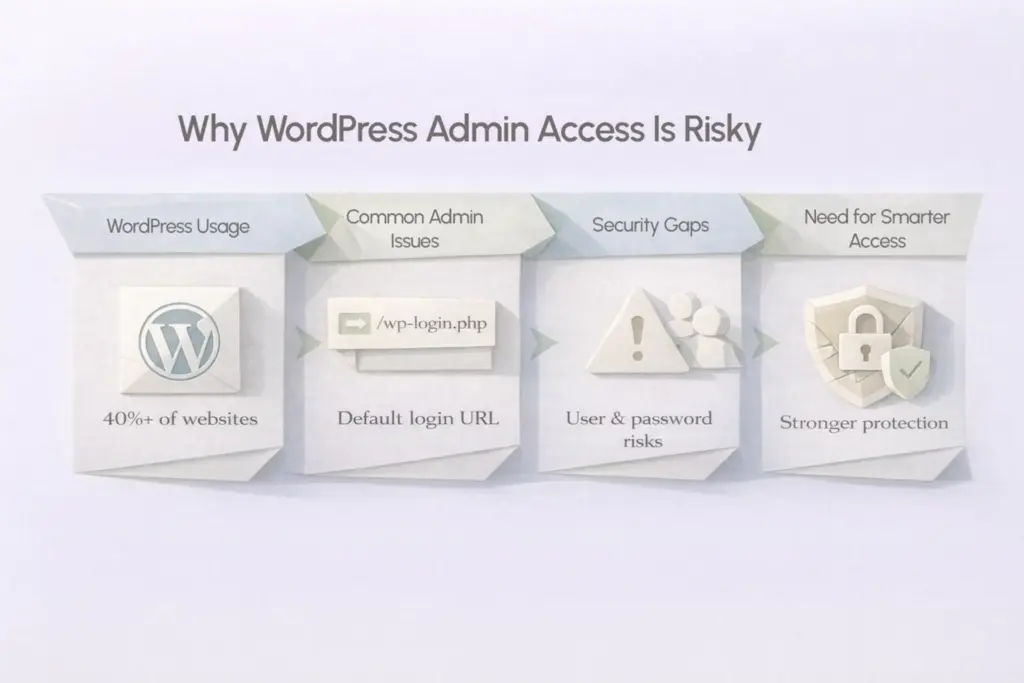
WordPress runs 40%+ of the web. This widespread use makes it highly visible. That’s when it becomes an easy target for automated login attacks and brute‑force attempts. The risk of unauthorized access is genuine. Site owners usually put performance and content in front of their priorities. But admin security is frequently left behind.
That’s exactly the gap IT Path Solutions set out to address in WordPress admin security. AccessDoor is a newly launched Smart Admin Login & URL Control plugin built to make admin access smarter, safer and more flexible. All without risking lockouts or breaking WordPress core functionality.
AccessDoor is not just about hiding wp-admin. It is about giving administrators control, clarity and confidence over how users access the backend.
Why WordPress Admin Security needs Rethinking
WordPress uses /wp-login.php and /wp-admin as its default login URLs. They are easy to find. Hackers do not need to “discover” them. They already know where to knock.
Even with strong passwords, risk remains. Predictable login paths and standard admin usernames significantly increase vulnerability. Add multiple users or vendors or SEO teams. Include WooCommerce managers as well. Admin access then becomes harder to manage securely.
This is where AccessDoor fills the gap with smarter and safer admin control
Many rely on several plugins or complex server rules. IT Path Solutions designed AccessDoor as a focused and admin‑first security plugin. It is simple to configure and powerful in control. It is even safe by design and protects without complexity.
Introducing AccessDoor by IPS
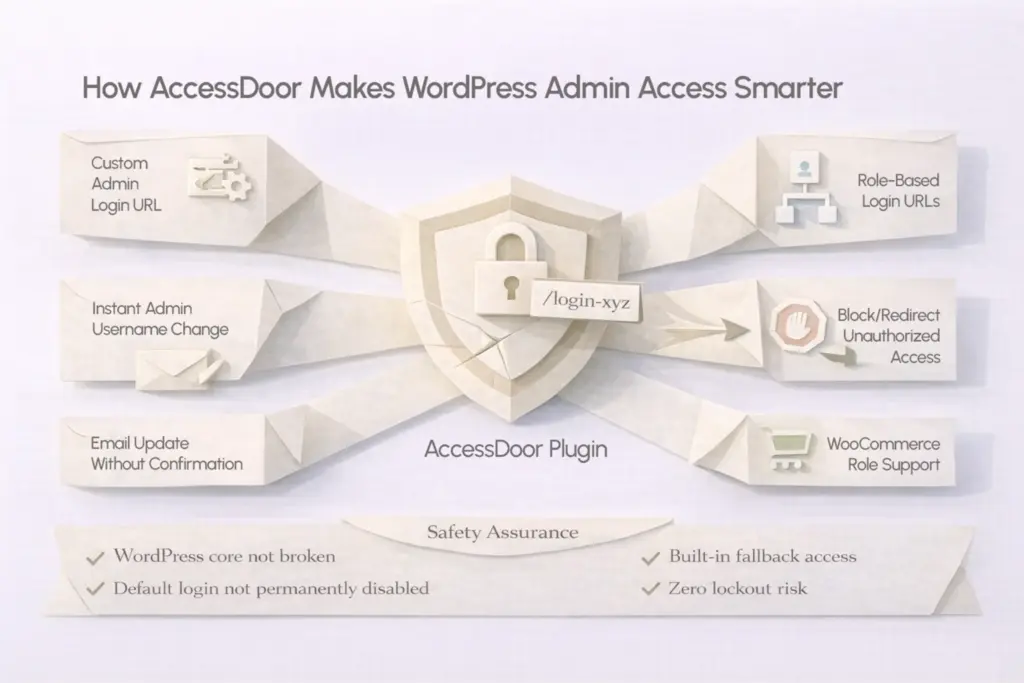
AccessDoor – Smart Admin Login & URL Control is a WordPress plugin. It allows you to:
- Change the default admin login URL
- Create role-based login links
- Secure admin usernames and emails
- Customize the WordPress login screen
- Block or redirect unauthorized access attempts
All while making sure that you never get locked out of your site.
This plugin was built by keeping real WordPress admins in mind. It supports developers, agencies and store owners. And even for businesses managing multiple users daily.
What makes AccessDoor different
Some plugins aggressively disable WordPress defaults. AccessDoor avoids that heavy‑handed approach. It chooses a smarter integration. It works with WordPress and is not against it. This plugin adds a smart security layer without permanently disabling login endpoints or risking accidental lockouts.
Let’s see what AccessDoor offers.
Key Features of AccessDoor
1. Custom Admin Login URL
AccessDoor lets you replace the default wp-admin login with a custom URL of your choice. This instantly reduces exposure to automated attacks that target default WordPress endpoints.
Your login page becomes known only to you and your team.
2. Role-Based Login URLs
Different users do not need the same access path.
With AccessDoor, you can create separate login URLs for different user roles by including:
- Subscribers
- Vendors
- SEO teams
- WooCommerce Shop Managers
- Any custom WordPress role
Each role gets its own controlled entry point. This improves both security and access management.
3. Instant Admin Username Changes
Changing the admin username in WordPress usually involves database edits or confirmation of workflows.
AccessDoor allows you to instantly update admin usernames safely. The process runs automatically without human input. This feature closes a frequent security loophole. WordPress setups become more secure and reliable.
4. Update Emails without Confirmation Delays
Need to update admin or user email addresses quickly?
AccessDoor lets you change email addresses without confirmation emails. This makes it ideal for:
- Site migrations
- Agency handovers
- Emergency security updates
No waiting. No broken workflows.
5. No waiting. No broken workflows.
Using “admin” or a common email for backend access is risky.
AccessDoor helps in protecting your site. It discourages the use of common or predictable admin usernames. It also secures vulnerable email IDs. Together, these measures reduce attack success rates.
6. Login Page Customization
With AccessDoor, you can customize the WordPress login screen by:
- Adding a custom logo
- Changing background colors
- Using a background image
This is especially useful for agencies and brands. They want professional and branded login experience.
7. Block or Redirect Unauthorized Access
AccessDoor allows you to block or redirect access. It applies to wp-login.php and wp-admin. Unauthorized users are stopped based on your configuration.
Instead of leaving the login page open, users are redirected safely. This minimizes risk while keeping WordPress functionality untouched.
Lockouts? Not with AccessDoor
The hidden risk of admin URL plugins is accidental lockouts.
AccessDoor addresses this upfront.
- The plugin does not permanently disable WordPress login functionality
- A built-in fallback access method is always available
- Administrators can regain access even if a custom URL is forgotten
AccessDoor was built with safety‑first logic. So, admins can stay in control every step of the way.
Who is AccessDoor for?
AccessDoor is ideal for:
- WordPress site owners concerned about admin security
- Agencies managing multiple client websites
- WooCommerce store owners with multiple user roles
- Developers who want lightweight and focused admin protection
- Businesses that want branding + security in one plugin
One site or many. AccessDoor integrates smoothly into your workflow.
Why IT Path Solutions built AccessDoor
At IT Path Solutions, plugin development starts with real-world problems.
AccessDoor was created after seeing recurring issues like:
- Exposed admin URLs
- Shared login links across teams
- Risky username practices
- Overcomplicated security plugins
Instead of adding another bloated solution… IT Path Solutions focused on doing one thing right. Making WordPress admin access smarter and safer.
Clearing Up the Basics
1. Worried about getting locked out after changing the login URL?
You do not have to be. AccessDoor includes a built-in fallback. So, admins can always recover access if something goes wrong.
2. What happens to the default WordPress login page?
It is not permanently disabled. AccessDoor simply redirects access based on your settings by keeping the core login system intact.
3. Can the login screen match my brand?
Yes. You can personalize the login page with your logo. You can even customize background color or image. This is for a cleaner and branded look.
4. Running a WooCommerce store with multiple roles?
AccessDoor works smoothly with WooCommerce roles like Shop Manager and Customer
Take a Look at AccessDoor
Serious about backend protection?
Keep usability intact. AccessDoor makes it possible. That’s why AccessDoor is worth exploring.
Have a look at AccessDoor – Smart Admin Login & URL Control by IT Path Solutions on the official WordPress plugin directory. See how simple admin security can be when it is built right.

Keyur Patel
Co-Founder
Keyur Patel is the director at IT Path Solutions, where he helps businesses develop scalable applications. With his extensive experience and visionary approach, he leads the team to create futuristic solutions. Keyur Patel has exceptional leadership skills and technical expertise in Node.js, .Net, React.js, AI/ML, and PHP frameworks. His dedication to driving digital transformation makes him an invaluable asset to the company.
Related Blog Posts

IT Path Solutions Becomes The Venue Sponsor For The WordPress Charity Hackathon Event Ahmedabad

How WordPress Evolved From Challenges to Innovation? State Of WordPress in 2024